
Primary 1: AI Era, If You Can Speak, You Can Code
This is a project-based learning tutorial. We encourage you to follow the steps one by one and try to reproduce the results. Don't worry about making mistakes or modifying the content. We always believe you can do it. Please always remember:
Chapter Outline
1. Dilemmas and Opportunities for Ordinary People
Many people have a bunch of product ideas in their heads: a small tool to help manage finances, a webpage to record a child's growth, or even a mini-game. But the thought of having to write code or find a programmer often discourages them directly.
After the emergence of AI, for the first time, ordinary people have a completely new possibility: you don't need to know how to write code, you just need to learn how to clearly tell AI what you want. Data from GitHub Copilot shows that over 15 million developers are using AI-assisted programming, with an average of 46% of code being AI-generated! In Java projects, this proportion can reach 61%.
For ordinary people, this trend is even more significant: if professional programmers are relying heavily on AI to write code, why can't those of us who don't know how to program communicate directly with AI to realize our ideas?
The goal of this course is to help you practice a new skill: building apps through natural language conversations. We will teach you how to communicate with AI using computer language and how to let AI turn the ideas in your head into real, usable products.
2. To What Extent Can AI Help You?
In this section, we only discuss one question: if you completely don't know how to write code, to what extent can today's AI help you?
Roughly speaking, you can understand current LLM capabilities as: competent in developing simple internal tools, data visualization dashboards, and some lightweight mini-games. These are generally sufficient for making tools for personal use or validating requirements from a product manager's perspective. But to generate a commercially mature product with one click, it still typically requires manual, continuous polishing of process design and details.
Next, let's take Snake as an example and see exactly what AI programming can achieve.
2.1 Build a Snake Game in 60 Seconds
First, please open the experimental site used in the course, z.ai. z.ai is an AI platform developed by Zhipu AI (one of China's leading LLM companies), powered by their proprietary GLM models. This platform includes various features, such as slideshow generation, poster design, and full-stack development. In this tutorial, we will focus on its full-stack development module.
💡 What is the "programming right on the web" paradigm?
In the past, developing a web app required:
- Installing programming environments (Node.js, Python, etc.)
- Configuring code editors
- Learning HTML/CSS/JavaScript
- Dealing with dependencies and errors
Now, with AI coding platforms, you only need to:
- Open your browser and visit the site
- Describe your desired features in natural language
- Have AI instantly generate the code and let you preview the result live
This "conversation as programming" paradigm changes coding from "writing instructions" to "describing requirements". You don't need to care about low-level technical details; just clearly state what you want. This is the new programming paradigm of the AI era—Vibe Coding.
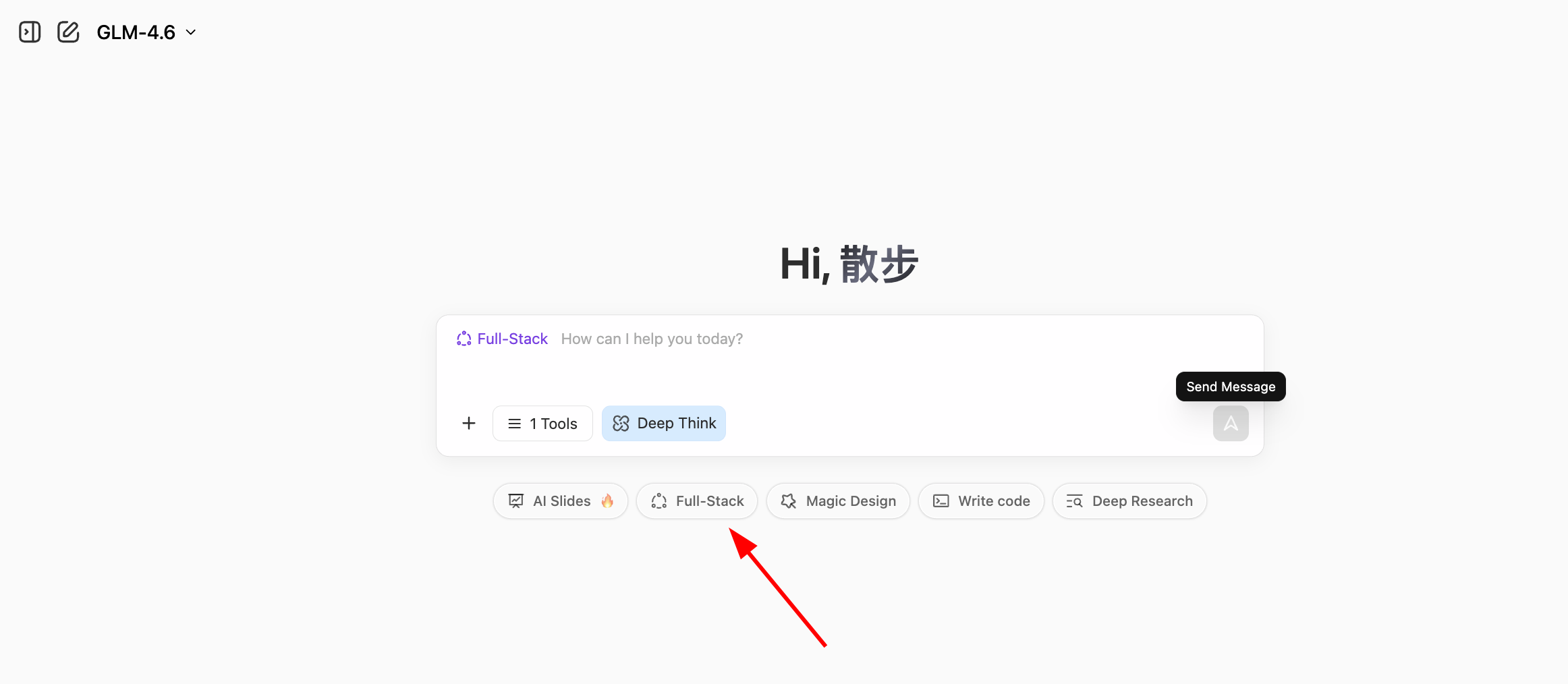
Input our simple requirement and click the Full-stack Development button. You can watch the webpage being built in real time. Usually, it takes just the time to brew a coffee!
Help me create a Snake game:
1. Control snake movement with arrow keys
2. When it eats food, it gets longer and the score increases
3. Hitting walls or itself results in Game Over
4. Include Start and Restart buttons
5. The UI should be clean and elegant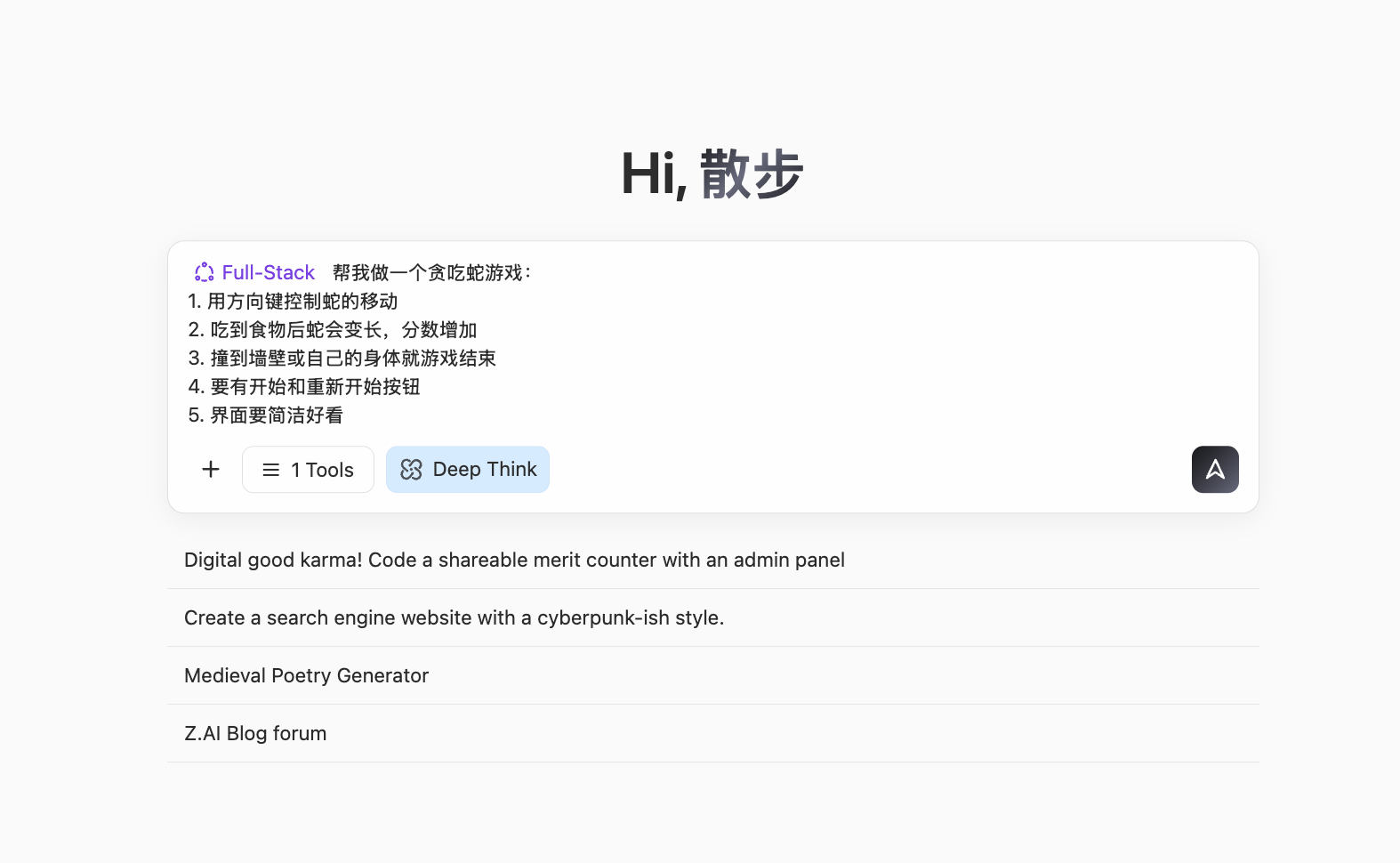
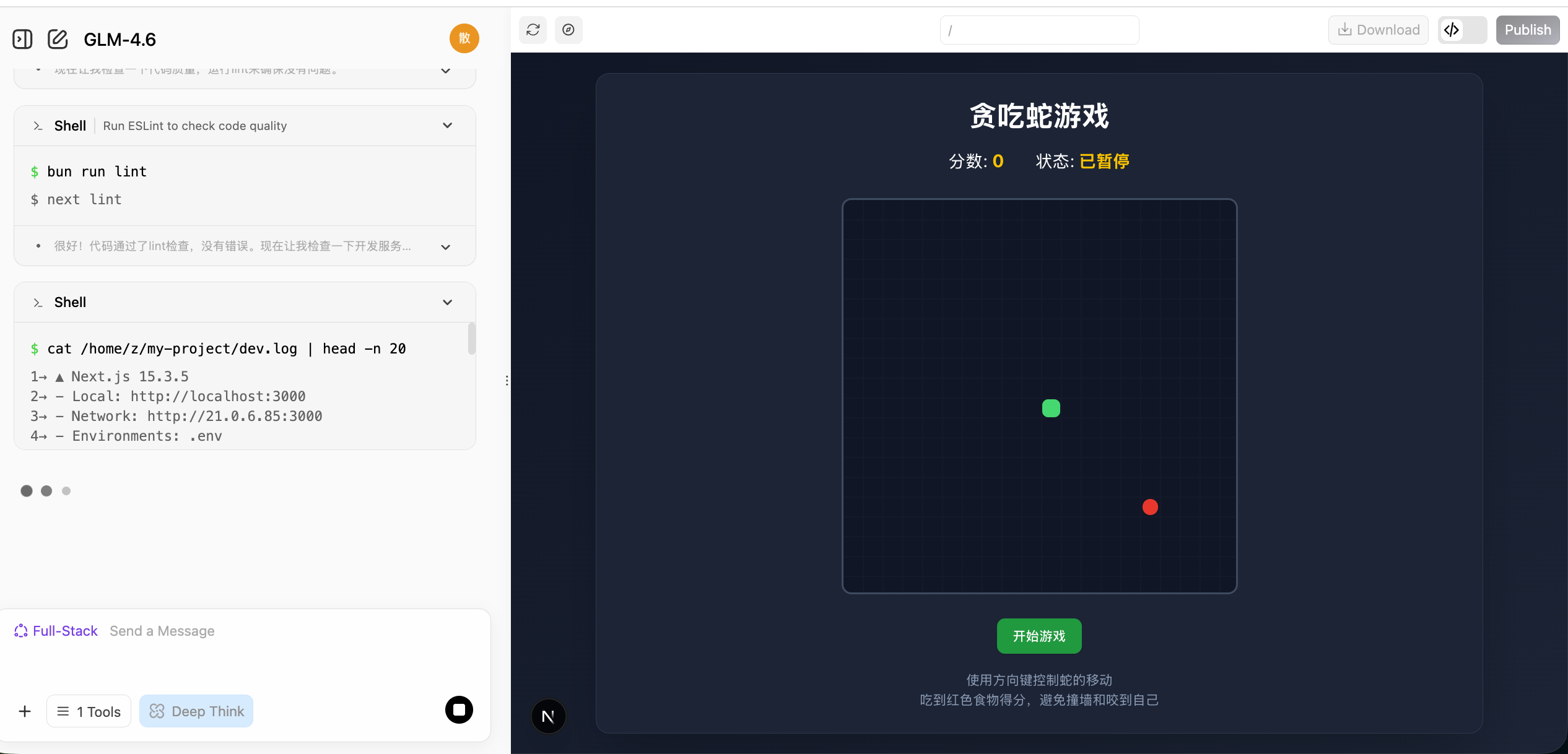
Once generated, you will see a browsable webpage UI on the right. Scroll around or click the 🧭 button at the top to view it in full screen.
The buttons at the top from left to right are: Arrow button expands chat history, Pencil button to start a new chat, Refresh icon to rebuild the page, Compass icon to toggle fullscreen, Download button to download the project, <> button to view code, and Publish button to publish it.
If you'd like to check the webpage's source code, click the code icon in the top right to view the entire codebase.

🌐 Explore More AI Programming Tools
Besides z.ai, we also recommend trying out these excellent AI programming platforms:
| Tool | Link | Features |
|---|---|---|
| Google AI Studio (Recommended) | aistudio.google.com/apps | Official tool from Google, powered by Gemini, great for rapid prototyping |
| Figma Make | figma.com/make | Deeply integrated with design tools, ideal for interactive prototypes |
| Coze | coze.com | AI bot platform by ByteDance, zero-code visual building |
| v0.dev | v0.dev | AI generation for React components from Vercel |
| Bolt.new | bolt.new | AI full-stack development capable of generating deployed apps |
| Lovable | lovable.dev | High-quality React app generation |
| Replit Agent | replit.com | Online IDE integrated with AI |
For more comparisons, view the appendix: Comparison of 7 AI Programming Tools
2.2 What Conversational Programming Can and Cannot Do
This section focuses on a specific question: When relying exclusively on conversational AI and writing no code at all, how far can you push a project? In terms of experience, a fairly consistent conclusion is: It can help you complete a "small but complete" thing, but determining "how much is enough" still requires your personal decision on every detailed step.
Excels at "Small and Clear" Apps
From the Snake game example, you already saw a typical pattern: As long as you can clearly describe the UI and interaction, AI can often piece together a fully functional, clickable webpage in just a few rounds of conversations.
Such tasks often share a few characteristics:
- Clear scope: one page, a simple internal tool, a small game mechanic.
- Visible results: you immediately see if it works as expected.
- Direct debugging: you can point out errors and ask for corrections easily.
Within these boundaries, you can view the AI as a highly capable "junior assistant".
AI's success rate in handling small-scale tasks:
Large Projects Require a "Process Perspective"
Once it exceeds the small and clear scope, relying purely on conversational requests to build complex systems end-to-end will quickly hit ceilings. Large projects deal with backend databases, third-party services, authentication, permissions, edge cases, state management, etc.
In these situations, the logical approach is to define a clear process flowchart and break it into segments to be handled individually.
The Difference Between Generating and Validating
Just because AI wrote it doesn't mean it's ready for a commercial launch! Always validate AI-generated code, especially in secure systems.
⚠️ Usage Guidelines
- Prototypes/Tools/Demos: Highly suitable for early stage builds iterations.
- Large consumer-facing products: Usually needs developers for architecture.
- High-security systems: Not suitable to deploy immediately. Needs stringent checks.
3. Hands-on: Your First AI Native Application
Let's do some hands-on work. We'll add some native AI integration elements into our game.
3.1 AI-Native Snake
You can simply provide these prompts:
💡 Example Prompt: Build me a Snake game.
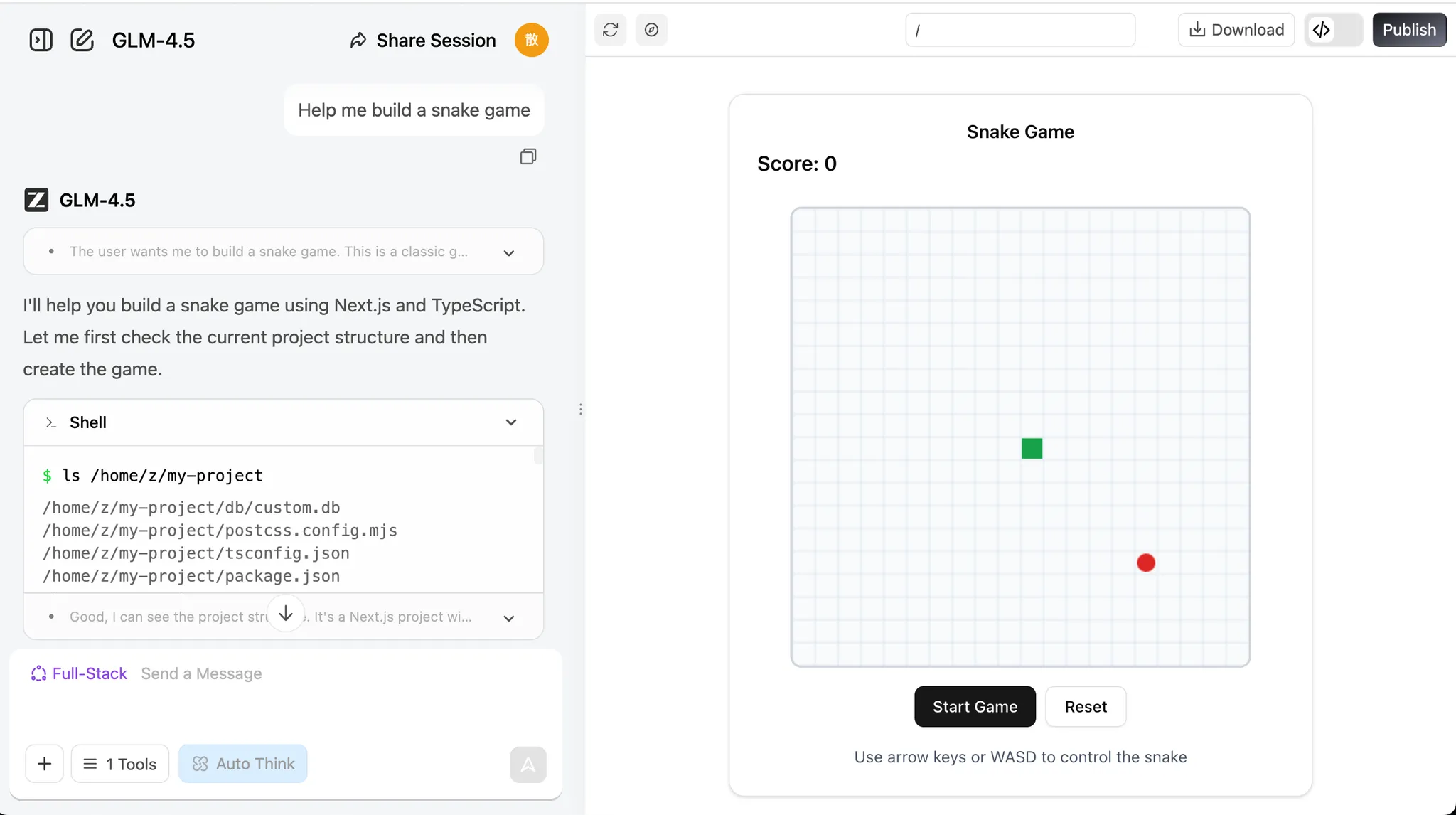
💡 Example Prompt: Build me a Snake game that supports:
- Eating different words and placing them in a collection box.
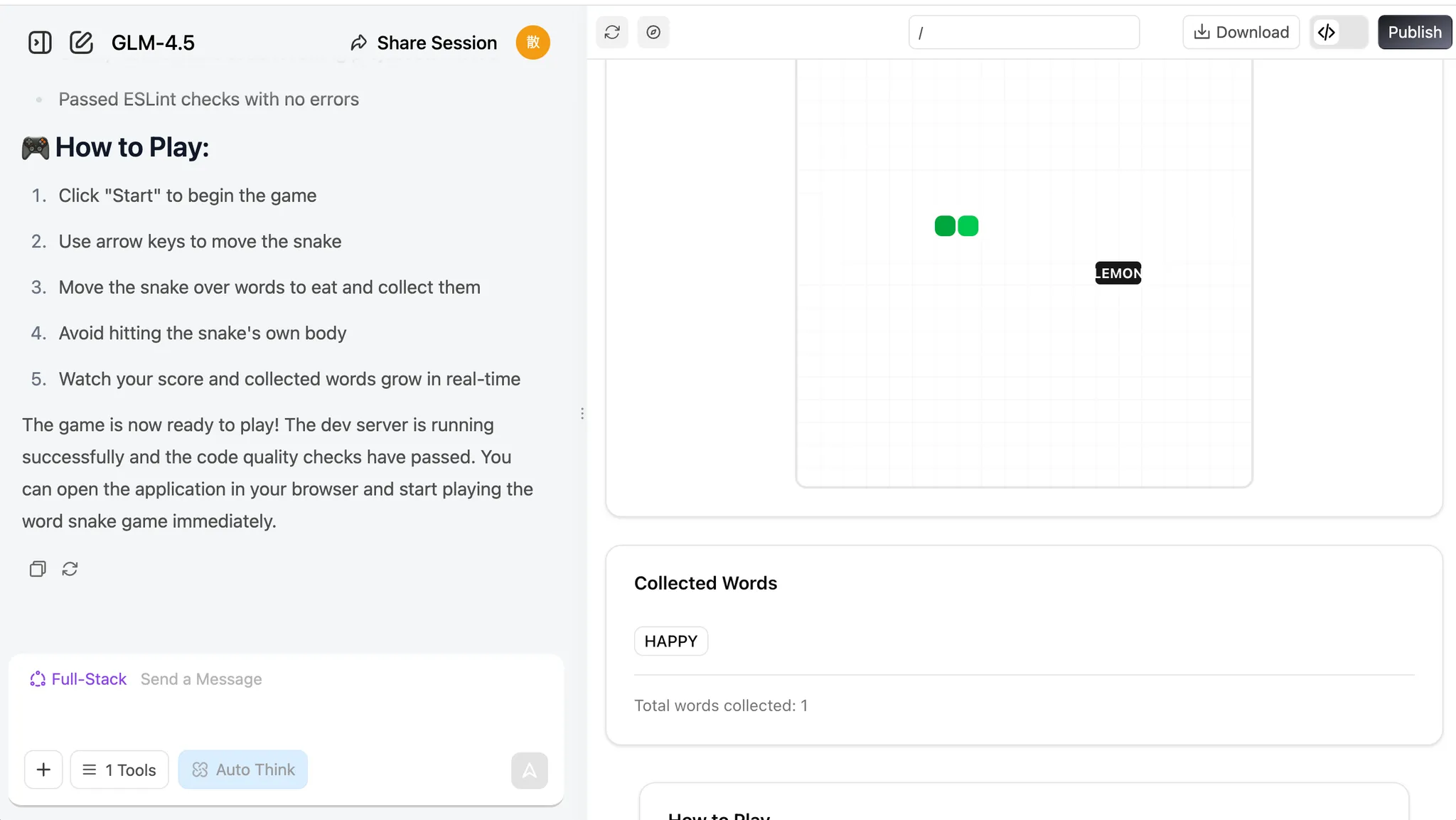
💡 Example Prompt: Build a Snake game that supports:
- I can eat distinct words, collected in a box.
- When eating 8 words, the LLM generates a poem using them.
- An image generation API is called right after the poem is composed.
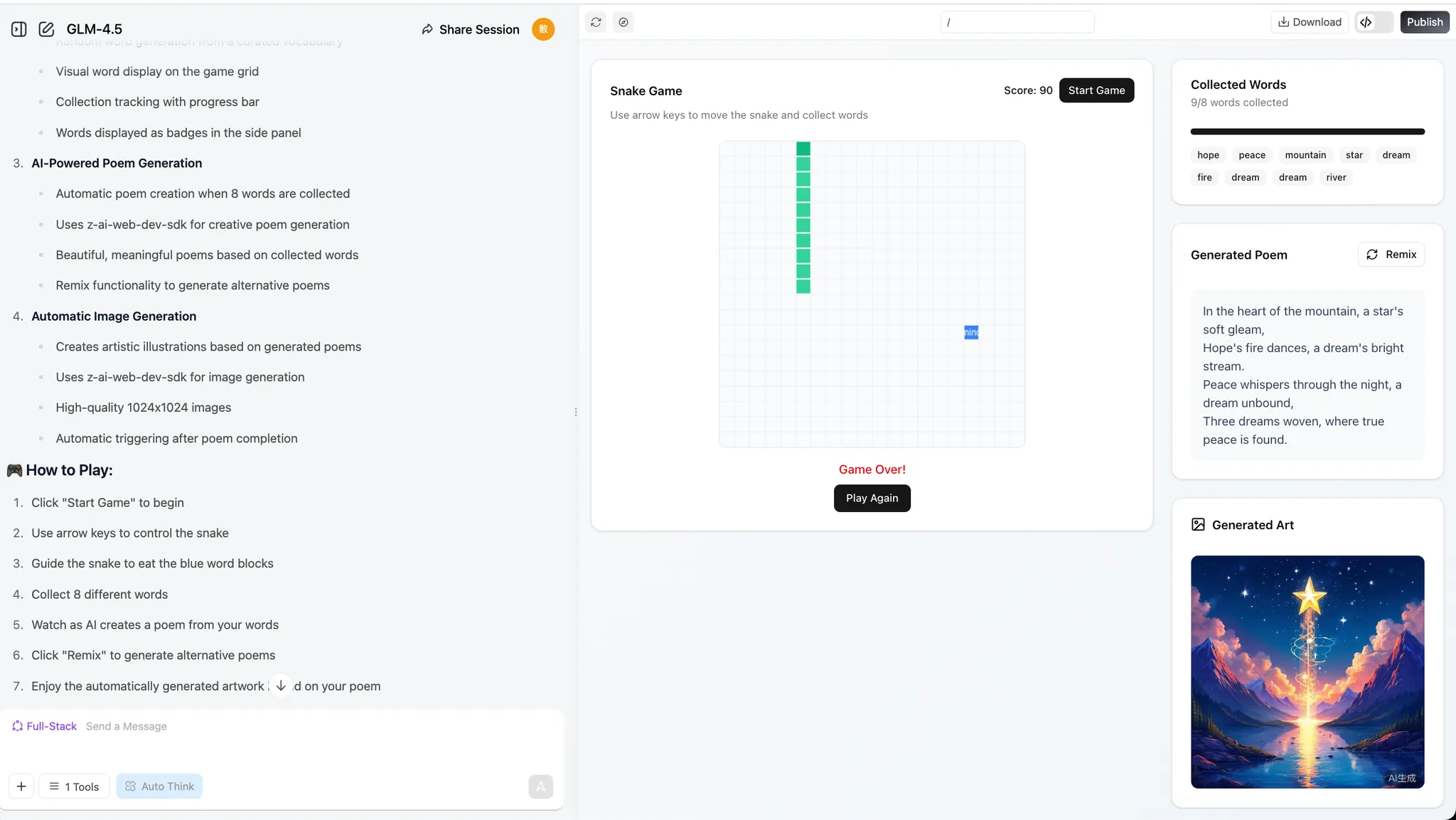
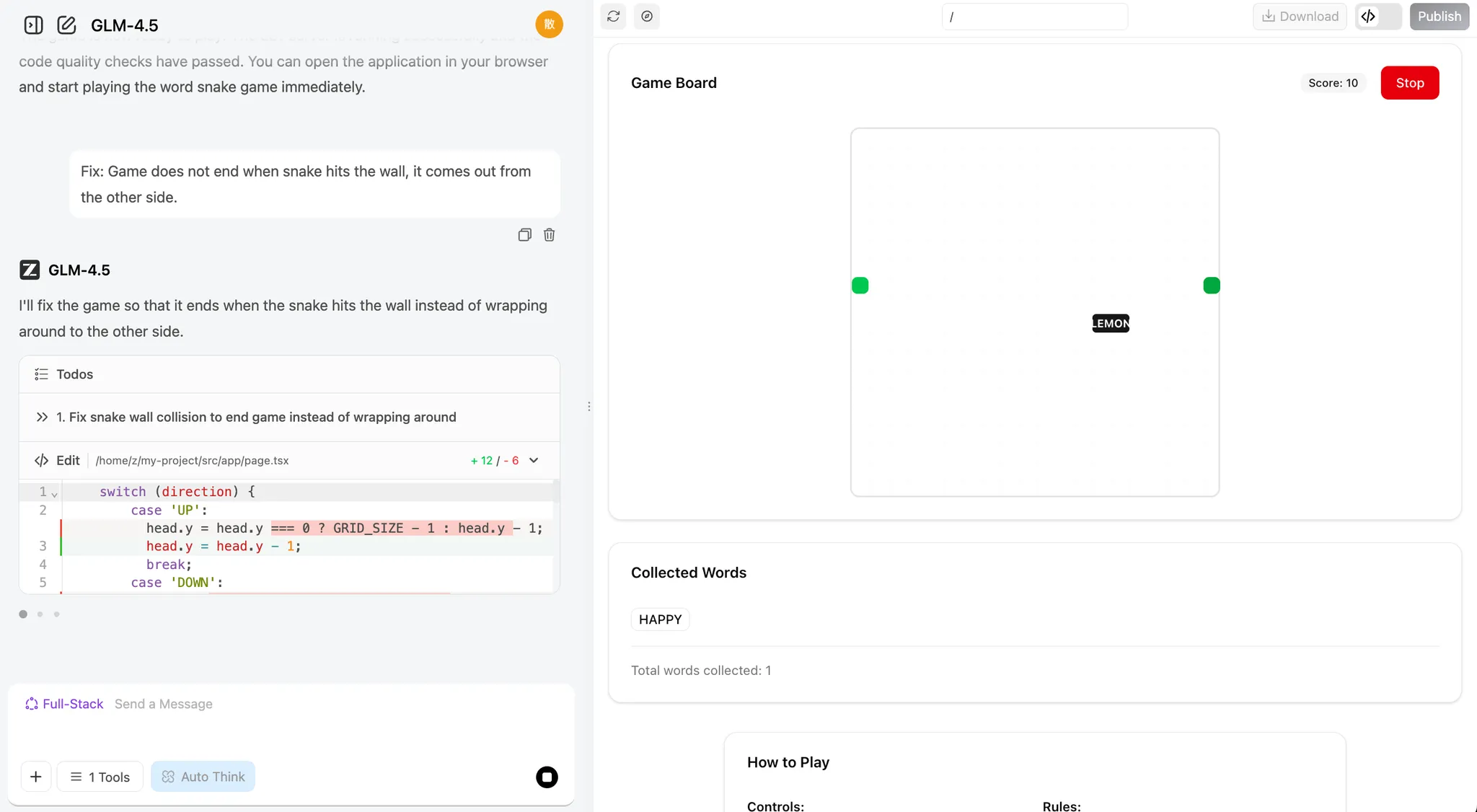
If you face any issues, just screenshot the error or tell the bot what's wrong and it will iterate the changes.
3.2 Add New Features to the Game
After completing the basic functionality, we can try adding some new twists to our program! If you find the process of the snake eating words or characters a bit boring, you can have the snake eat words of different colors and change the snake's color accordingly.
You can also add special effects to the "eating" process, or introduce magic words that trigger special effects—like increasing the snake's speed or size. Another idea is to have the model generate a poem and an image every time the snake eats a word, instead of waiting until it eats eight.
If these feel challenging, you can ask the language model directly for help! It can provide creative suggestions to make your game more fun. Give it a try!
1. "Word Unlocks World" Mechanic
Every time the snake eats a word, the LLM performs a poetic association on that word (e.g., "tree" → "forest", "shade"), and the image model instantly generates a small artwork for that word. These images gradually piece together into a unique, player-created panorama, so players are "painting and writing poetry" with every playthrough.

2. "Poetry Puzzle" Gameplay
Each word the snake eats triggers the LLM to generate a short verse, and the image model generates an illustration. These verses and images combine like puzzle pieces, forming an AI-collaborative poem and painting at the end of the round.

3. "Magic Words" & "Story Branches"
Special "magic words" (e.g., "wind", "night", "dream") not only trigger the LLM to generate poetry but also change the mood or theme of the scene—transforming the generated image style to nighttime, stormy, or dreamlike atmospheres.
Branching story: The LLM gives a theme or riddle at the start (e.g., "autumn memories"). The player's word choices directly influence the story and poetry evolution, with the image model updating backgrounds and visuals in real time.

4. "Real-time Interactive Generation"
After each word, the LLM generates a line of dialogue or description; NPCs in the game can "speak" to the player, or the environment can change accordingly.
The snake's appearance or obstacles in the game can visually change based on the words eaten, thanks to the image model.

5. "Create & Share"
Players can save and share their AI-created poems and images at the end of a session, showing off their unique "AI collaboration."
Leaderboards for "Most Beautiful Poem + Art", "Most Creative Word Combination", etc., encourage replaying and creativity.

6. "Sentence Snake" Challenge
Reverse mode: The LLM gives a line of poetry or a riddle, and the player must guide the snake to eat words in order to reconstruct the sentence. Eating the wrong word triggers funny or artistic consequences via the image generation model.

7. "Themed Levels" & "Style Selection"
At the start of the game, the player chooses a theme (e.g., "fairy tale", "sci-fi", "Tang poetry"), and both the LLM and image model adjust word selection, poetry style, and visuals to match, making each run feel fresh.

8. "Live Co-creation"
When a special word is eaten, the LLM can prompt the player to input a phrase or choose a style, then AI generates corresponding verses and illustrations, making it a true human-AI co-creation.

9. "AI Easter Eggs & Achievements"
Certain word combinations are recognized by the LLM as special themes or inside jokes (e.g., "moon", "osmanthus", "riverbank"), triggering rare verses and illustrations that reward exploration.

10. "A Growing Story"
As the snake grows, the LLM generates a continuous story-poem, and the image model creates a seamless scroll or panorama, so the player is simultaneously "writing, painting, and playing."
Additionally, we can also ask the LLM to generate project-level prompts for you directly. In the previous section, we only wrote the Snake game prompt ourselves. Now let's try having the LLM generate a prompt with an overall framework and implementation path (you can generate it directly with z.ai).
If you want to learn how to write better prompts, check out the Prompt Engineering Appendix.
I want AI to generate a web-based Snake game and need a more complete prompt to make the result more impressive and fun. Please generate the corresponding prompt. The current goal is: generate a Snake game that implements the function of eating different words to generate poetry, and should include an image generation module.
z.ai's response will look like this:
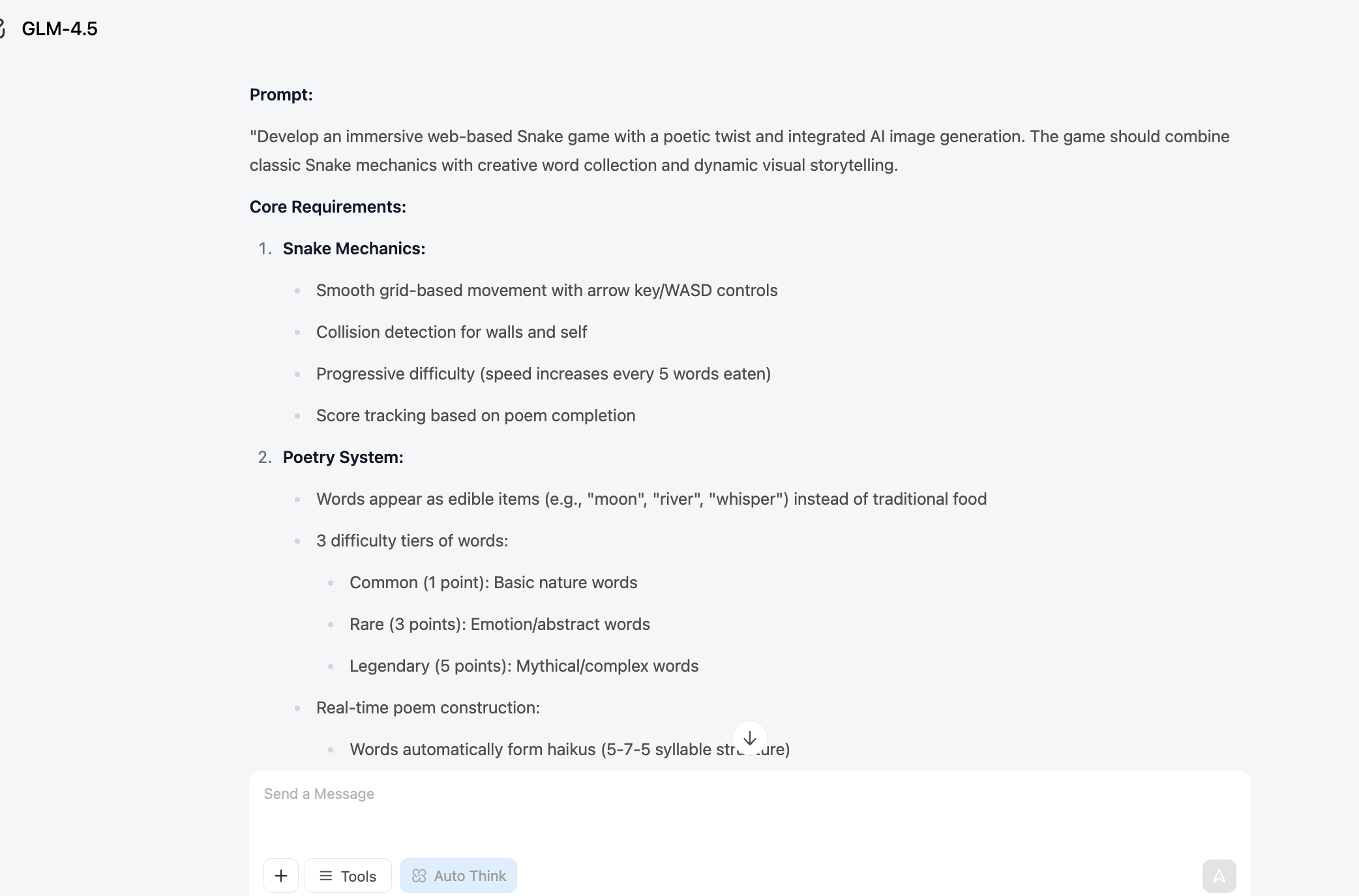
We can use this prompt to regenerate the project in full-stack development mode:
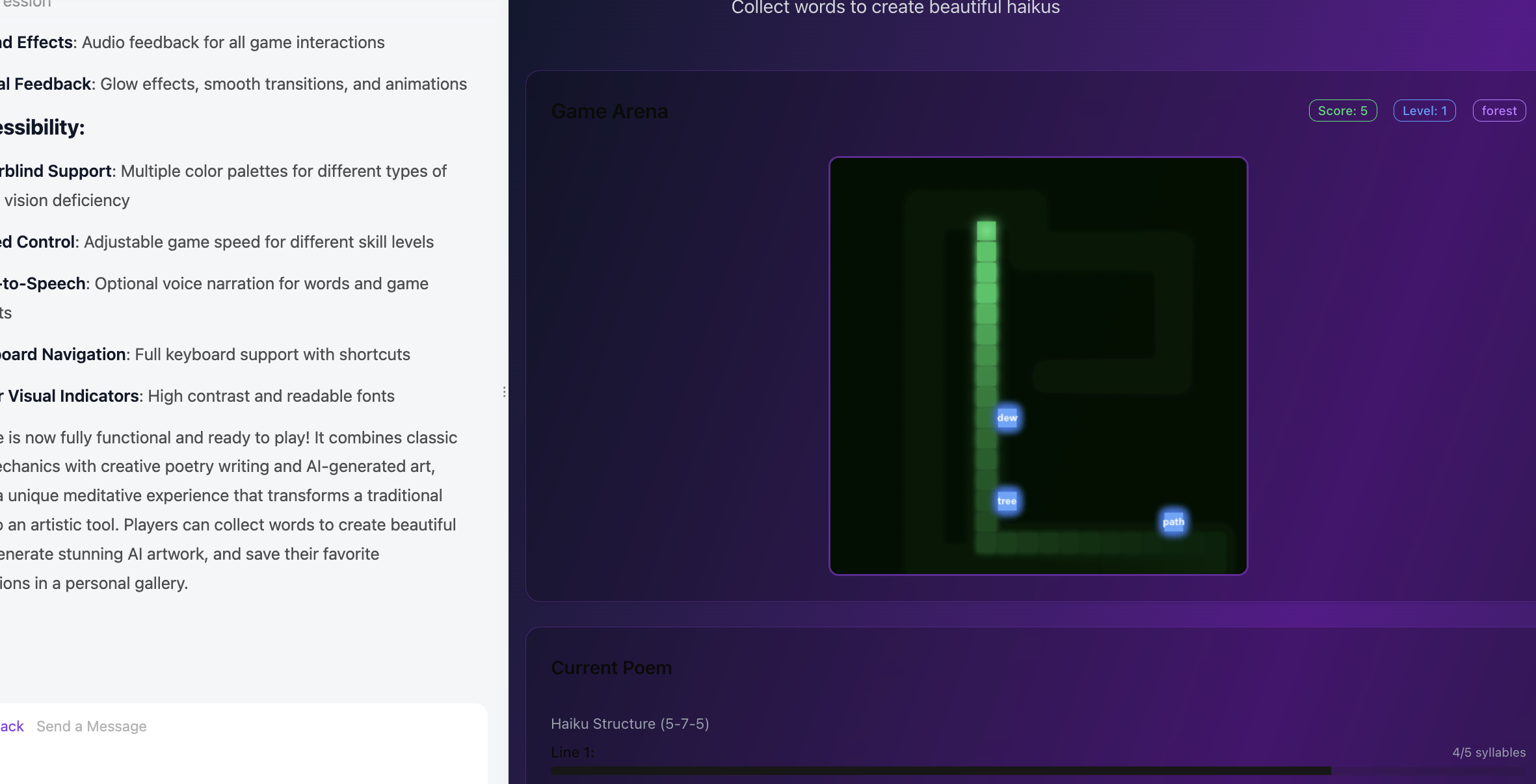
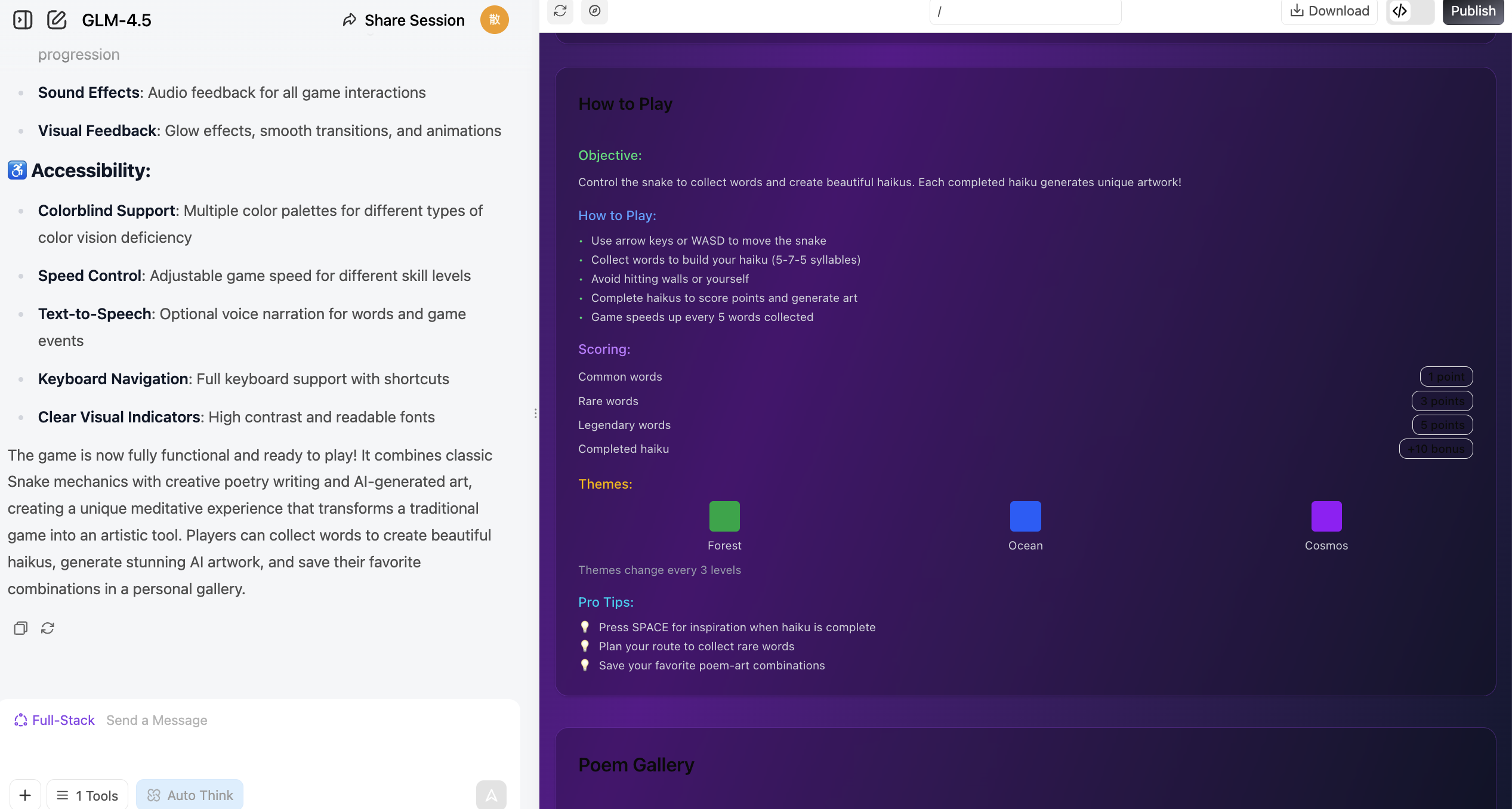
3.3 Try Making Other Mini-Games
Beyond Snake, we can let our imagination run wild.
Create anything we want to create, and even try to mess everything up! Then start over!
1. AI Art Gallery Platform
   Description: An online gallery showcasing AI-generated artworks where users can upload, share, and comment on AI art.
   Features: User account system, artwork upload and display, rating system, category browsing, AI generation tool integration.
   Tech highlights: React/Vue frontend, Node.js backend, MongoDB database, AI API integration.

2. Retro Game Archive
   Description: A website paying tribute to classic games, featuring game history, gameplay guides, and playable retro games online.
   Features: Game database, timeline display, online emulator, user reviews, game collection feature.
   Tech highlights: Responsive design, WebGL/Canvas game implementation, RESTful API, user authentication.

3. Sustainable Living Tracker
   Description: A website helping users track and reduce their carbon footprint through eco-tips and community challenges.
   Features: Personal carbon footprint calculator, goal setting, progress tracking, community challenges, eco knowledge base.
   Tech highlights: Data visualization, mobile optimization, social features, push notifications.

4. Virtual Kitchen Assistant
   Description: An AI-based cooking guidance platform providing personalized recipe recommendations and step-by-step cooking instructions.
   Features: Recipe database, ingredient recognition, personalized recommendations, cooking timer, nutrition analysis.
   Tech highlights: Image recognition API, ML recommendation system, voice control, real-time video guidance.

5. Underground Music Discovery Platform
   Description: A music streaming platform focused on indie and emerging artists, offering a unique discovery experience.
   Features: Music streaming, artist profiles, personalized recommendations, playlist creation, community reviews.
   Tech highlights: Audio streaming, recommendation algorithms, social features, music visualization.

6. Minimalist Task Management System
   Description: A task management tool with zen aesthetics, focused on simple and efficient task organization.
   Features: Task creation and categorization, priority setting, progress tracking, team collaboration, data analytics.
   Tech highlights: Minimalist UI design, drag-and-drop, real-time sync, cross-platform compatibility.

7. Sci-Fi Writing Workshop
   Description: A platform providing creative tools and inspiration for sci-fi writers, including world-building aids and character development tools.
   Features: Story structure tools, character profiles, world-building templates, writing statistics, community feedback.
   Tech highlights: Rich text editor, data visualization, collaborative editing, AI-assisted creation.

8. Personal Knowledge Graph
   Description: A tool helping users build personal knowledge networks, visualizing and connecting various ideas and information.
   Features: Node creation and connection, tagging system, search functionality, import/export tools, visual charts.
   Tech highlights: Graph database, data visualization algorithms, Markdown support, cross-device sync.

9. Virtual Botanical Garden
   Description: An interactive plant encyclopedia where users can explore the plant world and create virtual gardens.
   Features: Plant database, 3D plant models, growth simulation, gardening guides, community showcase.
   Tech highlights: 3D rendering, seasonal change simulation, AR integration, plant recognition API.

10. Programming Challenge Arena
    Description: An online competition platform for programmers with coding challenges of various difficulty levels.
    Features: Challenge problems, code editor, auto-evaluation, leaderboards, learning paths.
    Tech highlights: Code sandbox environment, real-time evaluation system, algorithm visualization, social learning features.
And... if you enjoy playing games, let's try creating games together!
1. 3D Open World RPG
   Description: A fantasy RPG with a vast open world, quests, and character progression.
   Features: Day-night cycle, dynamic weather, skill trees, multiplayer co-op, crafting system.
   Tech highlights: Three.js or Babylon.js for 3D rendering, server-side game logic, character customization, save system.

2. First-Person Shooter (FPS) Arena
   Description: A fast-paced multiplayer FPS with various game modes and maps.
   Features: Team deathmatch, capture the flag, weapon customization, ranked matches.
   Tech highlights: WebGL/Three.js for 3D graphics, multiplayer netcode, hit detection, voice chat.

3. AI Chess and Multiplayer
   Description: A full-featured chess platform with AI opponents and online matches.
   Features: AI difficulty levels, endgame challenges, tournament mode, replay analysis.
   Tech highlights: Chess logic library, WebSocket for real-time matches, ELO ranking system, anti-cheat.

4. Mahjong Online Multiplayer
   Description: A traditional Mahjong game with online multiplayer and scoring.
   Features: Multiple rule sets, private rooms, ranking system, replay feature.
   Tech highlights: Tile matching logic, real-time multiplayer, lobby system, score tracking.

5. Turn-Based Strategy Game
   Description: A tactical strategy game with grid-based combat and unit management.
   Features: Campaign mode, skirmish, unit upgrades, fog of war, multiplayer battles.
   Tech highlights: Grid movement system, AI decision-making, turn synchronization, save/load system.

6. Time Trial Racing Game
   Description: A 3D racing game focused on time trials and track records.
   Features: Multiple tracks, car customization, ghost replays, leaderboards.
   Tech highlights: 3D car physics, track editor, replay system, online leaderboards.

7. Card Battle Game (Deck Building)
   Description: A strategic card game where players build decks and battle opponents.
   Features: Card collection, deck building, ranked matches, seasonal events.
   Tech highlights: Card game logic, matchmaking system, AI opponents, card animations.

8. Battle Royale (Top-Down 2D)
   Description: A top-down 2D battle royale with shrinking play zones and loot mechanics.
   Features: Solo and squad modes, weapon variety, in-match events, leaderboards.
   Tech highlights: Real-time multiplayer, zone shrinking logic, loot generation system, matchmaking.

9. Horror Survival Game (First-Person)
   Description: A first-person horror game with resource management and escape mechanics.
   Features: Atmospheric environments, puzzles, enemy AI, multiple endings.
   Tech highlights: Dynamic lighting, sound design, enemy pathfinding, save system.

10. Music Rhythm Game (3D)
    Description: A 3D rhythm game where players hit notes to the beat of the music.
    Features: Multiple difficulty levels, track editor, custom song support, leaderboards.
    Tech highlights: Audio analysis, beat synchronization, 3D note tracks, input timing detection.
📚 Assignment
In this section, you've followed the steps to experience the complete process from "conversational Snake generation" to "understanding AI-native game design thinking." The following assignments will help you turn this understanding into real skills.
- Fully Reproduce the AI-Native Snake Game
- At minimum, implement: the snake can move, eating "food" changes its length and score, and hitting walls or itself ends the game.
- During reproduction, practice sending the error description + error message + key code snippets all at once to the AI, asking it to fix things in "beginner mode."
- (Optional) Create 1 Original AI-Native Mini-Game or Demo
- It can be any lightweight gameplay involving text, images, music, rhythm, etc., such as "eat words to write poems," "rhythm clicking," "generative runner," etc.
- The focus isn't on flashy graphics, but on being able to clearly articulate: what specifically did AI help with here, and what "hard-to-do-manually or tedious" part did it solve.
That's the complete tutorial! You may need about 4 hours to finish all the content and build your own Snake game. Don't rush—explore, experiment, and enjoy the process. If you encounter concepts you don't quite understand along the way, we recommend checking the relevant sections in the appendix below.
Appendix
Appendix 1: Do We Need Frontend Knowledge?
💡 One-line Summary
You don't need to write code, but understanding the basic concepts helps you describe requirements to AI more effectively.
- Page titles, text, images
- Buttons, input fields, dropdown menus
- Game interfaces, animation effects
- User score storage
- Login account verification
- Level content distribution
The Frontend Trio
Browsers use three types of "code" to build pages:
How Does Code Become a Page?
When you open a webpage, the browser processes three types of code in order:
1. HTML — Defines the page structure The browser first parses HTML to understand what elements are on the page (headings, paragraphs, images, buttons, etc.) and their hierarchical relationships.
2. CSS — Applies styles Then the browser applies CSS rules to add styles to these elements: colors, sizes, positions, spacing, etc., making the page look beautiful.
3. JavaScript — Adds interactivity Finally, JavaScript code is executed to make the page "come alive": responding to clicks, submitting forms, playing animations, etc.
4. Page rendering The combined result of all three is the webpage you ultimately see.
Modern Frontend Frameworks: From HTML to React/Vue
The HTML, CSS, and JavaScript introduced above are the "three essentials" of frontend development—they are the foundation of all webpages. But when pages become complex, developing directly with these three can be challenging: code becomes hard to maintain, there's lots of repetitive work, and data synchronization is troublesome.
Modern frontend frameworks (like React, Vue, Angular) are built on top of HTML/CSS/JS to make development more efficient:
1. HTML/CSS/JS (Basic stage) Directly manipulating page elements, suitable for simple pages. But as code grows, all logic gets mixed together and becomes hard to maintain.
2. jQuery (Transitional stage) Simplified DOM operations, making code more concise. But you still need to manually manage page state and find corresponding elements to update when data changes.
3. React/Vue (Modern stage) Adopts component-based and state-driven design:
- Component-based: Break the page into independent, reusable modules (like buttons, cards, navigation bars)
- State-driven: When data changes, the framework automatically updates the corresponding UI without manual manipulation
💡 Simple Understanding
- HTML/CSS/JS = Basic materials (bricks, cement, steel)
- React/Vue = Building framework (provides standards and tools for constructing buildings)
In the AI-assisted programming era, you don't need to deeply master every detail of frameworks. You just need to understand their basic concepts, and you can describe requirements in natural language to have AI generate code for you.
In Vibe Coding
Core point: You don't need to write code, you just need to know how to describe.
After understanding frontend concepts, you can describe requirements to AI like this:
"Use React to make a leaderboard page, with a score list on the right side. Clicking a row shows player details below. The style should be clean and modern."
If you want to dive deeper into frontend fundamentals like HTML, CSS, and JavaScript, check out the Web Basics Appendix. To learn about the evolution of frontend technology, check out the Frontend Evolution Appendix.
Appendix 2: What Exactly is Vibe Coding
💡 What is Vibe Coding? Computer scientist Andrej Karpathy (one of the co-founders of OpenAI, former head of AI at Tesla) coined the term vibe coding in February 2025. This concept refers to a coding methodology that relies on LLMs, allowing programmers to generate working code by providing natural language descriptions instead of manually writing code.
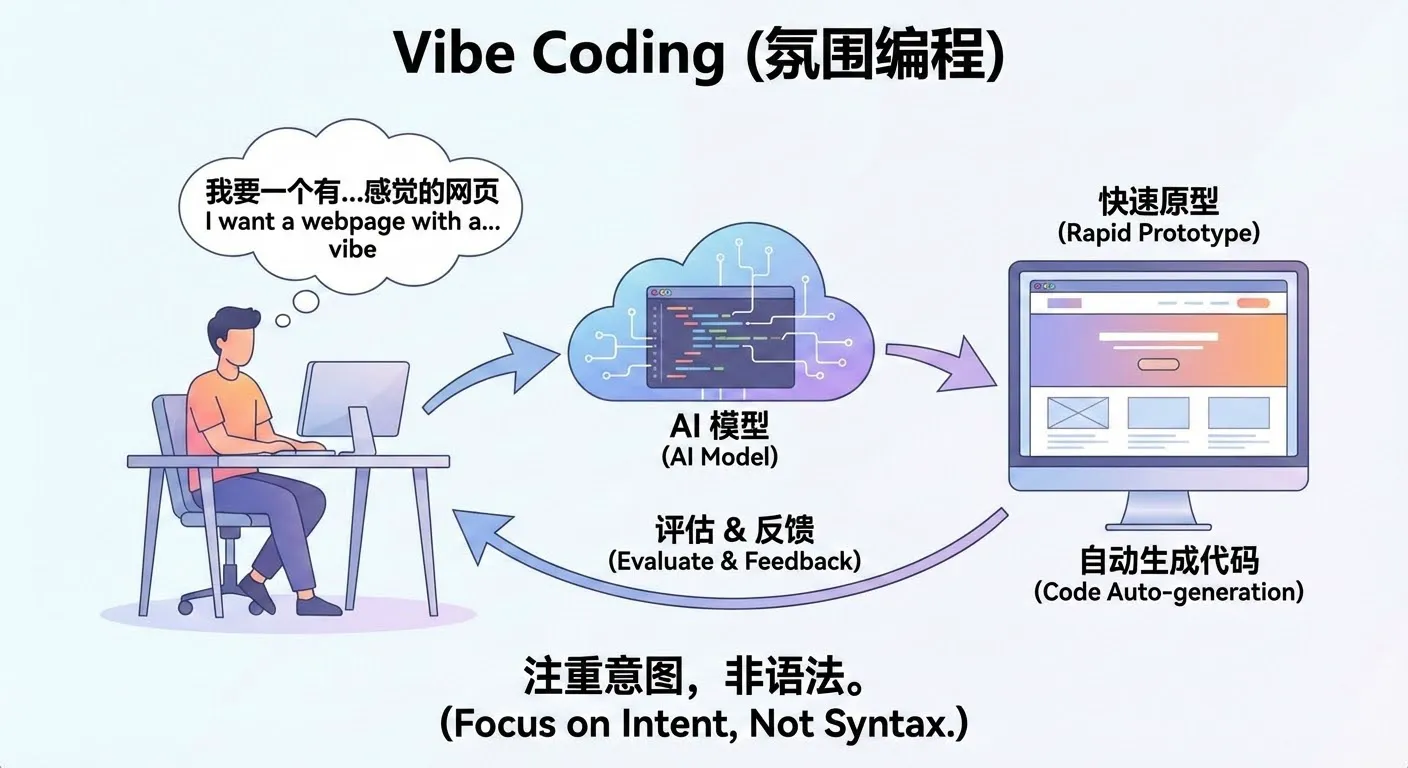
Literally, Vibe Coding can be understood as a way of "developing by talking." The core change is: you no longer need to write code line by line, look up syntax, or debug yourself. Instead, you directly describe what you want in natural language, for example:
"I need a login page with a phone number input field and a verification code input field." "After successful login, redirect to the homepage and display the username in the top right corner." "Give me a simple Snake game that can be controlled with keyboard arrow keys."
The Large Language Model (LLM) will automatically translate these descriptions into real, runnable code and generate the corresponding pages, logic, and data structures. After you see the results, you can propose modifications in natural language, such as "make the button bigger," "change the background to dark," "record scores and display a leaderboard," and the AI will continue adjusting the implementation according to your requirements.
In this mode, you don't need to learn a programming language first before writing code. Instead, you focus your main energy on: clearly stating what you want to do, judging "what's wrong" after seeing the results, and then proposing new modifications. AI handles turning these high-level ideas into concrete implementations, significantly reducing mechanical, repetitive coding work.
You can click here to learn more about vibe coding: https://www.ibm.com/think/topics/vibe-coding
You can click here to see more of Karpathy's shared content: https://karpathy.bearblog.dev/blog/
How to Pretend You're a Vibe Coding Master
In practice, during real vibe coding, we usually don't use many complex prompts. Perhaps we need a specific and moderately complex prompt for the entire program at the beginning, but after that, at each step, you may only need prompts like these:
"There's a bug in the code, please fix it."
"I don't want partial code, give me the complete modified code."
"Your code still has problems."
"Please modify again and give me the complete corrected code."
"It was working before, why isn't it working now?"
"Did you not understand what I meant? Don't change my original code."
"Don't add any debugging features."
"Don't do things I didn't ask you to do."
"Where is the feature I asked you to implement?"
"Can you not understand what I'm saying?"
"I only want one function."
"I told you to refer to my previous code."
"Please don't add unnecessary comments."
"Please don't modify the basic logic of my original code."
"Help me modify the code."
"Modify based on my code..."
"Don't change my variable names!!!"
"Don't change the original function names!"
"Don't mess with my variables."
"Don't add extra features."
"Don't just generate a skeleton, generate the complete code."
This may sound a bit exaggerated, but in reality, these are the prompts we might use in daily work. Due to the context length limitations of large language models, or sometimes because their instruction following ability isn't very strong, models may forget content discussed earlier in the conversation. In vibe coding, we tend to use models with long context and strong instruction following ability. We can judge whether a model is good through rankings or metrics of these two aspects.
Alternatively, due to the style of training datasets, large models tend to respond in the style of their training data. For example, some speak very seriously, some like to add lots of embellishments, and some models like to add lots of comments or unnecessary modules to code.
Appendix 3: Model Context
Model context can be understood as AI's short-term memory. It refers to all the text content that the model can "see" and "remember" during a single conversation or task, including your previous questions, system-provided instructions, relevant materials, etc.
It is precisely because of context that AI can understand you're continuing from previous content, enabling round after round of coherent, natural conversation. Without context, every sentence you say would appear to the model as a completely new question—it wouldn't know what you said before, and there would be no way to continue a conversation.
Each model has its own effective context length (context window). This length is usually measured in tokens (which can be roughly understood as units of "word fragments"), and most mainstream models currently range from 32k to 128k tokens. The longer the context, the more content the model can "read" at once, for example:
- Reading an entire lengthy paper or report in one go
- Referencing multiple materials and cases in the same conversation
- Having the model remember conclusions from complex discussions several rounds ago
When your input approaches or exceeds the model's context limit, some common phenomena often appear:
- The model starts forgetting details or key information from earlier in the long text
- As the conversation progresses, the topic gradually drifts from the original goal
- Across different Q&As about the same material, the referenced content becomes inconsistent
These phenomena don't mean the model suddenly "got dumber"—they are natural results of the context capacity being used up or nearly used up.
In practical use, we want the context to be as long as possible, while also being aware that:
- The longer the context, the more computing resources it consumes
- The corresponding API costs (fees) also increase accordingly
Therefore, when designing AI applications, you need to balance letting the model see enough information with controlling costs and improving efficiency. For example:
- Distill information that truly needs long-term retention before feeding it to the model
- Avoid stuffing detail information that's no longer needed into the context repeatedly
- Use external knowledge bases and similar approaches to hand "long-term memory" to the system rather than forcing it into the model's context
Appendix 4: Instruction Following
Instruction following refers to: after the model understands your instructions, whether it can accurately and completely execute according to your requirements. This includes not only answering questions, but also completing tasks in specified formats, styles, and steps.
For example, the following are all instructions with clear requirements for the model:
- Summarize this article into three key points
- Write a reply email in a formal, polite tone
- Translate this word into English and create an example sentence for each
- Extract the author, time, and main events from the article
A model with strong instruction following ability typically has these characteristics:
- Outputs content in the required quantity For example, if asked to summarize three key points, it won't give five.
- Covers all specified elements For example, if asked to extract author, time, and events, it won't omit any of them.
- Follows the specified format and tone For example, if asked to use a formal tone, it won't output overly colloquial responses.
- Doesn't make unnecessary additional extensions For example, if only asked to translate and create sentences, it won't output a large paragraph of unrelated explanations.
In practical applications, strong instruction following ability is very important for these reasons:
- Improved stability: The same instruction produces more consistent output structure and behavior patterns across different times and multiple runs, less likely to go off-script
- Improved reproducibility: When you configure a prompt into a product or workflow, you can predict roughly how the model will respond, making testing and iteration easier
- Easier system integration: When model output conforms to expected formats, it's easier to automatically interface with backend programs, workflows, or other tools
Therefore, when selecting and evaluating a large language model, in addition to focusing on whether it's smart and has broad knowledge coverage, you also need to pay special attention to its instruction following ability. For industrial-grade applications, being able to stably and accurately execute instructions is often more important than occasionally giving a stunning answer.