
🏢 Lobster University: One-Person Company in Practice (One Person, One Team)
Use case: You're a solo developer, freelancer, or small-team founder who wants AI to build a complete virtual company team — product, design, engineering, marketing, sales, ops, HR, and customer support all covered. Just describe your business goal in Telegram, and the Lobster breaks it down, assigns tasks to the right AI specialists, and delivers actionable results.
agency-agents is an open-source collection of specialized AI agent personalities, featuring 144 professional AI agents across 12 functional divisions. Each agent has its own identity, core workflows, technical deliverables, and success metrics — not generic prompt templates, but battle-tested professional roles.
Combined with OpenClaw's Telegram channel, you can send business goals directly from your phone and let the Lobster automatically dispatch the right agents to collaborate — from requirements analysis to code implementation, from marketing strategy to deployment. Truly run a company as one person.
1. What You'll Get (Real-World Value)
Once set up, you'll have a 24/7 AI company team at your command:
Scenario 1: From Idea to MVP
- Problem: You have a product idea, but handling requirements, design, development, and deployment alone is overwhelming
- Solution: Describe your goal in Telegram — agency-agents automatically breaks it into product requirements → UI design → frontend/backend implementation → deployment, with each step handled by the corresponding AI specialist
Scenario 2: Quickly Build a Marketing System
- Problem: Product is built, but you can't write copy, don't understand SEO, and have no marketing strategy
- Solution: The Marketing division's 31 agents handle content creation, social media management, SEO optimization, and email marketing
Scenario 3: Solo Client Project Delivery
- Problem: You've taken on a client project that needs product design, frontend/backend development, testing, and documentation
- Solution: Dispatch the complete delivery pipeline on demand: Product → Design → Engineering → Testing → Support
Scenario 4: Business Decision Support
- Problem: Unsure which direction to pursue; need market research, competitive analysis, and user personas
- Solution: Product division's Trend Researcher + Marketing division's market analysts collaborate to output structured decision references
2. Why agency-agents?
Core Architecture: 12 Divisions × 144 AI Specialists
flowchart TB

subgraph COMPANY["🏢 Your AI Company"]
direction TB

subgraph BIZ["Business Line"]
PRODUCT["🧭 Product<br/>5 agents"]
SALES["🎯 Sales<br/>8 agents"]
MARKETING["📣 Marketing<br/>31 agents"]
PAID["💰 Paid Media<br/>7 agents"]
end

subgraph TECH["Tech Line"]
ENGINEERING["🔧 Engineering<br/>24 agents"]
DESIGN["🎨 Design<br/>8 agents"]
TESTING["🧪 Testing<br/>8 agents"]
GAME["🎮 Game Dev<br/>20+ agents"]
end

subgraph OPS["Ops Line"]
PM["📋 Project Mgmt<br/>6 agents"]
SUPPORT["🎧 Support<br/>6 agents"]
ACADEMIC["📚 Academic<br/>5 agents"]
SPECIAL["⚡ Specialized<br/>30+ agents"]
end
end

USER["👤 You"] --> |"Send goal via Telegram"| COMPANY
Every Agent Is a "Specialist," Not a "Template"
The traditional approach is writing generic prompts and having AI role-play. agency-agents is different — each agent includes:
| Field | Description |
|---|---|
| Identity & Personality | Unique persona that influences communication style and decision-making |
| Core Workflows | Battle-tested standardized workflows |
| Technical Deliverables | Explicit deliverables checklist (not just concepts) |
| Success Metrics | Measurable success criteria |
| Memory & Learning | Pattern recognition for continuous improvement |
Division Overview
| Division | Agents | Capabilities |
|---|---|---|
| Engineering | 24 | Frontend/backend dev, DevOps, database optimization, security audits, API design |
| Marketing | 31 | Content creation, SEO, social media, email marketing, platform ad strategy |
| Design | 8 | UI/UX design, brand visuals, accessibility audits |
| Sales | 8 | Outbound strategy, customer discovery, deal strategy |
| Product | 5 | Product management, trend research, behavioral design |
| Testing | 8 | QA, performance benchmarking, accessibility testing |
| Project Mgmt | 6 | Project management, process optimization, resource scheduling |
| Support | 6 | Customer service, analytics, finance, compliance |
| Paid Media | 7 | PPC, search ads, programmatic buying |
| Game Dev | 20+ | Cross-engine development, platform adaptation |
| Academic | 5 | History, psychology, anthropology (world-building) |
| Specialized | 30+ | Blockchain auditing, Salesforce architecture, and more |
How It Differs from Plain Prompts
| Feature | Plain Prompts | agency-agents |
|---|---|---|
| Expertise | Depends on your prompt skill | Pre-built battle-tested workflows |
| Collaboration | Single role | Multi-agent collaboration with auto-routing |
| Deliverables | Freeform output | Standardized deliverables + success metrics |
| Reusability | Rewrite each time | Register as skills, invoke on demand |
| Scalability | Manual coordination | Unified registry + routing engine |
Key insight: The value of agency-agents isn't just "better prompts" — it's a registerable, composable, routable company function system. Through OpenClaw's skill registration mechanism, these agents become standardized capabilities that can be dispatched at any time.
3. Configuration Guide: Building Your AI Company
3.1 Prerequisites
| Requirement | Description |
|---|---|
| OpenClaw installed and running | Base environment ready |
| Telegram account | For interacting with OpenClaw |
| LLM API Key | Supports OpenAI / Claude / DeepSeek / local models |
| Tool profile set to coding/full | Requires command execution permission, see Chapter 7 |
3.2 Configure the Telegram Channel
Same as other Lobster University tutorials — set up the Telegram bot first. If you've already configured it in Automated Research in Practice, skip to 3.3.
Step 1: Create a Telegram Bot
Open Telegram, search for BotFather, select the official account with the blue verification badge, click Start, then send /newbot:
BotFather will ask two questions:
- Bot display name — can be anything, e.g., "Lobster"
- Bot username — must end with
bot, e.g.,HelloClawClaw_bot
Full conversation example:
You: /newbot
BotFather: Alright, a new bot. How are we going to call it?
           Please choose a name for your bot.
You: Lobster
BotFather: Good. Now let's choose a username for your bot.
           It must end in `bot`.
You: HelloClawClaw_bot
BotFather: Done! Congratulations on your new bot.
           Use this token to access the HTTP API:
8658429978:AAHNbNq3sNN4o7sDnz90ON6itCfiqqWLMrcImportant: Keep this Bot Token safe — you'll need it when configuring OpenClaw.
Step 2: Connect Telegram in OpenClaw
On your OpenClaw host, run the onboard command:
openclaw onboardSkip and continue until you reach the Select channel page, choose Telegram (Bot API), and paste your Bot Token.
Step 3: Get Your Telegram User ID
In Telegram, find the bot you just created and send /start. The bot will reply with your User ID:
OpenClaw: access not configured.

Your Telegram user id: 8561283145

Pairing code: 6KKG7C7K

Ask the bot owner to approve with:
openclaw pairing approve telegram 6KKG7C7K
Note the User ID and enter it in the allowFrom field. After configuration, select restart to restart OpenClaw.
3.3 Register agency-agents as OpenClaw Skills
With the Telegram channel ready, transform the 144 AI specialists into standardized OpenClaw skills.
Send this prompt in Telegram:
Read repo: https://github.com/msitarzewski/agency-agents

Goal: Restructure it into a set of "company function skills"
registerable to OpenClaw, for on-demand invocation and auto-routing.

Requirements:
1. Abstract existing agents into standardized skills
   (e.g., product / marketing / sales / ops / hr / support)
2. Each skill must include:
   - name / description (clearly searchable)
   - capabilities (what problems it solves)
   - inputs / outputs schema
   - tools / dependencies
   - prompt template (directly executable)
   - routing tags (for auto-matching)
3. Design a unified skill registry supporting search and composition
4. Define multi-skill collaboration protocol
   (task decomposition, state passing, feedback loops)
5. Output as "deployable structure" (directory + config), not explanations
6. Provide at least one end-to-end workflow example
   (auto-select and invoke multiple skills)

Constraint: Prioritize engineering usability and extensibility.
Avoid staying at conceptual design only.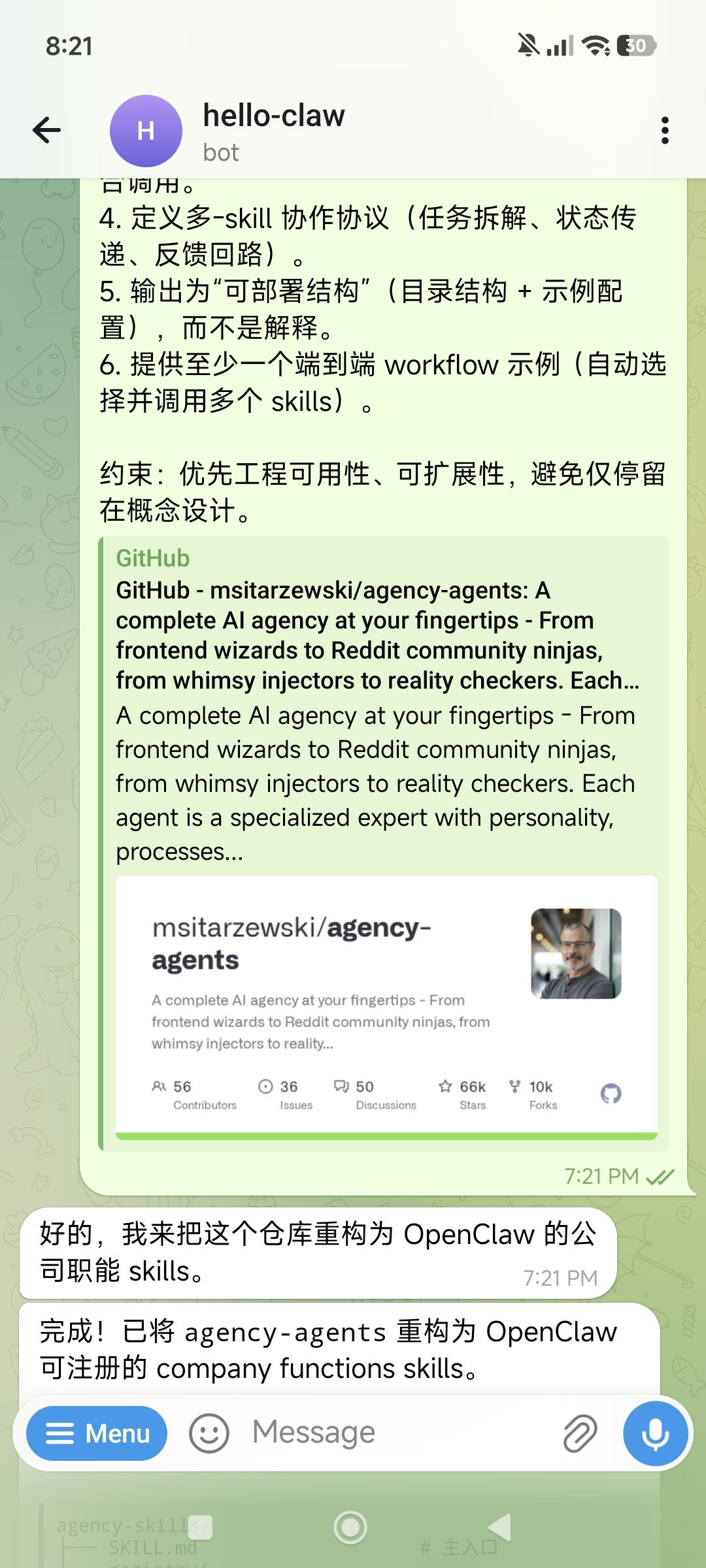
The Lobster reads the entire repository and outputs a complete skill registration structure:
agency-skills/
├── SKILL.md                    # Main entry
├── registry/
│   ├── registry.json          # Skill definitions + routing tags
│   └── COLLABORATION.md       # Multi-skill collaboration protocol
├── product/                    # 🧭 Product Management
├── marketing/                  # 📣 Marketing
├── sales/                      # 🎯 Sales
├── ops/                        # ⚙️ Operations
├── hr/                         # 👥 Human Resources
├── support/                    # 🎧 Customer Support
├── engineering/                # 🔧 Engineering
├── design/                     # 🎨 Design
├── workflows/                  # End-to-end workflows
└── scripts/router.py           # Routing CLI
Each skill includes standardized fields (name, description, capabilities, inputs/outputs schema, prompt template, routing tags) and supports auto-routing:
$ python scripts/router.py "write PRD for feature X"
→ 🧭 PRODUCT (matched: feature, PRD)

$ python scripts/router.py "build outbound campaign"
→ 📣 MARKETING + 🎯 SALES
Core value: This step transforms 144 scattered agents into searchable, composable, standardized capabilities. For any subsequent business goal, the Lobster can automatically match and dispatch the right skills.
4. First Run: From Goal to MVP Demo
With skills registered, let's run an end-to-end business scenario — from a business goal to a working demo website.
4.1 Send Your Business Goal
Describe what you want to build in Telegram. Here's an example using a harness engineering training website:
Goal: Design and implement a harness engineering training website Demo (MVP)

Requirement: Quickly build a runnable, demonstrable minimal system,
not a complete product.

Tasks:

1. Product structure (minimal closed loop)
   Design 3 modules:
   - Learn: Core courses (harness engineering concepts)
   - Practice: Simple agent harness experiments (e.g., prompt + eval loop)
   - Evaluate: Evaluate and provide feedback on agent output

2. Course content (minimal set)
   Provide 3 lessons:
   - What is harness engineering (definition + architecture)
   - Agent feedback loop (input → execution → evaluation → iteration)
   - Runtime scaffolding (tools / memory / routing)
   Each lesson includes a brief explanation + a runnable experiment

3. Technical implementation (must be runnable)
   - Frontend: Simple page (Next.js or static HTML)
   - Backend: Lightweight API (Node / Python)
   - Agent: Simple LLM call wrapper
   - Eval: Rule-based or simple scoring function

4. Demo scenario (must work end-to-end)
   Implement full flow:
   User input → agent execution → eval scoring → optimization suggestions

Constraint: Prioritize simplicity and runnability.
All modules must connect to form a closed loop.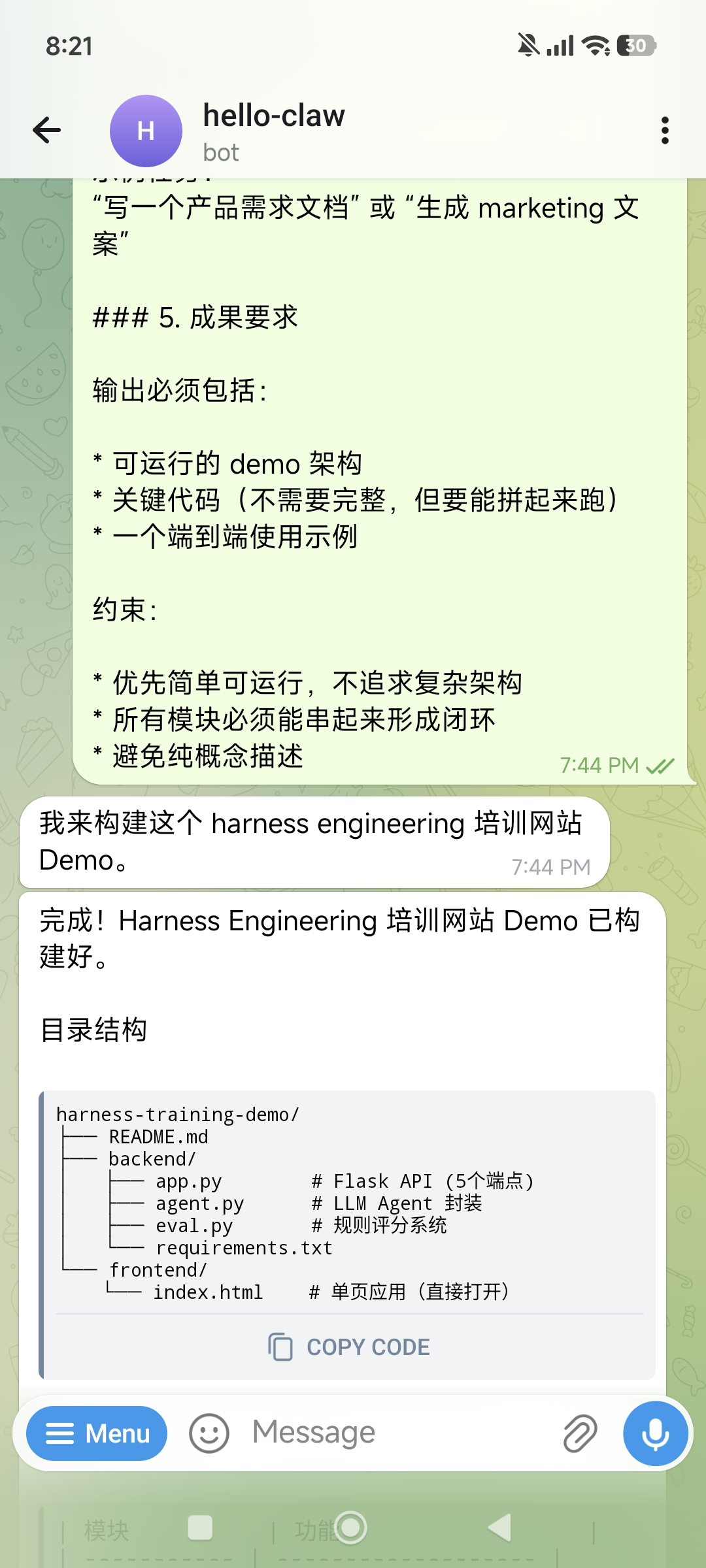
4.2 Lobster Auto-Dispatches Skills
After sending, the Lobster activates the product-launch workflow, dispatching in sequence:
- Product → Analyze requirements, define product structure and modules
- Design → Design page layouts and interaction flows
- Engineering → Implement frontend and backend code
- Support → Write usage documentation
Within minutes, you'll receive the build completion message:
Done! Harness Engineering Training Demo is ready.

harness-training-demo/
├── README.md
├── backend/
│   ├── app.py        # Flask API (5 endpoints)
│   ├── agent.py      # LLM Agent wrapper
│   ├── eval.py       # Rule-based scoring system
│   └── requirements.txt
└── frontend/
└── index.html # Single-page app (open directly)| Module | Function |
|---|---|
| 📚 Learn | 3 courses, each with a runnable experiment |
| 🔧 Practice | Agent single execution / feedback loop |
| 📊 Evaluate | PRD + marketing copy — two complete demos |
4.3 Run and Deploy the Demo
Code is generated, but you want to see it in the browser. Just tell the Lobster:
Please run it and find a way to let me browse the demo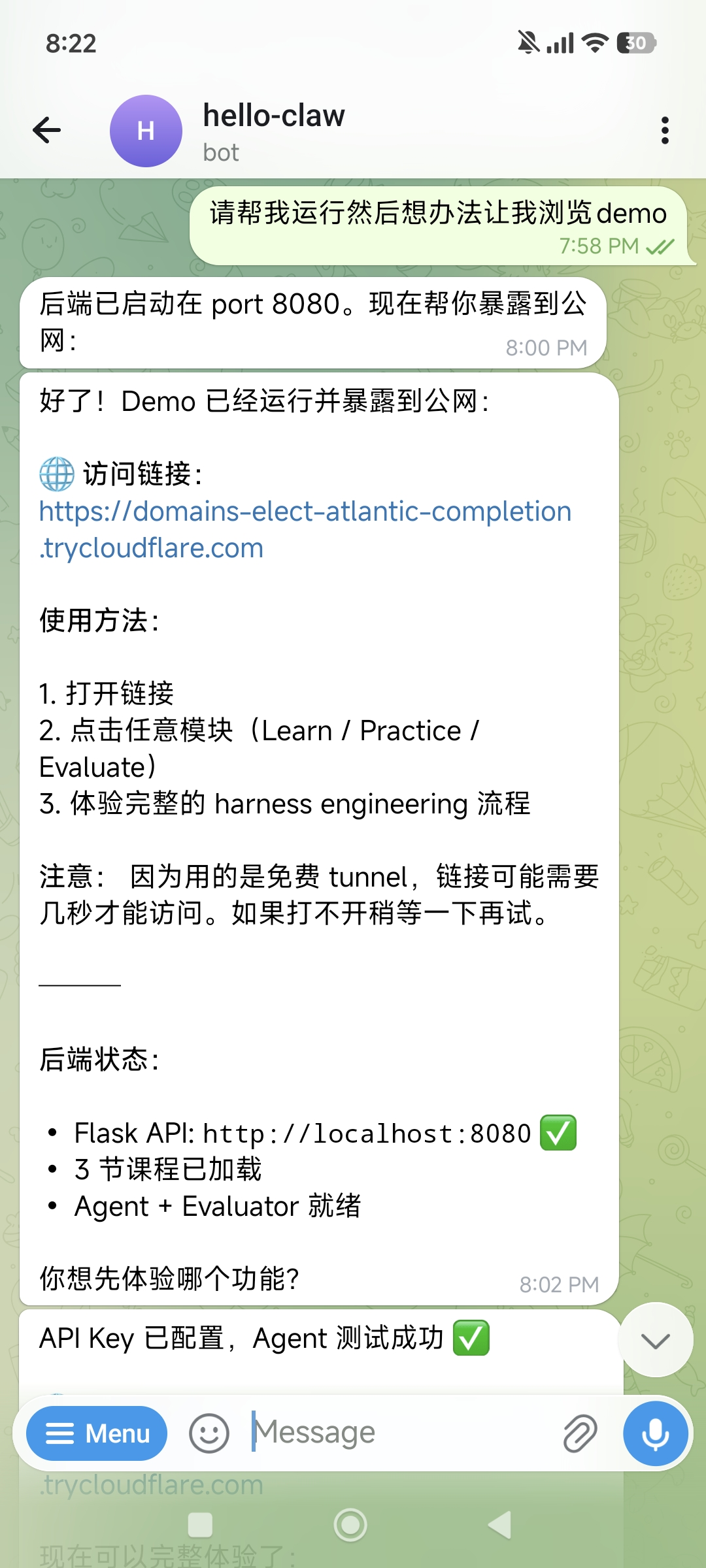
The Lobster will:
- Start the backend service (Flask API on port 8080)
- Configure frontend static file serving
- Expose the Demo to the internet via Cloudflare Tunnel
Done! Demo is running and exposed to the internet:

🌐 Access link:
https://domains-elect-atlantic-completion.trycloudflare.com

How to use:
1. Open the link
2. Click any module (Learn / Practice / Evaluate)
3. Experience the full harness engineering flow

Backend status:
• Flask API: http://localhost:8080 ✅
• 3 courses loaded
• Agent + Evaluator ready
Cloudflare Tunnel: The Lobster uses the free
cloudflaredservice to create a temporary tunnel — no domain or port forwarding configuration needed. The link is valid as long as the tunnel process is running.
4.4 View the Demo
Open your browser and visit the link to see a complete training website demo:
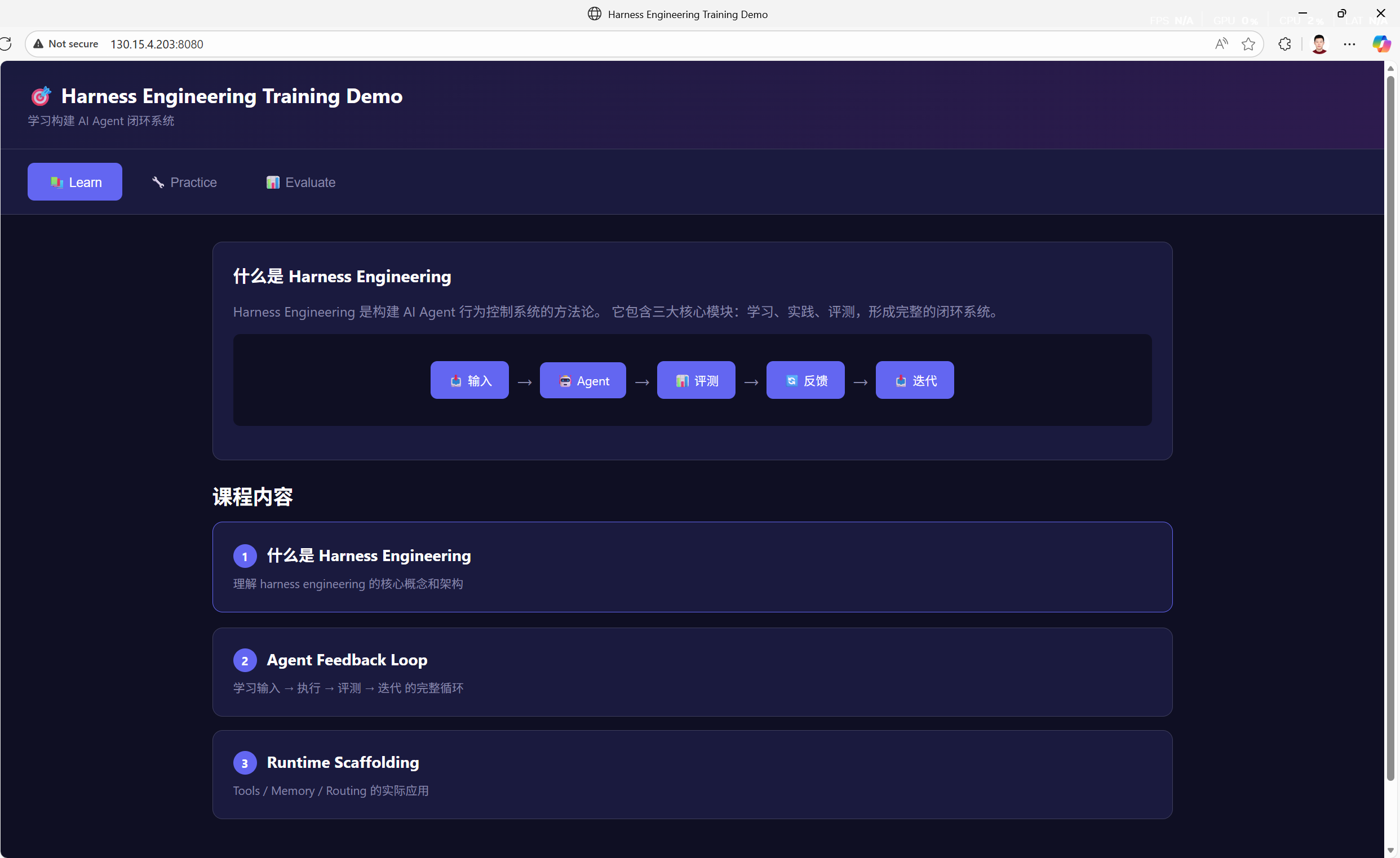
The full end-to-end loop is working:
- Learn → Browse course content, understand core concepts
- Practice → Input a task (e.g., "Write a product requirements document"), let the Agent execute
- Evaluate → Agent output is scored by the evaluation system, returns optimization suggestions
Note: This demo is just a minimal runnable prototype. If you get a 404 on first visit, the frontend static files may not be configured yet — just tell the Lobster and it'll fix it. In practice, the value of an MVP is rapid idea validation, not perfection.
5. Advanced Scenarios: From MVP to Operations
Scenario 1: Full Product Launch
Have multiple divisions collaborate on the entire journey from concept to launch:
Goal: Complete launch preparation for [your product name]

Need:
1. Product: Finalize PRD and user stories
2. Design: Design landing page and core interactions
3. Engineering: Implement core features and deploy
4. Marketing: Write launch copy, prepare social media content
5. Support: Write user guide and FAQ
The Lobster activates the product-launch workflow: product → design → engineering → marketing → support, with each stage's output feeding into the next.
Scenario 2: Quickly Build a Marketing Plan
Goal: Design a complete content marketing plan for my SaaS product

Need:
- Target user personas and pain point analysis
- Content calendar (Blog / Newsletter / Social media)
- SEO keyword strategy
- 3 sample blog articles
- Landing page copy
The Marketing division's Content Creator, SEO Strategist, and Social Media Manager collaborate to produce a complete plan.
Scenario 3: Client Project Delivery
Goal: Build a data dashboard for client [XXX]

Tech stack: React + FastAPI + PostgreSQL

Need:
1. Requirements analysis and data model design
2. Backend API implementation
3. Frontend pages and chart components
4. Testing and deployment scripts
5. Delivery documentation
Engineering's Frontend Developer, Backend Architect, and Database Specialist work together, with Project Management tracking progress.
Scenario 4: Competitive Research & Strategy
Goal: Analyze product strategies of [Competitor A], [Competitor B], [Competitor C]

Need:
- Feature matrix comparison
- Pricing strategy analysis
- User review summary
- Differentiation opportunity identification
- Action recommendations
Product's Trend Researcher + Marketing's market analysis agents jointly produce a structured report.
Scenario 5: Iterative Improvement
Not satisfied with the first delivery? Just add requirements:
The training website demo needs improvements:
1. Learn module: add syntax highlighting for code examples
2. Practice module: support multi-turn conversations
3. Evaluate module: add radar chart for evaluation dimensions
4. Overall: add responsive layout for mobile access
The Lobster iterates on existing code — no need to start from scratch.
6. Troubleshooting
Issue 1: Lobster Doesn't Know How to Use Registered Skills
Common causes:
- Prompt doesn't reference skill names explicitly — add "use the product skill" or "invoke the engineering team" in your follow-up messages
- registry.json routing tags aren't precise enough — go back to Telegram and have the Lobster optimize the routing tags
Solution:
List all registered skills and auto-select the right ones for:
[your goal description]
Issue 2: Demo Build Fails or Code Errors
Common causes:
- Missing Python/Node.js dependencies — have the Lobster run
pip installornpm installfirst - API Key not configured — ensure the LLM API Key is properly set
- Port already in use — specify a different port
Diagnostic steps:
openclaw logs --limit 50 # Check OpenClaw logsIssue 3: Cloudflare Tunnel Not Accessible
Common causes:
- Backend service not running — check if the Flask/Node process is alive
- Frontend static files not configured — backend needs to serve static files too
- Free tunnel is unstable — wait a few seconds and retry, or have the Lobster recreate the tunnel
Issue 4: Telegram Bot Not Responding
Diagnostic steps:
- Verify Bot Token is correct: check in BotFather
- Verify
allowFromincludes your User ID - Verify OpenClaw has been restarted:
openclaw restart - Check OpenClaw health:
openclaw doctor
7. Security & Compliance Reminders
Reminder 1: Telegram Bot Token Security
- Never leak your Bot Token: Anyone with the token can control your bot
- Never commit tokens to Git: Use environment variables or
.envfiles - Rotate tokens regularly: If you suspect a leak, use
/revokein BotFather to regenerate - Restrict
allowFrom: Only allow your own User ID to interact with the bot
Reminder 2: API Key & Demo Security
- Never hardcode LLM API Keys in demo code — use environment variables
- Don't repeatedly send API Keys in plaintext via Telegram chat
- Demos exposed via Cloudflare Tunnel are publicly accessible — don't include sensitive data
- Free tunnel links are temporary, but anyone can access them while active
Reminder 3: Deliverable Review
- Code and plans generated by agency-agents are AI output — always review before production use
- Marketing copy, legal compliance content needs professional review
- Demo code is suitable as prototypes and POCs; production deployment requires security audits
8. Summary: One Person's Company, 144 AI Specialists' Team
The core value of agency-agents is turning complete company functions into AI capabilities — just describe your business goal, and 12 divisions with 144 AI specialists handle the rest:
- Full-function coverage: Product → Design → Engineering → Testing → Marketing → Sales → Ops → Support
- Auto-routing dispatch: Just describe your goal; the Lobster automatically matches the best agent combination
- Standardized delivery: Every agent has explicit deliverables and success metrics — not vague suggestions
- Mobile control: Send goals and receive results anytime via Telegram
- Rapid iteration: Not satisfied? Add requirements and iterate on existing work
Remember: A one-person company doesn't mean "one person does everything" — it means one person directs an AI team to do everything. agency-agents transforms you from executor to decision-maker — you decide the "what" and "why," the AI team handles the "how."