
Chapter 1: Introduction to Git
1.1 Version Control
1.1.1 What is a Version Control System?
Have you ever encountered this situation:
Your initial code works perfectly, but as you add new features, you gradually discover that problems emerge in your code. Some developers might frantically press Ctrl+Z to revert changes, but this approach is far too cumbersome. This raises the question: is there a system that can help us track changes to our code and restore it to a specific version?
Such a system is precisely what we call a version control system. With it, we can revert selected files to their previous states, or even roll back the entire project to a specific point in time. We can compare detailed changes in files, identify who last modified which part, trace the root cause of peculiar issues, and determine who reported a particular bug and when. Using a version control system typically means that even if we recklessly modify or delete files throughout the entire project, we can easily restore everything to its original state with minimal additional effort.
1.1.2 Centralized Version Control vs. Distributed Version Control Systems
Existing version control systems primarily come in two forms: centralized and distributed.
Centralized Version Control Systems: In centralized version control, the repository is stored on a single central server that maintains all file revision versions. When collaborating, people must first retrieve the latest version from the central server, complete their work, and then push their changes back to the central server. Therefore, centralized version control systems require network connectivity to function.
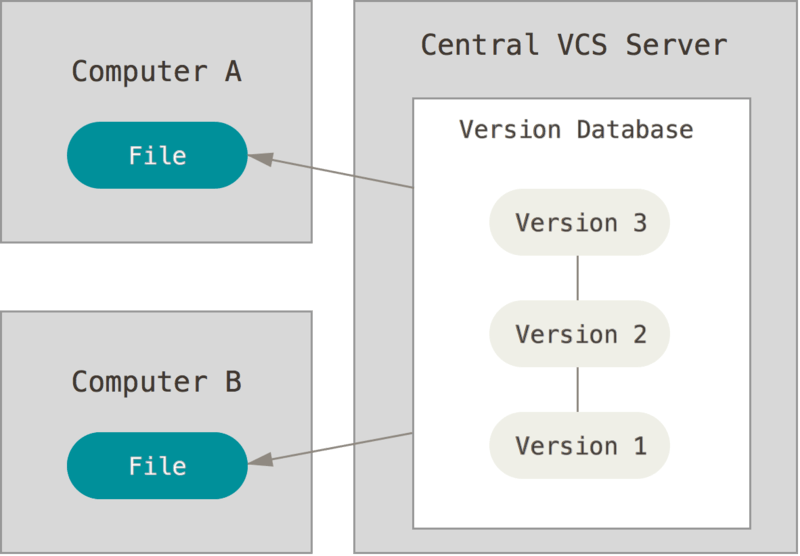
Centralized version control has a critical weakness: the single point of failure of the central server. If the server goes down for an hour, no one can commit updates or collaborate during that time. If the disk containing the central database becomes corrupted without proper backups, you will undoubtedly lose all data—including the entire change history of the project—leaving only individual snapshots that people have retained on their local machines.
Distributed Version Control Systems:
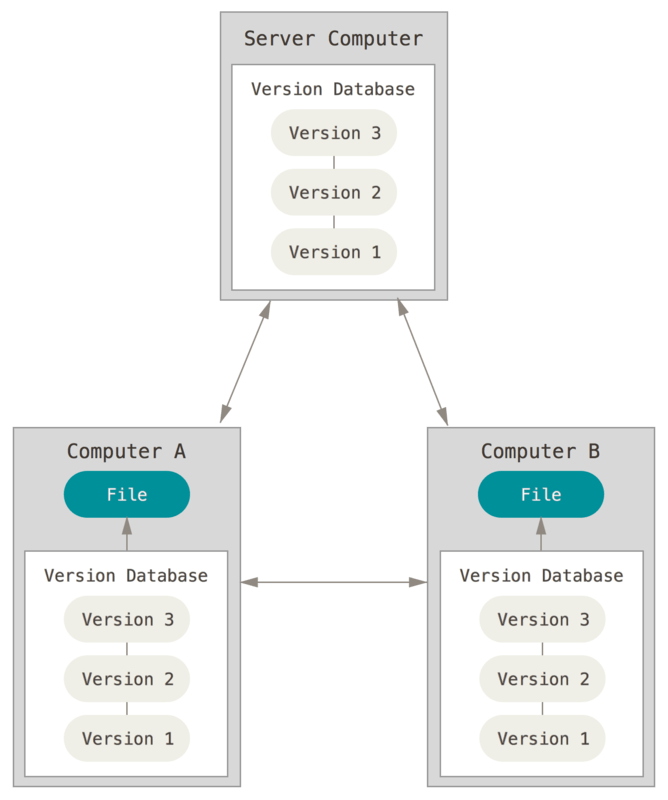
Distributed version control systems have no "central server" at all.
Each time we clone a repository, we create a complete mirror of the codebase, including its entire history. This means that everyone's computer contains a complete version repository. Consequently, if any server used for collaboration fails, it can be restored afterward using any of the mirrored local repositories. Additionally, we don't need network connectivity to work. Since everyone has a complete repository on their computer, how do multiple people collaborate? For instance, if you modify file A on your computer and your colleague also modifies file A on their computer, you simply need to push your respective changes to each other to see each other's modifications.
However, in practice when using distributed version control systems, people rarely push repository changes directly between two computers, because we might not be on the same local network and the computers cannot access each other. Therefore, distributed version control systems typically also have a computer or server acting as a "central server," but this server's role is merely to facilitate the "exchange" of everyone's modifications. Without it, everyone can still work; it just makes exchanging modifications less convenient. This is why we create repositories on GitHub.
1.2 Git Introduction and History
When discussing the birth of Git, we must mention Linus Torvalds, the father of Linux, and Linux itself. The Linux kernel open-source project has numerous contributors. The vast majority of Linux kernel maintenance work was spent on the tedious tasks of submitting patches and maintaining archives (from 1991 to 2002). By 2002, the entire project team began using a proprietary distributed version control system called BitKeeper to manage and maintain the code.
However, in 2005, the commercial company developing BitKeeper believed that someone within the Linux developer community had reverse-engineered the protocols used internally by BitKeeper, so they revoked the Linux kernel community's right to use BitKeeper for free. This forced the Linux open-source community (particularly Linus Torvalds, the creator of Linux) to develop their own version control system based on lessons learned from using BitKeeper. They established several goals for the new system:
- Speed
- Simple design
- Strong support for non-linear development (allowing thousands of parallel development branches)
- Fully distributed
- Ability to efficiently manage super-large-scale projects like the Linux kernel (in terms of speed and data volume)
Thus, under the leadership of Linus Torvalds, the father of Linux, the first version of Git was written in just 10 days. Since its inception, Git has matured and improved continuously, remaining highly user-friendly while retaining its initially set goals. It is incredibly fast, extremely suitable for managing large projects, and features an incredibly powerful non-linear branch management system (see Git Branching).
1.3 Installing Git
For Git installation, we can visit the download tutorial provided by the Git book. The following sections provide only brief descriptions. Specific link --> Installing Git
1.3.1 Linux
We can check whether Git is installed on the system by entering the git command in the terminal. If it's not installed, we can visit Git's installation page for Linux and Unix and enter the corresponding installation command. Web link --> Download for Linux and Unix
For common Debian and Ubuntu Linux distributions, we can use:
sudo apt-get install gitThis will directly complete the Git installation.
1.3.2 Windows
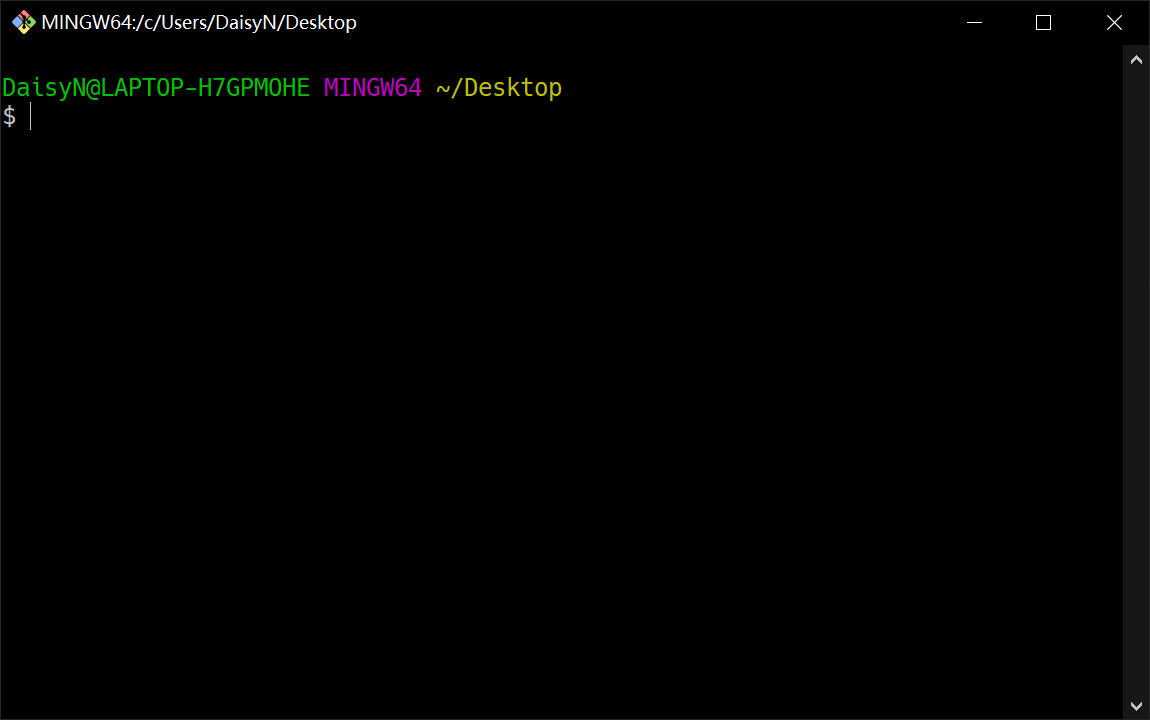
There are several methods to install Git on Windows. We can also open https://git-scm.com/downloads to download and install. After installation, we can open Git Bash.
Another simple method is to install GitHub Desktop. This installer includes both graphical and command-line versions of Git. It also supports PowerShell, provides stable credential caching, and proper line ending settings.
1.3.3 macOS
There are multiple ways to install Git on Mac. The simplest method is to install Xcode Command Line Tools. On Mavericks (10.9) or higher systems, simply try running the git command for the first time in Terminal.
git --versionIf you haven't installed the command-line developer tools, Terminal will prompt you to install them.
If we want to install a more recent version, we can use the binary installer. The officially maintained macOS Git installer can be downloaded from the Git official website at https://git-scm.com/download/mac.
1.3.4 First-Time Git Configuration
After installing Git, we need to perform some related settings in Git Bash or Terminal. The following settings only need to be configured once.
git config --global user.name "Your Name"
git config --global user.email "email@example.com"In addition, Git has many other settings, including commonly used editors. You can enter the following command to view your settings and make modifications.
git config --list1.4 Related Learning Resources
Here are several resources for learning Git that can help you gain a deeper understanding of Git in the future.