
第七章 Git 提交规范
7.0 前言
Git 是目前程序员必备基础技能,可以用来管理代码、文档、博客,甚至菜谱。个人的私有仓库的提交相对而言可以
较为随意,但是在团队开发中,还是要遵循相应的规范。本文对 Git 使用中涉及到提交相关的实践做了些整理,
供大家参考。
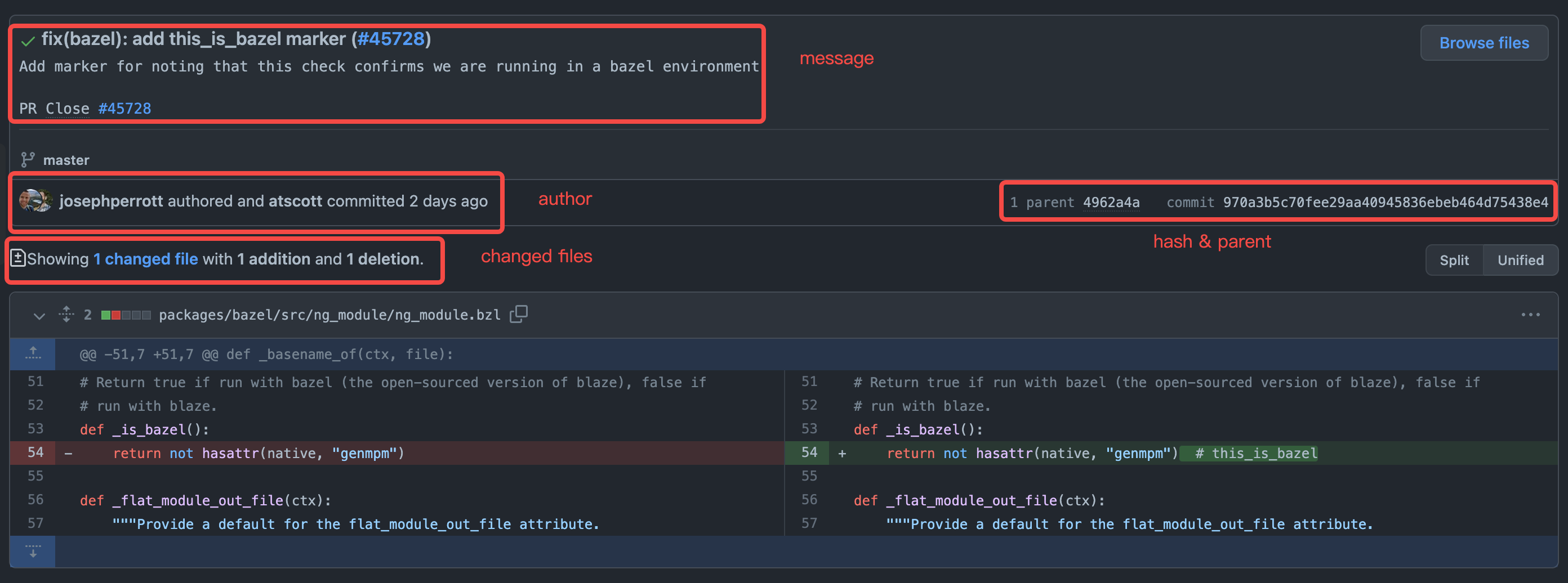
如上图所示(截取自 Angular commit 970a3b5),
一个 commit 包含如下几个信息:
- commit message - 提交的内容相关描述
- author & committer - 作者及提交者
- changed files - 修改的文件
- hash & parent - 提交内容的 hash 及在提交树上的位置
7.1 Commit Message
提交消息描述的是当前提交的功能相关信息,一般可以包括 header,body,footer,
<header>
<BLANK LINE>
<body>
<BLANK LINE>
<footer>业内做的好的可以参考 Angular 的提交标准:Commit Message Format
其中 header 是必须的。Angular 官方建议的格式如下
<type>(<scope>): <short summary>
  │       │             │
  │       │             └─⫸ Summary in present tense. Not capitalized. No period at the end.
  │       │
  │       └─⫸ Commit Scope: animations|bazel|benchpress|common|compiler|compiler-cli|core...
  │
└─⫸ Commit Type: build|ci|docs|feat|fix|perf|refactor|test<header> 中,<type> 与 <summary> 是必须的,<scope> 可以选填。建议 <header> 需要保持在 50 个字符之内。
<type> 表明本次提交的类型,一般有如下几种:
build: 涉及构建相关的改动ci: 持续集成相关的改动docs: 文档feat: 新功能fix: bug 修复perf: 性能相关改动refactor: 重构相关(非 bug、非新功能)test: 测试相关,包括新增测试或者更改已有测试
<scope> 表示改动影响的范围。在 Angular 中,某个提交可能涉及的范围有表单处理、动画处理等。
在实际工作中可以视项目而定。
<summary> 则是对本次提交的简要描述,使用祈使句、现在时。如使用 change 而不是 changed 或
changes。
<body> 是提交信息的更为详细的描述,与 <header> 一样也是用祈使句、现在时。<body> 描述本次
修改的动机,比如为什么引入本次改动,之前的逻辑是什么,现在的逻辑是什么,本次改动有哪些影响,等等。
最后,<footer> 是可选项,一般涉及破坏性改动、功能的弃用等说明,以及对 GitHub issue 或
Jira ticket 的引用,PR 的引用等。
规范的提交信息可以使用工具对内容进行解析,自动化生成文档或者发布日志。在一些大型的开源项目中,
版本的更新文档,接口的更新及兼容性影响,纯粹靠人工整理是很费时费力的,用统一的规范能够极大自动化
这部分工作。当然不同的项目对提交信息的要求和格式标准也不一样,开源项目或者公司项目对提交信息的
要求也有差异,一般需要遵从所在项目的约定。较为成熟的开源项目一般可以在 README 文档中找到如何贡献,
或者有单独的 CONTRIBUTING.md 文档,对代码风格、提交方式等进行约定。
7.1.1 自动化校验 commit message
有了提交信息的规范,如何确保开发者对规范进行遵守呢?我们可以使用 Git 提供的 Git Hooks 功能对提交
的信息进行校验。本文不对 Git Hooks 的细节做过多介绍,仅做基础的说明,具体细节可以参考
或 Atlassian的文档。
在新初始化的 git 项目内,我们可以在 .git/hooks 文件夹中找到官方提供的样例:
ls -l .git/hooks
total 120
-rwxr-xr-x  1 tomo  staff   478B Nov 11 20:44 applypatch-msg.sample
-rwxr-xr-x  1 tomo  staff   896B Nov 11 20:44 commit-msg.sample
-rwxr-xr-x  1 tomo  staff   4.5K Nov 11 20:44 fsmonitor-watchman.sample
-rwxr-xr-x  1 tomo  staff   189B Nov 11 20:44 post-update.sample
-rwxr-xr-x  1 tomo  staff   424B Nov 11 20:44 pre-applypatch.sample
-rwxr-xr-x  1 tomo  staff   1.6K Nov 11 20:44 pre-commit.sample
-rwxr-xr-x  1 tomo  staff   416B Nov 11 20:44 pre-merge-commit.sample
-rwxr-xr-x  1 tomo  staff   1.3K Nov 11 20:44 pre-push.sample
-rwxr-xr-x  1 tomo  staff   4.8K Nov 11 20:44 pre-rebase.sample
-rwxr-xr-x  1 tomo  staff   544B Nov 11 20:44 pre-receive.sample
-rwxr-xr-x  1 tomo  staff   1.5K Nov 11 20:44 prepare-commit-msg.sample
-rwxr-xr-x  1 tomo  staff   2.7K Nov 11 20:44 push-to-checkout.sample
-rwxr-xr-x 1 tomo staff 3.6K Nov 11 20:44 update.sample涉及提交相关的是下面四个:
pre-commit- 在 Git 生成commit对象前执行prepare-commit-msg- 在pre-commit后执行,用以生成默认的提交信息,脚本接收三个参数:- 包含提交信息的临时文件名
- 提交的类型,如
message,template,merge,squash - 相关提交的 SHA1,仅在有
-c,-C或--amend参数时提供该参数
commit-msg- 在开发者编写提交信息后执行,仅有临时文件名一个参数post-commit- 在commit-msg后立马执行,更多做通知用
我们可以用 prepare-commit-msg 对提交信息规范做说明,并用 commit-msg 对规范的执行
进行检查,脚本的非 0 的返回会中断本次提交。
如我们想应用简单的类似 Angular 的 <header> 的格式,可以参考如下的实现。
下面是 prepare-commit-msg 的示例:
#!/usr/bin/env python

import sys, os, re
from subprocess import check_output

# Collect the parameters
commit_msg_filepath = sys.argv[1]
if len(sys.argv) > 2:
    commit_type = sys.argv[2]
else:
    commit_type = ''
if len(sys.argv) > 3:
    commit_hash = sys.argv[3]
else:
    commit_hash = ''

print("prepare-commit-msg: File: %s\nType: %s\nHash: %s" % (commit_msg_filepath, commit_type, commit_hash))

msg_spec = '''# Please use follow format
# <type>(<scope>): <short summary>
#  │       │             │
#  │       │             └─⫸ Summary in present tense. Not capitalized. No period at the end.
#  │       │
#  │       └─⫸ Commit Scope: animations|bazel|benchpress|common|compiler|compiler-cli|core
#  │
#  └─⫸ Commit Type: build|ci|docs|feat|fix|perf|refactor|test'''

with open(commit_msg_filepath, 'r+') as f:
    f.write("\n" + msg_spec)

sys.exit(0) # return non-zero will abort current commit下面是简单的 commit-msg 示例:
#!/usr/bin/env python

import sys, os, re
# Collect the parameters
commit_msg_filepath = sys.argv[1]
print("commit-msg: File: %s" % commit_msg_filepath)

header_pattern = re.compile(r'^(?P<type>\w+)(\((?P<scope>\w+)\))?: .+$')
commit_types = 'build|ci|docs|feat|fix|perf|refactor|test'.split('|')
commit_scopes = 'animations|bazel|benchpress|common|compiler|compiler-cli|core'.split('|')

with open(commit_msg_filepath, 'r') as f:
    commit_msg_header = f.readline().rstrip('\n')  # header line
    print('<header>: %s' % commit_msg_header)
    match = header_pattern.match(commit_msg_header)
    if not match:
        print('commit message does not meet spec')
        sys.exit(1)
    commit_type = match.group('type')
    commit_scope = match.group('scope')
    if commit_type not in commit_types:
        print('invalid <type>')
        sys.exit(1)
    if commit_scope and commit_scope not in commit_scopes:  # scope is optional
        print('invalid <scope>')
        sys.exit(1)

sys.exit(0)想使用相关的 Git Hooks,可以在目录 .git/hooks 创建对应的文件,文件名为 prepare-commit-msg
及 commit-msg,并赋予可执行权限。这样在我们进行 git commit 操作时,对应的脚本就会执行。
下图是相关执行示意图,其中不合规范的提交会被中断。
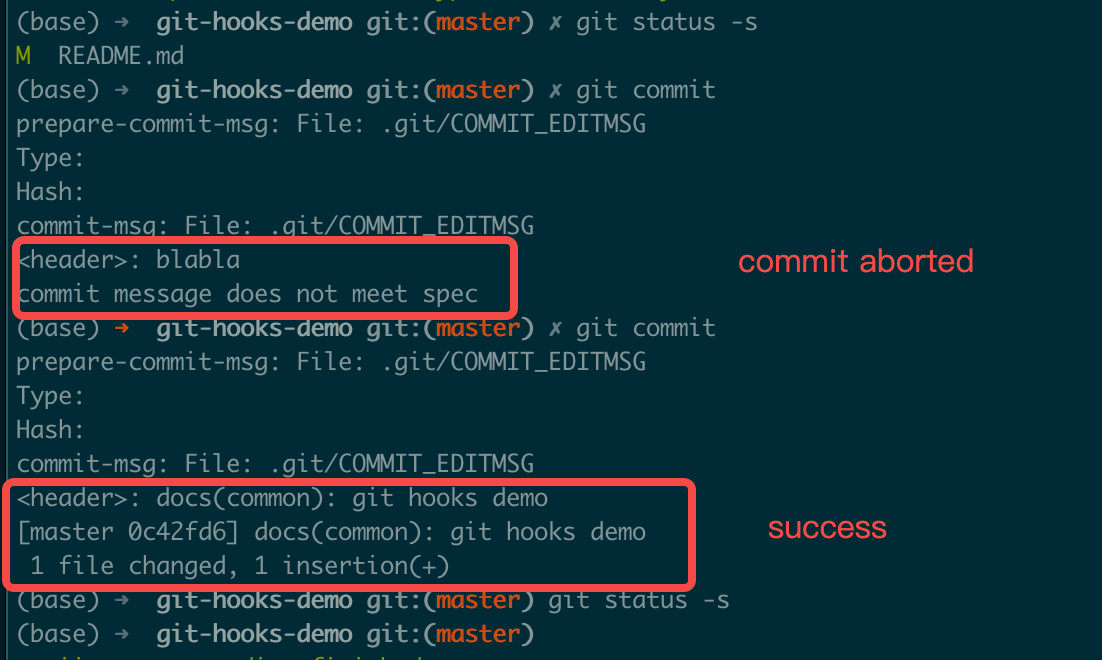
具体执行过程可以参考 在线执行过程
Git 的提交不会包含 .git 目录,所以对应的 hooks 的改动并不会被提交到仓库中。我们可以在仓库根目录
创建 .githooks 文件夹并将我们实现的代码放到该目录中,通过更改配置或者软连接的方式进行引用:
# use config
git config core.hooksPath .githooks
# OR use soft link
ln -sf .githooks/* .git/hooks当然这些都是客户端的校验,开发者可以完全忽视这样的一些 Git Hooks 的配置并引入不合规范的提交,
这种情况下我们可以使用服务端校验进行处理,或者引入一些 CI 工具或使用 GitHub Action 进行校验。
7.2 Author & Committer
Git 中,Author 表示原始纂写该提交的作者,Committer 表示应用该提交的人,如合并 Pull Request
的项目管理员。如果是个人开发者或只使用单个 Git 平台服务(如 GitHub、BitBucket 等),我们一般
不需要对作者进行特别的配置。但如果使用多个 Git 平台或者有公司内部要求,我们可能需要针对不同的仓库
设置不同的用户及邮箱,比如全局可以设置个人的 GitHub 账号,企业内部仓库设置企业邮箱等。
# 全局默认配置
git config --global user.email "<github email>"
git config --global user.name "<github username>"
# 企业内部仓库
git config user.email "<enterprise email>"
git config user.name "<real name>"7.3 Changed files
我们所有的提交,核心的其实我们提交的文件。不同的提交涉及的文件可多可少,一般遵循以下一些原则:
- 提交前使用
git diff查看文件的改动,使用git add添加期望进入提交的文件, 使用git status查看文件状态,最终使用git commit进行提交 - 单次提交仅提交相关的改动,例如修复两个不同的 bug 应该使用两次独立的提交
- 鼓励经常性的提交,这样可以更快的分享实现的功能,并且减少代码丢失的风险
- 在主分支或者协作的功能分支不能提交半成品,提交之前需要进过测试
- 编译输出,日志,中间产物等,不要引入到提交中,使用
.gitignore进行相关文件的排除,不同语言 或者操作系统有一些通用的排除配置,参考 github/gitignore - 密码、授权凭证、密钥等,不要提交。如 AWS 的 certificate.csv 文件或内容, GCP 的 Service Account 文件等,泄露到公开仓库会导致资源被不法分子使用,造成损失。同时由于 Git 的特性, 想从历史提交中移除这类文件会较为困难,参考 GitHub官方相关文档及描述
- 对于配置文件(如数据库连接信息等),一般使用配置模板,个人维护本地文件,且该文件在
.gitignore中配置。或者使用git update-index --[no-]assume-unchanged <file>来忽略某些文件的改动 - 其他一些常用命令(请在明确知道其含义后使用)
git reset <file>- 移除被添加的文件(提交之前),reset命令的其他可以查看帮助文档git clean -f- 移除较多的未被追踪的中间文件git checkout <file>- 回退对某个文件的改动(提交之前)
7.4 Hash & Parent
一般情况,commit hash 及父节点信息我们不需要额外关注,但在特定场景下我们可能需要对 commit
进行修复或者其他处理。在这样的场景下,我们需要理解整个 git 的提交链,每个提交对应的父节点,分支
间的共同祖先,以及本地与远端的差异,尤其涉及 rebase 相关的操作时。同时我们需要在整个提交中
遵循项目使用的工作流模型,使用对应工作流模型中建议的操作(常见的工作流模型参考
下面是一些实际开发过程中涉及的场景:
- 在自身的开发分支,某个功能涉及多个提交,在正式合并至主分支前对相关的提交进行整理,可以使用
git rebase -i <commit>命令,对提交进行合并、废弃、修改提交信息等处理。需要注意的是如果提交 已经发布到远端,需要使用git push -f进行覆盖(仅限个人开发分支)。下面是一个简单的例子及相关 命令描述,常见的命令有pick,reword,fixup,drop等。
$ git rebase -i 8717c71fc
reword 27e67629b feat: some feature first commit
fixup 7a3f0cd25 feat: some feature second commit
fixup d9a9d7f04 feat: some feature third commit

# Rebase 8717c71fc..d9a9d7f04 onto 8717c71fc (3 commands)
#
# Commands:
# p, pick <commit> = use commit
# r, reword <commit> = use commit, but edit the commit message
# e, edit <commit> = use commit, but stop for amending
# s, squash <commit> = use commit, but meld into previous commit
# f, fixup [-C | -c] <commit> = like "squash" but keep only the previous
#                    commit's log message, unless -C is used, in which case
#                    keep only this commit's message; -c is same as -C but
#                    opens the editor
# x, exec <command> = run command (the rest of the line) using shell
# b, break = stop here (continue rebase later with 'git rebase --continue')
# d, drop <commit> = remove commit
# l, label <label> = label current HEAD with a name
# t, reset <label> = reset HEAD to a label
# m, merge [-C <commit> | -c <commit>] <label> [# <oneline>]
# .       create a merge commit using the original merge commit's
# .       message (or the oneline, if no original merge commit was
# .       specified); use -c <commit> to reword the commit message
#
# These lines can be re-ordered; they are executed from top to bottom.
#
# If you remove a line here THAT COMMIT WILL BE LOST.
#
# However, if you remove everything, the rebase will be aborted.- 在一些 Git 工作流模型中,使用
git pull --rebase对本地提交进行更新 - 原则上禁止对主分支等进行
git push -f操作,涉及需要回退的,使用git revert <commit> - 涉及多分枝代码同步,可以使用
git cherry-pick命令
7.5 Exercise
基于课程中7.1.1 自动化校验commit message方案, 实现README.md 中提交信息规范的git-hook的实现。