
OpenClaw: The AI Revolution from Conversation to Action
ChatGPT gives you advice. OpenClaw gets it done.
In early 2026, OpenClaw amassed 247,000 GitHub stars in just two months, surpassing Linux to become the fastest-growing open-source project in history. Thirteen major domestic tech companies followed suit, sparking the "Lobster Wars".
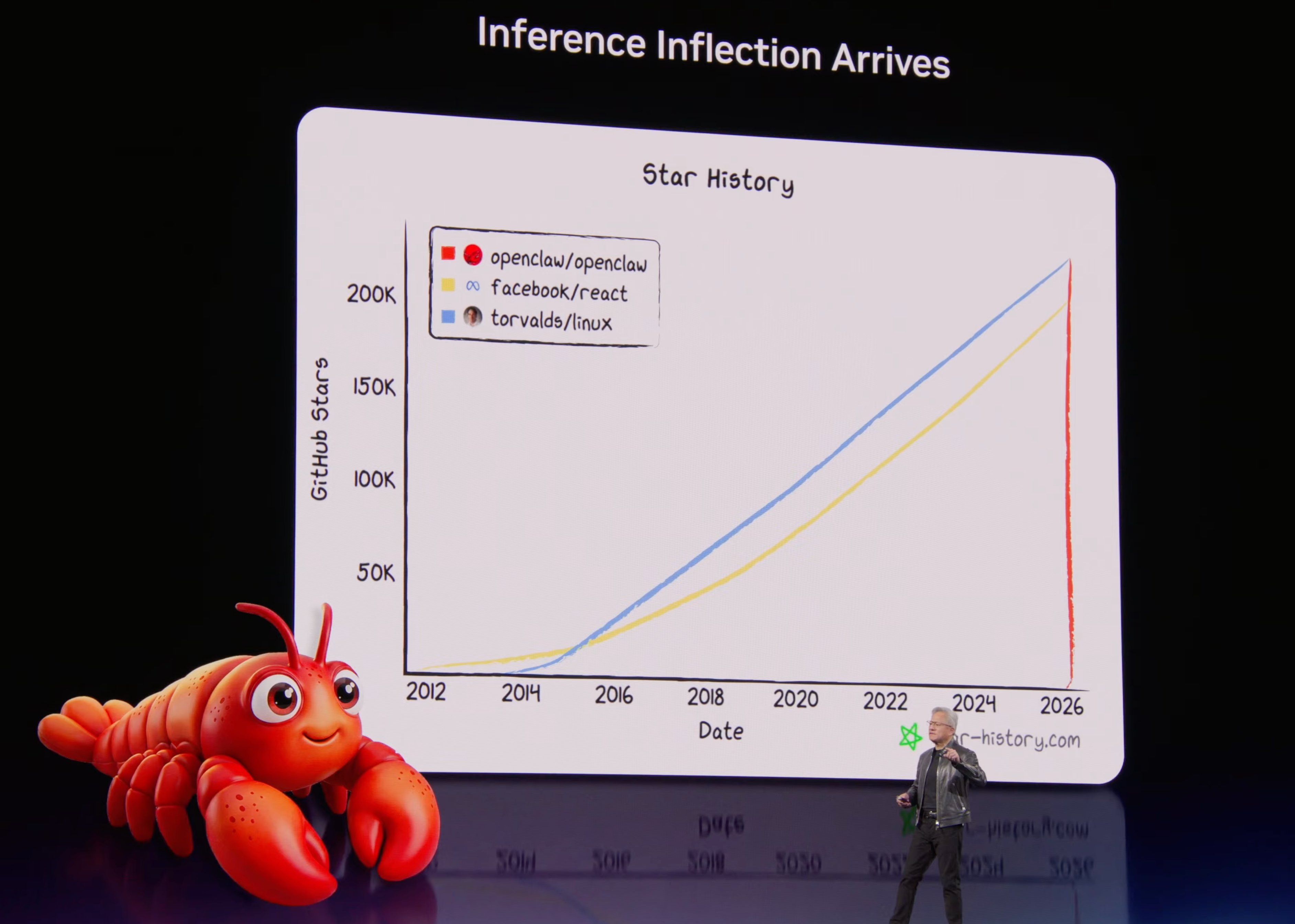 GTC 2026 Keynote: Jensen Huang presenting OpenClaw's growth curve from zero to 318K stars in four months
This is not another chatbot. It is an AI employee that lives on your computer and actually gets work done — and behind this lies a fundamental leap in how we interact with AI.
From Prompt Engineering (teaching AI how to ask), to Context Engineering (teaching AI what to feed), to today's Harness Engineering — putting AI on a real leash so it can work continuously and autonomously on your behalf. OpenClaw is that leash.
Not Chat, But Action
You may be used to AI that works like this:
You: Help me organize my inbox
ChatGPT: Here are some tips for organizing your email...
OpenClaw is different:
You: Help me organize my inbox
OpenClaw: [Connecting to Gmail API...]
          [Read 127 unread emails...]
          [Categorized by topic, generating summary...]
          Done! Emails sorted into 5 categories, 3 high-priority messages flagged.
One gives advice. The other takes action. That is the fundamental difference.
OpenClaw (the lobster) can read and write files, execute commands, control browsers, send and receive messages, and run scheduled checks — all with data staying on your own device. You can have it send you a morning news briefing, auto-reply to emails, write code, submit PRs, and run tests.
What OpenClaw really is: an autonomous AI Agent
OpenClaw is an open-source autonomous AI Agent execution engine created by developer Peter Steinberger. According to Wikipedia, it is a free and open-source autonomous AI agent project that uses messaging platforms (WhatsApp, Telegram, Discord, Slack, etc.) as its primary user interface.
Core characteristics:
- Runs locally: Your data stays under your control, never sent to someone else's servers
- Actually executes: Doesn't just generate code — it runs, verifies, and fixes it
- Autonomous decision-making: Can decompose tasks, choose tools, self-check, and iterate
- Multi-platform integration: Control it anytime via Telegram, Discord, Slack, Feishu, and more
History: From Clawdbot to OpenClaw
- 2025.11: First released under the name Clawdbot
- Brief rename: Changed to Moltbot due to trademark issues with Anthropic
- 2026.01: Officially renamed OpenClaw
- 2026.02: Went viral, becoming the fastest-growing project in GitHub history
- 2026.02.14: Developer announced joining OpenAI; project transferred to an open-source foundation
Why Did the Lobster Blow Up?
Just like DeepSeek's explosive rise last year — it took capabilities that a small group of people were already enjoying and brought them to a much wider audience for the first time.
| Design Decision | Why It Works | Trade-off |
|---|---|---|
| Chat interface as the entry point | Reuses existing habits from WeChat/Feishu/WhatsApp — near-zero learning curve | Linear conversation, process is not observable |
| Unified context + persistent memory | Remembers everything across platforms and sessions — "it actually gets me" | Memory is a black box; cross-project contamination is easy |
| Rich Skills ecosystem | 25,000+ composable skills, and the AI can even write new ones itself | 12% of third-party skills contain malicious code |
These three elements form a flywheel effect: memory compounds data, skills enable self-evolution, ease of use drives frequency — the more you use it, the more powerful it gets.
For a more complete analysis, see Appendix B: Community Voices and Ecosystem Outlook.
Lobster Wars
A panoramic view of 13 major domestic tech companies following OpenClaw:
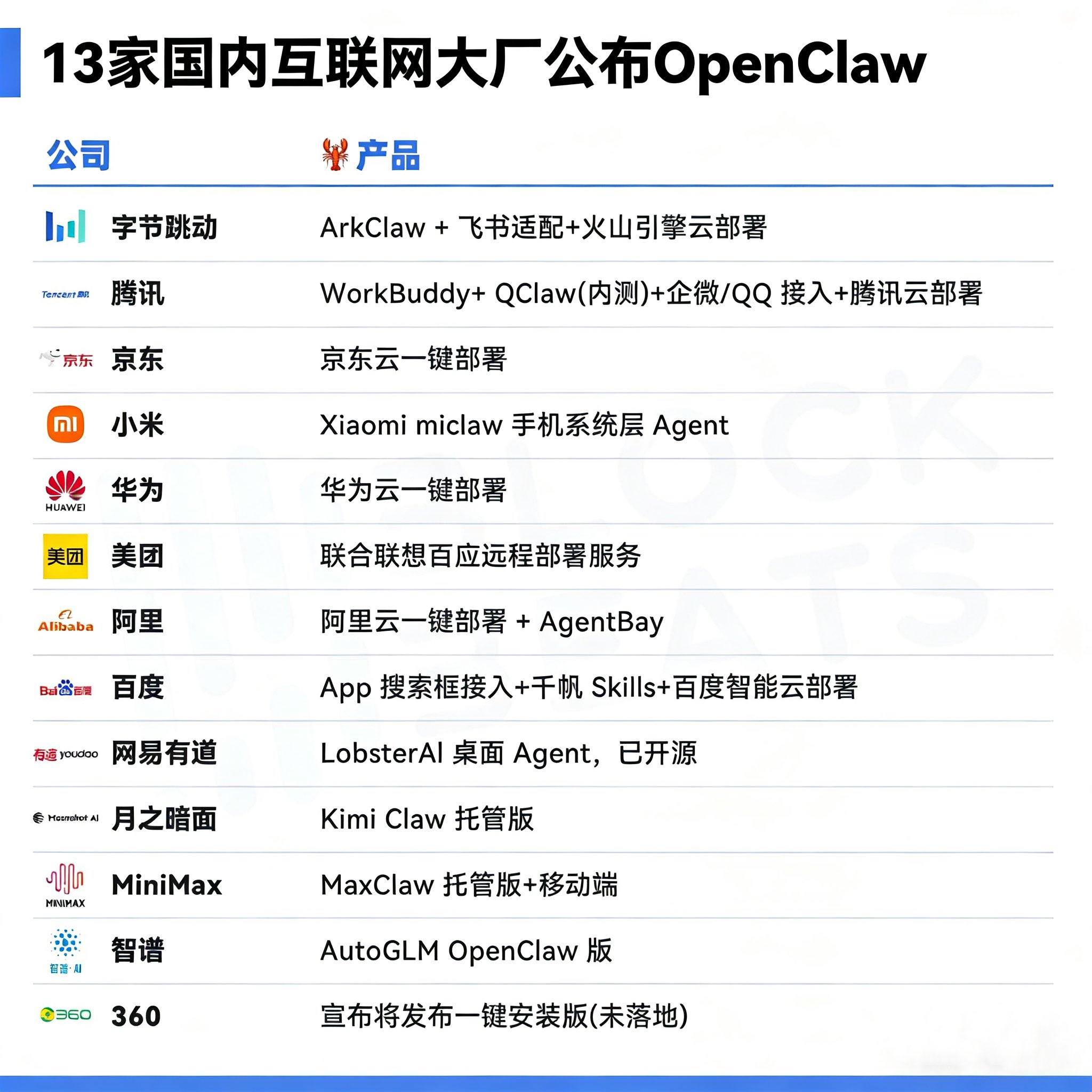 Image source: TheBlockBeats
Deep dive: Core architecture
OpenClaw's architecture is divided into four layers:
- Channels: Telegram, Discord, Slack, Feishu, CLI, and other access points
- Brain: LLM reasoning, task decomposition and planning, tool selection and invocation
- Skills plugin system: File operations, shell commands, browser control, API integration, and more
- Memory & Identity system: A set of Markdown files — IDENTITY.md (identity), SOUL.md (personality), USER.md (your information), MEMORY.md (long-term memory), and others
This layered design makes OpenClaw both flexible and controllable. For details, see Chapter 6: Agent Management.
Deep dive: Value and cost
Advantages:
- Parallel exploration: Multiple sub-agents search, analyze, and synthesize simultaneously — much faster than serial execution
- Context isolation: Sub-tasks run in clean contexts, avoiding "context degradation"
- Expanded reasoning capacity: Breaks through the context window limit of a single agent
Costs:
- Token costs jump from 1x to 15x
- Context details can be lost between agents (the "telephone game" effect)
- Implicit decision conflicts may arise with multiple agents running in parallel
From Anthropic's experience: "Some teams spend months building complex multi-agent architectures, only to find that improving the prompts for a single agent achieves the same result."
Rule of thumb: Loosely coupled tasks (search, information gathering) are good candidates for splitting; tightly coupled tasks (architecture design, core coding) should stay with a single agent.
Deep dive: Use cases
Personal productivity: Auto-deliver a morning briefing with weather, calendar, and email digest; automatically categorize emails and flag priorities.
Developer workflows: Automatic code review after a PR is submitted; auto-update API docs when function signatures change.
Enterprise applications: Multi-channel customer support automation; automatic weekly data analysis reports.
Start Your Journey
Four Ways to Use OpenClaw
| Method | Best For | In a Nutshell | Details |
|---|---|---|---|
| AutoClaw Quick Install | Zero-experience users | Download → Double-click → Register and go, with built-in model and free quota | Chapter 1 |
| Manual Installation | Users who want full control | A few terminal commands, free choice of model and configuration | Chapter 2 |
| Security-First / Multi-Agent | Privacy-sensitive / Team collaboration | IronClaw (WASM sandbox) / HiClaw (multi-lobster collaboration) | Chapter 1 Alternatives |
| Cloud Hosting / Docker | Server deployment | Managed solutions from major cloud providers | Appendix C |
The Four-Step Adoption Method: Raising a Lobster Like Hiring an Employee
Adopting a lobster is essentially like hiring an employee — you just need four things:
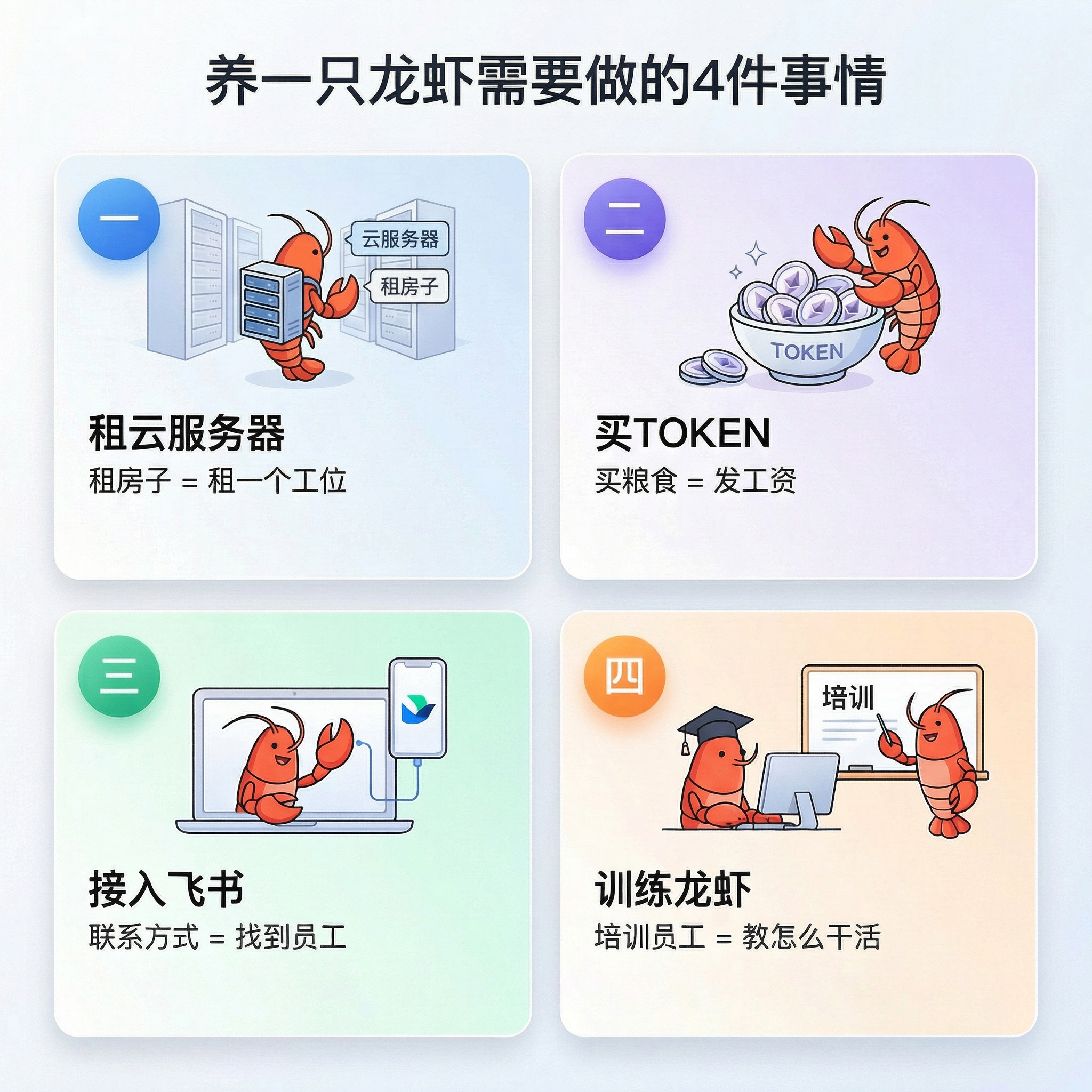
| Step | Analogy | What You Do | Chapter |
|---|---|---|---|
| Set up a workspace | Give the employee a desk | Install OpenClaw (local machine or cloud server) | Chapter 1 / Chapter 2 |
| Buy food | Pay the employee's salary | Configure a model API Key (tokens are the lobster's "fuel") | Chapter 2 / Chapter 5 |
| Give a contact channel | Let clients reach the employee | Connect a chat platform (QQ / Feishu / Telegram) | Chapter 4 |
| Train and onboard | Teach the employee how to work | Configure agents, tools, and scheduled tasks | Chapter 6 / Chapter 7 |
The first two steps (workspace + food) are the minimum requirements — once OpenClaw is installed and a model API Key is configured, the lobster can chat with you in the terminal. The last two steps take it from "can talk" to "can work."
Learning Paths
Adopt a Claw — the user guide, 11 chapters. Getting your lobster up and running from scratch:
- 📦 Installation (Chapters 1–3) — AutoClaw quick start → Manual installation → Configuration wizard
- ⚙️ Core Configuration (Chapters 4–6) — Chat platform integration → Model management → Agent management
- 🔌 Extensions & Operations (Chapters 7–9) — Tools and scheduled tasks → Gateway operations → Remote access
- 🛡️ Security & Clients (Chapters 10–11) — Security hardening → Web interface and clients
Lobster University — the hands-on guide, curated skill combinations by scenario to build reusable automation loops:
- 🎓 Getting Started — ClawHub skill selection principles → Installation and debugging → Featured menu
- 📧 Office Automation — Email assistant (163 mail walkthrough) → Voice research (speak a question, get a report)
- 💻 Developer Tools — Vibe Coding (say it, ship it) → Paper digest bot (Skill development walkthrough)
- 🤝 Advanced Practice — Multi-agent collaboration (HiClaw) → Security risks and comprehensive protection
Build a Claw — the developer guide, opening the hood and going from "driver" to "engineer":
- 🏗️ Core Principles (Chapters 1–3) — Architectural design philosophy → ReAct loop → Prompt system
- 🔧 System Mechanics (Chapters 4–6) — Tool system → Message loop and event-driven design → Unified gateway
- 🛡️ Security & Optimization (Chapters 7–9) — Security sandbox → Lightweight solutions → Security hardening
- 🔩 Hardware & Extensions (Chapters 10–13) — Hardware options (running on "shrimp") → Skill development
Appendix — 7 reference manuals (A–G):
- 📚 Getting Started Reference — Learning resources (A) → Community voices and ecosystem outlook (B)
- 🔍 Selection Guides — Claw-like solutions compared (C) → Model provider selection (E)
- 🛠️ Developer Reference — Skill development and publishing guide (D) → Command cheat sheet (F) → Configuration file reference (G)
Let's get started. 🦞