
Appendix D: Skill Development and Publishing Guide
The Skill system in OpenClaw is its core extension mechanism — by writing a single SKILL.md file, you can teach an AI Agent new capabilities. This appendix walks you through skill structure, the development workflow, and how to publish skills from scratch.
Recommended Tool: Anthropic's official skill-creator is the most mature skill development assistant available. This appendix uses it as the primary reference.
I. What Is a Skill?
Skills vs Tools
Let's clarify two concepts first:
| Tools | Skills | |
|---|---|---|
| Analogy | Hands, feet, and permission switches | Mini-programs / plugins |
| Purpose | Determines what types of actions an Agent can perform | Adds specific capabilities to an Agent |
| Examples | File read/write, shell execution, network requests | Web search, weather lookup, code review |
Simply put: Tools are "capability channels," and Skills are "the specific abilities loaded into those channels."
Three-Level Skill Loading
OpenClaw loads skills in priority order from highest to lowest:
| Priority | Type | Location | Description |
|---|---|---|---|
| 1 | Workspace Skills | ~/.openclaw/workspace/skills/ | Exclusive to the current workspace; highest priority |
| 2 | Managed Skills | ~/.openclaw/skills/ | Shared skills installed via ClawHub |
| 3 | Built-in Skills | Bundled with OpenClaw | Official built-ins; lowest priority |
Skills with the same name are overridden by higher-priority ones. A lazy-loading strategy is used — the body of SKILL.md is only read when the skill is actually invoked.
II. Skill Structure
Each skill is a folder, with SKILL.md at its core:
my-skill/
├── SKILL.md           # Required: skill definition file (YAML frontmatter + Markdown instructions)
├── scripts/           # Optional: executable scripts (search, API calls, etc.)
├── references/        # Optional: reference documentation (loaded on demand, not in persistent context)
└── assets/            # Optional: templates, icons, and other static assets
SKILL.md Format
SKILL.md consists of two parts: YAML frontmatter (metadata) + Markdown body (instructions).
---
name: my-skill
description: Skill description (the most important field — the AI uses this to decide when to invoke the skill)
user-invocable: true
disable-model-invocation: false
metadata:
  openclaw:
    requires:
      env:
        - MY_API_KEY
      bins:
        - node
---

# Skill Instructions

Write clear Markdown here describing how the AI should use this skill.

You can use `{baseDir}` to reference the skill's directory — OpenClaw replaces it with the actual path at runtime.
Frontmatter Field Reference
| Field | Required | Description |
|---|---|---|
name | Yes | Skill identifier: lowercase letters and hyphens (e.g., my-awesome-skill) |
description | Yes | Determines when the AI invokes this skill — describe clearly "what it does" and "when to use it" |
user-invocable | No | Whether the skill can be manually invoked via a slash command (default: true) |
disable-model-invocation | No | Set to true to prevent automatic AI triggering; manual invocation only (default: false) |
homepage | No | Link to the skill's or service's official website |
metadata.openclaw.requires.env | No | Required environment variables (skill is marked "unavailable" if not set) |
metadata.openclaw.requires.bins | No | Required system commands (e.g., node, python, curl) |
metadata.openclaw.requires.config | No | Required configuration paths |
Three-Level Loading Mechanism
Skill content is loaded on demand in stages to conserve context window space:
| Level | Content | When Loaded | Recommended Size |
|---|---|---|---|
| 1 | name + description | Always in context | ~100 words |
| 2 | SKILL.md body | When the skill is triggered | <500 lines |
| 3 | Files in references/ | When the body instructs reading them | Unlimited |
Writing tip: Keep the SKILL.md body under 500 lines. For larger content, place detailed documentation in the
references/directory and guide the AI from the body with phrases like "For more on X, read{baseDir}/references/x.md."
III. Developing a Skill (Recommended: skill-creator)
skill-creator is an official Anthropic tool that guides you through the complete process from concept to tested skill.
This guide includes the full source of skill-creator in the
docs/en/appendix/skill-creator/directory for offline reference.
Installing skill-creator
skill-creator is itself an OpenClaw skill, so installation works the same as any other skill:
# Option 1: Install via ClawHub (recommended)
clawhub install skill-creator

# Option 2: Manual install to workspace
# Copy the skill-creator folder to:
# ~/.openclaw/workspace/skills/skill-creator/
After installation, skill-creator will automatically appear in OpenClaw's available skill list:
openclaw skills list | grep skill-creatorUsage Workflow
skill-creator uses a conversational development approach — just describe the skill you want in chat, and it guides you through every step:
Step 1: Describe your intent
In the OpenClaw chat interface, tell the Agent what you want to build:
Help me create a weather lookup skillOr more specifically:
I want a skill that automatically calls the QWeather API to return real-time weather when a user asks about the weatherskill-creator will ask a few clarifying questions:
- What should the Agent do with this skill?
- When should it trigger? (What does the user say?)
- What format should the output be?
- Do you need test cases?
Step 2: Auto-generate SKILL.md
skill-creator generates a complete SKILL.md based on your answers, including:
- Frontmatter metadata (name, description, dependency declarations)
- Markdown instruction body
- Any required script files (e.g., API call scripts)
Step 3: Test and iterate
skill-creator generates 2–3 test cases simulating real user conversation scenarios, then:
- Runs these tests with your skill
- Shows you the results for review
- Improves the skill based on your feedback
- Repeats until you're satisfied
skill-creator full directory structure
skill-creator/
├── SKILL.md              # Skill definition (core instructions, ~480 lines)
├── LICENSE.txt            # Apache 2.0 license
├── agents/               # Dedicated sub-agent instructions
│   ├── grader.md          # Grader agent: evaluates whether assertions pass
│   ├── comparator.md      # Comparator agent: blind A/B comparison
│   └── analyzer.md        # Analyzer agent: interprets benchmark results
├── scripts/              # Automation scripts
│   ├── run_loop.py        # Description optimization main loop
│   ├── run_eval.py        # Trigger rate evaluation
│   ├── improve_description.py  # Description improvement
│   ├── aggregate_benchmark.py  # Benchmark aggregation
│   ├── generate_report.py      # Report generation
│   ├── package_skill.py        # Skill packaging
│   └── quick_validate.py       # Quick validation
├── references/
│   └── schemas.md         # JSON data structure specifications
├── assets/
│   └── eval_review.html   # Evaluation result review UI template
└── eval-viewer/
    └── generate_review.py # Visual evaluation result viewer
skill-creator advanced features
Description Optimization
The description field is the sole basis on which the AI decides whether to invoke a skill. skill-creator has a built-in automatic optimization workflow:
- Generates 20 test queries (10 that should trigger + 10 that should not)
- After you review and confirm, runs the optimization loop
- Automatically splits the evaluation set into 60% training / 40% test
- Runs up to 3 iterations per round for reliable trigger rates
- Selects the description with the highest score on the test set (not the training set) to avoid overfitting
Blind Comparison
Want to rigorously compare two versions of a skill? skill-creator can pass both versions' outputs to an independent agent for blind evaluation — it doesn't know which is the new version and which is the old one, and scores based on quality alone.
Benchmarking
Each iteration automatically generates a benchmark.json containing:
- Pass rate for each assertion
- Comparison of time and token usage
- Mean ± standard deviation + delta
Manual Development (Without skill-creator)
If you prefer to work manually, the steps are:
Create the directory
bashmkdir -p ~/.openclaw/workspace/skills/my-skillWrite SKILL.md (following the format described in Section II of this appendix)
Validate
bashopenclaw skills check openclaw skills info my-skillTest: Send a trigger keyword in chat and observe whether the skill works correctly.
IV. Real-World Example: The tavily-search Skill
Using tavily-search (v1.0.0) from ClawHub as an example, let's look at the complete structure of a real skill. This skill provides AI Agents with web search capability via the Tavily API.
Directory Structure
tavily-search-1.0.0/
├── SKILL.md           # Skill definition (frontmatter + usage instructions)
├── _meta.json         # ClawHub publishing metadata
└── scripts/
    ├── search.mjs     # Web search implementation
    └── extract.mjs    # Web page content extraction implementation
SKILL.md Contents
---
name: tavily
description: AI-optimized web search via Tavily API. Returns concise, relevant results for AI agents.
homepage: https://tavily.com
metadata: {"clawdbot":{"emoji":"...","requires":{"bins":["node"],"env":["TAVILY_API_KEY"]},"primaryEnv":"TAVILY_API_KEY"}}
---
# Tavily Search
AI-optimized web search using Tavily API. Designed for AI agents - returns clean, relevant content.
## Search
```bash
node {baseDir}/scripts/search.mjs "query"
node {baseDir}/scripts/search.mjs "query" -n 10
node {baseDir}/scripts/search.mjs "query" --deep
node {baseDir}/scripts/search.mjs "query" --topic news
```
## Options
- `-n <count>`: Number of results (default: 5, max: 20)
- `--deep`: Use advanced search for deeper research (slower, more comprehensive)
- `--topic <topic>`: Search topic - `general` (default) or `news`
- `--days <n>`: For news topic, limit to last n days
## Extract content from URL
```bash
node {baseDir}/scripts/extract.mjs "https://example.com/article"
```
Notes:
- Needs `TAVILY_API_KEY` from https://tavily.com
- Use `--deep` for complex research questions
- Use `--topic news` for current eventsDesign Notes
Frontmatter Design
| Field | Value | Purpose |
|---|---|---|
name | tavily | Skill identifier after installation |
description | AI-optimized web search... | The AI uses this to decide when to invoke — clearly stating "what it does" is key |
homepage | https://tavily.com | Helps users sign up to get an API Key |
metadata.requires.bins | ["node"] | Declares a Node.js requirement; checked automatically at load time |
metadata.requires.env | ["TAVILY_API_KEY"] | Marks the skill "unavailable" rather than crashing when not set |
metadata.primaryEnv | TAVILY_API_KEY | Tells the configuration wizard which key to prompt the user for |
metadata.installRecipe | { "bins": ["node"], "npm": ["tavily"] } | One-click install recipe: CLI and Control UI auto-prompt for dependency installation when requirements are missing |
Script Design Patterns
Core logic of search.mjs (~100 lines):
// 1. Read the API Key from environment variables
const apiKey = (process.env.TAVILY_API_KEY ?? "").trim();
if (!apiKey) { console.error("Missing TAVILY_API_KEY"); process.exit(1); }

// 2. Call the Tavily API
const resp = await fetch("https://api.tavily.com/search", {
  method: "POST",
  headers: { "Content-Type": "application/json" },
  body: JSON.stringify({ api_key: apiKey, query, search_depth: searchDepth, ... }),
});

// 3. Format output as Markdown (AI-friendly format)
if (data.answer) console.log("## Answer\n" + data.answer);
for (const r of results) {
  console.log(`- **${r.title}** (relevance: ${(r.score * 100).toFixed(0)}%)`);
  console.log(`  ${r.url}`);
}
Four key principles:
| Principle | Approach | Reason |
|---|---|---|
| Output Markdown | console.log("## Answer\n" + ...) | AI Agents can parse structured results directly |
| Validate parameters first | process.exit(1) when Key is missing | Lets OpenClaw catch the error and prompt the user, rather than throwing an exception |
| Truncate results | content.slice(0, 300) | Prevents overly long output from filling the context window |
{baseDir} variable | Reference script paths in SKILL.md | Automatically replaced with the actual path at runtime; no hardcoding needed |
Configuration
Set the API Key after installation and the skill is ready to use:
# Set environment variable (recommended: write to ~/.openclaw/.env)
echo 'TAVILY_API_KEY=tvly-your-key-here' >> ~/.openclaw/.env
Skills installed via ClawHub are enabled by default. Use openclaw skills list to check status, and openclaw skills info <name> to view details (including API key setup guidance and storage path hints). Skills with missing dependencies are labeled Needs Setup instead of "missing".
V. Publishing to ClawHub
Once your skill is complete, you can publish it to the ClawHub community so OpenClaw users worldwide can install and use it.
Pre-Publication Checklist
Make sure your skill folder structure is complete:
my-skill/
├── SKILL.md           # Required: contains complete frontmatter and instructions
├── scripts/           # Optional: script files
└── ... # Other supporting files (plain text only)Note: ClawHub only accepts folders containing
SKILL.mdand plain text files. Binary files, images, and similar assets are not supported for upload.
Publishing Steps
1. Log in to ClawHub
Visit clawhub.ai and log in with your GitHub account.
2. Go to the publish page
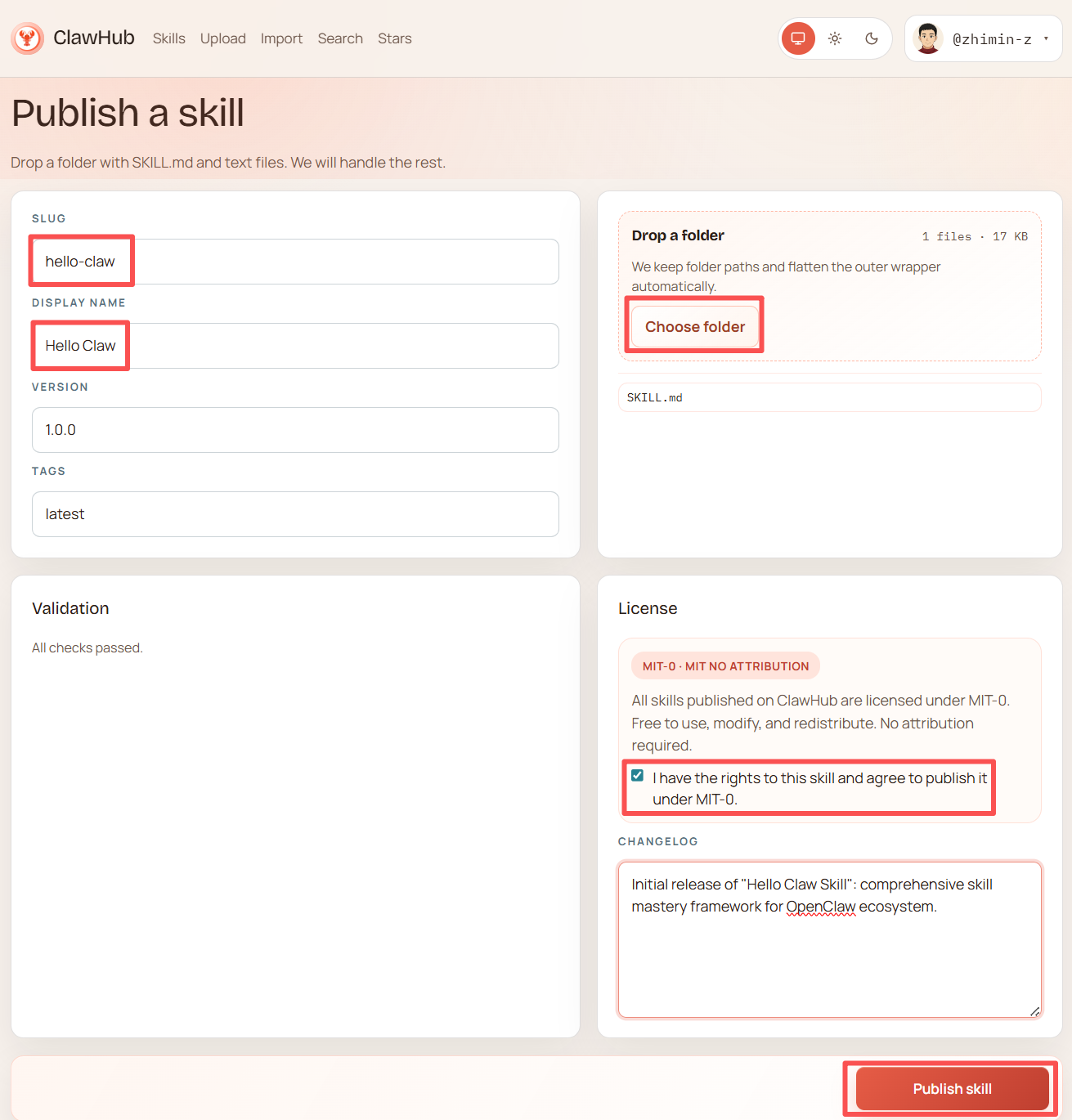
Click the "Publish" button at the top of the page to enter the skill publishing interface:
3. Fill in the publishing details
| Field | Description | Example |
|---|---|---|
| Slug | URL identifier for the skill (lowercase letters + hyphens) | hello-claw |
| Display name | Display name for the skill | Hello Claw |
| Version | Version number following Semantic Versioning (SemVer) | 1.0.0 |
| Tags | Version tag, defaults to latest | latest |
4. Upload the skill folder
Drag the folder containing SKILL.md into the "Drop a folder" area, or click "Choose folder" to select it manually.
After uploading, the detected SKILL.md file will appear on the right side of the page. The system automatically strips any outer wrapper directory — you just need to ensure SKILL.md is inside the folder.
5. Automatic validation
ClawHub automatically checks whether the skill meets community requirements:
- Whether
SKILL.mdexists and is correctly formatted - Whether the frontmatter contains the required
nameanddescription - Whether all files are plain text
A "All checks passed" message is displayed upon successful validation.
6. Confirm the license
The default license is MIT-0 (MIT No Attribution):
Anyone may freely use, modify, and redistribute the skill without attribution.
Check "I have the rights to this skill and agree to publish it under MIT-0" to confirm.
Note: MIT-0 is one of the most permissive open-source licenses and is well-suited for community sharing. If your skill contains proprietary content, confirm license compatibility before publishing.
7. Write a Changelog (optional)
Briefly describe what this version contains, for example:
Initial release of "Hello Claw Skill" - comprehensive skill mastery framework for OpenClaw ecosystem.8. Publish
Once everything looks good, click the "Publish skill" button in the bottom right. After successful publication, other users can install the skill with:
clawhub install your-username/my-skillUpdating a Published Skill
After modifying a skill, simply increment the version number and re-upload:
- Update the content in SKILL.md
- Enter the new version number on the publish page (e.g.,
1.0.0→1.1.0) - Upload the updated folder
- Write a Changelog describing the changes
- Click Publish
Users can get the latest version via clawhub update.
VI. Skill Management
CLI Commands
# View all available skills
openclaw skills list

# Show only ready skills
openclaw skills list --eligible

# Show detailed information (including missing dependencies)
openclaw skills list -v

# View details of a specific skill
openclaw skills info <skill-name>

# Check status of all skills
openclaw skills check
Installing Skills via ClawHub
# Search for skills
clawhub search <keyword>

# Install a skill
clawhub install <skill-name>

# View installed skills
clawhub list

# Update a skill
clawhub update <skill-name>
clawhub update --all

# Uninstall a skill
clawhub uninstall <skill-name>
For the full ClawHub CLI reference, see Appendix A.
Enabling Skills in Configuration
Skills installed via ClawHub are enabled by default. To manage skill status manually:
openclaw skills list              # View all skills and their status
openclaw skills info <skill-name> # View details of a specific skill
For fine-grained control over enabling/disabling skills in the configuration file, see Appendix G: Configuration File Reference.
Configuring Credentials (SecretRef)
For skills that require an API Key, it is recommended to use environment variables or SecretRef for secure storage:
# Option 1: Environment variable (most common)
echo 'TAVILY_API_KEY=tvly-your-key-here' >> ~/.openclaw/.env

# Option 2: Interactive SecretRef configuration
openclaw secrets configure

# Option 3: Check secret status
openclaw secrets audit --check
Supported SecretRef source types:
| source | Description | Use Case |
|---|---|---|
env | Read from environment variable | Most common; suitable for local development |
file | Read from a file | Suitable for shared servers with multiple users |
exec | Read from command execution output | Suitable for integrating with secret management systems |
VII. Plugin Development
For extension needs more complex than skills (such as custom Transports or new Tool types), you can develop a plugin.
Plugin Development Notes
- Plugin development uses the modular
openclaw/plugin-sdk/*interface. See the Plugin SDK documentation. - ClawHub is the preferred distribution channel: When running
openclaw plugins install, the system searches ClawHub first, falling back to npm only if the package is not found. - Cross-ecosystem compatibility: Supports discovering and installing plugin packages from Claude, Codex, and Cursor — their Skills are automatically mapped into the OpenClaw skill system.
Plugin Management Commands
# List installed plugins
openclaw plugins list

# Install a plugin (from 3.22, ClawHub is checked first; falls back to npm)
openclaw plugins install <path|.tgz|npm-spec>

# Enable/disable a plugin
openclaw plugins enable <id>
openclaw plugins disable <id>

# Plugin diagnostics
openclaw plugins doctor
Image Generation Model Configuration
Image generation capabilities in plugins are managed through the unified agents.defaults.imageGenerationModel configuration path.
VIII. Troubleshooting
Skill Fails to Load
# Check skill status (shows missing dependencies)
openclaw skills check

# View detailed information
openclaw skills info <skill-name> -v

# View gateway logs
openclaw logs --follow
Common causes:
- Missing environment variables (variables declared in
metadata.requires.envare not set) - Missing system commands (commands declared in
metadata.requires.binsare not installed) - SKILL.md formatting errors (frontmatter missing
nameordescription)
Skill Does Not Trigger
- Check whether
descriptionaccurately describes the trigger scenario - Confirm that
disable-model-invocationis not set totrue - Try adding trigger keywords to the description (skill-creator's description optimization feature can help with this)
Skill Permission Issues
Ensure the skill directory has the correct read permissions:
# macOS / Linux
chmod -R 755 ~/.openclaw/workspace/skills/my-skill/
IX. Development Checklist
Before developing a skill, confirm each item on this checklist:
- [ ] SKILL.md frontmatter includes
nameanddescription - [ ]
descriptionclearly describes the trigger conditions and capabilities (the AI relies on this to decide when to invoke the skill) - [ ] Environment variable requirements are declared in
metadata.requires.env - [ ] System command dependencies are declared in
metadata.requires.bins - [ ] Scripts output in Markdown format (AI-friendly)
- [ ] Sensitive information uses environment variables or SecretRef — no hardcoding
- [ ] Error handling is thorough (
exit(1)when Key is missing; clear error output on API failure) - [ ] Local testing passes (
openclaw skills check+ real conversation testing) - [ ] When ready to publish: folder contains only SKILL.md and plain text files