Qwen3-8B-LoRA with SwanLab Visualization
Environment Setup
Refer to the README for environment configuration. Install ROCm-compatible PyTorch, then install the following dependencies:
uv pip install -r ../../requirements.txtModel Download
# model_download.py
# Change cache_dir to your desired save path
from modelscope import snapshot_download
model_dir = snapshot_download('Qwen/Qwen3-0.6B', cache_dir='please-change-me', revision='master')

print(f"Model downloaded to: {model_dir}")Dataset Construction
The data format for supervised fine-tuning (SFT) of large language models is as follows:
{
  "instruction": "Answer the following user question. Output only the answer.",
  "input": "What is 1+1?",
  "output": "2"
}Here, instruction is the user instruction telling the model what task to perform; input is the user input required to complete the instruction; output is the expected model response.
The goal of supervised fine-tuning is to give the model the ability to understand and follow user instructions. When constructing a dataset, we should build data targeted at our specific task. For example, if our goal is to fine-tune a model to role-play Zhen Huan's dialogue style using extensive character dialogue data, a data sample would look like:
{
  "instruction": "Who is your father?",
  "input": "",
  "output": "My father is Zhen Yuandao, the Vice Minister of the Court of Judicial Review."
}All example fine-tuning datasets are located at 02-Fine-tune/datasets
Data Preparation
LoRA (Low-Rank Adaptation) training data needs to be formatted and encoded before being fed to the model. We need to encode input text as input_ids and output text as labels — both become vectors after encoding. We first define a preprocessing function that encodes both input and output text for each sample and returns an encoded dictionary:
def process_func(example):
    MAX_LENGTH = 1024  # Maximum sequence length of 1024 tokens
    input_ids, attention_mask, labels = [], [], []  # Initialize return values
    # Adapt to chat_template
    instruction = tokenizer(
        f"<s><|im_start|>system\n现在你要扮演皇帝身边的女人--甄嬛<|im_end|>\n"
        f"<|im_start|>user\n{example['instruction'] + example['input']}<|im_end|>\n"
        f"<|im_start|>assistant\n<think>\n\n</think>\n\n",
        add_special_tokens=False
    )
    response = tokenizer(f"{example['output']}", add_special_tokens=False)
    # Concatenate instruction and response input_ids, append eos token
    input_ids = instruction["input_ids"] + response["input_ids"] + [tokenizer.pad_token_id]
    # Attention mask indicating positions the model should attend to
    attention_mask = instruction["attention_mask"] + response["attention_mask"] + [1]
    # Use -100 for instruction positions so loss is not computed for them
    labels = [-100] * len(instruction["input_ids"]) + response["input_ids"] + [tokenizer.pad_token_id]
    if len(input_ids) > MAX_LENGTH:  # Truncate if exceeding max length
        input_ids = input_ids[:MAX_LENGTH]
        attention_mask = attention_mask[:MAX_LENGTH]
        labels = labels[:MAX_LENGTH]
    return {
        "input_ids": input_ids,
        "attention_mask": attention_mask,
        "labels": labels
}Qwen3 uses the following Chat Template format:
Since Qwen3 is a hybrid reasoning model, you can manually choose whether to enable thinking mode.
Without thinking mode:
messages = [
    {"role": "system", "content": "===system_message_test==="},
    {"role": "user", "content": "===user_message_test==="},
    {"role": "assistant", "content": "===assistant_message_test==="},
]

text = tokenizer.apply_chat_template(
    messages,
    tokenize=False,
    add_generation_prompt=True,
    enable_thinking=False
)
print(text)<|im_start|>system
===system_message_test===<|im_end|>
<|im_start|>user
===user_message_test===<|im_end|>
<|im_start|>assistant
<think>
</think>
===assistant_message_test===<|im_end|>
<|im_start|>assistant
<think>
</think>With thinking mode enabled:
messages = [
    {"role": "system", "content": "===system_message_test==="},
    {"role": "user", "content": "===user_message_test==="},
    {"role": "assistant", "content": "===assistant_message_test==="},
]

text = tokenizer.apply_chat_template(
    messages,
    tokenize=False,
    add_generation_prompt=True,
    enable_thinking=True
)
print(text)<|im_start|>system
===system_message_test===<|im_end|>
<|im_start|>user
===user_message_test===<|im_end|>
<|im_start|>assistant
<think>
</think>
===assistant_message_test===<|im_end|>
<|im_start|>assistantLoad Model and Tokenizer
tokenizer = AutoTokenizer.from_pretrained('please-change-me/Qwen/Qwen3-0.6B')

model = AutoModelForCausalLM.from_pretrained('please-change-me/Qwen/Qwen3-0.6B', device_map="auto", torch_dtype=torch.bfloat16)LoRA Config
Key parameters in LoraConfig:
task_type: Model type. Mostdecoder_onlymodels are causal language models (CAUSAL_LM).target_modules: Names of model layers to train, mainly theattentionlayers. Different models have different layer names.r:LoRArank, determining the low-rank matrix dimension. Smallerrmeans fewer parameters.lora_alpha: Scaling parameter. Together withr, it determines the LoRA update strength. The actual scaling ratio islora_alpha/r, which is32 / 8 = 4in this example.lora_dropout:Dropout rateapplied to LoRA layers to prevent overfitting.
config = LoraConfig(
    task_type=TaskType.CAUSAL_LM,
    target_modules=["q_proj", "k_proj", "v_proj", "o_proj", "gate_proj", "up_proj", "down_proj"],
    inference_mode=False,  # Training mode
    r=8,  # LoRA rank
    lora_alpha=32,  # LoRA alpha
    lora_dropout=0.1  # Dropout rate
)Training Arguments
output_dir: Model output pathper_device_train_batch_size:batch_sizeper GPUgradient_accumulation_steps: Gradient accumulationnum_train_epochs: Number of training epochs
args = TrainingArguments(
    output_dir="./output/Qwen3_0.6B_LoRA",  # Modify as needed
    per_device_train_batch_size=4,
    gradient_accumulation_steps=4,
    logging_steps=10,
    num_train_epochs=3,
    save_steps=100,
    learning_rate=1e-4,
    save_on_each_node=True,
    gradient_checkpointing=True,
    report_to="none",
)SwanLab Introduction
SwanLab is an open-source model training logging tool for AI researchers. It provides training visualization, automatic logging, hyperparameter recording, experiment comparison, and team collaboration features. On SwanLab, researchers can discover training issues through intuitive visual charts, compare multiple experiments for research inspiration, and break down team communication barriers through shareable online links and organization-based collaborative training.
Why Log Training?
Compared to software development, model training is more like experimental science. Behind every high-quality model are often thousands of experiments. Researchers need to continuously try, record, and compare to accumulate experience and find the optimal model architecture, hyperparameters, and data mix. Efficient recording and comparison is crucial for improving research productivity.
Instantiate SwanLabCallback
We recommend registering an account on the SwanLab website first, then selecting
(2) Use an existing SwanLab account during training initialization and logging in with your private API Key.
import swanlab
from swanlab.integration.transformers import SwanLabCallback

# Instantiate SwanLabCallback
swanlab_callback = SwanLabCallback(
    project="Qwen3-Lora",  # Modify as needed
    experiment_name="Qwen3-0.6B-LoRA-experiment"  # Modify as needed
)Train with Trainer
trainer = Trainer(
    model=model,
    args=args,
    train_dataset=tokenized_id,
    data_collator=DataCollatorForSeq2Seq(tokenizer=tokenizer, padding=True),
    callbacks=[swanlab_callback]  # Pass the swanlab_callback
)
trainer.train()TrainOutput(global_step=699, training_loss=2.6425710331557988, metrics={'train_runtime': 879.9696, 'train_samples_per_second': 12.713, 'train_steps_per_second': 0.794, 'total_flos': 5.190619083415757e+16, 'train_loss': 2.6425710331557988, 'epoch': 2.990353697749196})After training, open SwanLab to view the logged parameters and the visualized training loss curve:
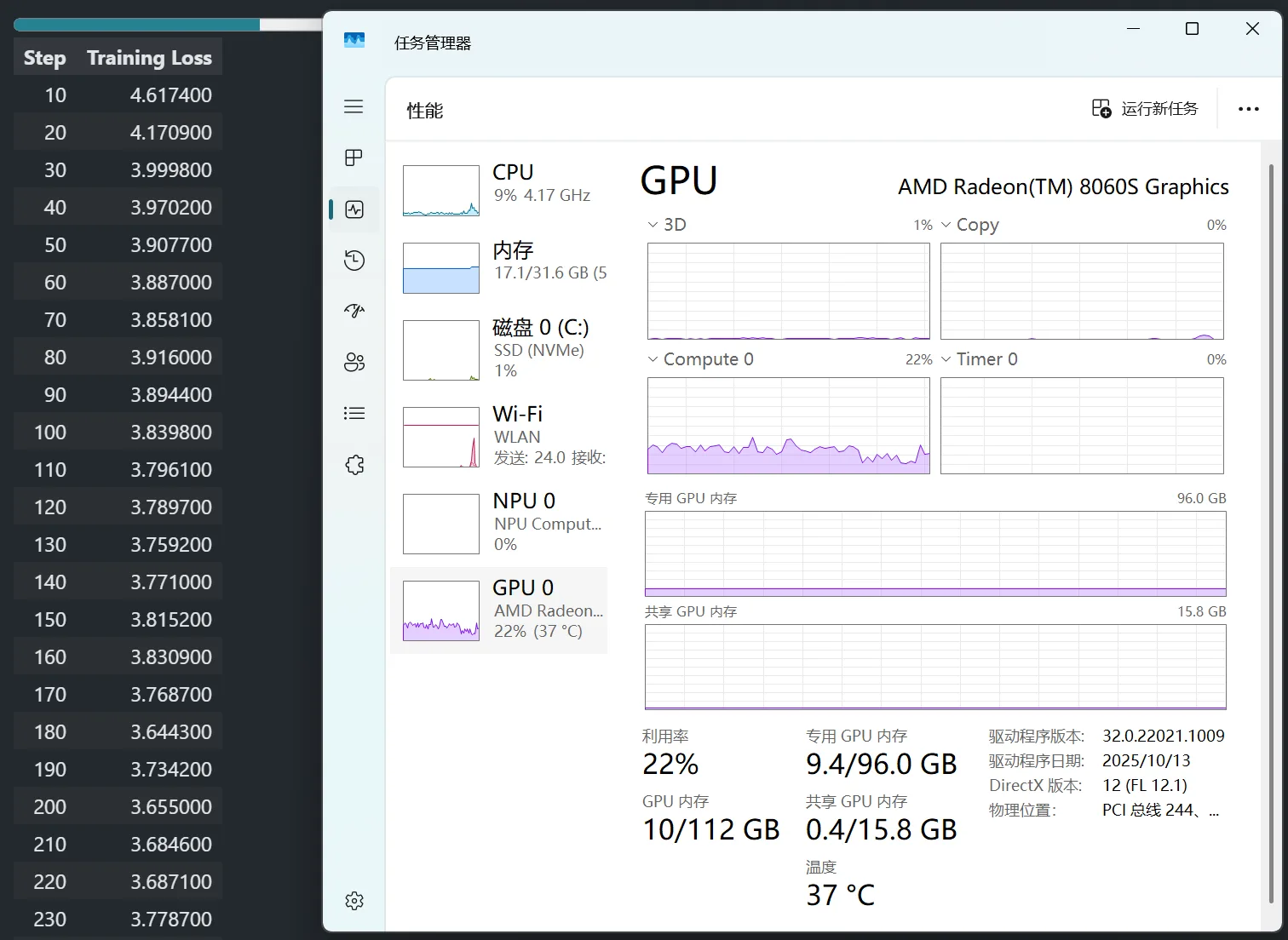
The example training log is publicly available at the following link for reference:
Load LoRA Weights for Inference
After obtaining any checkpoint, load LoRA weights for inference:
from transformers import AutoModelForCausalLM, AutoTokenizer
import torch
from peft import PeftModel

mode_path = 'please-change-me/Qwen/Qwen3-0.6B'  # Modify as needed
lora_path = './output/Qwen3_0.6B_LoRA/checkpoint-699'  # Modify as needed

# Load tokenizer
tokenizer = AutoTokenizer.from_pretrained(mode_path)

# Load Qwen3 base model
model = AutoModelForCausalLM.from_pretrained(mode_path, device_map="auto",torch_dtype=torch.bfloat16, trust_remote_code=True)

# Load LoRA weights
model = PeftModel.from_pretrained(model, model_id=lora_path)

prompt = "Who are you?"
inputs = tokenizer.apply_chat_template(
                                    [{"role": "user", "content": "Assume you are Zhen Huan, a woman by the emperor's side."},{"role": "user", "content": prompt}],
                                    add_generation_prompt=True,
                                    tokenize=True,
                                    return_tensors="pt",
                                    return_dict=True,
                                    enable_thinking=False
                                ).to(model.device)

# Sampling parameters
gen_kwargs = {"max_length": 2500, "do_sample": True, "top_k": 1}
with torch.no_grad():
    outputs = model.generate(**inputs, **gen_kwargs)
    outputs = outputs[:, inputs['input_ids'].shape[1]:]
print(tokenizer.decode(outputs[0], skip_special_tokens=True))I am Zhen Huan. My father is Zhen Yuandao, the Vice Minister of the Court of Judicial Review.