
向量检索封装
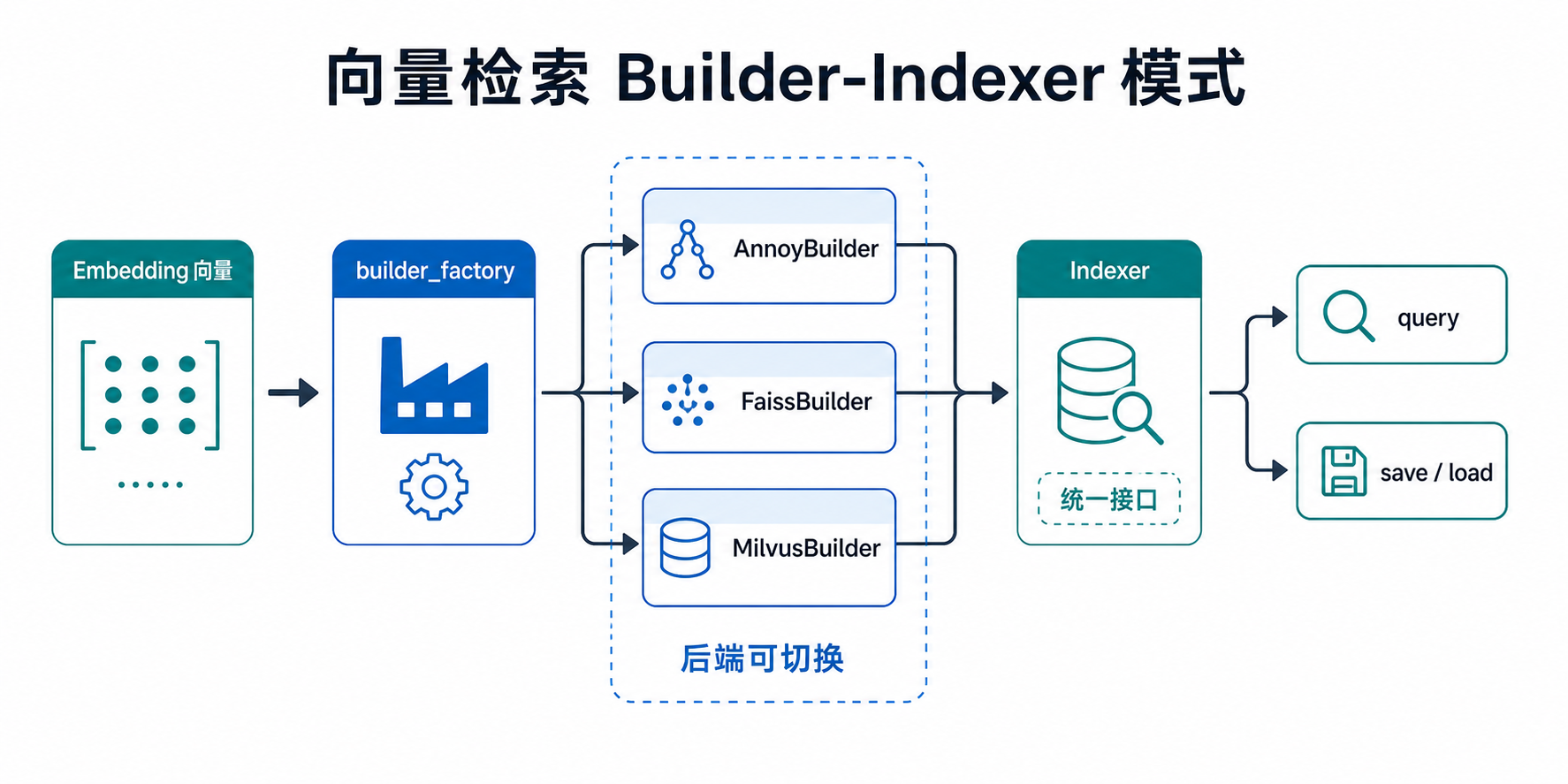
Torch-RecHub 提供了统一的向量检索接口,支持三种主流的近似最近邻(ANN)检索库:Annoy、FAISS 和 Milvus。通过标准化的 Builder-Indexer 模式,用户可以方便地在不同检索后端之间切换。
安装
当前 torch_rechub.serving 在导入时会同时加载三个后端。即使只调用其中一个,也需要安装全部检索 extra:
pip install "torch-rechub[annoy,faiss,milvus]"这是当前包导入方式的限制,不代表运行时必须同时使用三个后端。
快速开始
import torch
from torch_rechub.serving import builder_factory

# 准备嵌入向量
item_embeddings = torch.randn(1000, 64, dtype=torch.float32)  # 1000个物品,64维
user_embeddings = torch.randn(10, 64, dtype=torch.float32)    # 10个用户,64维

# 创建 Builder 并构建索引
builder = builder_factory("faiss", index_type="Flat", metric="L2")

with builder.from_embeddings(item_embeddings) as indexer:
    # 查询 Top-K
    ids, scores = indexer.query(user_embeddings, top_k=10)
    # 保存索引
    indexer.save("item.index")

# 加载已有索引
with builder.from_index_file("item.index") as indexer:
    ids, scores = indexer.query(user_embeddings, top_k=10)
第二个返回值的语义由度量决定:L2/angular 通常是越小越近的距离,IP/COSINE 通常是越大越相似的分数。不要在不同度量之间直接比较该数值。
核心概念
Builder-Indexer 模式
- Builder:负责索引的构建配置,通过
builder_factory工厂函数创建 - Indexer:负责具体的查询和保存操作,通过 Builder 的上下文管理器获取
工厂函数
from torch_rechub.serving import builder_factory

builder = builder_factory(model, **builder_config)| 参数 | 类型 | 说明 |
|---|---|---|
model | str | 检索后端名称:"annoy"、"faiss" 或 "milvus" |
**builder_config | dict | 传递给具体 Builder 的配置参数 |
Annoy
Annoy(Approximate Nearest Neighbors Oh Yeah)是 Spotify 开源的近似最近邻搜索库,特点是内存友好、支持文件内存映射。
后端依赖
pip install "torch-rechub[annoy,faiss,milvus]"⚠️ 注意:Annoy 包含 C++ 扩展。如果 PyPI 没有适配当前 Python/平台的 wheel,安装时会转为本地编译:Linux/macOS 需要可用的
gcc/g++或clang,Windows 需要 Visual Studio Build Tools。不要从来源不明的第三方站点安装二进制 wheel。
参数说明
builder = builder_factory(
    "annoy",
    d=64,                    # 向量维度(必需)
    metric="angular",        # 距离度量
    n_trees=10,              # 树的数量
    threads=-1,              # 构建时的线程数
    searchk=-1,              # 搜索时检查的节点数
)| 参数 | 类型 | 默认值 | 说明 |
|---|---|---|---|
d | int | 必需 | 向量维度 |
metric | str | "angular" | 距离度量:"angular"(余弦)、"euclidean"(欧氏)、"dot"(点积) |
n_trees | int | 10 | 构建的树数量,越多精度越高但构建越慢 |
threads | int | -1 | 构建线程数,-1 表示使用所有可用核心 |
searchk | int | -1 | 搜索时检查的节点数,-1 表示 n_trees * top_k |
使用示例
import torch
from torch_rechub.serving import builder_factory

item_embeddings = torch.randn(1000, 64, dtype=torch.float32)
user_embeddings = torch.randn(10, 64, dtype=torch.float32)

# 使用余弦相似度
builder = builder_factory(
    "annoy",
    d=64,
    metric="angular",
    n_trees=50,
    searchk=100,
)

with builder.from_embeddings(item_embeddings) as indexer:
    ids, distances = indexer.query(user_embeddings, top_k=10)
    indexer.save("annoy.index")

print(f"召回物品ID: {ids}")
print(f"距离: {distances}")
FAISS
FAISS(Facebook AI Similarity Search)是 Meta 开源的高性能相似性搜索库,支持多种索引类型。Torch-RecHub 当前封装创建的是 CPU 索引,没有执行 CPU→GPU 索引转换。
后端依赖
pip install "torch-rechub[annoy,faiss,milvus]"faiss-gpu 本身提供 GPU 能力,但当前 FaissBuilder 不会把索引转移到 GPU;通过本页 API 使用的仍是 CPU 路径。
支持的索引类型
| 索引类型 | 说明 | 适用场景 |
|---|---|---|
Flat | 暴力搜索,精确结果 | 小规模数据(< 10万) |
HNSW | 基于图的近似搜索 | 中等规模,高召回率要求 |
IVF | 倒排索引,聚类后搜索 | 大规模数据 |
参数说明
Flat 索引
builder = builder_factory(
    "faiss",
    index_type="Flat",       # 索引类型
    metric="L2",             # 距离度量
)| 参数 | 类型 | 默认值 | 说明 |
|---|---|---|---|
index_type | str | "Flat" | 索引类型 |
metric | str | "L2" | 距离度量:"L2"(欧氏距离)、"IP"(内积) |
HNSW 索引
builder = builder_factory(
    "faiss",
    index_type="HNSW",
    metric="L2",
    m=32,                    # 每个节点的最大邻居数
    efSearch=50,             # 搜索时的候选节点数
)| 参数 | 类型 | 默认值 | 说明 |
|---|---|---|---|
m | int | 32 | 每个节点的最大邻居数,越大精度越高 |
efSearch | int | None | 搜索时的候选节点数,越大精度越高但越慢 |
IVF 索引
builder = builder_factory(
    "faiss",
    index_type="IVF",
    metric="L2",
    nlists=100,              # 聚类中心数量
    nprobe=10,               # 搜索时访问的聚类数
)| 参数 | 类型 | 默认值 | 说明 |
|---|---|---|---|
nlists | int | 100 | 聚类中心数量,建议为 sqrt(n) 到 4*sqrt(n) |
nprobe | int | None | 搜索时访问的聚类数,越大精度越高但越慢 |
使用示例
import torch
from torch_rechub.serving import builder_factory

item_embeddings = torch.randn(10000, 128, dtype=torch.float32)
user_embeddings = torch.randn(100, 128, dtype=torch.float32)

# 使用 HNSW 索引
builder = builder_factory(
    "faiss",
    index_type="HNSW",
    metric="IP",  # 内积,适合归一化后的向量
    m=32,
    efSearch=64,
)

with builder.from_embeddings(item_embeddings) as indexer:
    ids, distances = indexer.query(user_embeddings, top_k=20)
    indexer.save("faiss_hnsw.index")
Milvus
Milvus 是一个云原生向量数据库,支持分布式部署和多种索引算法,适合生产环境的大规模向量检索。
后端依赖与服务
pip install "torch-rechub[annoy,faiss,milvus]"注意:使用 Milvus 还需要先启动服务。Milvus Standalone 包含额外组件,不能只运行一个未带启动命令的镜像;请按 Milvus 官方 Docker 安装文档 启动与检查服务。
支持的索引类型
| 索引类型 | 说明 | 适用场景 |
|---|---|---|
FLAT | 暴力搜索 | 小规模数据,精确结果 |
HNSW | 基于图的索引 | 中等规模,高召回率 |
IVF_FLAT | 倒排索引 | 大规模数据 |
参数说明
FLAT 索引
builder = builder_factory(
    "milvus",
    d=64,                    # 向量维度(必需)
    index_type="FLAT",
    metric="COSINE",         # 默认距离度量
)| 参数 | 类型 | 默认值 | 说明 |
|---|---|---|---|
d | int | 必需 | 向量维度 |
metric | str | "COSINE" | 距离度量:"L2"、"IP"、"COSINE" |
HNSW 索引
builder = builder_factory(
    "milvus",
    d=64,
    index_type="HNSW",
    metric="COSINE",
    m=30,                    # 每个节点的最大邻居数
    ef=50,                   # 搜索时的候选节点数
)| 参数 | 类型 | 默认值 | 说明 |
|---|---|---|---|
m | int | 30 | 每个节点的最大邻居数 |
ef | int | None | 搜索时的候选节点数 |
IVF_FLAT 索引
builder = builder_factory(
    "milvus",
    d=64,
    index_type="IVF_FLAT",
    metric="IP",
    nlist=128,               # 聚类中心数量
    nprobe=16,               # 搜索时访问的聚类数
)| 参数 | 类型 | 默认值 | 说明 |
|---|---|---|---|
nlist | int | 128 | 聚类中心数量 |
nprobe | int | None | 搜索时访问的聚类数 |
使用示例
import torch
from torch_rechub.serving import builder_factory

item_embeddings = torch.randn(10000, 64, dtype=torch.float32)
user_embeddings = torch.randn(100, 64, dtype=torch.float32)

# 使用 Milvus HNSW 索引
builder = builder_factory(
    "milvus",
    d=64,
    index_type="HNSW",
    metric="COSINE",
    m=32,
    ef=64,
)

with builder.from_embeddings(item_embeddings) as indexer:
    ids, distances = indexer.query(user_embeddings, top_k=10)
    # 当前封装不支持本地 save
MilvusBuilder.from_embeddings() 会创建随机命名的临时 collection,并在退出 with 时执行 drop();save() 和 from_index_file() 也未实现。因此这段封装适合一次性实验,不是持久化在线 collection 的管理接口。长期服务请直接用 Milvus 客户端创建和维护 collection。
完整示例:召回模型评估
以下是一个单兴趣(用户与物品 embedding 均为二维张量)的双塔模型向量化评估示例。MIND/ComiRec 等输出 [batch, interests, dim] 的多兴趣模型需要先展开兴趣并定义去重、合并策略,不能直接套用此函数。
import collections
import numpy as np
import pandas as pd
import torch
from torch_rechub.serving import builder_factory
from torch_rechub.basic.metric import topk_metrics

def match_evaluation(
    user_embedding: torch.Tensor,
    item_embedding: torch.Tensor,
    test_user: dict,
    all_item: dict,
    user_col: str = 'user_id',
    item_col: str = 'item_id',
    raw_id_maps: str = "./raw_id_maps.npy",
    topk: int = 10,
    backend: str = "faiss",
    **backend_kwargs,
):
    """
    使用向量检索进行召回评估

    Args:
        user_embedding: 用户嵌入向量 (n_users, dim)
        item_embedding: 物品嵌入向量 (n_items, dim)
        test_user: 测试用户数据字典
        all_item: 全量物品数据字典
        user_col: 用户ID列名
        item_col: 物品ID列名
        raw_id_maps: ID映射文件路径
        topk: 召回数量
        backend: 检索后端 ("annoy", "faiss", "milvus")
        **backend_kwargs: 传递给 builder_factory 的额外参数

    Returns:
        评估指标字典
    """
    print(f"使用 {backend} 进行向量化召回评估")

    # 1. 创建 Builder
    dim = item_embedding.shape[1]

    if backend == "annoy":
        config = {"d": dim, "n_trees": 10}
    elif backend == "faiss":
        config = {"index_type": "Flat", "metric": "L2"}
    elif backend == "milvus":
        config = {"d": dim, "index_type": "FLAT", "metric": "L2"}
    else:
        raise ValueError(f"不支持的后端: {backend}")
    # 调用方参数覆盖默认值,避免重复关键字(如 index_type)
    config.update(backend_kwargs)
    builder = builder_factory(backend, **config)

    # 2. 确保张量在 CPU 上
    item_embedding = item_embedding.cpu().float()
    user_embedding = user_embedding.cpu().float()

    # 3. 加载 ID 映射
    user_map, item_map = np.load(raw_id_maps, allow_pickle=True)

    # 4. 构建索引并查询
    match_res = collections.defaultdict(dict)

    with builder.from_embeddings(item_embedding) as indexer:
        ids, distances = indexer.query(user_embedding, topk)
        ids_np = ids.numpy()

        for i, user_id in enumerate(test_user[user_col]):
            items_idx = ids_np[i]
            predicted_item_ids = all_item[item_col][items_idx]
            match_res[user_map[user_id]] = np.vectorize(item_map.get)(predicted_item_ids)

    # 5. 构建 ground truth
    data = pd.DataFrame({user_col: test_user[user_col], item_col: test_user[item_col]})
    data[user_col] = data[user_col].map(user_map)
    data[item_col] = data[item_col].map(item_map)
    user_pos_item = data.groupby(user_col).agg(list).reset_index()
    ground_truth = dict(zip(user_pos_item[user_col], user_pos_item[item_col]))

    # 6. 计算指标
    out = topk_metrics(y_true=ground_truth, y_pred=match_res, topKs=[topk])
    return out


# 使用示例
# result = match_evaluation(
#     user_embedding, item_embedding, test_user, all_item,
#     topk=10, backend="faiss", index_type="HNSW", m=32
# )
性能对比与选型建议
| 特性 | Annoy | FAISS | Milvus |
|---|---|---|---|
| 安装难度 | 简单 | 中等 | 需要服务 |
| 内存占用 | 低 | 中等 | 依赖服务配置 |
| 构建速度 | 慢 | 快 | 快 |
| 查询速度 | 中等 | 快 | 快 |
| 当前封装 GPU 路径 | ❌ | ❌ | 由 Milvus 服务决定 |
| 分布式 | ❌ | ❌ | ✅ |
| 当前封装适用场景 | 小规模离线 | 中大规模离线 | 临时实验 |
选型建议
- 快速原型/小数据集:使用 Annoy,安装简单,内存友好
- 中大规模离线计算:使用 FAISS;当前封装走 CPU 路径
- 持久化在线服务:Milvus 服务本身支持分布式和动态更新,但应直接使用 Milvus 客户端管理 collection,而不是当前会自动删除 collection 的上下文封装
API 参考
BaseBuilder
class BaseBuilder(abc.ABC):
    def from_embeddings(self, embeddings: torch.Tensor) -> ContextManager[BaseIndexer]:
        """从嵌入向量构建索引"""

    def from_index_file(self, index_file: FilePath) -> ContextManager[BaseIndexer]:
        """从文件加载索引"""
BaseIndexer
class BaseIndexer(abc.ABC):
    def query(self, embeddings: torch.Tensor, top_k: int) -> tuple[torch.Tensor, torch.Tensor]:
        """
        查询最近邻

        Args:
            embeddings: 查询向量 (n, d)
            top_k: 返回的最近邻数量

        Returns:
            ids: 最近邻ID (n, top_k)
            distances: 距离 (n, top_k)
        """

    def save(self, file_path: FilePath) -> None:
        """保存索引到文件"""
以上是抽象接口;具体后端并非都实现持久化方法。当前 Milvus 后端的 from_index_file() 与 save() 会抛出 NotImplementedError。