
DSSM Tutorial
1. Model Overview and Use Cases
DSSM (Deep Structured Semantic Model) is a classic two-tower model proposed by Microsoft at CIKM 2013. It maps users and items through separate DNN towers into the same vector space and computes matching scores with cosine similarity. It is one of the most commonly used base models in the retrieval stage of recommendation systems.
Paper: Learning Deep Structured Semantic Models for Web Search using Clickthrough Data
Model Architecture
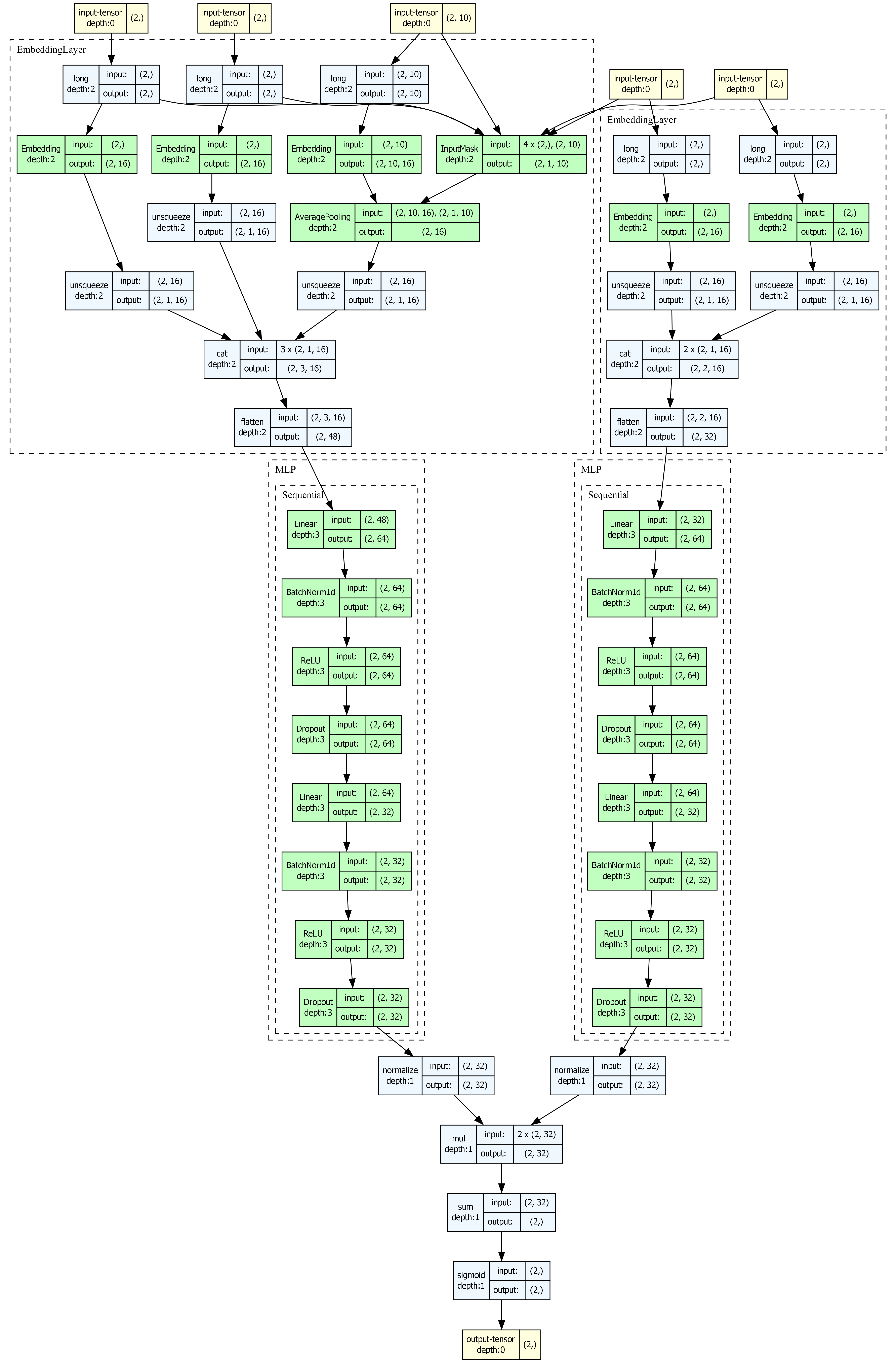
- User Tower: maps user features to a vector representation
- Item Tower: maps item features to a vector representation
- Similarity calculation: computes user-item matching scores with cosine similarity or a dot product
Suitable Scenarios
- Retrieval stage of recommendation systems
- Fast filtering of large candidate sets through vector search
- Search relevance matching
- Online real-time services, because the two-tower structure supports offline precomputation of user/item vectors
2. Data Preparation and Preprocessing
This example uses the MovieLens-1M dataset, which contains about one million user ratings of movies.
2.1 Load and Process Data
import os
import numpy as np
import pandas as pd
import torch
from sklearn.preprocessing import LabelEncoder

from torch_rechub.basic.features import SparseFeature, SequenceFeature
from torch_rechub.utils.data import MatchDataGenerator, df_to_dict
from torch_rechub.utils.match import gen_model_input, generate_seq_feature_match

# Load sampled MovieLens data
data = pd.read_csv("examples/matching/data/ml-1m/ml-1m_sample.csv")
data["cate_id"] = data["genres"].apply(lambda x: x.split("|")[0])

# Define discrete features
sparse_features = ['user_id', 'movie_id', 'gender', 'age', 'occupation', 'zip', 'cate_id']
user_col, item_col = "user_id", "movie_id"
2.2 Encode Features
feature_max_idx = {}
for feature in sparse_features:
    lbe = LabelEncoder()
    data[feature] = lbe.fit_transform(data[feature]) + 1
    feature_max_idx[feature] = data[feature].max() + 1

# Extract user/item profiles
user_profile = data[["user_id", "gender", "age", "occupation", "zip"]].drop_duplicates("user_id")
item_profile = data[["movie_id", "cate_id"]].drop_duplicates("movie_id")
2.3 Build Sequence Features and Training Data
# Generate sequence features (user behavior histories) and negative samples
df_train, df_test = generate_seq_feature_match(
    data, user_col, item_col,
    time_col="timestamp",
    item_attribute_cols=[],
    sample_method=1,    # Random negative sampling
    mode=0,             # Point-wise
    neg_ratio=3,        # Negative-sample ratio
    min_item=0
)

# Build model inputs
x_train = gen_model_input(df_train, user_profile, user_col, item_profile, item_col, seq_max_len=50)
y_train = x_train["label"]
x_train = {k: v for k, v in x_train.items() if k != "label"}
x_test = gen_model_input(df_test, user_profile, user_col, item_profile, item_col, seq_max_len=50)
2.4 Define Features
user_cols = ['user_id', 'gender', 'age', 'occupation', 'zip']
item_cols = ['movie_id', 'cate_id']

# User features = user attributes + historical behavior sequence
# DSSM does not model complex temporal relations directly; it first compresses the history into a fixed user vector
user_features = [
    SparseFeature(name, vocab_size=feature_max_idx[name], embed_dim=16)
    for name in user_cols
]
user_features += [
    SequenceFeature(
        "hist_movie_id",
        vocab_size=feature_max_idx["movie_id"],
        embed_dim=16,
        pooling="mean",           # Sequence aggregation method
        shared_with="movie_id"    # Share the embedding with movie_id
    )
]

# Item features
item_features = [
    SparseFeature(name, vocab_size=feature_max_idx[name], embed_dim=16)
    for name in item_cols
]

# Full item data used for evaluation
all_item = df_to_dict(item_profile)
test_user = x_test
2.5 Create DataLoaders
dg = MatchDataGenerator(x=x_train, y=y_train)
train_dl, test_dl, item_dl = dg.generate_dataloader(
    test_user, all_item, batch_size=4096, num_workers=0
)
3. Model Configuration and Parameter Reference
3.1 Create the Model
from torch_rechub.models.matching import DSSM

model = DSSM(
    user_features=user_features,
    item_features=item_features,
    temperature=1.0,  # Used by full-batch in-batch training, not point-wise BCE
    user_params={
        "dims": [256, 128, 64],
        "activation": "prelu"      # PReLU usually works better here
    },
    item_params={
        "dims": [256, 128, 64],
        "activation": "prelu"
    }
)
3.2 Parameter Details
| Parameter | Type | Description | Suggested Value |
|---|---|---|---|
user_features | list[Feature] | User-side feature list | User attributes + behavior sequence |
item_features | list[Feature] | Item-side feature list | Item ID + attributes |
temperature | float | Finite positive temperature for full-batch in-batch cross entropy; does not affect point-wise BCE | Default 1.0; example 0.02 |
user_params.dims | list[int] | User Tower MLP dimensions | [256, 128, 64] |
item_params.dims | list[int] | Item Tower MLP dimensions | [256, 128, 64] |
*_params.activation | str | Activation function | "prelu" recommended |
The default full-batch in-batch path in
MatchTrainerusestemperature. The point-wise DSSMforwardstill returns the sigmoid of unscaled cosine similarity.
4. Training Process and Code Example
4.1 Train the Model
import os
from torch_rechub.trainers import MatchTrainer

torch.manual_seed(2022)
save_dir = "./saved/dssm/"
os.makedirs(save_dir, exist_ok=True)

trainer = MatchTrainer(
    model,
    mode=0,                        # 0: point-wise, 1: pair-wise, 2: list-wise
    optimizer_params={
        "lr": 1e-4,
        "weight_decay": 1e-6
    },
    n_epoch=10,
    device="cpu",
    model_path=save_dir
)

trainer.fit(train_dl)
4.2 Training Mode Reference
| mode | Training Method | Loss Function | Description |
|---|---|---|---|
| 0 | Point-wise | BCE Loss | Computes each sample independently |
| 1 | Pair-wise | BPR Loss | Requires the model to return (pos_score, neg_score), as FaceBookDSSM does |
| 2 | List-wise | Softmax Loss | Requires the model to return [B, 1+n_neg] logits, as YoutubeDNN / MIND do |
mode defines the trainer's loss contract; it cannot be switched arbitrarily for the same DSSM instance. The scalar probability output of the DSSM on this page requires mode=0.
4.3 Single-Device In-Batch Training
Run from examples/matching:
python run_ml_dssm.py --in_batch_neg --batch_size 256 --temperature 0.02 --device cpuUse --device cuda:0 for one GPU. The example generates positive interactions with neg_ratio=0 and uses a separate data cache. Without --in_batch_neg, it keeps the original offline negatives and BCE training.
The other MovieLens retrieval examples also support --in_batch_neg. Existing code usually needs two changes:
df_train, df_test = generate_seq_feature_match(data, user_col, item_col, "timestamp", in_batch_neg=True)
trainer = MatchTrainer(model, in_batch_neg=True)
The data helper produces positive pairs. Existing model parameters, training modes, and inference interfaces keep their original form. The default model forward() still returns its original scores; the trainer temporarily switches the existing model.mode during the in-batch forward and restores it afterwards. No embedding-output switch or prediction-code migration is required.
All public matching models support this entry point. MIND/ComiRec retain positive-item-based interest selection; YoutubeSBC retains sampling-bias correction. NARM/STAMP can use their existing next-item ID labels directly: enable run_sbr.py --in_batch_neg. Custom session histories use post-padding, and y must contain actual next-item IDs unless an explicit item_feature and corresponding item column are supplied. SASRec retains its original per-position positive/negative training; in-batch training uses the positive item at the last valid sequence position.
Normalization follows each model's original scoring: DSSM/YoutubeDNN use normalized vectors, YoutubeSBC uses cosine scores, and NARM/STAMP/SINE retain dot products. The trainer does not impose a shared embedding scale, keeping training aligned with the existing retrieval evaluation.
This in-batch entry point currently supports a single device (cpu or one CUDA GPU). Multi-GPU support is maintained separately.
For paired data, each row must be a positive user-item interaction without offline negative rows. DSSM's towers provide normalized embeddings; MatchTrainer(model, in_batch_neg=True) computes user_emb @ item_emb.T / model.temperature and applies cross entropy with diagonal targets arange(B). Training labels y are placeholders for explicit user-item pairs; next-item labels for session models supply the actual target item IDs. Explicit random/hard sampling and BPR configurations retain their existing paths.
This simple version treats all off-diagonal entries as negatives without duplicate-item masking. It adds no sampling-probability correction beyond YoutubeSBC's own correction. Repeated items can therefore become false negatives. Use batch_size >= 2; singleton batches are skipped with a warning, and an epoch with no usable batches raises an error.
Evaluate retrieval using the embeddings as shown below. A positive-only training dataset is not an AUC validation dataset: AUC validation through fit(..., val_dataloader=...) still requires genuine binary labels.
5. Model Evaluation and Result Analysis
5.1 Generate Embeddings and Evaluate
To evaluate DSSM, first generate the user and item embeddings, then use vector retrieval to compute Recall@K.
# Generate user embeddings
user_embedding = trainer.inference_embedding(
    model=model, mode="user",
    data_loader=test_dl,
    model_path=save_dir
)

# Generate item embeddings
item_embedding = trainer.inference_embedding(
    model=model, mode="item",
    data_loader=item_dl,
    model_path=save_dir
)

print(f"User Embedding shape: {user_embedding.shape}")
print(f"Item Embedding shape: {item_embedding.shape}")
5.2 Recall@K Evaluation
# Requires the match_evaluation helper
# Located in examples/matching/movielens_utils.py
from examples.matching.movielens_utils import match_evaluation

match_evaluation(
    user_embedding,
    item_embedding,
    test_user,
    all_item,
    raw_id_maps="examples/matching/data/ml-1m/saved/raw_id_maps.npy",
    topk=10,
)
6. Tuning Suggestions
6.1 Key Tuning Points
- Activation function:
"prelu"usually works better than"relu"(as recommended in the original paper) - Embedding dimension: the final output dimensions of the User and Item Towers should match (determined by
dims[-1]) - Negative-sample ratio:
neg_ratio=3~5usually works well - Learning rate: a smaller learning rate such as
1e-4is recommended for matching tasks
6.2 Vector Retrieval and Deployment
After training, you can insert the embeddings into a vector index for ANN (approximate nearest-neighbor) search. The project retains both the legacy wrappers under torch_rechub.utils.match and the Builder/Indexer API under torch_rechub.serving.
Option 1: Annoy (Lightweight and Suitable for Rapid Prototyping)
pip install "torch-rechub[annoy]"from torch_rechub.utils.match import Annoy
# Build an Annoy index
annoy = Annoy(n_trees=10, metric='angular')
annoy.fit(item_embedding)
# Query the Top-10 similar items for one user
indices, distances = annoy.query(user_embedding[0], n=10)
print(f"Top-10 item indices: {indices}")
print(f"Corresponding distances: {distances}")Option 2: Faiss (This Project's Optional Dependency Is the CPU Build)
pip install "torch-rechub[faiss]"from torch_rechub.utils.match import Faiss
import numpy as np
# Make sure the embeddings are float32 NumPy arrays
item_emb_np = item_embedding.cpu().numpy().astype(np.float32)
user_emb_np = user_embedding.cpu().numpy().astype(np.float32)
# Create a Faiss index (supports flat / ivf / hnsw)
faiss_index = Faiss(dim=item_emb_np.shape[1], index_type='flat', metric='l2')
faiss_index.fit(item_emb_np)
# Query the Top-10
indices, distances = faiss_index.query(user_emb_np[0], n=10)
print(f"Top-10 item indices: {indices}")
# With metric='l2', distances are distances, so smaller values mean nearer neighbors
# Save / load the index
faiss_index.save_index("item_faiss.index")
faiss_index.load_index("item_faiss.index")Choosing a Faiss index type (the practical scale limit depends on dimensionality, memory, and retrieval parameters, so benchmark your own workload):
Type Characteristics Suitable Scenario flatExact search; no training required Small scale or a recall baseline ivfInverted-file index; requires training Trading off speed against recall hnswGraph index; no training required High-recall requirements
Option 3: Milvus (Legacy Wrapper for Isolated Local Experiments Only)
pip install "torch-rechub[milvus]"
# Start a Milvus service first: https://milvus.io/docs/install_standalone-docker.md
Data-deletion risk
The legacy torch_rechub.utils.match.Milvus deletes any existing collection with the fixed name rechub when it is constructed, then recreates it. Do not run the following example against a Milvus instance that stores real data.
from torch_rechub.utils.match import Milvus
from pymilvus import connections

# Connect to Milvus and insert embeddings
connections.connect(alias="default", host="localhost", port="19530")
milvus = Milvus(dim=item_embedding.shape[1], host="localhost", port="19530")
milvus.fit(item_embedding)

# Query the Top-10
indices, distances = milvus.query(user_embedding, n=10)
Using the New Serving API (Builder/Indexer Pattern)
The project also provides a more standardized serving module. At present, importing torch_rechub.serving loads all three backends eagerly, so install all three dependency groups even if this example uses only Faiss:
pip install "torch-rechub[annoy,faiss,milvus]"The example below uses Faiss. top_k is this API's parameter name, and the return order is (indices, distances):
from torch_rechub.serving import builder_factory

# Create a Builder through the factory (supports "annoy" / "faiss" / "milvus")
builder = builder_factory("faiss", index_type="Flat", metric="L2")

# Build the index and query it
with builder.from_embeddings(item_embedding) as indexer:
    indices, distances = indexer.query(user_embedding[:5], top_k=10)
    print(indices, distances)
    indexer.save("item.index")

# Load from a file
with builder.from_index_file("item.index") as indexer:
    indices, distances = indexer.query(user_embedding[:5], top_k=10)
The Milvus Builder in the Serving API deletes its temporary collection when the context exits and does not support from_index_file; therefore, it is not currently a persistent production-serving wrapper either.
7. Model Visualization
Torch-RecHub includes a torchview-based model-visualization utility that can generate a model's computation graph.
Install Dependencies
pip install torch-rechub[visualization]
# Also install the system-level graphviz package:
# Ubuntu: sudo apt-get install graphviz
# macOS: brew install graphviz
# Windows: choco install graphviz
Visualize the DSSM Model
from torch_rechub.utils.visualization import visualize_model

# Generate inputs automatically and visualize the model (displayed directly in Jupyter)
graph = visualize_model(model, depth=4)

# Save as an image (suitable for papers/documentation)
visualize_model(model, save_path="dssm_architecture.png", dpi=300)

# Save as PDF
visualize_model(model, save_path="dssm_architecture.pdf")
The visualizer extracts feature metadata from the model and generates dummy inputs automatically; you do not need to construct inputs manually.
DSSM Architecture Diagram
8. ONNX Export
Install the optional ONNX dependencies before exporting the model:
pip install "torch-rechub[onnx]"The exported files can be consumed by a compatible ONNX Runtime. A complete serving and deployment workflow is outside the scope of this project.
Export the Full Model
from torch_rechub.utils.onnx_export import ONNXExporter

exporter = ONNXExporter(model, device="cpu")

# Export the full DSSM model
exporter.export("dssm_full.onnx", verbose=True)
Export the User Tower and Item Tower Separately
A two-tower model can export its towers independently for separate deployment:
# Export the User Tower (real-time online inference)
exporter.export("dssm_user_tower.onnx", mode="user")

# Export the Item Tower (offline batch computation)
exporter.export("dssm_item_tower.onnx", mode="item")
Run Inference with ONNX Runtime
import onnxruntime as ort
import numpy as np

# Load the User Tower
session = ort.InferenceSession("dssm_user_tower.onnx")

# Inspect input metadata
for inp in session.get_inputs():
    print(f"  {inp.name}: shape={inp.shape}, type={inp.type}")

# Construct inputs and run inference
input_feed = {}
for inp in session.get_inputs():
    shape = [dim if isinstance(dim, int) else 1 for dim in inp.shape]
    dtype = np.int64 if "int" in inp.type.lower() else np.float32
    input_feed[inp.name] = np.zeros(shape, dtype=dtype)
output = session.run(None, input_feed)
print(f"User Embedding shape: {output[0].shape}")
9. FAQ and Troubleshooting
Q1: Must the dims of the User Tower and Item Tower be identical?
Their final output dimensions (dims[-1]) must match because the model needs to compute similarity. Their intermediate dimensions may differ.
Q2: How do I add user behavior sequence features?
Define the historical behavior sequence with SequenceFeature and share its embedding with the item ID through shared_with:
SequenceFeature("hist_movie_id", vocab_size=n_movie,
                embed_dim=16, pooling="mean",
                shared_with="movie_id")
Q3: How can DSSM be deployed efficiently online?
The key is to decouple users and items:
- Compute all item embeddings offline and store them in a vector database (Faiss/Milvus)
- Compute user embeddings in real time with ONNX Runtime
- Retrieve the most similar Top-K items through ANN search
Q4: Does temperature affect the current DSSM implementation?
Default full-batch in-batch training uses it to scale logits. Point-wise BCE is unchanged: DSSM.forward() still does not perform temperature scaling.
Q5: How should I choose among Annoy, Faiss, and Milvus?
| Characteristic | Annoy | Faiss | Milvus |
|---|---|---|---|
| Installation complexity | Simple | Moderate | Requires a service |
| Project optional dependency | annoy | faiss-cpu | pymilvus |
| Persistence | Can save indexes | Can save indexes | The current Serving context deletes its temporary collection on exit |
| Current recommendation | Rapid prototyping | Single-node experiments and benchmarking | Validate only in an isolated instance; do not use directly for persistent production data |
Complete Example
import os
import numpy as np
import pandas as pd
import torch
from sklearn.preprocessing import LabelEncoder

from torch_rechub.basic.features import SparseFeature, SequenceFeature
from torch_rechub.models.matching import DSSM
from torch_rechub.trainers import MatchTrainer
from torch_rechub.utils.data import MatchDataGenerator, df_to_dict
from torch_rechub.utils.match import gen_model_input, generate_seq_feature_match, Annoy


def main():
    torch.manual_seed(2022)
    save_dir = "./saved/dssm/"
    os.makedirs(save_dir, exist_ok=True)

    # 1. Process data
    data = pd.read_csv("examples/matching/data/ml-1m/ml-1m_sample.csv")
    data["cate_id"] = data["genres"].apply(lambda x: x.split("|")[0])
    sparse_features = ['user_id', 'movie_id', 'gender', 'age', 'occupation', 'zip', 'cate_id']
    user_col, item_col = "user_id", "movie_id"

    feature_max_idx = {}
    for feature in sparse_features:
        lbe = LabelEncoder()
        data[feature] = lbe.fit_transform(data[feature]) + 1
        feature_max_idx[feature] = data[feature].max() + 1

    user_profile = data[["user_id", "gender", "age", "occupation", "zip"]].drop_duplicates("user_id")
    item_profile = data[["movie_id", "cate_id"]].drop_duplicates("movie_id")

    # 2. Build sequence features
    df_train, df_test = generate_seq_feature_match(
        data, user_col, item_col, time_col="timestamp",
        item_attribute_cols=[], sample_method=1, mode=0, neg_ratio=3, min_item=0
    )
    x_train = gen_model_input(df_train, user_profile, user_col, item_profile, item_col, seq_max_len=50)
    y_train = x_train["label"]
    x_train = {k: v for k, v in x_train.items() if k != "label"}
    x_test = gen_model_input(df_test, user_profile, user_col, item_profile, item_col, seq_max_len=50)

    # 3. Define features
    user_cols = ['user_id', 'gender', 'age', 'occupation', 'zip']
    item_cols = ['movie_id', 'cate_id']
    user_features = [SparseFeature(name, vocab_size=feature_max_idx[name], embed_dim=16) for name in user_cols]
    user_features += [SequenceFeature("hist_movie_id", vocab_size=feature_max_idx["movie_id"], embed_dim=16, pooling="mean", shared_with="movie_id")]
    item_features = [SparseFeature(name, vocab_size=feature_max_idx[name], embed_dim=16) for name in item_cols]

    all_item = df_to_dict(item_profile)
    test_user = x_test

    # 4. Create the model
    dg = MatchDataGenerator(x=x_train, y=y_train)
    model = DSSM(user_features, item_features, temperature=1.0,
                 user_params={"dims": [256, 128, 64], "activation": "prelu"},
                 item_params={"dims": [256, 128, 64], "activation": "prelu"})

    # 5. Train
    trainer = MatchTrainer(model, mode=0, optimizer_params={"lr": 1e-4, "weight_decay": 1e-6},
                           n_epoch=10, device="cpu", model_path=save_dir)
    train_dl, test_dl, item_dl = dg.generate_dataloader(test_user, all_item, batch_size=4096, num_workers=0)
    trainer.fit(train_dl)

    # 6. Generate embeddings
    user_embedding = trainer.inference_embedding(model=model, mode="user", data_loader=test_dl, model_path=save_dir)
    item_embedding = trainer.inference_embedding(model=model, mode="item", data_loader=item_dl, model_path=save_dir)
    print(f"User Embedding: {user_embedding.shape}, Item Embedding: {item_embedding.shape}")

    # 7. Retrieve vectors with Annoy
    annoy = Annoy(n_trees=10)
    annoy.fit(item_embedding)
    for i in range(min(5, len(user_embedding))):
        indices, distances = annoy.query(user_embedding[i], n=10)
        print(f"User {i} -> Top-10 Items: {indices}")


if __name__ == "__main__":
    main()