第 2 章:解密 AI 加速器——从软件栈到硬件架构
实验环境
- 设备: AMD AI+ MAX395
- GPU: Radeon 8060S
- 架构: gfx1151 (RDNA 3)
- ROCm 版本: 7.x
- 系统: Ubuntu 24.04 / 22.04
本章学习目标
通过本章,你将理解三件核心事情:
- 软件调用链路:PyTorch 代码如何经过 HIP → HSA → Driver → GPU 执行
- 思维范式转变:从 CPU 的"低延迟"到 GPU 的"高吞吐",SIMT 模型的工作原理
- 硬件架构原理:AMD GPU 的 CU、LDS、HBM,以及内存带宽的重要性
2.1 从 Python 到 GPU:一次代码执行的完整旅程
当你写下 x + y 这样的 PyTorch 代码时,你知道这行代码经历了多少层"翻译"才最终在 GPU 上执行吗?这一节,我们用 Linux 的工具来追踪整个调用链路。

图2.1 从 Python 到 GPU 的总览流程:PyTorch 代码经过 HIP、HSA、Driver,最终在 GPU 上并行执行
2.1.1 黑盒解密:用 ldd 追踪 PyTorch 的依赖链路
PyTorch 只是一个高层封装,真正在 GPU 上干活的是底层的 ROCm 软件栈。让我们用
ldd工具(查看动态库依赖)来揭开这个黑盒。
追踪命令
# 找到 torch 库的路径
TORCH_LIB=$(python -c "import torch; print(torch.__file__)" | sed 's/__init__.py/lib/')

# 查看核心依赖 (过滤出 amd/rocm 相关的)
ldd $TORCH_LIB/libtorch_python.so | grep -E "amd|hip|hsa"输出示例
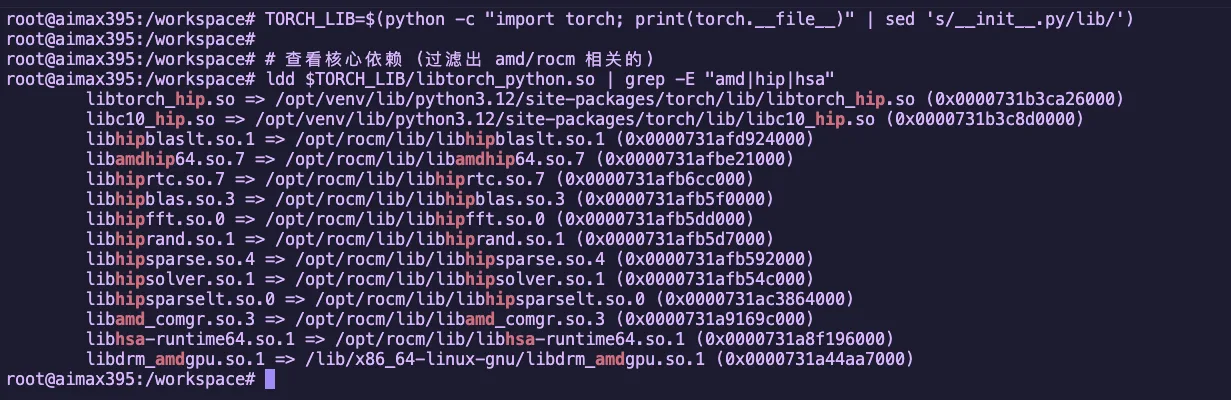
图2.2 ldd 查看 PyTorch 的 ROCm 依赖库
这些库构成了 ROCm 软件栈的核心,我们逐个拆解:
四大核心组件
| 组件 | 库名 | 职责 | 对应关系 |
|---|---|---|---|
| 翻译官 | libamdhip64.so | 将 CUDA 风格的 API 调用转换为 AMD 的指令 | NVIDIA 的 libcudart |
| 工头 | libhsa-runtime64.so | 真正调度 GPU、管理内存、让显卡开始干活 | HSA 异构计算基础架构 |
| 技能包 | hipblas/hipfft 等 | 高性能数学库(矩阵乘法、FFT 等) | NVIDIA 的 cuBLAS/cuFFT |
| 编译器前端 | libamd_comgr.so | 动态编译 HIP 代码为二进制对象 | NVIDIA 的 NVRTC |
数学库详解
| 库名 | 作用 | 应用场景 |
|---|---|---|
hipblas | 矩阵运算(BLAS) | 线性层、矩阵乘法 |
hipfft | 快速傅里叶变换 | 信号处理、某些注意力机制 |
hiprand | 随机数生成 | Dropout、噪声注入 |
hipsparse | 稀疏矩阵运算 | 稀疏注意力机制 |
为什么需要这些数学库?
这些库是 AMD 工程师用汇编语言手写优化的,性能比你自己写的 HIP 代码快 10-100 倍。当你跑 Qwen 模型时,大量的矩阵运算就是由
hipblas完成的。
2.1.2 全景图解:完整调用链路
前面的图用漫画方式展示了“一行 Python 代码如何一路跑到 GPU 上”。
现在我们换成更工程化的视角,把这条链路按软件栈分层拆开:
关键数据流
| 阶段 | 位置 | 任务 |
|---|---|---|
| 1. CPU 端 | 系统内存 | 准备数据、调用 API |
| 2. PCIe 总线 | 总线传输 | 数据从系统内存搬运到显存 |
| 3. GPU 端 | GPU 核心 | Compute Units 并行执行计算 |
| 4. 返回 | 总线传输 | 结果从显存搬回系统内存 |
2.1.3 编译器视角:ROCm 如何用 LLVM/Clang 把高层代码"降维"
你写的 Python/HIP 代码,GPU 是看不懂的。编译器需要做一系列转换才能让 GPU 执行。

图2.3 HIP / LLVM / ISA 编译链路:从 C++/HIP 源码到 GPU 可执行二进制
示例:一个简单的 HIP 函数如何被编译
实战演练:让我们用实际的编译命令输出 LLVM IR 和 ISA。
创建文件 simple_add.cpp:
// file: src/infra/decode-ai-accelerator/code/simple_add.cpp
#include <hip/hip_runtime.h>
#include <iostream>

__global__ void add(float* a, float* b, float* c, int n) {
    int i = blockIdx.x * blockDim.x + threadIdx.x;
    if (i < n) {
        c[i] = a[i] + b[i];
    }
}

int main() {
    int n = 1024;
    size_t bytes = n * sizeof(float);

    float *a, *b, *c;
    hipMalloc(&a, bytes);
    hipMalloc(&b, bytes);
    hipMalloc(&c, bytes);

    float *h_a = new float[n];
    float *h_b = new float[n];
    for(int i = 0; i < n; i++) {
        h_a[i] = 1.0f;
        h_b[i] = 2.0f;
    }

    hipMemcpy(a, h_a, bytes, hipMemcpyHostToDevice);
    hipMemcpy(b, h_b, bytes, hipMemcpyHostToDevice);

    hipLaunchKernelGGL(add, dim3(1), dim3(n), 0, 0, a, b, c, n);
    hipDeviceSynchronize();

    float *h_c = new float[n];
    hipMemcpy(h_c, c, bytes, hipMemcpyDeviceToHost);

    std::cout << "Result: " << h_c[0] << ", " << h_c[n-1] << std::endl;

    delete[] h_a;
    delete[] h_b;
    delete[] h_c;
    hipFree(a);
    hipFree(b);
    hipFree(c);

    return 0;
}方法 1:使用 hipcc 直接输出 LLVM IR
# 输出未经优化的 LLVM IR
hipcc --offload-arch=gfx1151 \
      -emit-llvm \
      -S \
      -O0 \
      simple_add.cpp -o simple_add_O0.ll

# 输出优化后的 LLVM IR
hipcc --offload-arch=gfx1151 \
      -emit-llvm \
      -S \
      -O3 \
      simple_add.cpp -o simple_add_O3.ll

# 查看生成的 LLVM IR(只显示 GPU kernel 部分)
sed -n '/__CLANG_OFFLOAD_BUNDLE____START__ hip-amdgcn/,/__CLANG_OFFLOAD_BUNDLE____END__ hip-amdgcn/p' simple_add_O0.ll | grep -A 40 "define protected amdgpu_kernel"
sed -n '/__CLANG_OFFLOAD_BUNDLE____START__ hip-amdgcn/,/__CLANG_OFFLOAD_BUNDLE____END__ hip-amdgcn/p' simple_add_O3.ll | grep -A 40 "define protected amdgpu_kernel"实际输出示例(未经优化的 LLVM IR -O0):
; 生成的文件: simple_add_O0.ll
define protected amdgpu_kernel void @_Z3addPfS_S_i(ptr addrspace(1) noundef %0, ptr addrspace(1) noundef %1, ptr addrspace(1) noundef %2, i32 noundef %3) #4 {
  %5 = alloca i32, align 4, addrspace(5)
  %6 = alloca i32, align 4, addrspace(5)
  %7 = alloca i32, align 4, addrspace(5)
  %8 = alloca i32, align 4, addrspace(5)
  %9 = alloca i32, align 4, addrspace(5)
  %10 = alloca i32, align 4, addrspace(5)
  %11 = alloca ptr, align 8, addrspace(5)
  %12 = alloca ptr, align 8, addrspace(5)
  %13 = alloca ptr, align 8, addrspace(5)
  %14 = alloca ptr, align 8, addrspace(5)
  %15 = alloca ptr, align 8, addrspace(5)
  %16 = alloca ptr, align 8, addrspace(5)
  %17 = alloca i32, align 4, addrspace(5)
  %18 = alloca i32, align 4, addrspace(5)
  store ptr addrspace(1) %0, ptr addrspacecast(ptr addrspace(5) %11 to ptr), align 8
  %27 = load ptr, ptr addrspacecast(ptr addrspace(5) %11 to ptr), align 8
  store ptr addrspace(1) %1, ptr addrspacecast(ptr addrspace(5) %12 to ptr), align 8
  %28 = load ptr, ptr addrspacecast(ptr addrspace(5) %12 to ptr), align 8
  store ptr addrspace(1) %2, ptr addrspacecast(ptr addrspace(5) %13 to ptr), align 8
  %29 = load ptr, ptr addrspacecast(ptr addrspace(5) %13 to ptr), align 8
  %32 = call i64 @__ockl_get_group_id(i32 noundef 0) #17
  %33 = trunc i64 %32 to i32
  %36 = call i64 @__ockl_get_local_size(i32 noundef 0) #17
  %37 = trunc i64 %36 to i32
  %38 = mul i32 %33, %37
  %41 = call i64 @__ockl_get_local_id(i32 noundef 0) #17
  %42 = trunc i64 %41 to i32
  %43 = add i32 %38, %42
  store i32 %43, ptr addrspacecast(ptr addrspace(5) %18 to ptr), align 4
  %44 = load i32, ptr addrspacecast(ptr addrspace(5) %18 to ptr), align 4
  %45 = load i32, ptr addrspacecast(ptr addrspace(5) %17 to ptr), align 4
  %46 = icmp slt i32 %44, %45
  br i1 %46, label %47, label %63

47:
  %48 = load ptr, ptr addrspacecast(ptr addrspace(5) %14 to ptr), align 8
  %50 = sext i32 %49 to i64
  %52 = load float, ptr %51, align 4
  %58 = fadd contract float %52, %57
  store float %58, ptr %62, align 4
  br label %63

63:
  ret void
}
; O0 版本约 75 行代码实际输出示例(优化后的 LLVM IR -O3):
; 生成的文件: simple_add_O3.ll
define protected amdgpu_kernel void @_Z3addPfS_S_i(ptr addrspace(1) noundef readonly captures(none) %0, ...) local_unnamed_addr #0 {
  ; 无栈分配!所有变量都在寄存器中
  %5 = tail call i32 @llvm.amdgcn.workgroup.id.x()
  %6 = tail call ptr addrspace(4) @llvm.amdgcn.implicitarg.ptr()
  %8 = load i16, ptr addrspace(4) %7, align 4, !tbaa !6
  %9 = zext i16 %8 to i32
  %10 = mul i32 %5, %9
  %11 = tail call noundef range(i32 0, 1024) i32 @llvm.amdgcn.workitem.id.x()
  %12 = add i32 %10, %11
  %13 = icmp slt i32 %12, %3
  br i1 %13, label %14, label %22

14:
  %15 = sext i32 %12 to i64
  %19 = load float, ptr addrspace(1) %18, align 4, !tbaa !10
  %20 = load float, ptr addrspace(1) %17, align 4, !tbaa !10
  %21 = fadd contract float %19, %20
  store float %21, ptr addrspace(1) %16, align 4, !tbaa !10
  br label %22

22:
  ret void
}
; O3 版本仅约 35 行代码O0 vs O3 关键差异对比
维度 O0 O3 栈使用 18 个 alloca(private memory) 完全无栈分配 函数调用 @__ockl_get_group_id等包装函数直接调用 @llvm.amdgcn.workgroup.id.x()intrinsic代码量 约 75 行 约 35 行(优化掉 50%) 内存访问 多次冗余 load/store 所有变量保持寄存器 TBAA 注解 无 添加 !tbaa用于类型别名分析优化参数属性 无 添加 readonly/captures(none)帮助优化
(可选)输出 AMDGPU ISA 汇编代码:
# 输出 ISA 汇编代码
hipcc --offload-arch=gfx1151 -S -O3 simple_add.cpp -o simple_add.s

# 查看生成的汇编(只显示 GPU kernel 部分)
sed -n '/__CLANG_OFFLOAD_BUNDLE____START__ hip-amdgcn/,/__CLANG_OFFLOAD_BUNDLE____END__ hip-amdgcn/p' simple_add.s | head -100实际输出示例(AMDGPU ISA 汇编):
# __CLANG_OFFLOAD_BUNDLE____START__ hip-amdgcn-amd-amdhsa--gfx1151
        .amdgcn_target "amdgcn-amd-amdhsa--gfx1151"
        .amdhsa_code_object_version 6
        .text
        .protected      _Z3addPfS_S_i
        .globl  _Z3addPfS_S_i
        .p2align        8
        .type   _Z3addPfS_S_i,@function
_Z3addPfS_S_i:
; %bb.0:
        s_clause 0x1
        s_load_b32 s3, s[0:1], 0x2c
        s_load_b32 s4, s[0:1], 0x18
        s_waitcnt lgkmcnt(0)
        s_and_b32 s3, s3, 0xffff
        s_delay_alu instid0(SALU_CYCLE_1)
        v_mad_u64_u32 v[0:1], null, s2, s3, v[0:1]
        s_mov_b32 s2, exec_lo
        v_cmpx_gt_i32_e64 s4, v0
        s_cbranch_execz .LBB0_2
; %bb.1:
        s_load_b128 s[4:7], s[0:1], 0x0
        v_ashrrev_i32_e32 v1, 31, v0
        s_load_b64 s[0:1], s[0:1], 0x10
        s_delay_alu instid0(VALU_DEP_1) | instskip(SKIP_1) | instid1(VALU_DEP_1)
        v_lshlrev_b64 v[0:1], 2, v[0:1]
        s_waitcnt lgkmcnt(0)
        v_add_co_u32 v2, vcc_lo, s4, v0
        s_delay_alu instid0(VALU_DEP_1) | instskip(SKIP_1) | instid1(VALU_DEP_1)
        v_add_co_ci_u32_e64 v3, null, s5, v1, vcc_lo
        v_add_co_u32 v4, vcc_lo, s6, v0
        v_add_co_ci_u32_e64 v5, null, s7, v1, vcc_lo
        global_load_b32 v2, v[2:3], off
        global_load_b32 v3, v[4:5], off
        v_add_co_u32 v0, vcc_lo, s0, v0
        s_delay_alu instid0(VALU_DEP_1)
        v_add_co_ci_u32_e64 v1, null, s1, v1, vcc_lo
        s_waitcnt vmcnt(0)
        v_add_f32_e32 v2, v2, v3
        global_store_b32 v[0:1], v2, off
.LBB0_2:
s_endpgm关键汇编指令解读:
| 指令 | 说明 |
|---|---|
s_load_b32 | 标量加载:从常量内存加载到 SGPR |
v_mad_u64_u32 | 向量乘加:计算线程全局 ID |
v_cmpx_gt_i32 | 向量比较:边界检查,同时更新执行掩码 |
global_load_b32 | 全局内存加载:从显存读取数据 |
v_add_f32_e32 | 向量浮点加法:执行实际的加法运算 |
global_store_b32 | 全局内存存储:写回显存 |
s_endpgm | 程序结束:终止 kernel 执行 |
为什么需要运行时编译(JIT)?
PyTorch 有一个强大的能力:运行时编译。当你写一个自定义算子时,PyTorch 会:
- 在运行时调用
hiprtc(HIP Runtime Compilation) - 使用
libamd_comgr编译你的 HIP 代码 - 生成适配当前 GPU 架构的二进制
- 加载到 GPU 执行
这就是为什么 PyTorch 能"动态编译" HIP 算子。
2.1.4 实战验证:手写第一个 HIP 程序
实战目标:现在我们跳过 Python,直接用 C++ 写一个 HIP 程序,验证整个调用链路。
创建文件 hello_rocm.cpp
// file: src/infra/decode-ai-accelerator/code/hello_rocm.cpp
#include <hip/hip_runtime.h>
#include <iostream>
#include <cstdlib>

#define HIP_CHECK(call)                                                         \
    do {                                                                        \
        hipError_t err = call;                                                  \
        if (err != hipSuccess) {                                                \
            std::cerr << "HIP Error: " << hipGetErrorString(err)                \
                      << " at line " << __LINE__ << std::endl;                  \
            std::exit(EXIT_FAILURE);                                            \
        }                                                                       \
    } while (0)

__global__ void vector_add(float *a, float *b, float *c, int n) {
    int i = blockDim.x * blockIdx.x + threadIdx.x;
    if (i < n) {
        c[i] = a[i] + b[i];
    }
}

int main() {
    int n = 1024;
    size_t bytes = n * sizeof(float);

    float *h_a, *h_b, *h_c;
    h_a = (float*)malloc(bytes);
    h_b = (float*)malloc(bytes);
    h_c = (float*)malloc(bytes);

    for(int i=0; i<n; i++) {
        h_a[i] = 1.0f;
        h_b[i] = 2.0f;
    }

    float *d_a, *d_b, *d_c;
    HIP_CHECK(hipMalloc(&d_a, bytes));
    HIP_CHECK(hipMalloc(&d_b, bytes));
    HIP_CHECK(hipMalloc(&d_c, bytes));

    HIP_CHECK(hipMemcpy(d_a, h_a, bytes, hipMemcpyHostToDevice));
    HIP_CHECK(hipMemcpy(d_b, h_b, bytes, hipMemcpyHostToDevice));

    hipLaunchKernelGGL(vector_add, dim3(1), dim3(n), 0, 0, d_a, d_b, d_c, n);
    HIP_CHECK(hipDeviceSynchronize());

    HIP_CHECK(hipMemcpy(h_c, d_c, bytes, hipMemcpyDeviceToHost));

    std::cout << "Element [0]: " << h_a[0] << " + " << h_b[0] << " = " << h_c[0] << std::endl;
    std::cout << "Element [1023]: " << h_a[1023] << " + " << h_b[1023] << " = " << h_c[1023] << std::endl;
    std::cout << ">>> ROCm HIP Kernel executed successfully on AMD GPU!" << std::endl;

    HIP_CHECK(hipFree(d_a)); HIP_CHECK(hipFree(d_b)); HIP_CHECK(hipFree(d_c));
    free(h_a); free(h_b); free(h_c);

    return 0;
}编译并运行
# 确认 hipcc 编译器是否就绪
which hipcc

# 编译
hipcc hello_rocm.cpp -o hello_rocm

# 运行
./hello_rocm预期输出:
Element [0]: 1 + 2 = 3
Element [1023]: 1 + 2 = 3
>>> ROCm HIP Kernel executed successfully on AMD GPU!
图2.4 HIP 程序执行流程:CPU 负责调度,GPU 负责并行计算
程序执行流程
| 步骤 | CPU 端 | GPU 端 |
|---|---|---|
| 1. 分配内存 | malloc 分配系统内存 | hipMalloc 分配显存 |
| 2. 数据搬运 | hipMemcpy(H2D) 把数据搬到显存 | 等待数据 |
| 3. 启动计算 | hipLaunchKernelGGL 发射计算任务 | 1024 个线程并行计算 |
| 4. 同步 | hipDeviceSynchronize 等待 GPU 完成 | 完成计算 |
| 5. 结果搬运 | hipMemcpy(D2H) 把结果搬回内存 | 返回结果 |
恭喜!你刚刚完成了:第一次手动管理 GPU 内存、第一次手动启动 GPU 核函数、第一次完整走通了 PyTorch 底层的整个调用链路。
2.2 硬件思维革命:从 CPU 到 GPU 的范式转变
现在你已经知道代码如何跑到 GPU 上了,但一个更根本的问题是:为什么 AI 必须用 GPU?为什么 CPU 算不动?
答案在于 CPU 和 GPU 的设计哲学完全不同。
2.2.1 为什么 CPU 算不动 AI?
CPU 的设计哲学:低延迟
CPU 是为通用计算设计的,它的设计目标是:
| 设计目标 | 说明 |
|---|---|
| 低延迟 | 让单个任务尽可能快地完成 |
| 复杂控制流 | 支持复杂的分支预测、乱序执行 |
| 大缓存 | L1/L2/L3 缓存减少内存访问延迟 |
| 少量强大的核心 | 通常 4-128 个核心,每个核心很强 |
CPU 擅长的任务:操作系统调度、数据库查询、逻辑复杂的业务代码、分支很多的算法。
AI 计算的特点:高吞吐
AI(深度学习)的负载完全不同:
| 计算特点 | 说明 |
|---|---|
| 数据并行 | 同时处理成千上万个数据 |
| 规则简单 | 主要是矩阵乘法、卷积 |
| 计算密集 | 每个数据需要大量浮点运算 |
| 内存带宽敏感 | 需要快速搬运大量数据 |

图2.5 CPU 低延迟 vs GPU 高吞吐设计哲学对比
CPU vs AI 需求的不匹配
| CPU 的优化 | AI 的需求 | 结果 |
|---|---|---|
| 大缓存减少延迟 | 需要高带宽搬数据 | 缓存太小,装不下模型 |
| 少量强大核心 | 需要数千弱核心并行 | 并行度不够 |
| 复杂分支预测 | 简单重复计算 | 分支预测器浪费资源 |
性能对比:ResNet-50 推理
我们用一个实际例子说明:在 CPU vs GPU 上运行 ResNet-50 推理。
实战演练:让我们在 Radeon 8060S (gfx1151) 上实际测试一下!
创建文件 bench_resnet.py:
# file: src/infra/decode-ai-accelerator/code/bench_resnet.py
import torch
import torchvision
import time

device_cpu = torch.device("cpu")
device_gpu = torch.device("cuda" if torch.cuda.is_available() else "cpu")

print(f"=== GPU 信息 ===")
if torch.cuda.is_available():
    print(f"GPU 设备: {torch.cuda.get_device_name(0)}")
    props = torch.cuda.get_device_properties(0)
    print(f"架构: {props.name}")
    print(f"显存: {props.total_memory / 1024**3:.1f} GB")
    print(f"计算能力: {props.major}.{props.minor}")
else:
    print("未检测到 GPU")

print("\n=== 加载 ResNet-50 模型 ===")
model = torchvision.models.resnet50(pretrained=True)
model.eval()

batch_size = 32
dummy_input = torch.randn(batch_size, 3, 224, 224)

# ========== CPU 推理测试 ==========
print("\n=== CPU 推理测试 ===")
model_cpu = model.to(device_cpu)

for _ in range(3):
    with torch.no_grad():
        _ = model_cpu(dummy_input)

start = time.time()
num_iterations = 10
with torch.no_grad():
    for _ in range(num_iterations):
        _ = model_cpu(dummy_input)
end = time.time()

cpu_time_ms = (end - start) / num_iterations * 1000 / batch_size
cpu_throughput = batch_size * num_iterations / (end - start)

print(f"CPU 平均延迟: {cpu_time_ms:.2f} ms/image")
print(f"CPU 吞吐量: {cpu_throughput:.2f} img/s")

# ========== GPU 推理测试 ==========
if torch.cuda.is_available():
    print("\n=== GPU 推理测试 ===")
    model_gpu = model.to(device_gpu)
    dummy_input_gpu = dummy_input.to(device_gpu)

    for _ in range(10):
        with torch.no_grad():
            _ = model_gpu(dummy_input_gpu)
        torch.cuda.synchronize()

    torch.cuda.synchronize()
    start = time.time()
    num_iterations = 100
    with torch.no_grad():
        for _ in range(num_iterations):
            _ = model_gpu(dummy_input_gpu)
    torch.cuda.synchronize()
    end = time.time()

    gpu_time_ms = (end - start) / num_iterations * 1000 / batch_size
    gpu_throughput = batch_size * num_iterations / (end - start)

    print(f"GPU 平均延迟: {gpu_time_ms:.2f} ms/image")
    print(f"GPU 吞吐量: {gpu_throughput:.2f} img/s")

    speedup = cpu_time_ms / gpu_time_ms
    print(f"\nGPU 加速比: {speedup:.1f}x")
print(f"\n显存使用: {torch.cuda.max_memory_allocated() / 1024**3:.2f} GB")运行测试:
python bench_resnet.py预期输出示例(在 Radeon 8060S 上):
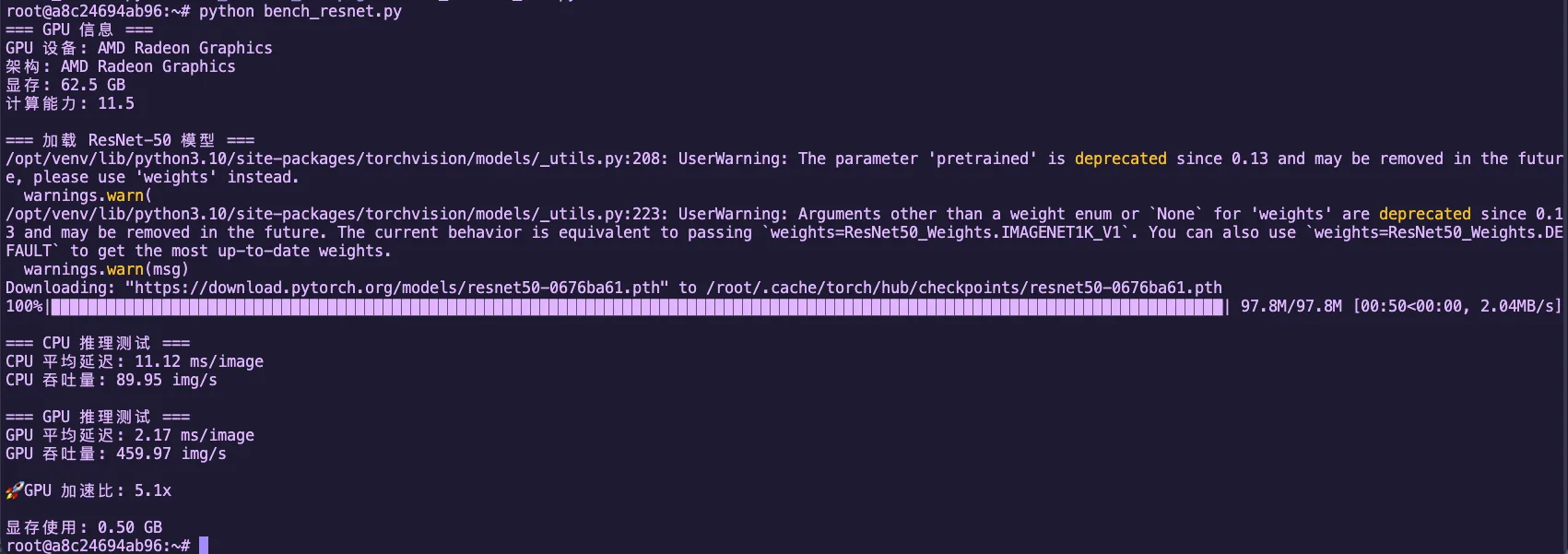
图2.7 ResNet-50 CPU vs GPU 推理性能对比(Radeon 8060S)
GPU vs CPU 性能对比分析
- Radeon 8060S (gfx1151) 是消费级显卡,仍然有数十个 CU
- 每个 CU 能同时跑多个 wavefront(每个 wavefront 是 32/64 个线程)
- 对比 CPU:即使多核 CPU,并行度仍然远低于 GPU
- 差距的核心:GPU 用"人海战术",CPU 是"精英战术"
2.2.2 SIMT 模型图解:单指令多线程的魔力
GPU 的核心技术是 SIMT (Single Instruction, Multiple Threads),即"单指令多线程"。
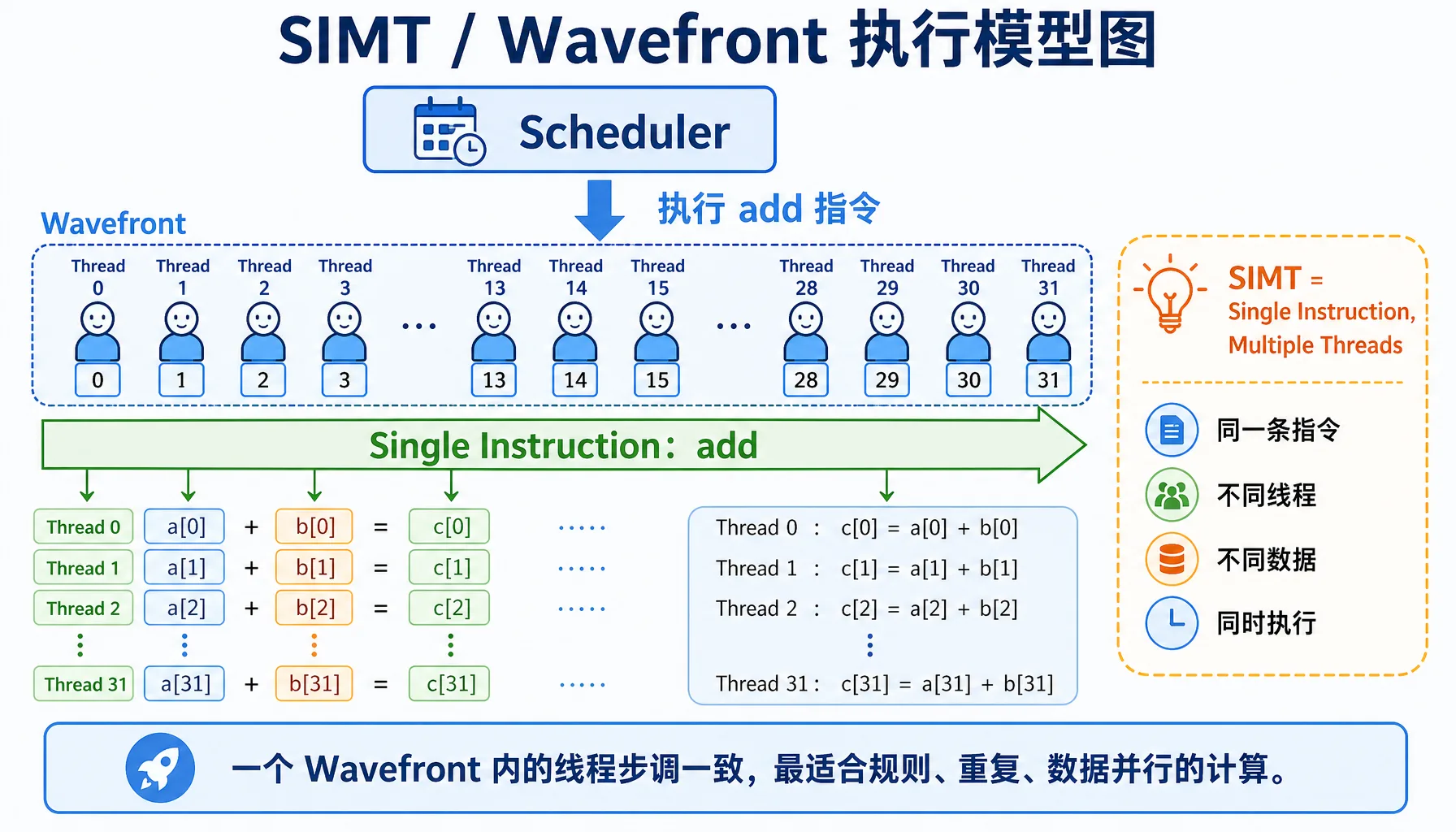
图2.8 SIMT / Wavefront 执行模型:同一条指令,多个线程处理不同数据

图2.9 控制单元 vs 运算单元:CPU 与 GPU 的晶体管分配差异
关键概念
| 概念 | NVIDIA | AMD | 说明 |
|---|---|---|---|
| 线程组 | Warp (32线程) | Wavefront (32/64线程) | 一组线程一起执行相同指令 |
| 分支发散 | Warp Divergence | Wavefront Divergence | 如果有 if-else 分支,性能会下降 |
上图说明了什么?
- CPU:任务按顺序一个接一个执行,就像单人排队打饭
- GPU:32个线程(一个 Wavefront)同时执行相同指令,就像一个班的同学一起做操
分支发散问题
当 wavefront 内的线程需要执行不同的代码路径时,就会发生分支发散,导致性能下降。

图2.10 分支发散:同一个 Wavefront 内线程走不同分支,会被拆成多次执行
糟糕的代码:
__global__ void bad_branch(float* data) {
    int i = threadIdx.x;
    if (i % 2 == 0) {  // 分支发散!
        data[i] *= 2.0f;
    } else {
        data[i] += 1.0f;
    }
}执行情况:
- Wavefront 包含线程 0-31
- 线程 0,2,4,... 执行
if分支 - 线程 1,3,5,... 执行
else分支 - GPU 不得不串行执行两个分支,性能减半!
好的代码:
__global__ void good_branch(float* data) {
    int i = threadIdx.x;
    data[i] = data[i] * 2.0f + 1.0f;  // 无分支,全部并行
}实战测试:分支发散性能影响
实战测试:让我们实际测试一下分支发散对性能的影响!
创建文件 bench_divergence.cpp:
// file: src/infra/decode-ai-accelerator/code/bench_divergence.cpp
#include <hip/hip_runtime.h>
#include <iostream>
#include <vector>
#include <cstdlib>

#define HIP_CHECK(call) \
    do { \
        hipError_t err = call; \
        if (err != hipSuccess) { \
            std::cerr << "HIP Error: " << hipGetErrorString(err) \
                      << " at line " << __LINE__ << std::endl; \
            std::exit(EXIT_FAILURE); \
        } \
    } while (0)

constexpr int WARP_SIZE = 32;

// 版本1:分支+同步的传统 reduction
__global__ void reduce_branchy(const float* __restrict__ in,
                               float* __restrict__ out,
                               int n) {
    extern __shared__ float sdata[];
    int tid = threadIdx.x;
    int global = blockIdx.x * blockDim.x * 2 + tid;

    float sum = 0.0f;
    if (global < n) sum += in[global];
    if (global + blockDim.x < n) sum += in[global + blockDim.x];
    sdata[tid] = sum;
    __syncthreads();

    for (int stride = blockDim.x / 2; stride > 0; stride >>= 1) {
        if (tid < stride) {
            sdata[tid] += sdata[tid + stride];
        }
        __syncthreads();
    }

    if (tid == 0) out[blockIdx.x] = sdata[0];
}

// wavefront shuffle sum
__device__ __forceinline__ float wf_reduce_sum(float v) {
    for (int offset = WARP_SIZE / 2; offset > 0; offset >>= 1) {
        v += __shfl_down(v, offset, WARP_SIZE);
    }
    return v;
}

__global__ void reduce_shuffle(const float* __restrict__ in,
                               float* __restrict__ out,
                               int n) {
    extern __shared__ float wf_sums[];

    int tid = threadIdx.x;
    int idx = blockIdx.x * blockDim.x * 2 + tid;

    float v = 0.0f;
    if (idx < n) v += in[idx];
    if (idx + blockDim.x < n) v += in[idx + blockDim.x];

    float wf_sum = wf_reduce_sum(v);

    int lane = tid % WARP_SIZE;
    int wid  = tid / WARP_SIZE;

    if (lane == 0) wf_sums[wid] = wf_sum;
    __syncthreads();

    if (wid == 0) {
        int num_waves = (blockDim.x + WARP_SIZE - 1) / WARP_SIZE;
        float x = (lane < num_waves) ? wf_sums[lane] : 0.0f;
        float block_sum = wf_reduce_sum(x);
        if (lane == 0) out[blockIdx.x] = block_sum;
    }
}

// Host:多轮 reduction 直到剩一个数
float run_reduce(const float* d_in, int n,
                 bool use_shuffle,
                 int threads, int iterations) {
    hipEvent_t start, stop;
    HIP_CHECK(hipEventCreate(&start));
    HIP_CHECK(hipEventCreate(&stop));

    int max_blocks = (n + (threads * 2 - 1)) / (threads * 2);
    float* d_buf1 = nullptr;
    float* d_buf2 = nullptr;
    HIP_CHECK(hipMalloc(&d_buf1, max_blocks * sizeof(float)));
    HIP_CHECK(hipMalloc(&d_buf2, max_blocks * sizeof(float)));

    auto launch_once = [&](int cur_n, const float* cur_in, float* cur_out) {
        int blocks = (cur_n + (threads * 2 - 1)) / (threads * 2);
        size_t smem = 0;
        if (use_shuffle) {
            int num_waves = (threads + WARP_SIZE - 1) / WARP_SIZE;
            smem = num_waves * sizeof(float);
            hipLaunchKernelGGL(reduce_shuffle, dim3(blocks), dim3(threads),
                               smem, 0, cur_in, cur_out, cur_n);
        } else {
            smem = threads * sizeof(float);
            hipLaunchKernelGGL(reduce_branchy, dim3(blocks), dim3(threads),
                               smem, 0, cur_in, cur_out, cur_n);
        }
        return blocks;
    };

    // warmup
    {
        int cur_n = n;
        const float* cur_in = d_in;
        float* cur_out = d_buf1;
        while (cur_n > 1) {
            int next_n = launch_once(cur_n, cur_in, cur_out);
            cur_n = next_n;
            cur_in = cur_out;
            cur_out = (cur_out == d_buf1) ? d_buf2 : d_buf1;
        }
        HIP_CHECK(hipDeviceSynchronize());
    }

    HIP_CHECK(hipEventRecord(start));
    for (int it = 0; it < iterations; ++it) {
        int cur_n = n;
        const float* cur_in = d_in;
        float* cur_out = d_buf1;

        while (cur_n > 1) {
            int next_n = launch_once(cur_n, cur_in, cur_out);
            cur_n = next_n;
            cur_in = cur_out;
            cur_out = (cur_out == d_buf1) ? d_buf2 : d_buf1;
        }
    }
    HIP_CHECK(hipEventRecord(stop));
    HIP_CHECK(hipEventSynchronize(stop));

    float ms = 0.0f;
    HIP_CHECK(hipEventElapsedTime(&ms, start, stop));

    HIP_CHECK(hipFree(d_buf1));
    HIP_CHECK(hipFree(d_buf2));
    HIP_CHECK(hipEventDestroy(start));
    HIP_CHECK(hipEventDestroy(stop));
    return ms;
}

int main() {
    int n = 1024 * 1024 * 1000; // 10M
    size_t bytes = n * sizeof(float);

    std::cout << "=== 向量求和(reduction)发散对比 ===\n";
    std::cout << "数据量: " << n << " (" << bytes / 1024.0 / 1024.0 << " MB)\n";
    std::cout << "WARP_SIZE(AMD wavefront): " << WARP_SIZE << "\n";

    std::vector<float> h(n, 1.0f);
    float* d_in = nullptr;
    HIP_CHECK(hipMalloc(&d_in, bytes));
    HIP_CHECK(hipMemcpy(d_in, h.data(), bytes, hipMemcpyHostToDevice));

    int threads = 256;
    int iterations = 50;

    std::cout << "\n=== reduce_branchy(分支+同步)===\n";
    float t1 = run_reduce(d_in, n, false, threads, iterations);
    std::cout << "总时间: " << t1 << " ms\n";
    std::cout << "平均每次: " << t1 / iterations << " ms\n";

    std::cout << "\n=== reduce_shuffle(shuffle 更少分支)===\n";
    float t2 = run_reduce(d_in, n, true, threads, iterations);
    std::cout << "总时间: " << t2 << " ms\n";
    std::cout << "平均每次: " << t2 / iterations << " ms\n";

    std::cout << "\n=== 对比 ===\n";
    float speedup = t1 / t2;
    std::cout << "shuffle 版本加速比: " << speedup << "x\n";
    std::cout << "性能提升: " << (speedup - 1.f) * 100.f << "%\n";

    HIP_CHECK(hipFree(d_in));
    return 0;
}编译并运行:
hipcc bench_divergence.cpp -o bench_divergence -O3
./bench_divergence预期输出(在 Radeon 8060S 上):
=== 向量求和(reduction)发散对比 ===
数据量: 1048576000 (4000 MB)
WARP_SIZE(AMD wavefront): 32

=== reduce_branchy(分支+同步)===
总时间: 1104.58 ms
平均每次: 22.0915 ms

=== reduce_shuffle(shuffle 更少分支)===
总时间: 960.202 ms
平均每次: 19.204 ms

=== 对比 ===
shuffle 版本加速比: 1.15036x
性能提升: 15.0359%结论
从测试结果可以看到,使用 shuffle 指令减少分支发散带来了**约15%**的性能提升。虽然这个例子中提升不算巨大,但在某些场景下分支发散的影响会更大。在实际编写 GPU 代码时,应尽量避免在 wavefront 内部使用 if-else 分支。
为什么 32 或 64 个线程一组?
| 选项 | 优点 | 缺点 |
|---|---|---|
| 太少(如 8 个) | 灵活 | 硬件调度开销大 |
| 太多(如 1024 个) | 吞吐高 | 分支发散影响太大 |
| 32/64 个 | 刚好平衡并行度和灵活性 |
架构差异:老架构用 64,新架构(如 gfx1151)用 32
2.2.3 数据并行思维:如何把问题拆解成 GPU 能吃的形式
并行度分析:什么任务适合 GPU?
| 特征 | 适合 GPU | 不适合 GPU |
|---|---|---|
| 数据量 | 大数据集(>1000 元素) | 小数据(<100 元素) |
| 数据依赖 | 数据之间独立 | 数据之间有复杂依赖 |
| 计算模式 | 规则重复(矩阵、卷积) | 复杂逻辑(递归、回溯) |
| 分支 | 很少 if-else | 很多 if-else |
| 内存访问 | 连续访问 | 随机跳转 |
示例对比
适合 GPU:矩阵乘法(每个元素独立计算)、图像卷积(每个像素独立处理)、向量加法 c[i] = a[i] + b[i]
不适合 GPU:斐波那契数列(有依赖)、快速排序(分支太多)、图遍历(内存访问不规则)
内存访问模式:合并访问 vs 随机访问
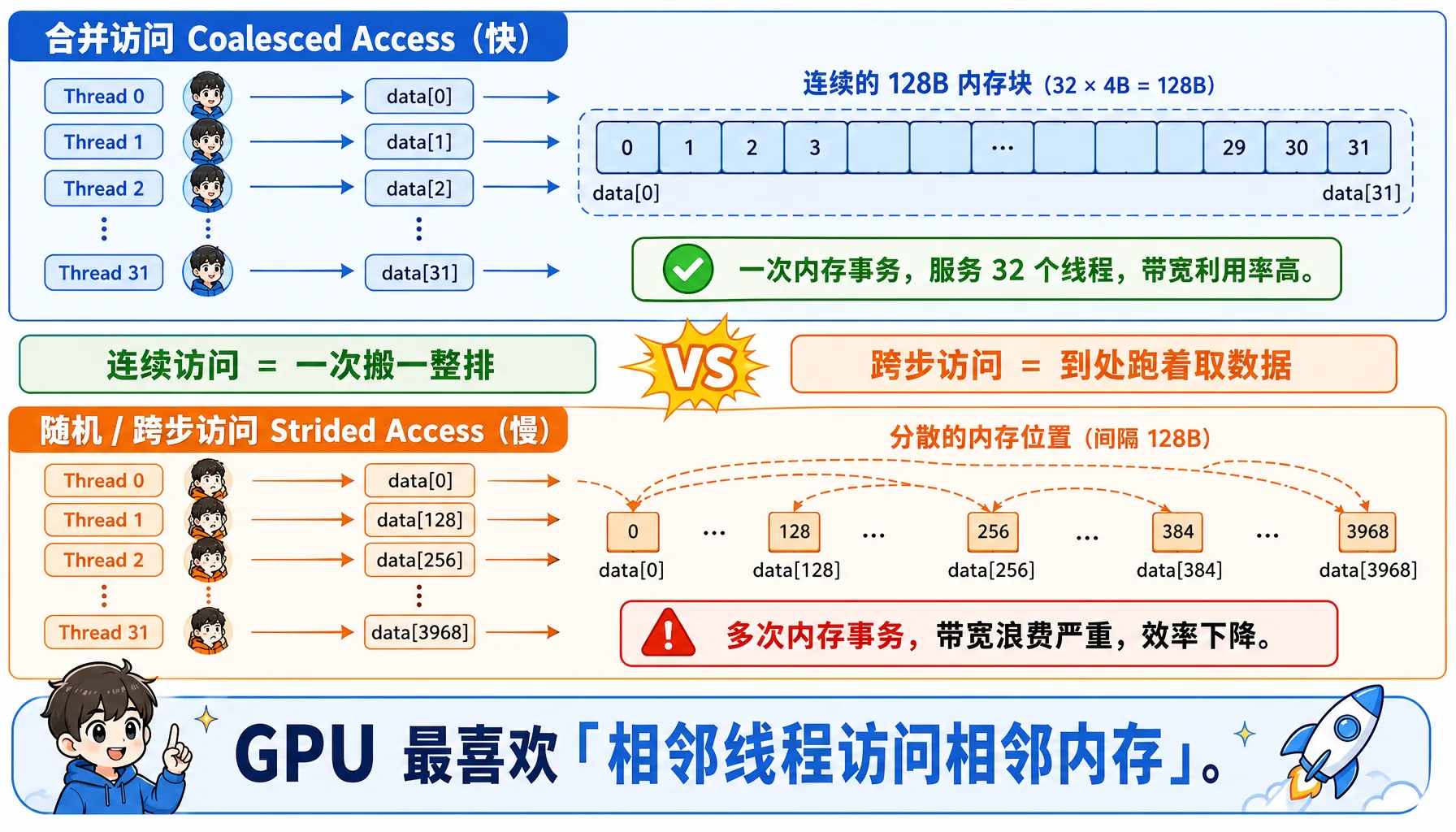
图2.11 合并访问 vs 随机访问:连续线程访问连续地址,访存效率最高
合并访问(Coalesced Access)- 快:
__global__ void good_access(float* data) {
    int i = threadIdx.x;  // 0, 1, 2, 3, ...
    // 连续的线程访问连续的内存 -> 一次内存事务
    float x = data[i];
}线程0 -> data[0] (字节 0-3)
线程1 -> data[1] (字节 4-7)
线程2 -> data[2] (字节 8-11)
...
线程31 -> data[31] (字节 124-127)
总共需要一次内存事务,一次读 128 字节,服务 32 个线程随机访问(Strided Access)- 慢:
__global__ void bad_access(float* data) {
    int i = threadIdx.x;
    float x = data[i * 128];  // 跨度128
}线程0 -> data[0] -> 需要 1 次 128 字节事务
线程1 -> data[128] -> 需要 1 次 128 字节事务
...
线程31 -> data[3968] -> 需要 1 次 128 字节事务
总共:32 次内存事务!2.3 走进 AMD GPU 内部:硬件架构详解
现在我们深入 AMD GPU 的硬件,了解它的"内脏"是如何组织的。
2.3.1 Compute Unit (CU):GPU 的"干活小组"

图2.12 AMD GPU Compute Unit 内部结构:SIMD、VGPR、SGPR、LDS 与调度器协同工作
CU 内部结构
一个 Compute Unit (CU) 是 GPU 的基本计算单元,它包含以下组件:
以 Radeon 8060S (gfx1151 架构) 为例
组件详情表:
| 组件 | 全称 | 功能比喻 | 关键特性 |
|---|---|---|---|
| SIMD Units | 单指令多数据单元 | 搬砖工:大家听同一个口令,搬不同的砖 | 每个 CU 通常有 4 个 SIMD,负责执行向量指令 |
| VGPR | 向量通用寄存器 | 工人的背包:每个线程私有的存储空间 | 极快但极贵。数量限制了能同时开工的工人数 |
| SGPR | 标量通用寄存器 | 队长的记事本:存储所有线程共用的数据 | 由标量单元处理,不占用向量单元资源 |
| LDS | Local Data Store | 队内的小仓库:同一个 CU 内的线程可以交换数据 | 速度比显存快 10-20 倍,用于 Block 内通讯 |
架构差异小贴士
- CDNA (如 MI300):专为计算设计,通常采用 Wave64 模式(64个线程一组)
- RDNA (如 Radeon 7900):专为游戏设计,通常采用 Wave32 模式(32个线程一组),但在计算任务中也可以编译为 Wave64
关键参数
| 参数 | 说明 |
|---|---|
| CU 数量 | Radeon 8060S 有数十个 CU(具体数量取决于芯片型号) |
| 每个 CU 的 SIMD 数量 | 2-4 个 |
| 每个 CU 的 ALU 总数 | 数百个 |
| 理论峰值 FP32 吞吐 | 数 TFLOPS 级别 |
一个 CU 能同时跑多少线程?
这是 GPU 性能优化的关键问题。我们需要理解几个概念:
| 概念 | 说明 |
|---|---|
| Work-Item(线程) | 最小的执行单位 |
| Work-Group(线程块) | 一组线程,可以共享 LDS |
| Wavefront(波前) | 32/64 个线程(取决于架构),一起执行相同指令 |
并发计算:
- 每个 wavefront 需要:32 或 64 个 VGPR(假设每个线程用 1 个寄存器)、一定数量的 LDS(如果使用)、指令槽位
- 每个 CU 可以同时跑 多个 wavefront(具体数量取决于架构)
CU 数量 x wavefront/CU x 32/64 thread/wavefront = 数万到数十万个线程为什么线程束要超过物理核心数?
- GPU 的物理 ALU 数量有限
- 但能跑远超物理核心数的线程(数倍到十倍!)
- 原因:内存延迟隐藏
- 当 Wave A 等待内存(需要 500 个周期)时,调度器瞬间切换到 Wave B 执行计算
- 只要排队的 Wave 足够多,CU 就永远不会停下来
Occupancy:资源利用率

图2.13 Occupancy 与寄存器压力:每个线程用的寄存器越多,同时驻留的 Wavefront 越少
公式:Occupancy = 实际并发 wavefront 数 / 理论最大 wavefront 数
影响因素:
| 资源 | 限制因素 | 优化方法 |
|---|---|---|
| VGPR | 每个线程用太多寄存器 | 减少寄存器使用 |
| LDS | Work-group 用太多 LDS | 减小 LDS 使用 |
| 指令槽位 | Code 太大 | 减小代码大小 |
示例对比:
// 寄存器使用多 -> Occupancy 低
__global__ void heavy_register(float* data) {
    float a, b, c, d, e, f, g, h;  // 8个寄存器
    // ... 复杂计算
}

// 寄存器使用少 -> Occupancy 高
__global__ void light_register(float* data) {
    float a = data[threadIdx.x];
    a *= 2.0f;
    data[threadIdx.x] = a;
}实战分析:使用 rocprof 工具分析 GPU 程序的 Occupancy 和性能指标
安装 rocprof(如果尚未安装):
# Ubuntu/Debian
sudo apt install hip-dev rocprofiler-dev roctracer-dev -y

# 验证安装
/opt/rocm/bin/rocprof --version创建测试程序 test_occupancy.cpp:
// file: src/infra/decode-ai-accelerator/code/test_occupancy.cpp
#include <hip/hip_runtime.h>
#include <iostream>
#include <cstdlib>
#include <cmath>

#define HIP_CHECK(call) \
    do { \
        hipError_t err = call; \
        if (err != hipSuccess) { \
            std::cerr << "HIP Error: " << hipGetErrorString(err) \
                      << " at line " << __LINE__ << std::endl; \
            std::exit(EXIT_FAILURE); \
        } \
    } while (0)

// Heavy kernel: 让每个线程占用 >64 个 VGPR
__global__ void heavy_kernel(float* data, int n) {
    int idx = blockIdx.x * blockDim.x + threadIdx.x;
    if (idx < n) {
        volatile float v0 = data[idx];
        volatile float v1 = v0 * 1.01f;
        volatile float v2 = v1 * 1.02f;
        volatile float v3 = v2 * 1.03f;
        volatile float v4 = v3 * 1.04f;
        volatile float v5 = v4 * 1.05f;
        volatile float v6 = v5 * 1.06f;
        volatile float v7 = v6 * 1.07f;
        volatile float v8 = v7 * 1.08f;
        volatile float v9 = v8 * 1.09f;

        volatile float a[20];
        #pragma unroll
        for(int i=0; i<20; i++) {
            a[i] = v0 * (float)(i+1);
        }

        float sum = 0.0f;
        #pragma unroll
        for(int i=0; i<20; i++) {
            sum += a[i] * v1;
            sum -= v2 * v3;
            sum += v4 / (v5 + 1e-6f);
            sum *= (v6 + v7);
        }

        data[idx] = sum + v8 + v9;
    }
}

// 对照组:低寄存器占用 Kernel
__global__ void light_kernel(float* data, int n) {
    int idx = blockIdx.x * blockDim.x + threadIdx.x;
    if (idx < n) {
        float val = data[idx];
        val *= 2.0f;
        data[idx] = val;
    }
}

int main() {
    int n = 1024 * 1024 * 20; // 20M floats
    size_t bytes = n * sizeof(float);

    float *d_data;
    HIP_CHECK(hipMalloc(&d_data, bytes));

    const int threads = 256;
    const int blocks = (n + threads - 1) / threads;

    std::cout << "Data size: " << n << " elements (" << bytes/1024/1024 << " MB)" << std::endl;

    hipLaunchKernelGGL(light_kernel, dim3(blocks), dim3(threads), 0, 0, d_data, n);
    HIP_CHECK(hipDeviceSynchronize());

    std::cout << "=== Running heavy_kernel (High Register Pressure) ===" << std::endl;
    for(int i=0; i<5; i++) {
        hipLaunchKernelGGL(heavy_kernel, dim3(blocks), dim3(threads), 0, 0, d_data, n);
    }
    HIP_CHECK(hipDeviceSynchronize());

    std::cout << "\n=== Running light_kernel (Low Register Pressure) ===" << std::endl;
    for(int i=0; i<5; i++) {
        hipLaunchKernelGGL(light_kernel, dim3(blocks), dim3(threads), 0, 0, d_data, n);
    }
    HIP_CHECK(hipDeviceSynchronize());

    HIP_CHECK(hipFree(d_data));
    return 0;
}编译并使用 rocprof 分析:
# 编译
hipcc test_occupancy.cpp -o test_occupancy -O3

# 运行分析(会生成 results.csv)
rocprof --stats ./test_occupancy

# 查看生成的 CSV 文件
cat results.csvrocprof 输出示例(节选关键字段):
"Index","KernelName","arch_vgpr","scr","DurationNs"
0,"light_kernel(float*, int)",8,0,804159
1,"heavy_kernel(float*, int)",72,144,34497058关键指标解读:
| 指标 | Light Kernel | Heavy Kernel | 差异倍数 |
|---|---|---|---|
| arch_vgpr (向量寄存器) | 8 | 72 | 9倍差距! |
| DurationNs (执行时间) | ~720,000 ns (0.72ms) | ~34,500,000 ns (34.5ms) | ~48倍差距! |
| scr (Scratch Memory) | 0 | 144 | 发生寄存器溢出 (Spill) |
计算理论 Occupancy:
对于 gfx1151 架构(Radeon 8060S),每个 CU 的 VGPR 总数为 1024,每个 CU 的 LDS 总数为 64 KB,每个 CU 最大 wavefront 数为 32(理论值)。
# file: src/infra/decode-ai-accelerator/code/calc_occupancy.py

def calculate_occupancy_arch1151(vgpr_per_thread, lds_per_workgroup, threads_per_wg):
    total_physical_vgprs = 65536 // 4  # 16384
    wave_size = 32  # RDNA3 默认为 Wave32
    max_waves_per_simd = 32
    vgpr_granularity = 8

    aligned_vgpr = ((vgpr_per_thread + vgpr_granularity - 1) // vgpr_granularity) * vgpr_granularity
    vgpr_per_wave = aligned_vgpr * wave_size

    if vgpr_per_wave == 0:
        waves_by_vgpr = max_waves_per_simd
    else:
        waves_by_vgpr = total_physical_vgprs // vgpr_per_wave

    max_lds_bytes = 65536
    waves_per_wg = (threads_per_wg + wave_size - 1) // wave_size

    if lds_per_workgroup > 0:
        max_wgs_by_lds = max_lds_bytes // lds_per_workgroup
        waves_by_lds = max_wgs_by_lds * waves_per_wg
    else:
        waves_by_lds = max_waves_per_simd

    limit_waves = min(waves_by_vgpr, waves_by_lds, max_waves_per_simd)
    active_waves = (limit_waves // waves_per_wg) * waves_per_wg
    occupancy_pct = (active_waves / max_waves_per_simd) * 100

    return active_waves, occupancy_pct

print("=== 理论 Occupancy 计算 (RDNA3 / gfx1151) ===\n")

vgpr_heavy = 72
occ_heavy, pct_heavy = calculate_occupancy_arch1151(vgpr_heavy, 0, 256)
print(f"Heavy Kernel (VGPR={vgpr_heavy}):")
print(f"  Active Waves: {occ_heavy} / 32")
print(f"  Occupancy:    {pct_heavy:.1f}%")

vgpr_light = 8
occ_light, pct_light = calculate_occupancy_arch1151(vgpr_light, 0, 256)
print(f"\nLight Kernel (VGPR={vgpr_light}):")
print(f"  Active Waves: {occ_light} / 32")
print(f" Occupancy: {pct_light:.1f}%")输出:
Heavy Kernel (VGPR=72):
  Active Waves: 8 / 32
  Occupancy:    12.5%

Light Kernel (VGPR=8):
  Active Waves: 32 / 32
Occupancy: 100.0%终极性能分析报告
| 性能杀手 | 现象 | 解释 |
|---|---|---|
| 1. 极低的并行度 | Occupancy: 12.5% | CU 里有 87.5% 的计算资源是闲置的。原本可以跑 32 个 Wave,现在只能跑 8 个。GPU 无法通过切换线程来掩盖内存延迟,只能干等 |
| 2. 资源碎片化 | Waves: 8 / 14 | 虽然 VGPR 够放 14 个 Wave,但因为 Workgroup 强制要求 8 个 Wave 一组,剩下的空位塞不下第二个 Workgroup,白白浪费了 |
| 3. 内存溢出 (最致命) | scr: 144 bytes | 即使只有 12.5% 的 Occupancy,寄存器还是不够用!编译器被迫把部分变量"溢出"到慢速的 Scratch Memory 中,读写速度从几 TB/s 降到几百 GB/s |
rocprof 常用命令
命令 用途 rocprof --stats ./your_program基础性能分析 rocprof --sys-trace --hip-trace ./your_program追踪 HIP API 和 HSA 运行时 rocprof-plot -i results.csv -o report.html生成 HTML 报告
优化建议
- Occupancy > 70%:通常足够,不必追求 100%
- 减少寄存器使用:简化计算、复用变量
- 减小 LDS 使用:合理设计 workgroup 大小
- 使用
--maxrregcount=N编译选项限制寄存器数
2.3.2 显存 (VRAM) vs 内存 (DRAM):数据搬运的"过路费"
GPU 的另一个瓶颈是内存带宽。
HBM 带宽为什么这么贵?
| 内存类型 | 带宽 | 延迟 | 容量 | 价格 |
|---|---|---|---|---|
| DDR4 (CPU) | ~25 GB/s | ~80 ns | 128 GB | 便宜 |
| GDDR6 (游戏显卡) | ~500 GB/s | ~100 ns | 24 GB | 中等 |
| HBM3 (MI300X) | 5.3 TB/s | ~120 ns | 192 GB | 非常贵 |
MI300X 的 5.3 TB/s 是什么概念?
- 相当于每秒搬运 1000 部高清电影
- 或者每秒搬运 整个维基百科(英文版)100 次
为什么 HBM 这么快?
| 技术 | 说明 |
|---|---|
| 堆叠封装 | 内存芯片直接堆在 GPU 旁边 |
| 超宽总线 | 4096 bit(对比 DDR4 的 64 bit) |
| 短距离 | 信号传输路径只有几毫米 |
PCIe Gen5 的瓶颈
GPU 和 CPU 之间的数据搬运通过 PCIe 总线,它的速度远慢于 HBM:
| PCIe 版本 | 带宽 (x16) | 单向搬运 32 GB 时间 |
|---|---|---|
| PCIe 4.0 | 32 GB/s | 1 秒 |
| PCIe 5.0 | 64 GB/s | 0.5 秒 |
实际影响:
# 在 CPU 准备数据
x = torch.randn(1024, 1024, 1024)  # 4 GB

# 搬到 GPU
x = x.cuda()  # PCIe 5.0 需要 0.06 秒

# 在 GPU 计算
y = x @ x.T # GPU 只需要几毫秒!实战测试:让我们实际测试一下 PCIe 和 GPU 显存的带宽差异!
创建文件 bench_bandwidth.py:
# file: src/infra/decode-ai-accelerator/code/bench_bandwidth.py
import torch
import time

torch.manual_seed(42)

print("=== 内存带宽测试 ===")

if not torch.cuda.is_available():
    print("错误: 未检测到 GPU 设备!")
    exit(1)

device_id = 0
device = torch.device(f"cuda:{device_id}")
props = torch.cuda.get_device_properties(device_id)

print(f"GPU 设备: {torch.cuda.get_device_name(device_id)}")
print(f"架构: {props.name}")
print(f"总显存: {props.total_memory / 1024**3:.2f} GB\n")

# 测试 1: PCIe / 总线带宽 (CPU -> GPU)
print("=== 测试 1: PCIe 带宽 (CPU -> GPU) ===")

sizes_mb = [1, 10, 100, 500, 1024, 2048]

for size_mb in sizes_mb:
    size_bytes = size_mb * 1024 * 1024
    data_cpu = torch.randn(size_bytes // 4, dtype=torch.float32).pin_memory()

    data_cpu.to(device, non_blocking=True)
    torch.cuda.synchronize()

    start_event = torch.cuda.Event(enable_timing=True)
    end_event = torch.cuda.Event(enable_timing=True)

    start_event.record()
    data_gpu = data_cpu.to(device, non_blocking=True)
    end_event.record()

    torch.cuda.synchronize()
    elapsed_ms = start_event.elapsed_time(end_event)

    bandwidth_gbs = (size_mb / 1024) / (elapsed_ms / 1000)
    print(f"数据大小: {size_mb:4d} MB | 时间: {elapsed_ms:8.2f} ms | 带宽: {bandwidth_gbs:6.2f} GB/s")

# 测试 2: GPU 显存带宽 (GPU 内部)
print("\n=== 测试 2: GPU 显存带宽 (GPU 内部) ===")

test_sizes_mb = [100, 500, 1024]
max_safe_mb = int((props.total_memory / 1024**3) * 1024 * 0.4)
test_sizes_mb = [s for s in test_sizes_mb if s <= max_safe_mb]
if not test_sizes_mb: test_sizes_mb = [max_safe_mb]

for size_mb in test_sizes_mb:
    size_elements = (size_mb * 1024 * 1024) // 4
    src = torch.randn(size_elements, device=device, dtype=torch.float32)
    dst = torch.empty_like(src)

    dst.copy_(src)
    torch.cuda.synchronize()

    iterations = 50
    start_event = torch.cuda.Event(enable_timing=True)
    end_event = torch.cuda.Event(enable_timing=True)

    start_event.record()
    for _ in range(iterations):
        dst.copy_(src)
    end_event.record()

    torch.cuda.synchronize()
    total_time_ms = start_event.elapsed_time(end_event)
    avg_time_ms = total_time_ms / iterations

    total_data_gb = (size_mb * 2) / 1024
    bandwidth_gbs = total_data_gb / (avg_time_ms / 1000)

    print(f"数据大小: {size_mb:4d} MB | 时间: {avg_time_ms:8.2f} ms | 带宽: {bandwidth_gbs:6.2f} GB/s")

# 测试 3: 计算 vs 搬运
print("\n=== 测试 3: 计算时间 vs 数据搬运时间 ===")

data_size_mb = 256
N = 1024 * 1024 * (data_size_mb // 4)
data_cpu = torch.randn(N, dtype=torch.float32).pin_memory()

data_gpu = data_cpu.to(device, non_blocking=True)
torch.cuda.synchronize()

start_event = torch.cuda.Event(enable_timing=True)
end_event = torch.cuda.Event(enable_timing=True)

start_event.record()
data_gpu = data_cpu.to(device, non_blocking=True)
end_event.record()
torch.cuda.synchronize()
transfer_time_ms = start_event.elapsed_time(end_event)

torch.relu(data_gpu)
torch.cuda.synchronize()

start_event.record()
result = torch.relu(data_gpu)
end_event.record()
torch.cuda.synchronize()
compute_time_ms = start_event.elapsed_time(end_event)

print(f"数据搬运 (PCIe): {transfer_time_ms:.2f} ms")
print(f"简单计算 (GPU):  {compute_time_ms:.2f} ms (ReLU)")

ratio = transfer_time_ms / compute_time_ms
print(f"\n数据搬运比计算慢 {ratio:.1f} 倍!")
print("   (这证明了:频繁搬运数据会成为系统瓶颈)")

print("\n=== 理论带宽对比 ===")
print(f"PCIe 4.0 x16 理论带宽: 32 GB/s")
print(f"PCIe 5.0 x16 理论带宽: 64 GB/s")
print(f"LPDDR5X 理论带宽:    ~270 GB/s (Radeon 8060S)")

del data_cpu, data_gpu, src, dst, result
torch.cuda.empty_cache()运行测试:
python bench_bandwidth.py输出(在 Radeon 8060S 上):
=== 内存带宽测试 ===
GPU 设备: AMD Radeon 8060S
架构: AMD Radeon 8060S
总显存: 62.47 GB

=== 测试 1: PCIe 带宽 (CPU -> GPU) ===
数据大小:    1 MB | 时间:     0.29 ms | 带宽:   3.34 GB/s
数据大小:   10 MB | 时间:     0.29 ms | 带宽:  34.23 GB/s
数据大小:  100 MB | 时间:     1.22 ms | 带宽:  80.34 GB/s
数据大小:  500 MB | 时间:     6.11 ms | 带宽:  79.98 GB/s
数据大小: 1024 MB | 时间:    12.17 ms | 带宽:  82.19 GB/s
数据大小: 2048 MB | 时间:    24.79 ms | 带宽:  80.68 GB/s

=== 测试 2: GPU 显存带宽 (GPU 内部) ===
数据大小:  100 MB | 时间:     0.97 ms | 带宽: 201.87 GB/s
数据大小:  500 MB | 时间:     4.93 ms | 带宽: 197.89 GB/s
数据大小: 1024 MB | 时间:    10.19 ms | 带宽: 196.21 GB/s

=== 测试 3: 计算时间 vs 数据搬运时间 ===
数据搬运 (PCIe): 3.21 ms
简单计算 (GPU):  2.43 ms (ReLU)

数据搬运比计算慢 1.3 倍!
(这证明了:频繁搬运数据会成为系统瓶颈)关键发现 (Strix Halo 特有)
- Host-to-Device 带宽惊人: ~80 GB/s(远超 PCIe 4.0/5.0,得益于 APU 统一内存架构)
- GPU 显存带宽: ~200 GB/s(符合 LPDDR5X 四通道理论值)
- 数据搬运依然是瓶颈: 尽管拥有极高的互联带宽,数据传输耗时仍比 GPU 内部访存/计算慢 30% 以上
因此,即使在高性能 APU 上,减少 CPU-GPU 数据传输依然是优化的黄金法则。
解决方案:
| 方案 | 说明 |
|---|---|
| 数据预取 | 提前把数据搬到 GPU |
| 流水线重叠 | 计算和数据搬运同时进行 |
| 模型并行 | 把模型分布到多个 GPU,减少跨卡通信 |
数据局部性优化:如何减少 GPU 饿肚子
GPU 计算快,但需要持续的数据流。如果数据供应不上,GPU 就会"饿肚子"。
饥饿示例:
__global__ void starving(float* data) {
    int i = threadIdx.x;
    // 每次访问都去显存拿 -> 高延迟
    for (int j = 0; j < 100; j++) {
        data[i] += data[i + j * 1024];
    }
}优化:使用共享内存缓存
当你需要重复访问同一块数据时,LDS 是神器。
__global__ void optimized(float* data) {
    __shared__ float s_data[256];  // 片上共享内存
    int i = threadIdx.x;

    // 只访问一次显存,放到共享内存
    s_data[i] = data[i];
    __syncthreads();  // 等所有线程都加载完

    // 后续都从共享内存读(快10倍)
    for (int j = 0; j < 100; j++) {
        s_data[i] += s_data[(i + j) % 256];
    }

    data[i] = s_data[i];  // 最后写回
}访问速度对比
存储层次 延迟 显存 (HBM) 100-200 周期(慢) 共享内存 (LDS) 10-20 周期(快 10 倍) 寄存器 (VGPR) 1 周期(极快)
性能提升:通常能快 2-10 倍。
本章代码
本章涉及的完整源码位于 src/infra/decode-ai-accelerator/code/ 目录:
| 文件 | 说明 |
|---|---|
hello_rocm.cpp | 第一个 HIP 程序:向量加法验证 |
simple_add.cpp | HIP 编译链路演示:LLVM IR / ISA 输出 |
bench_resnet.py | ResNet-50 CPU vs GPU 推理性能对比 |
bench_divergence.cpp | 分支发散性能影响测试(reduction 对比) |
bench_bandwidth.py | PCIe vs GPU 显存带宽测试 |
calc_occupancy.py | 理论 Occupancy 计算脚本 |
本章小结
本章我们完成了以下内容:
- 用
ldd追踪了 PyTorch → HIP → HSA → 驱动 → GPU 的完整调用链路。 - 理解了 CPU「低延迟」与 GPU「高吞吐」的设计哲学差异,以及 SIMT 执行模型。
- 深入 AMD GPU 硬件架构,掌握了 CU、VGPR、LDS、显存带宽等核心概念。
- 通过 rocprof 实测了 Occupancy、分支发散、内存带宽等关键性能指标。
实战练习
通过本章学习,你已经获得了多个完整的测试程序。现在请动手实践:
必做练习
- 追踪依赖
TORCH_LIB=$(python -c "import torch; print(torch.__file__)" | sed 's/__init__.py/lib/')
ldd $TORCH_LIB/libtorch_python.so | grep -E "amd|hip|hsa"手写 HIP:运行
hello_rocm.cpp,验证 GPU 能正常工作;尝试修改核函数实现向量乘法而非加法性能对比测试
python bench_resnet.py- 分支发散测试
hipcc bench_divergence.cpp -o bench_divergence -O3
./bench_divergence- 内存带宽测试
python bench_bandwidth.py进阶练习
- Occupancy 分析
hipcc test_occupancy.cpp -o test_occupancy -O3
rocprof --stats ./test_occupancy
cat results.csv- 优化挑战:尝试优化
bench_divergence.cpp中的代码消除分支发散;尝试优化test_occupancy.cpp中的寄存器使用提高 Occupancy