
L09 · Synthetic Data Recording and Collection Throughput
Course status: the bilingual lectures and notebooks are complete. The EN/ZH CPU non-rendering diagnostic paths, English CPU+EGL path, and a reference R9700 AMD+EGL path all passed. L09 is
gpu-verified; GPU remains recommended for the normal camera-recording experiment, while the non-rendering path checks only sampling and schema.
From a successful rollout to a trustworthy dataset
L08 built a seven-phase banana-to-bowl expert and attached a per-step hook that can see the commanded action and measured robot state. Those values are useful only in memory so far. L09 turns the same rollout into a persistent dataset by answering four questions:
- Which observation belongs with each action?
- Which 100 Hz control steps should become dataset frames?
- When does an attempted rollout become a committed episode?
- How do we prove that the result can be read back without overstating collection throughput or policy quality?
The core pipeline is:
L08 task + expert + per-step hook + success predicate
  → align observation_t with action_t
  → sample the 100 Hz control loop at the dataset FPS
  → buffer one complete attempt
  → commit only an accepted episode
  → finalize and reopen the LeRobot dataset
  → inspect boundaries, values, and synchronized camera frames
This is a recording lesson, not a policy-training lesson. L10 will examine the dataset representation more deeply and introduce imitation-learning sample semantics. L11 will vary the data distribution through domain randomization, and L12 will train policies. Here the goal is narrower: make a small recording whose temporal and transactional meaning can be defended.
Before starting, you should be able to:
- run the L08
TaskSpec("011_banana", "024_bowl")scripted expert; - distinguish the scripted expert's nine-dimensional commanded action (the joint target it sends) from the robot's measured joint positions (
qpos); - explain why the world and wrist cameras are observations rather than task success tests;
- use the banana-in-bowl success predicate after release and settling; and
- distinguish an unbatched scene from the leading environment dimension introduced in L06.
A 120-minute route
| Time | Topic | Learner output |
|---|---|---|
| 0–15 min | Frame, attempt, and episode boundaries | Identify when a record begins and when it may be committed |
| 15–35 min | observation_t, action_t, and the transition | Mark the exact capture, command, and step order |
| 35–50 min | 100 Hz control to 5/30 FPS | Derive capture indices and separate physical gaps from logical timestamps |
| 50–65 min | User features, automatic fields, and action semantics | State every shape, name order, and ownership rule |
| 65–90 min | Record two accepted episodes | Save two complete episodes and discard failed attempts |
| 90–105 min | Finalize and read back with PyAV | Check indices, timestamps, tensors, task text, and both videos |
| 105–115 min | Timeline, command/state curves, and synchronized montage | Explain one persisted episode using numerical and visual evidence |
| 115–120 min | Throughput boundaries and one-variable exercise | Separate dataset FPS, batching, and measured wall-clock throughput |
Learning objectives
By the end of L09, you should be able to:
- explain what a robot-learning dataset records—robot state, expert action, task, and camera observations—and why each observation must be paired with the action taken at the same moment;
- turn successful L08 expert demonstrations into a small, complete LeRobot dataset;
- reopen the saved dataset and use its files, plots, and camera frames to check that the episodes were recorded as intended; and
- explain how the recording rate and collection setup affect dataset size and the time needed to collect more demonstrations.
One aligned frame and one episode transaction
The two correctness boundaries operate at different scales. Within one control step, state, cameras, and action must describe the same decision point. Across one attempt, no frames should become a training episode until the task outcome is known.
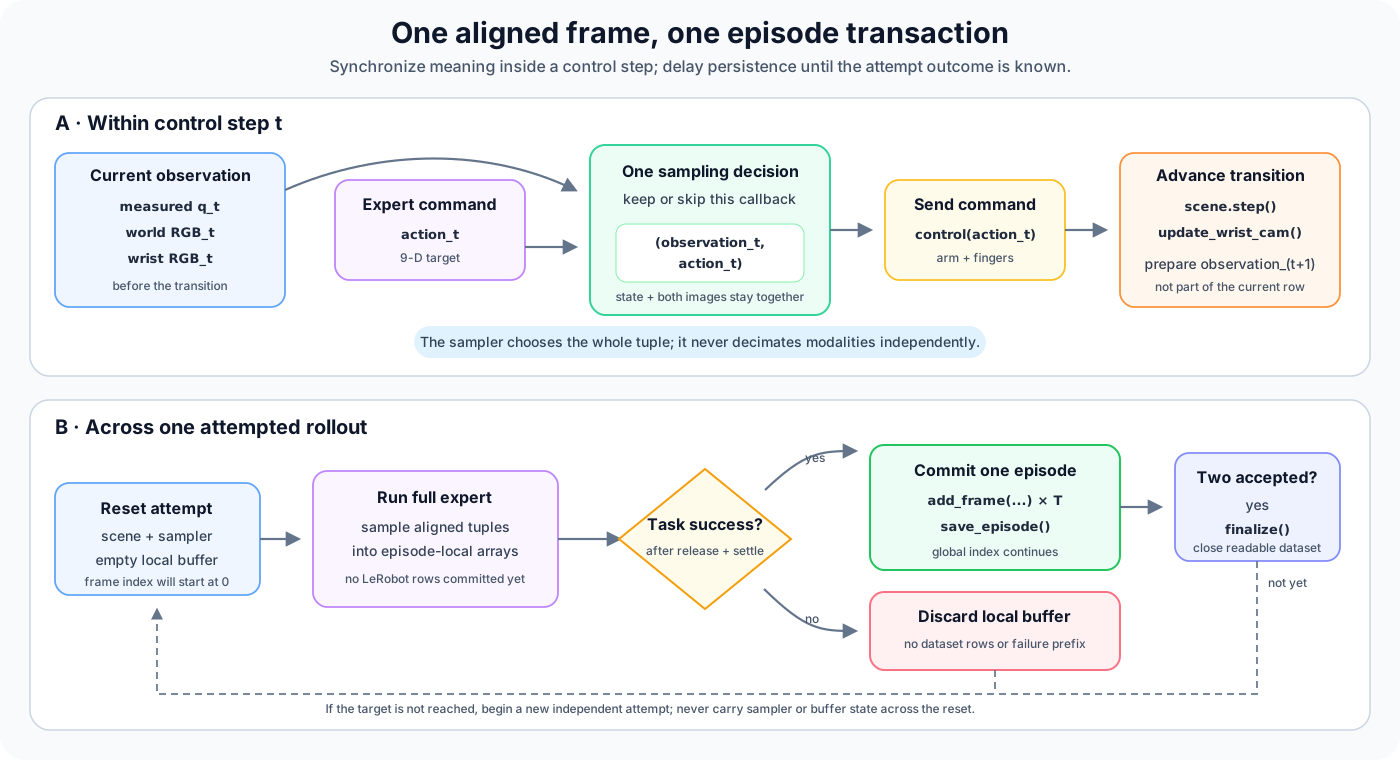
Course-created diagram. The upper half defines temporal alignment; the lower half defines the success-gated episode transaction used in this course.
Confusing these two boundaries creates different bugs. An off-by-one frame can silently teach an action from the wrong state even when every episode file is valid. A missing transaction boundary can leave half an attempt in an otherwise well-aligned dataset.
Align observation and action before advancing the simulator
The recorder runs before the simulator advances
Here, a transition is the change from the simulator's current state to its next state after an action is applied. The scripted expert from L08 computes a command, calls recorder.on_step(action), sends that command, advances the simulator, and updates the wrist camera pose:
current simulator state and current camera poses
  → compute action_t
  → recorder.on_step(action_t)
      ├── read measured q_t
      ├── render world_t
      ├── render wrist_t
      └── retain commanded target a_t
  → send a_t to the arm and fingers
  → scene.step()
  → update the wrist-camera pose
  → observation_{t+1} is ready for the next callback
The supervised pair is therefore
(observation_t, action_t),not (observation_{t+1}, action_t). The observation contains what was visible when the expert chose or exposed action_t. The transition caused by that command produces the next observation.
This convention agrees with the L08 trace. The persistent recorder adds two camera images and a sampling decision, but it must not move the hook to the other side of scene.step().
All recorded fields share one sampling decision
When a control step is retained, the recorder keeps all of these values together:
measured q_t
commanded target a_t
world RGB_t
wrist RGB_t
task text
Use one keep-or-skip decision for the whole group. If a control step is kept, store its state, action, and both camera images; if it is skipped, store none of them. Do not give each field its own sampling counter, and do not advance the scene between rendering the world and wrist views. Equal array lengths alone show only that the fields contain the same number of samples, not that corresponding rows came from the same control step.
A shape-correct dataset can still be one frame wrong
Pairing state_{t+1} with action_t often produces arrays with perfect shapes, finite values, and plausible plots. The semantic error appears only when the control-loop order is inspected. Record the callback index and keep capture, state, action, and both images inside one branch.
Sample a 100 Hz controller without inventing time
Control rate and dataset rate have different jobs
The current scene uses dt = 0.01 s, so the expert exposes one recorder callback per control step at 100 Hz. The dataset does not need to retain every callback. If its target rate is f FPS, the ideal spacing is
control_steps_per_frame = 100 / f.At 5 FPS this is exactly 20 control steps. At 30 FPS it is approximately 3.333, which is not an executable integer step count. Always taking every third step would produce about 33.3 FPS; always taking every fourth would produce 25 FPS.
Use the recorder's fractional accumulator
EpisodeRecorder converts the fractional interval into integer capture decisions with a running accumulator. It preloads the accumulator so that the first callback is retained, then adds one on every callback:
control_fps = 100  # Example: 100 control steps per simulated second
dataset_fps = 30   # Example: retain 30 dataset frames per simulated second
steps_per_frame = control_fps / dataset_fps
accum = steps_per_frame

for control_step in range(total_control_steps):
    accum += 1.0
    if accum < steps_per_frame:
        continue
    accum -= steps_per_frame
    capture(control_step)
This is the same update order used by the source recorder. For 100 callbacks, it produces:
| Dataset rate | Initial capture indices | Gap pattern | Number retained |
|---|---|---|---|
| 5 FPS | 0, 19, 39, 59, 79, 99 | first 19, then 20 | 6 |
| 30 FPS | 0, 3, 6, 10, 13, ... | 3 and 4 | 30 |
The extra 5 FPS sample comes from retaining the first callback and then reaching the last threshold at callback 99. Over longer episodes, the average approaches the requested rate. EpisodeRecorder.reset() restores the preloaded accumulator for every attempt, so sampling never continues from the previous attempt.
Logical timestamp is not the exact physical step time
LeRobot 0.6.0 assigns an episode-local frame_index and computes
timestamp = frame_index / dataset_fps.At 30 FPS, the logical timestamps are 0, 0.0333..., 0.0666..., and so on. The corresponding retained simulator callbacks may occur at indices 0, 3, 6, 10, with physical gaps of 30, 30, and 40 ms. The logical timeline is uniform; the integer-step sampling gaps alternate.
Both are useful, but they answer different questions:
| Quantity | Meaning | Stored by the default schema? |
|---|---|---|
| Control-step index | Which simulator callback would be retained | Calculated in the sampling exercise only |
| Physical simulator time | control_step / control_fps | Derivable from the calculated index |
| LeRobot timestamp | Uniform episode time, frame_index / dataset_fps | Yes |
| Wall-clock time | How long the machine took to simulate, render, encode, and write | Measured separately |
The notebook calculates the expected capture indices with the same accumulator, but does not add them to the dataset or use them as policy input. Do not call LeRobot's logical timestamp a wall-clock measurement, and do not treat the average 3.333 gap as one fixed number of simulator steps.
Define the frame schema before writing data
Four declared features plus one required task string
The recording schema has four user-declared features:
| Key | Writer input | Meaning |
|---|---|---|
observation.state | float32, shape (9,) | Measured 7 arm + 2 finger qpos at the callback |
action | float32, shape (9,) | Commanded 7 arm + 2 finger position target paired with that observation |
observation.images.world | uint8, shape (120, 160, 3) declared as video | Fixed world-camera RGB in HWC order |
observation.images.wrist | uint8, shape (120, 160, 3) declared as video | Eye-in-hand RGB in HWC order |
Each add_frame() call also includes the required task string:
pick the banana and place it in the bowlIn LeRobot 0.6.0, task is special input used to build the task table; it is not another feature that this caller declares in build_features(). On readback, the reader resolves the stored task_index back to task text.
The writer receives HWC uint8 images. The default reader path returns decoded video as channel-first torch.float32, so a (120,160,3) write contract and a (3,120,160) readback contract are compatible rather than contradictory. L10 will explain the reader representation and training samples in more detail.
LeRobot owns five bookkeeping fields
The caller must not provide these fields:
| Automatic field | Boundary |
|---|---|
frame_index | Starts at zero inside each episode |
timestamp | Equals frame_index / fps inside each episode |
episode_index | Identifies the committed episode |
index | Continues globally across committed frames |
task_index | Points into the task metadata table |
add_frame() creates frame_index and timestamp in the active episode buffer. save_episode() assigns the global index, fills episode_index, and maps task strings to task_index. Supplying these fields manually would mix caller and writer ownership, so LeRobot's frame validation rejects them.
Preserve the nine-dimensional joint order
Both state and action use JOINT_NAMES from robo_genesis.record_dataset:
panda_joint1 ... panda_joint7,
panda_finger_joint1, panda_finger_joint2
The names make dimension ownership explicit. Checking only shape == (9,) would not detect a swapped finger pair or an arm/finger reorder.
During grasp, lift, and transport, the arm receives position targets, while the two fingers are controlled by a closing force. The dataset still stores one nine-value position-target action: seven arm targets followed by two zeros. For the finger entries, 0.0 is a proxy meaning “close the gripper”; it is neither the actual force command nor the measured finger position. This keeps the action format consistent with the later policy, which outputs nine joint- position targets.
Treat each episode as a transaction
Attempt first, commit later
The outcome of an attempt is unknown until release, retreat, and settling are complete. The course recorder therefore buffers sampled arrays outside the LeRobot writer:
reset scene and EpisodeRecorder
  → run the complete scripted attempt
  → evaluate check_success()
      ├── success + non-empty buffer
      │     → dataset.add_frame(...) for every buffered frame
      │     → dataset.save_episode()
      └── failure
            → discard the episode-local arrays
This ordering matters because LeRobot's own add_frame() may write temporary camera images before save_episode(). By waiting until success before calling add_frame(), the course's normal success-only path never puts a failed attempt into the writer at all.
The target is two accepted banana-to-bowl episodes, with at most ten attempts. If two successes are not obtained, the final check fails.
Success is an episode-level gate
For this dataset, success means that the released banana satisfies the L08 horizontal and below-rim containment checks after settling. It decides whether the whole attempt enters the main dataset.
The success-only dataset therefore does not add a per-frame success feature that would be true in every saved row. Such a column would be redundant and would not preserve where or why a rejected attempt failed.
save_episode() and finalize() close different boundaries
save_episode() commits the current episode: it writes tabular data, encodes videos, updates metadata, and resets the writer's episode buffer. The next episode starts with frame_index=0 and timestamp=0; its episode_index increments, while global index continues.
finalize() closes the dataset after all accepted episodes. In LeRobot 0.6.0 it waits for pending image/video work, closes the Parquet writer, and finalizes metadata. Without it, required footer metadata may be missing and the dataset may be invalid. A garbage-collection safety net is not a substitute for an explicit lifecycle call.
The minimum recording experiment
Deliberately small parameters
The companion notebook uses:
| Setting | Core value | Why |
|---|---|---|
| Task | banana → bowl | Reuses the accepted L08 task and predicate |
| Accepted episodes | 2 | Makes the episode boundary observable without implying training sufficiency |
| Maximum attempts | 10 | Prevents an unbounded collection loop |
| Dataset FPS | 5 | Preserves task progression with modest encoding cost |
| Image size | 160×120 | Keeps two-camera video small enough for the four-path verification matrix |
| Camera keys | world + wrist | Combines scene context with an eye-in-hand view |
| RGB codec | H.264 | Explicit codec used by the current verification path |
| Scene batch size | n_envs=1 | Uses the supported serial recorder |
These values are a verification scale, not a recommended production dataset. Two successful episodes cannot establish expert success rate, coverage, diversity, or policy performance.
Create the writer explicitly
The shared module owns the schema helpers; the notebook exposes their result before constructing the writer:
from lerobot.configs.video import RGBEncoderConfig
from lerobot.datasets.lerobot_dataset import LeRobotDataset
from robo_genesis.record_dataset import build_features

dataset = LeRobotDataset.create(
    repo_id="local/l09_banana_demo",
    root=dataset_root,
    fps=5,
    features=build_features((160, 120)),
    robot_type="franka",
    use_videos=True,
    rgb_encoder=RGBEncoderConfig(vcodec="h264"),
)
The logical repository ID and local root are separate values. The default root is the configured DATASETS_DIR / "l09_banana_demo"; set ROBO_GENESIS_DATASETS_DIR before starting the notebook kernel to relocate the dataset.
The notebook also places HF_DATASETS_CACHE, XDG_CACHE_HOME, and MPLCONFIGDIR in writable, isolated locations before kernel startup. A valid local dataset can still fail to open when a library cache points to a read-only directory.
Protect existing datasets
If the exact output directory already exists, the notebook stops by default. Only RG101_L09_OVERWRITE=1 opts into replacing that resolved l09_banana_demo directory. Never recursively delete the whole datasets directory, project root, home directory, or a path that has not been resolved and checked.
Rendering is required for the hands-on experiment
ROBO_GENESIS_RENDER=1 is required to complete the L09 experiment. It creates both cameras, runs the scripted attempts, writes and reopens the dataset, and produces visual evidence.
ROBO_GENESIS_RENDER=0 runs only limited diagnostic checks of the sampling schedule, schema, and throughput calculations. It does not create cameras, run the recorder, write or reopen a dataset, or produce visual evidence, so it does not complete the experiment.
Reopen the result instead of trusting the writer
After the second accepted episode and finalize(), construct fresh metadata and reader objects:
from lerobot.datasets.lerobot_dataset import (
    LeRobotDataset,
    LeRobotDatasetMetadata,
)

metadata = LeRobotDatasetMetadata(
    "local/l09_banana_demo",
    root=dataset_root,
)
recorded = LeRobotDataset(
    "local/l09_banana_demo",
    root=dataset_root,
    video_backend="pyav",
)
sample = recorded[0]
This is a persistence test, not just another view of the in-memory recorder. The readback must establish:
- metadata reports 5 FPS, two episodes, one task, and a positive total frame count;
- total frames equal the sum of the two accepted in-memory buffer lengths;
- global
indexis continuous across both episodes; - each episode's
frame_indexandtimestamprestart at zero; timestamp == frame_index / 5for every row;- state and action decode as finite
(9,)torch.float32values in the declared joint order; - both images decode through PyAV as finite
(3,120,160)torch.float32tensors; and - task text resolves exactly to the banana-to-bowl description.
Inspect representative paths under meta/, data/, and videos/, including meta/info.json and meta/tasks.parquet, but do not assume that every episode must map to one separate Parquet or MP4 file. LeRobot can shard storage while preserving logical episode boundaries.
Three views of one persisted episode
The notebook presents evidence only after readback:
- Episode timeline: global
index,episode_index,frame_index, andtimestampshow continuation across episodes and reset within each one. - Command/state curves: one arm joint and the fingers compare commanded target with measured qpos. Arm radians and finger metres use separate panels rather than a misleading shared scale.
- Synchronized montage: start, middle, and end samples from one episode form a 2×3 world/wrist grid. Each column has the same episode, frame, and timestamp in its title.
The montage should be non-empty and non-black, show task progression, and make the wrist viewpoint change plausible. It proves that current persisted video can be decoded and associated with the tabular row. It does not prove that the demonstrations are diverse or sufficient for training.
Collection throughput is a pipeline property
Dataset FPS is not wall-clock speed
One serial attempt contains several stages:
simulate → render two cameras → resize → buffer → encode → write metadata/dataLowering dataset FPS reduces retained frames, image work, and encoding volume. It does not by itself make physics simulation advance faster, and it says nothing about successful episodes per wall-clock hour. A machine can produce a 5 FPS dataset slower than real time if rendering or encoding is expensive.
Useful measurements state both numerator and denominator:
committed_frames / wall_clock_second
accepted_episodes / wall_clock_hour
simulated_seconds / wall_clock_second
They also record backend, batch size, dataset FPS, resolution, codec, warm-up, synchronization, and whether failed attempts are included in elapsed time.
Batched simulation is not a complete parallel recorder
L06 showed that scene.build(n_envs=B) creates B independent simulator states. That fact does not automatically solve recording:
| Capability | What must be true | What it does not prove |
|---|---|---|
| Serial collection | One environment has one sampler, buffer, success result, and reset | High throughput or broad coverage |
| Batched simulation | State/action rows retain a leading environment identity | Independent episode commits or encoded videos |
| Batched rendering | Camera arrays preserve environment and camera identity | Writer capacity or correct asynchronous resets |
| Complete parallel recording | Every environment has its own clock, buffer, outcome, reset, and commit path; encoding queues are bounded | A fixed speedup on every machine |
For a complete parallel recorder, environment 2 finishing must not truncate environment 0's active episode. A reset in one row must not reset another row's sampler. Camera frames must retain both camera and environment identity. Finally, the encoder and storage writer must either sustain the producer rate or apply bounded queues and backpressure instead of consuming unbounded memory.
The V1 lesson implements only the single-environment recorder. B × FPS is a theoretical frame production rate, not a measured speedup claim.
Diagnose failures by boundary
- Dependency or codec: confirm LeRobot 0.6.0, the dataset dependencies, and the API codec value
h264; do not substitute an FFmpeg encoder name such aslibx264without checking the API contract. - Cache or output path: check that the precise dataset root and library caches are writable. Do not solve a permission error by deleting unrelated data.
- Camera capture: confirm rendering is enabled, both cameras were declared before
build(), the wrist pose updates after every step, and captured RGB has the expected shape and dtype. - Temporal alignment: print callback and capture indices. Read state and both images before sending the paired action; do not hide an off-by-one bug by trimming one end of an array.
- Sampling rate: inspect control FPS, dataset FPS, initial phase, episode reset, count, and gap set. Wall-clock jitter does not belong in the logical frame timestamp.
- Episode leakage: inspect recorder reset, success gate,
save_episode()calls, and the next episode's first frame. A failed attempt must not leave dataset rows or video. - Unreadable output: confirm
finalize()ran, reopen withvideo_backend="pyav", and inspect metadata, Parquet, and both video keys rather than accepting directory existence alone. - Low throughput: time simulation, rendering, resize, encoding, and writing separately before changing multiple parameters or claiming that batching fixed the bottleneck.
Checkpoints and one-variable exercise
Concept checkpoints
- Why is
(state_{t+1}, action_t)wrong for this recorder hook? - Why can 100/30 not be rounded to one fixed three-step interval?
- How can LeRobot timestamps be uniform while retained simulator gaps alternate between three and four steps?
- Why can a complete failed attempt be buffered and then discarded without corrupting the dataset?
- What distinct boundaries do
save_episode()andfinalize()close? - Why must state, action, world RGB, and wrist RGB share one sampling decision?
- Why does
n_envs=4alone not demonstrate a complete parallel recorder or a four-times throughput improvement? - What does a success-only dataset prove, and what failure or recovery information does it omit?
One-variable exercise: change only dataset FPS
Keep control_fps=100, the same rollout length, schema, image size, and codec. Choose one candidate rate from 10, 20, or 30 FPS.
Before computing, predict:
- the set of possible control-step gaps;
- the logical timestamp spacing;
- the number of retained frames for a given control-step count; and
- which costs may decrease when fewer frames are retained.
Then run the sampling calculation and compare its capture indices with your prediction. Report “dataset frames per simulated second” separately from “wall-clock throughput not measured.” Do not rerun Genesis or infer machine speed from the sampling schedule.
Evidence boundary and connection to L10
Two readable, successful episodes establish a limited but important result: the current task, recorder, schema, video path, transaction boundary, and reader can work together. They do not establish:
- expert success probability across seeds;
- dataset diversity or coverage;
- a causal benefit from either camera;
- sufficient data for ACT or SmolVLA;
- policy loss, open-loop accuracy, or closed-loop success; or
- sim-to-real transfer.
L10 will begin from the persisted rows and metadata that this lesson verifies. It will explain dataset anatomy, decoded sample semantics, statistics, temporal windows, and why behavior cloning learns from observation/action examples. Keeping those topics there lets L09 stay focused on producing records whose meaning is already correct.
Summary
- Capture measured state, both images, and commanded action before the transition so each row means
(observation_t, action_t). - Use one deterministic episode-local sampling clock; 100 Hz to 30 FPS needs alternating integer gaps, not a rounded fixed interval.
- LeRobot's uniform
frame_index / fpstimestamp is distinct from simulator callback time and wall-clock throughput. - Declare four user features, provide task text to
add_frame(), and leave bookkeeping fields to LeRobot. - Buffer a complete attempt, use task success as the acceptance gate, call
save_episode()once per accepted episode, and callfinalize()once after collection. - Reopen the dataset and decode both cameras before trusting the output.
- Treat FPS, batched simulation, complete parallel recording, and measured throughput as separate claims.
Sources
- LeRobot 0.6.0
LeRobotDatasetsource — version-pinned create, readback, episode-save, and finalization interface. - LeRobot 0.6.0
DatasetWritersource — version-pinned frame indices, timestamps, task mapping, episode commit, video encoding, and writer lifecycle. - LeRobot 0.6.0 feature validation source — ownership of user features and automatic bookkeeping fields.
- Genesis World documentation — official engine, camera, simulation, and parallel-environment APIs.
- Genesis World 1.3.3 on PyPI — the exact engine version pinned by this course.
- PyAV documentation — the video container and frame-decoding library used by the explicit readback path.