
ONNX Export & Quantization
Torch-RecHub supports exporting trained models to ONNX for cross-platform inference deployment. This page covers the complete usage and recommended practices for ONNX export and quantization (INT8/FP16) in production inference scenarios that require low latency and low memory usage.
Install Dependencies
ONNX-related dependencies are optional and can be installed as needed:
pip install "torch-rechub[onnx]"Notes:
torch-rechub[onnx]installsml-dtypes,onnx,onnxscript,onnxruntime, andonnxconverter-commonfor FP16 conversion.- For GPU inference, use the
onnxruntime-gpupackage that matches your local CUDA version and driver, and verify that your environment actually imports the intended Runtime variant.
Export to ONNX (Trainer export_onnx)
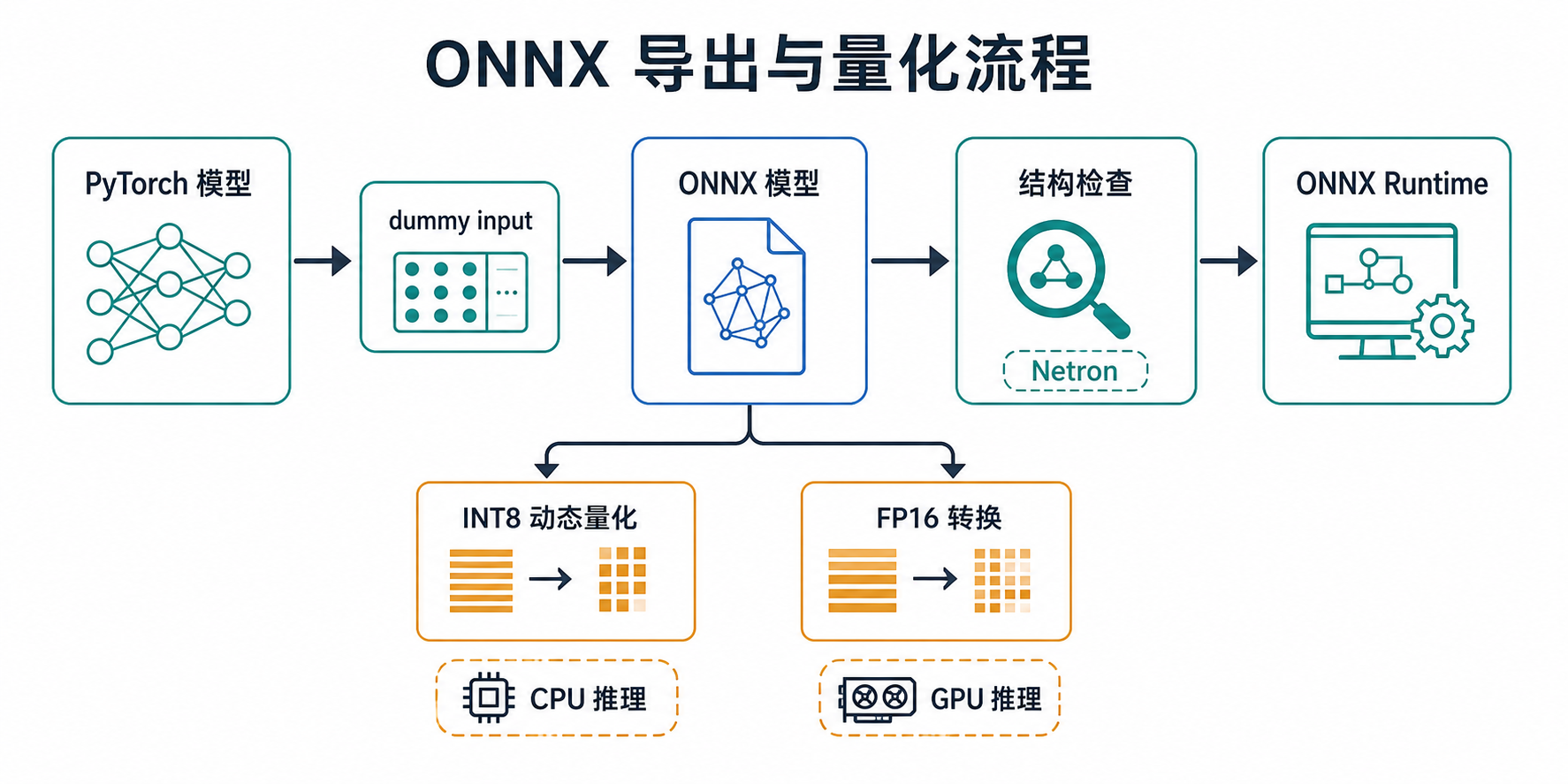
Every Torch-RecHub trainer provides an export_onnx() method (CTR/Matching/MTL/Seq). The export process automatically constructs dummy inputs and supports a dynamic batch size.
Export CTR Models (Ranking/Re-ranking)
from torch_rechub.trainers import CTRTrainer

# ... trainer.fit(train_dl, val_dl)
trainer.export_onnx("deepfm.onnx")
Export Matching Models (Retrieval): Full Model / Separate Towers
For two-tower models, it is generally best to export the user tower and item tower separately so their embeddings can be computed independently online:
from torch_rechub.trainers import MatchTrainer

# Export the user tower (for user embeddings)
trainer.export_onnx("user_tower.onnx", mode="user")

# Export the item tower (for item embeddings)
trainer.export_onnx("item_tower.onnx", mode="item")
Export Multi-Task Models (MTL)
from torch_rechub.trainers import MTLTrainer

trainer.export_onnx("mmoe.onnx")
Export Arguments and Advanced Control (onnx_export_kwargs)
To select an exporter or pass arguments to torch.onnx.export() that are not already used by the wrapper, provide them through onnx_export_kwargs:
trainer.export_onnx(
    "model.onnx",
    dynamic_batch=True,  # Dynamic batch size (recommended)
    onnx_export_kwargs={
        "dynamo": False,  # Force the legacy exporter in this example
    },
)
The wrapper already sets f, input_names, output_names, opset_version, do_constant_folding, verbose, and the automatically generated dynamic_axes. Do not repeat them in onnx_export_kwargs, or a ValueError will be raised.
Exporter selection recommendations:
- CTR / Matching / MTL: By default, first try
dynamo=True, expressing the dynamic batch throughdynamic_shapes; on failure, the exporter automatically falls back to the legacy exporter anddynamic_axes. - SeqTrainer: Dynamic batch and sequence lengths use the legacy exporter by default; for fixed shapes, you can explicitly pass
dynamo=Truewhen needed. - Older PyTorch versions: If
dynamois unsupported, the exporter ignores the argument and uses a compatible path. Operator coverage may still differ across PyTorch versions.
Inspect the ONNX Model Structure
After exporting to ONNX, you can inspect the model structure online with Netron:
- Open https://netron.app/
- Drag or upload the exported
.onnxfile - Inspect the model's network structure, layer parameters, and tensor shapes
Tip: Netron supports multiple model formats (ONNX, TensorFlow, PyTorch, and others) and is a convenient tool for debugging and validating exported models.
ONNX Quantization
FP32 is often not the best choice for production inference. Two common compression methods are:
- INT8 dynamic quantization: Primarily quantizes weights for operations such as Linear/MatMul to INT8. It usually provides substantial inference speedups on CPU with manageable accuracy loss.
- FP16 conversion: Better suited to GPU inference with Tensor Core support; it can reduce GPU memory use and improve throughput.
Torch-RecHub provides a unified API in its quantization module:
from torch_rechub.utils.quantization import quantize_model1) INT8 Dynamic Quantization (Recommended for CPU)
from torch_rechub.utils.quantization import quantize_model

quantize_model(
    input_path="model_fp32.onnx",
    output_path="model_int8.onnx",
    mode="int8",
)
Optional arguments:
per_channel=True: Enable per-channel quantization for weightsreduce_range=True: Reduce the quantization range, which may be more stable on some CPUsweight_type="qint8"|"quint8": Weight quantization type
Note: Support for
quantize_dynamic()arguments varies slightly betweenonnxruntimeversions. Torch-RecHub automatically filters out arguments unsupported by the installed version to maintain compatibility.
2) FP16 Conversion (Recommended for GPU)
from torch_rechub.utils.quantization import quantize_model

quantize_model(
    input_path="model_fp32.onnx",
    output_path="model_fp16.onnx",
    mode="fp16",
    keep_io_types=True,  # Keeping I/O in FP32 is generally recommended for better compatibility
)
Example Scripts and Benchmarks
The repository provides scripts for quick validation:
Quantization Scripts
python examples/serving/quantize_onnx.py --input model_fp32.onnx --output model_int8.onnx --mode int8
python examples/serving/quantize_onnx.py --input model_fp32.onnx --output model_fp16.onnx --mode fp16
Performance Comparison Scripts
Compare model size and inference latency across FP32, INT8, and FP16:
python examples/serving/benchmark_onnx_quantization.py --fp32 model_fp32.onnx --int8 model_int8.onnx
python examples/serving/benchmark_onnx_quantization.py --fp32 model_fp32.onnx --fp16 model_fp16.onnx --provider CUDAExecutionProvider
The script automatically constructs dummy inputs from the ONNX input signature, making it suitable for a quick end-to-end performance sanity check.
A successful export only confirms that the model file was generated. Before production use, run both PyTorch and ONNX Runtime on real samples to compare output shapes, numerical errors, and dynamic batching, then reevaluate business metrics after quantization. The benchmark script does not replace these consistency checks.