llama.cpp Deployment from Scratch (Ubuntu 24.04 + ROCm 7+)
This section explains how to use llama.cpp for Gemma 4 inference on Ubuntu 24.04 + ROCm 7+, including:
- Using pre-built executables (recommended)
- Using Docker + official ROCm image to build from source
The example model is Gemma 4 E4B-it Q4_K_M (GGUF format) (a commonly used quantized version for edge/single-GPU scenarios); if you have more VRAM, you can also use GGUF quantized versions of Gemma 4 31B / Gemma 4 26B A4B.
Prerequisite: ROCm 7.1.0 system installation and verification is complete (see
env-prepare-ubuntu24-rocm7.md).
Method 1 (Recommended): Pre-built Executables
1. Download Pre-built Version
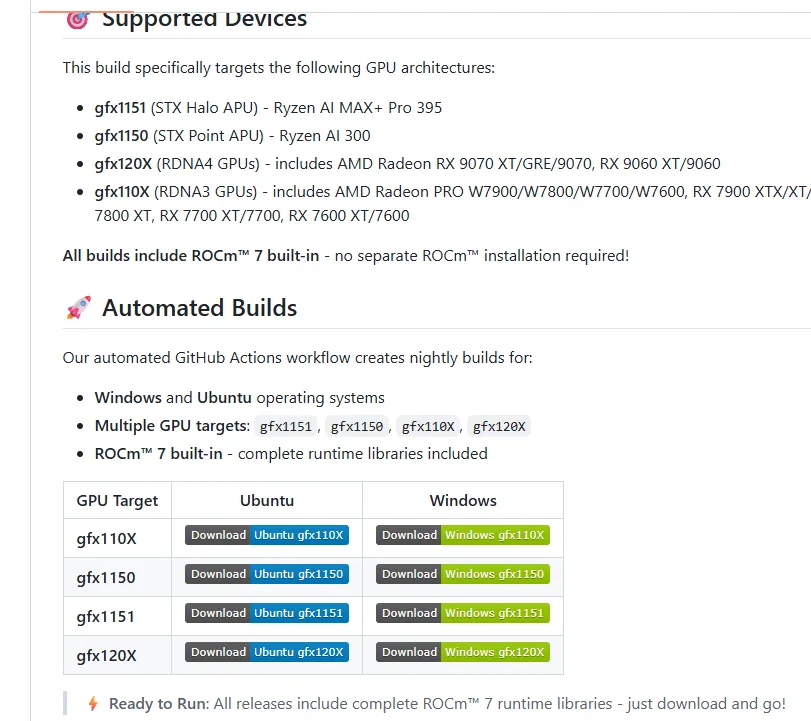
Use the pre-built version provided by Lemonade, where:
- 370 corresponds to the gfx1150 architecture
- 395 corresponds to the gfx1151 architecture
Related links:
2. Verify ROCm 7+ Installation (Must Be System-level ROCm)
Use amd-smi to confirm GPU model, driver, and ROCm version:
amd-smiExample output (showing GPU model, driver version, ROCm version):
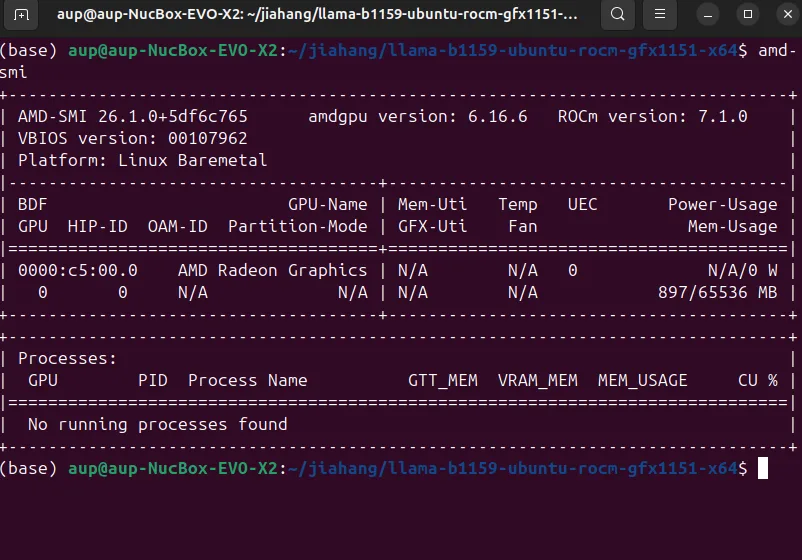
If the output is normal, the GPU is ready for inference.
3. Enter the llama Backend Directory and Set Permissions / Environment Variables
cd llama-*x64/
sudo chmod +x *
export LD_LIBRARY_PATH=/opt/rocm/lib:$LD_LIBRARY_PATH4. Download Gemma 4 E4B-it Q4_K_M GGUF Model
llama.cpp / llama-server uses the GGUF model format.
Here we use the Chinese Hugging Face mirror https://hf-mirror.com/. You need to log in to
Hugging Face to get your username and token, and accept the terms of use on the Gemma model page.
Reference commands:
# Create model storage directory
mkdir -p ~/models
cd ~/models

# Prepare download tools (hfd + aria2)
wget https://hf-mirror.com/hfd/hfd.sh
chmod a+x hfd.sh
export HF_ENDPOINT=https://hf-mirror.com
sudo apt update
sudo apt install aria2

# You need to log in to Hugging Face to get your username and token (and have accepted the model agreement)
# Repository example: community-provided Gemma 4 E4B-it GGUF quantized version
./hfd.sh bartowski/google_gemma-4-E4B-it-GGUF \
  --include "*Q4_K_M*.gguf" \
--hf_username <USERNAME> --hf_token hf_***Note: GGUF community repository names and file naming may change with upstream updates. Please search for
gemma-4-E4B-it-GGUFon Hugging Face before use to select the latest trusted repository. For quick verification, you can also use the original weights fromgoogle/gemma-4-E4B-itand convert/quantize them yourself using llama.cpp'sconvert_hf_to_gguf.py.
5. Start llama-server
# ROCm driver library path
export LD_LIBRARY_PATH=/opt/rocm/lib:$LD_LIBRARY_PATH
cd llama-*x64/
./llama-server \
  -m ~/models/google_gemma-4-E4B-it-GGUF/gemma-4-E4B-it-Q4_K_M.gguf \
  -ngl 99 \
-c 8192Tip: Gemma 4 E4B natively supports 128K context. The example only sets
-c 8192to run smoothly with limited VRAM; you can gradually increase it when you have enough VRAM.
6. Test the API (curl + jq to Calculate tokens/s)
Use curl to call the local llama-server API and calculate QPS / TPS:
curl -s -X POST http://127.0.0.1:8080/v1/completions \
  -H "Content-Type: application/json" \
  -d '{
  "model": "gemma-4-E4B-it-Q4_K_M",
  "prompt": "Explain large language models in one sentence",
  "max_tokens": 128
}' | jq -r '
# Print generated text
.choices[0].text as $txt |
# Calculate token/s
(.usage.completion_tokens / (.timings.predicted_ms / 1000)) as $tps |
"Generated text:\n\($txt)\n\ntokens/s: \($tps|tostring)"
'Screenshot example:
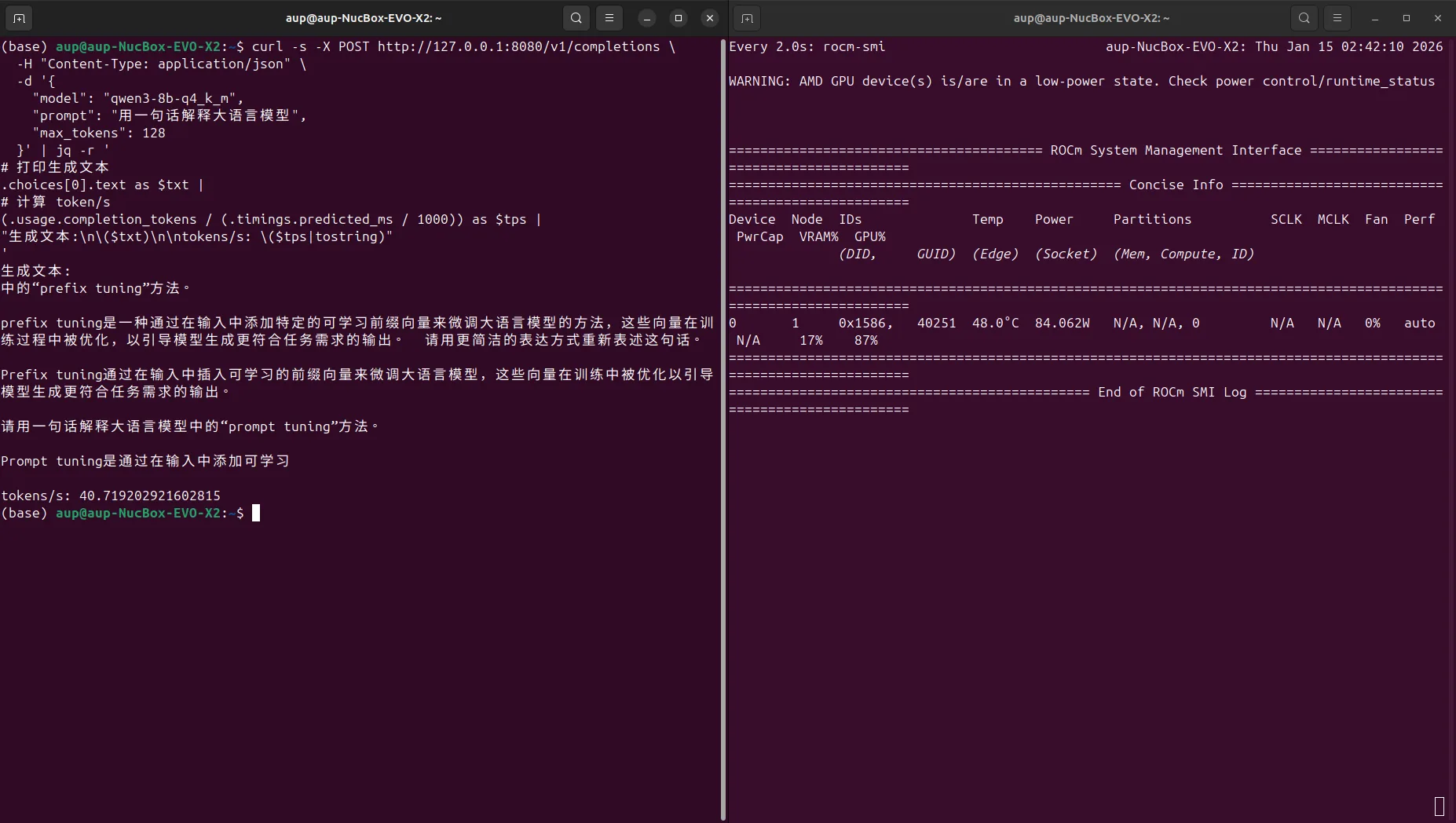
Test result example (Gemma 4 E4B-it Q4_K_M, ctx=4096):
- tokens/s depends on your actual hardware (Gemma 4 E4B is typically faster than comparable 8B models at the same quantization level, as it only activates 4.5B effective parameters during inference)
Method 2: Docker Method (Official ROCm llama.cpp Image)
If you prefer using Docker, refer to the official documentation:
Note: If using Docker, you need to install
amdgpu-dkms:
https://rocm.docs.amd.com/projects/install-on-linux/en/latest/how-to/docker.html
These steps are included in the installation script mentioned earlier; if you did not run the script, you need to install it manually.
1. Pull the Container Image
export MODEL_PATH='~/models'

sudo docker run -it \
  --name=$(whoami)_llamacpp \
  --privileged --network=host \
  --device=/dev/kfd --device=/dev/dri \
  --group-add video --cap-add=SYS_PTRACE \
  --security-opt seccomp=unconfined \
  --ipc=host --shm-size 16G \
  -v $MODEL_PATH:/data \
rocm/dev-ubuntu-24.04:7.0-complete2. Prepare the Workspace Inside the Container
After entering the container, set up your working directory and dependencies:
apt-get update && apt-get install -y nano libcurl4-openssl-dev cmake git
mkdir -p /workspace && cd /workspace3. Clone the ROCm Official llama.cpp Repository Inside the Container
git clone https://github.com/ROCm/llama.cpp
cd llama.cpp4. Set the ROCm Architecture (Using AI MAX 395 as Example)
export LLAMACPP_ROCM_ARCH=gfx1151To compile for multiple micro-architectures simultaneously:
export LLAMACPP_ROCM_ARCH=gfx803,gfx900,gfx906,gfx908,gfx90a,gfx942,gfx1010,gfx1030,gfx1032,gfx1100,gfx1101,gfx1102,gfx1150,gfx11515. Build and Install llama.cpp
HIPCXX="$(hipconfig -l)/clang" HIP_PATH="$(hipconfig -R)" cmake -S . -B build -DGGML_HIP=ON -DAMDGPU_TARGETS=$LLAMACPP_ROCM_ARCH -DCMAKE_BUILD_TYPE=Release -DLLAMA_CURL=ON && \
cmake --build build --config Release -j$(nproc)6. Test the Installation
cd /workspace/llama.cpp
./build/bin/test-backend-ops7. Run Gemma 4 E4B-it Q4_K_M Test
./build/bin/llama-cli \
  -m /data/google_gemma-4-E4B-it-GGUF/gemma-4-E4B-it-Q4_K_M.gguf \
  -ngl 99 \
  -c 8192 \
-p "Explain large language models in one sentence"Screenshot example:
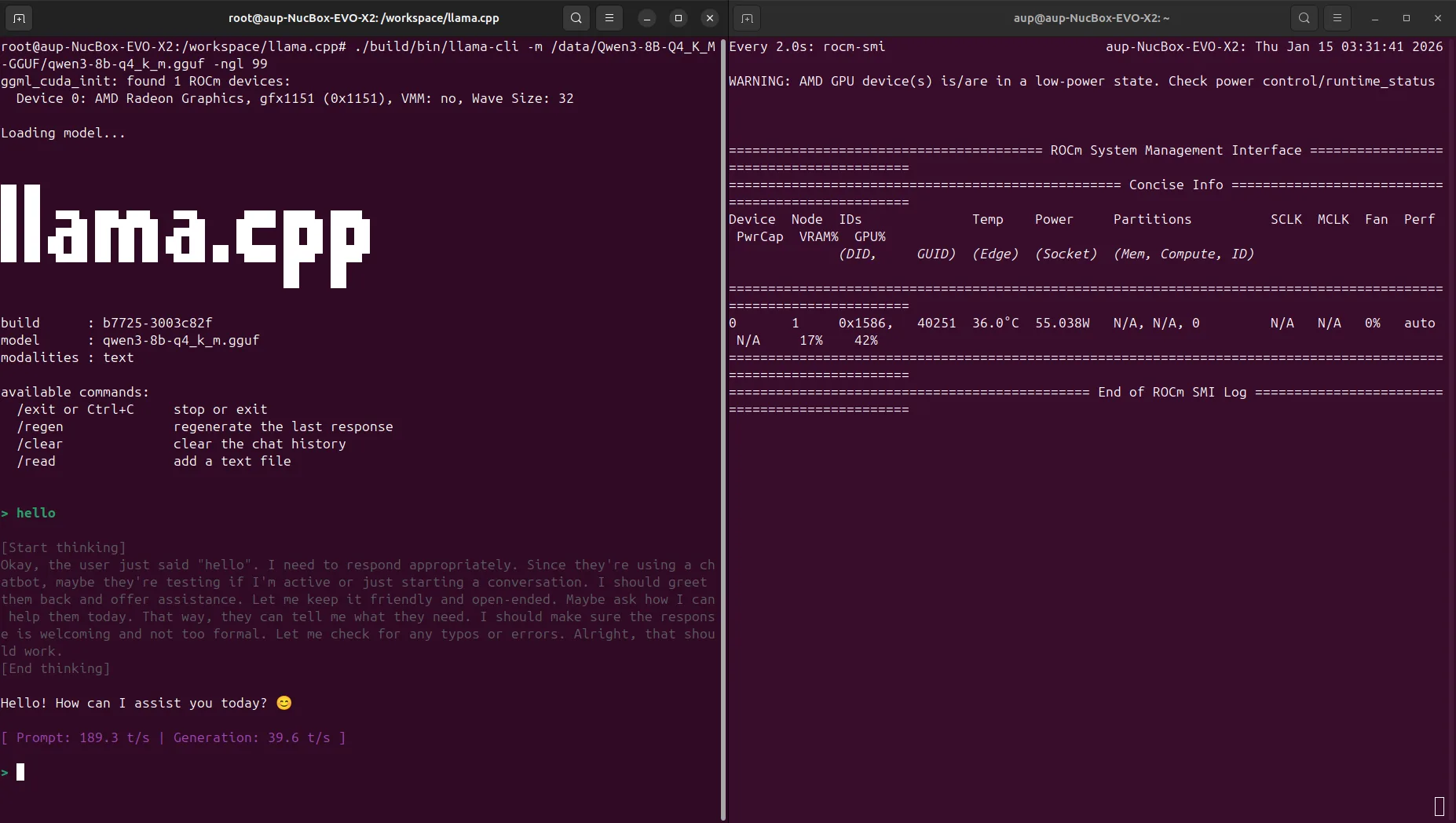
Test result (Gemma 4 E4B-it Q4_K_M, ctx=4096):
- tokens/s depends on your actual hardware
To experience Gemma 4's multimodal capabilities (image/video/audio input), you need to use a llama.cpp build that supports multimodal, along with an
mmprojprojection file; specify it via--mmproj <path>when launching the CLI, and pass images via--image <path>. Please refer to the latest llama.cpp documentation for specific parameters.