
Building Software End to End with GitHub Issues: From Product Conversation to a macOS App
This tutorial follows one complete Spec-driven development cycle. We begin with a rough product idea, clarify it with an AI agent, turn the agreement into a written specification, publish prioritized GitHub Issues, implement them in dependency order, and review the finished software.
How is this different from the previous chapter?
From Vibe Coding to Spec Coding explains why specifications are becoming central to AI development. This chapter is the practical companion: a real public repository shows how a specification becomes Issues, dependencies, commits, tests, and a working product.
Our starting point was one sentence:
I want to build a macOS CRM that helps me manage imported contacts and understand my relationships. We can use sample data first.
The result is Relationship Compass, a native macOS application that searches and filters contacts, edits relationship profiles, imports CSV files, records interactions, and calculates who needs a follow-up.
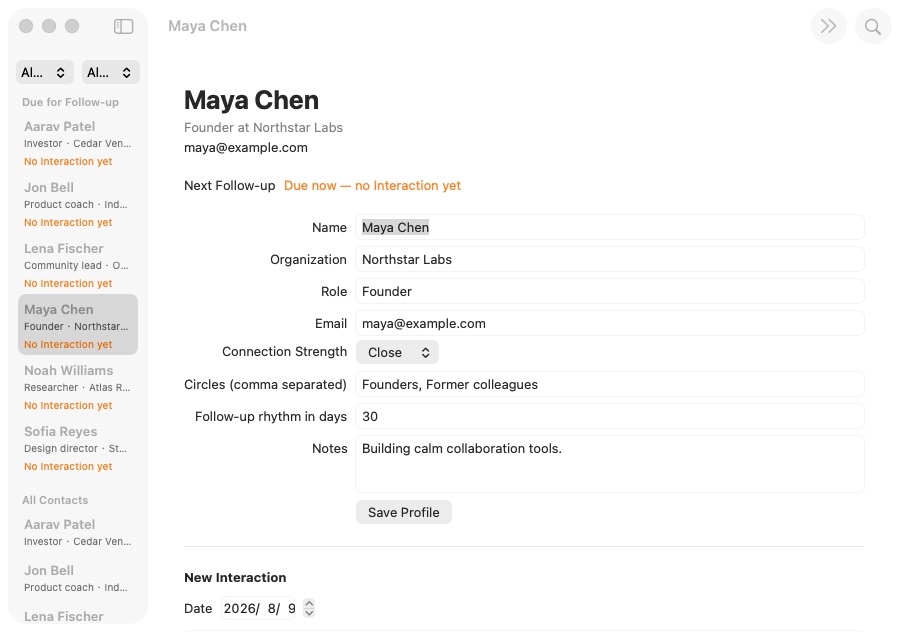
Explore the complete public example repository. It contains only sample data and preserves the specification, Issues, commit history, source code, and tests.
1. What Spec-driven development means
A common AI coding loop looks like this:
Describe an idea → AI writes code → something is wrong → add another instruction → modify againThat can work for a small page. As a project grows, however, earlier requirements disappear from the conversation, large changes become hard to track, and a feature may run without actually satisfying the original request.
Matt Pocock's Skills address this by giving the agent a repeatable workflow. A Skill tells the agent what to establish, what artifact to produce, and when to stop for confirmation—not merely which code to write.
1.1 Chat-first versus Spec-driven work
| Chat-first implementation | Spec-driven implementation |
|---|---|
| The current conversation is the main source of truth | A versioned Spec is the source of truth |
| New requirements are appended informally | Scope changes update the Spec and tasks first |
| Progress lives in agent summaries | Progress lives in Issues and commits |
| “It runs” is the main completion signal | Every acceptance criterion is checked |
The goal is not paperwork. It is to turn intent into a shared, durable standard that humans and agents can inspect, update, and verify.
1.2 GitHub's role in the workflow
GitHub is more than code storage here. It is simultaneously:
- a project archive for the Spec, terminology, and architecture decisions;
- a task board where Issues, priority, and dependencies express the work order;
- a completion record where commits, tests, comments, and closed Issues show what happened.
| GitHub artifact | Plain-language meaning | Example |
|---|---|---|
| Spec | What the finished software must do | specs/relationship-compass-mvp.md |
| Issue | One independently deliverable task | #2 Browse sample Contacts |
| Dependency | Which task must finish first | #3 is blocked by #2 |
| Commit | What changed in one implementation step | feat: browse sample contacts |
| Tests | Evidence that behavior still works | swift test |
| ADR | Why an important technical choice was made | docs/adr/0002-native-swiftui-macos.md |
flowchart LR
  A["Agreed decisions"] --> B["Versioned Spec"]
  B --> C["Parent Issue #1"]
  C --> D["Implementation Issues #2–#6"]
  D --> E["Priority + dependencies"]
  E --> F["Commits + tests"]
  F --> G["Close implementation Issues"]
  G --> H["Final review"]
  H --> I["Close the parent Issue"]
GitHub therefore becomes a development workspace with memory. A new session can reconstruct the project's decisions and current frontier without replaying the entire conversation.
1.3 The complete route
This example uses five Skills:
grill-with-docsclarifies the product and technical boundaries;to-specwrites the agreement as a formal specification;to-ticketscreates prioritized, dependency-aware GitHub Issues;implementcompletes the ready Issues one at a time;code-reviewchecks code health and requirement coverage.
Idea → clarify → specify → create tickets → implement → review2. Before you begin
To reproduce the example, prepare:
- a GitHub account;
- GitHub CLI (
gh) authenticated in your terminal; - Node.js 18 or newer;
- an AI coding tool that can load project Skills;
- a Mac with Xcode if you want to run the finished application.
2.1 Install Matt Pocock's Skills
Run this inside your project directory:
npx skills@latest add mattpocock/skillsTo install every Skill without selecting them individually:
npx skills@latest add mattpocock/skills -yThe practical flow is:
grill-with-docs → to-spec → to-tickets → implement → code-reviewFor a very large or uncertain project, wayfinder can identify the decisions that must be made before this flow begins.
2.2 Create a public example repository
Check GitHub authentication:
gh auth statusIf necessary, sign in with gh auth login -h github.com. Then create and push the repository:
gh repo create relationship-compass-macos \
  --public \
  --source . \
  --remote origin \
  --push
Never publish real contact data
This tutorial uses a public repository because every record is fictional. For a personal relationship manager, use --private and check samples, logs, and Git history for names, email addresses, or private notes before pushing.
2.3 Prepare task labels
| Label | Meaning |
|---|---|
ready-for-agent | The requirement is clear enough to implement |
priority:P0 | Foundation work that must happen first |
priority:P1 | Core work waiting on a dependency |
priority:P2 | Polish, documentation, and final verification |
completed-by-agent | Implemented and verified by the agent |
3. The product we will build
Relationship Compass is a personal relationship manager rather than a sales pipeline. The first release:
- starts with six deterministic sample contacts;
- searches contacts and filters by relationship strength and circle;
- edits organization, role, email, notes, and follow-up rhythm;
- imports UTF-8 CSV files;
- records an interaction and calculates the next follow-up date;
- persists data in a local JSON file and restores it on launch.
It deliberately excludes cloud sync, AI relationship scoring, accounts, a backend, and macOS Contacts access. This preserves a complete but privacy-safe MVP.
4. Step one: clarify the request with grill-with-docs
grill-with-docs behaves like an experienced product and technical partner. It asks about decisions that materially change the implementation before any code is written.
4.1 Let the conversation converge
The user does not need to know SwiftUI or database design. They only need to describe the desired experience clearly.
The conversation established these durable decisions:
| Decision | Choice | Reason |
|---|---|---|
| Platform | Native SwiftUI on macOS 14+ | Native file selection, keyboard behavior, and accessibility |
| Seed data | Six deterministic samples | No sensitive data needed to evaluate the app |
| Import | UTF-8 CSV | Easy to prepare, inspect, and repair |
| Persistence | Local JSON | Transparent and backend-free |
| Strength | Close / Active / Dormant | Avoid turning relationships into sales scores |
| Privacy | No Contacts access or network | No sensitive permission in the MVP |
| Test surface | Public RelationshipStore behavior | Verify outcomes rather than implementation details |
4.2 Establish a shared project vocabulary
The team records ambiguous terms in CONTEXT.md:
**Interaction**:
A dated note that records a meaningful exchange with a Contact.
_Avoid_: Activity, event, touchpoint

**Follow-up**:
A suggested next connection date derived from the latest Interaction
and the Relationship Profile's rhythm.
_Avoid_: Task, reminder, notification
This keeps code, tests, and Issues from drifting between Contact, Lead, and Customer, or between follow-ups, reminders, and notifications.
4.3 Record only consequential architecture decisions
The project contains two short ADRs:
0001-local-first-private-data.md: relationship data stays local and no Contacts permission is requested;0002-native-swiftui-macos.md: the app uses SwiftUI instead of Electron or a web shell.
ADRs are valuable for decisions that are expensive to reverse and have real trade-offs. They are not needed for every small implementation choice.
GitHub at this stage
The discussion happens in chat, but agreed facts are committed as CONTEXT.md and docs/adr/*. GitHub preserves the confirmed context so a later session can recover it. No implementation ticket exists yet.
5. Step two: write the specification with to-spec
The resulting Spec covers the problem, proposed MVP, 24 user stories, accepted technical decisions, verification strategy, and explicit non-goals. Read it at specs/relationship-compass-mvp.md or Issue #1.
5.1 Specify behavior, not filenames
A useful user story says:
As a user, I want contacts with no interaction history to appear in Follow-ups so newly imported people are not silently forgotten.
It identifies the user, desired behavior, and value without freezing the Swift file structure. The requirement survives refactoring.
5.2 Define verification early
The Spec requires public-behavior tests for sample initialization, combined filtering, CSV validation and deduplication, JSON persistence, profile editing, interaction ordering, and follow-up calculations at a controlled date.
GitHub at this stage
The Markdown file supports version history and review; Issue #1 provides a visible project entry point. A later scope change must update the Spec in a commit instead of living only in a new chat.
6. Step three: turn the Spec into ordered Issues with to-tickets
Avoid horizontal tickets such as “all models,” “all stores,” “all UI,” and “tests at the end.” A vertical slice joins the minimum data, interface, and tests needed to demonstrate one user outcome.
| Issue | Priority | Demonstrable result | Blocked by |
|---|---|---|---|
| #2 Browse sample Contacts | P0 | Launch, samples, search, and details | None |
| #3 Import and persist private Contact data | P0 | CSV deduplication and JSON persistence | #2 |
| #4 Organize Relationship Profiles | P1 | Profile editing, strength, circles, filters | #2 |
| #5 Record Interactions and plan Follow-ups | P1 | History and Follow-ups | #4 |
| #6 Polish and verify the MVP | P2 | Errors, docs, packaging, full verification | #3 and #5 |
flowchart LR
  T1["P0 · Browse sample Contacts"] --> T2["P0 · Import and persist"]
  T1 --> T3["P1 · Organize Profiles"]
  T3 --> T4["P1 · Interactions and Follow-ups"]
  T2 --> T5["P2 · Polish and verify"]
  T4 --> T5
Priority says how important a task is; a dependency says whether it can start now. The ready, unblocked tickets form the current task frontier.
GitHub at this stage
The Spec becomes five independently trackable Issues with priority:P0/P1/P2 and native Blocked by relationships. GitHub has now changed from an archive into the live task board.
7. Step four: implement one ready Issue at a time
| Issue | Main commit |
|---|---|
| #2 Browse samples | 9d9d7bd |
| #3 Import and persist | 935750b |
| #4 Organize profiles | 329bd67 |
| #5 Interactions and follow-ups | 83f4af6 |
| #6 Polish and verify | 3ae0bbf |
| Review fixes | cbad102, 11361ca, d1c83be |
7.1 Prove the behavior is missing first
For the CSV ticket, the agent:
- wrote a test proving that importing the same CSV twice must not duplicate contacts;
- ran it and confirmed the behavior was absent;
- implemented parsing and deduplication;
- added a test proving an invalid header cannot corrupt existing contacts;
- reran the focused tests and full build;
- committed the change and closed the Issue.
swift test --filter RelationshipStoreTests
swift build
swift test
The final project passes all 13 public-behavior tests.
7.2 Inspect the real code
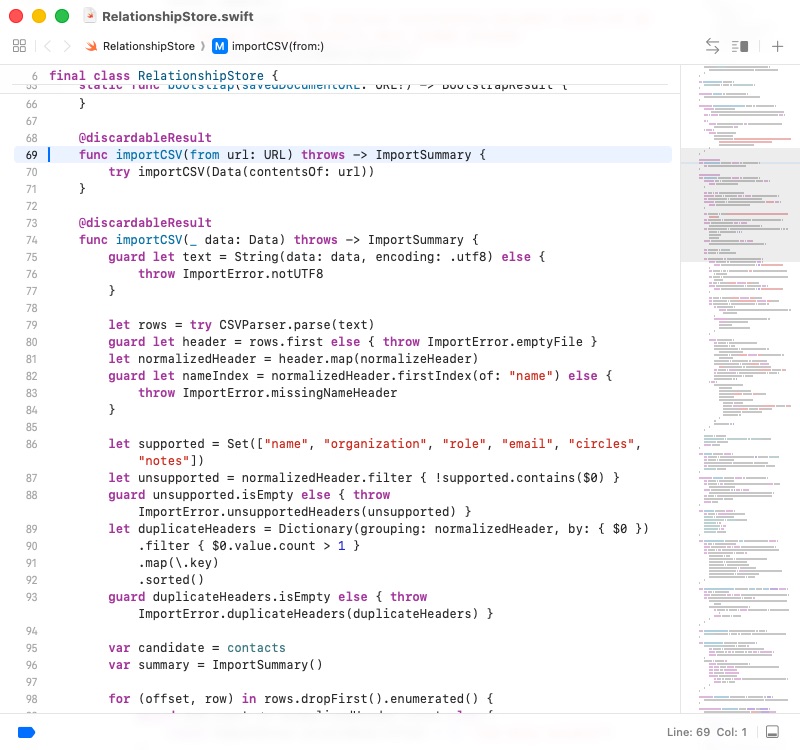
The committed RelationshipStore.importCSV reads UTF-8, validates headers, identifies duplicates, and builds a candidate result before replacing live data. A failure therefore cannot leave a half-imported state.
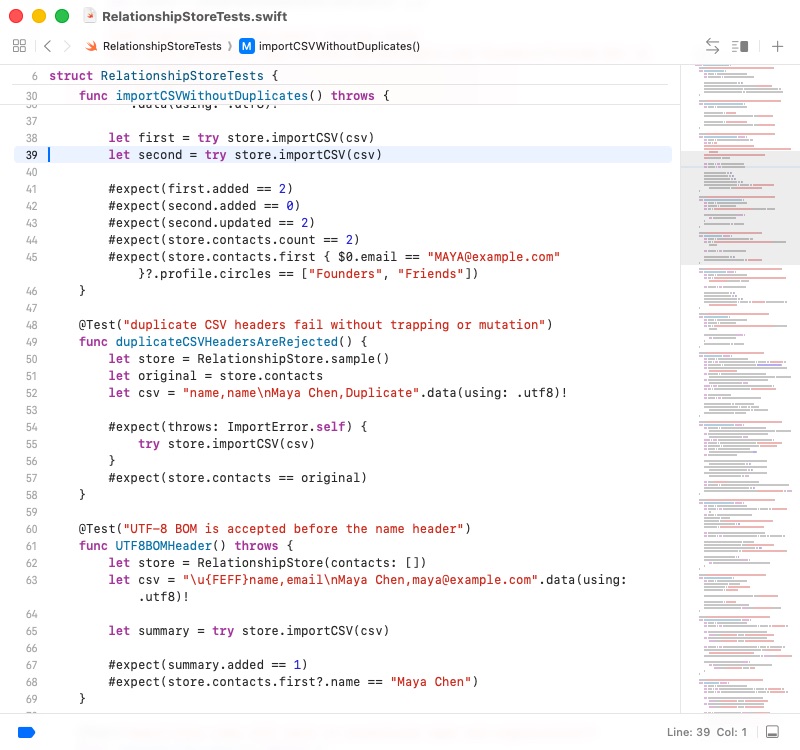
The matching RelationshipStoreTests cover repeated imports, duplicate headers, malformed input, and UTF-8 BOM files.
GitHub at this stage
The agent selects work using ready-for-agent, priority, and Blocked by. On completion it posts the commit and test result, removes the ready label, adds completed-by-agent, and closes the Issue. Issue state is therefore the real project state.
8. Step five: review code and requirement coverage
Closing the implementation Issues is not enough. code-review performs two distinct passes.
8.1 Review code health
The first pass checks naming, duplication, oversized files, coupling, and repository conventions. It found that the main SwiftUI view carried too many responsibilities and that the follow-up interval could bypass its minimum-one-day rule. The implementation was refactored and a validated value type was introduced.
8.2 Review completion against the Spec
The second pass rereads the Spec and every Issue. It found real gaps that the initial test suite missed:
- duplicate CSV headers produced a runtime error rather than a safe message;
- contacts without email could not be deduplicated by name and organization;
- the Follow-ups list ignored filters applied to the main contact list;
- saved data was not restored automatically on launch;
- the detail view did not show the calculated next follow-up date.
Tests were added first, the defects were fixed, and both review passes were rerun. This matters because green tests prove only the behavior those tests describe; they do not prove that every original requirement was tested.
GitHub at this stage
Review fixes remain visible as separate commits. Completion comments on Issues #2–#6 link the commits and verification results; only after both reviews pass is parent Issue #1 closed.
9. The finished application
Relationship Compass is a buildable, testable, packageable native macOS application—not a mockup.
| Deliverable | Result |
|---|---|
| GitHub planning | One parent requirement Issue and five implementation Issues, all closed |
| Implementation history | Nine focused commits completed in dependency order |
| Automated verification | 13/13 behavior tests pass and the project builds |
| Final review | Code-health and Spec-completion reviews pass |
| Runnable artifact | A script creates Relationship Compass.app |
| Privacy boundary | Local-only data, no Contacts access, no relationship upload |
9.1 Search and combined filters
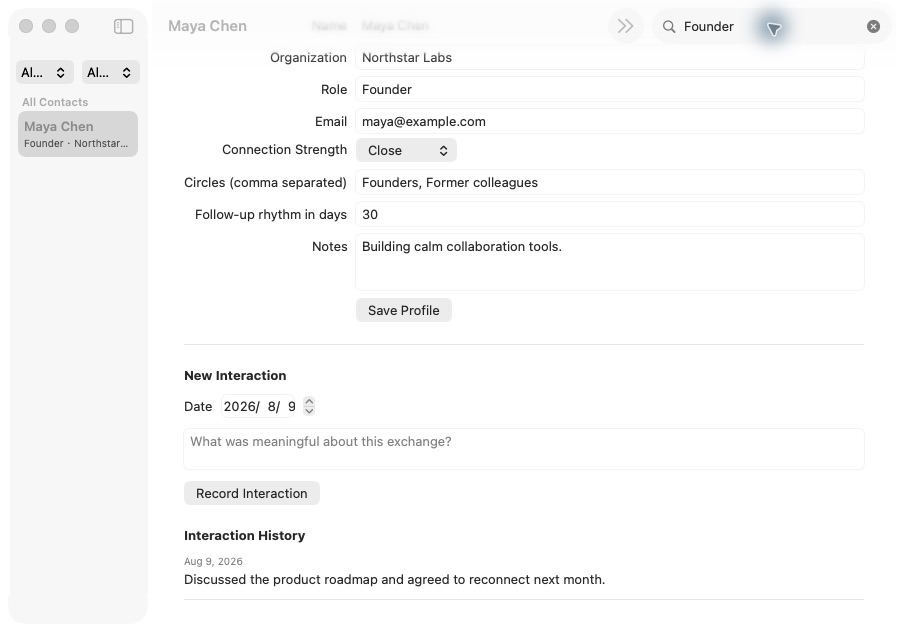
Searching for Founder narrows six sample contacts to Maya Chen. Relationship strength and circle filters can be combined, and the main list and Follow-ups use the same rules.
9.2 Edit a relationship profile
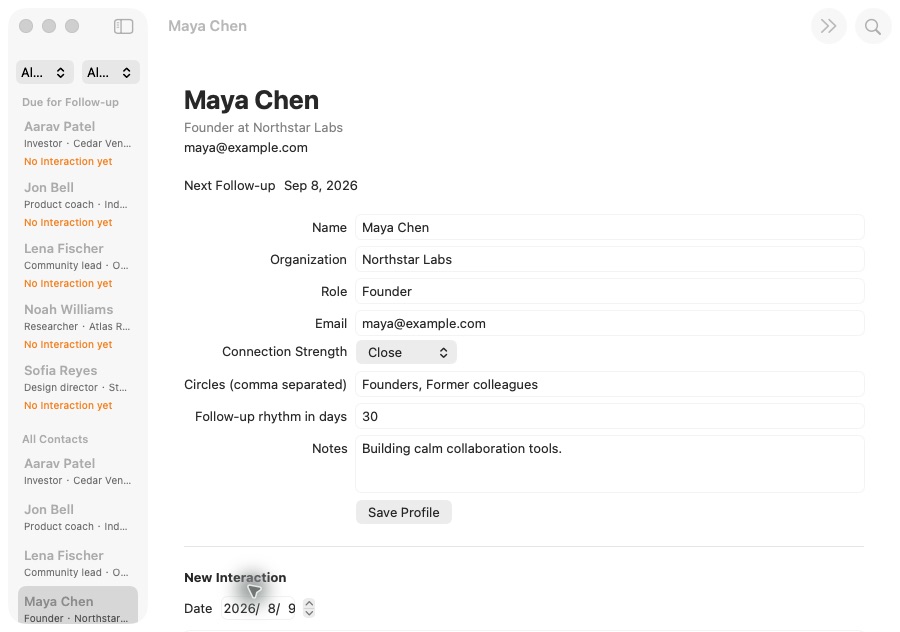
The detail view edits organization, role, email, relationship strength, circles, rhythm, and notes. Duplicate circles are normalized and the follow-up interval must be at least one day.
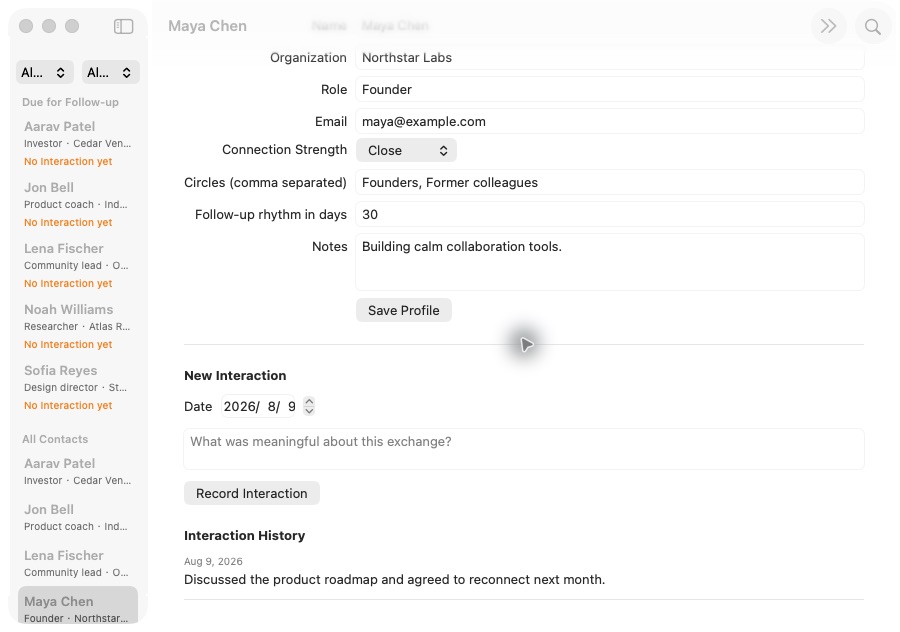
9.3 Record an interaction and calculate the next follow-up
After an interaction on August 9, 2026, a 30-day rhythm produces September 8, 2026 as the next connection date. The entry appears in Interaction History and the contact moves into Follow-ups when due.
On a Mac, run the complete project with:
git clone https://github.com/sanbuphy/relationship-compass-macos.git
cd relationship-compass-macos
swift build
swift test
./scripts/package-app.sh
open "dist/Relationship Compass.app"
This is not a production contacts product
Cloud sync, Contacts permission, encryption, and AI analysis would require a new privacy discussion and new architecture decisions.
10. Copy-ready prompts
10.1 Clarify the request
10.2 Generate the Spec
10.3 Create Issues
10.4 Implement everything
11. When full-autonomy mode is appropriate
This workflow suits scoped MVPs, sites, apps, and backends with observable behavior and reliable test or build commands. It is a poor fit when requirements change hourly, verification is impossible, or the work directly mutates production data.
Even during continuous implementation, a person should confirm:
- the MVP boundary after the requirements conversation;
- ticket coverage and dependency order before Issues are published;
- any payment, deployment, deletion, permission, privacy, or production operation;
- the real interface, build artifact, and review results at the end.
Reliable autonomy does not outsource every decision. The human owns goals, boundaries, and acceptance; the agent executes the agreed work consistently.
Summary
Rough idea
  ↓ grill-with-docs
Agreed scope + vocabulary + durable technical decisions
  ↓ to-spec
Versioned, testable requirements
  ↓ to-tickets
Prioritized, dependency-aware GitHub Issues
  ↓ implement
One ticket, test, and commit at a time
  ↓ code-review
Code-health review + Spec-completion review
  ↓
Buildable and verifiable software
When a chat ends, the Spec, Issues, dependency graph, commits, and test evidence remain in GitHub. The next session can resume from recorded project state instead of guessing the user's intent again.