From a Web Page to Real Software, and Then to an AI-Native Product
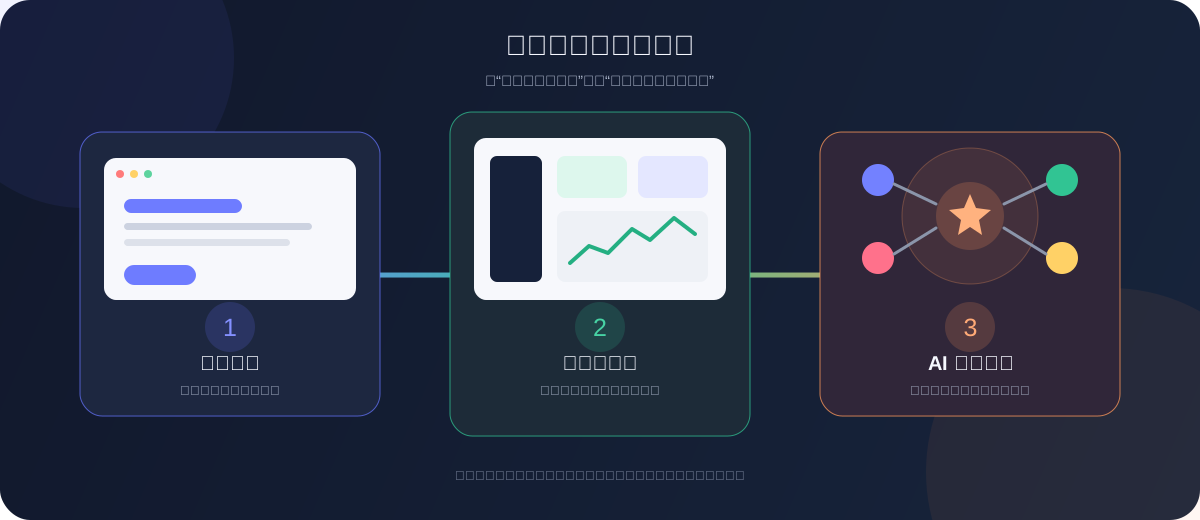
Most people begin vibe coding with a simple request: “Build me a web page.” Once that page appears, the useful next step is not to add more buttons. It is to make the product remember data, serve real users, and eventually let AI take part in completing a task.
This chapter explains those three stages and the capability worth adding at each one.
1. Start with a web page
A web page is an excellent first project. You describe the content and appearance, AI writes the first version, and within minutes the idea becomes something you can open, click, and share.
At this stage, focus on three skills:
- turn a vague idea into a clear page structure;
- revise the page until it reflects your own judgment;
- deploy the local page to a public link.
A personal home page, event page, portfolio, or small utility is enough for a first project.
When is the page finished?
A new visitor can tell what it does, it works on a phone, and every visible button has a real purpose.
If you do not have a public link yet, begin with the modern web landing-page project.
2. Turn the page into software
A polished page can present an idea. Real software helps someone complete a task.
Imagine a “Fridge Chef” page. A demo may show an input box and a sample recipe. A complete application lets the user submit ingredients, receive a result, save previous recipes, close the page, and continue later.
The move from page to program usually begins with four capabilities:
- Real data: users can save, edit, and delete information instead of looking at hard-coded examples.
- A backend: accounts, business rules, and secret keys do not live in the browser.
- Failure handling: empty input, lost connections, and failed requests explain what happened and what to do next.
- A real release: other people can open, install, or update the product without connecting to your computer.
“Software” does not have to mean a phone app. A website, mini program, desktop tool, or browser extension is complete software when it reliably finishes a real job.
Continue with Databases and Supabase, then choose a platform based on where your users work.
3. Build an AI-native product
Adding a chat box does not automatically make a product AI-native.
Traditional software waits for the user to click through a fixed sequence. An AI-native product first understands the outcome the user wants, reads the required context, uses controlled tools, and asks for confirmation before consequential actions.
For example, a normal meeting tool asks users to copy tasks by hand. An AI-native meeting assistant can:
- find commitments and risks in the discussion;
- ask who owns an unclear task or when it is due;
- prepare task drafts in the team's task system;
- show the drafts for approval before sending them.
The important design decision is the division of work:
- regular code owns deterministic rules, data, and permissions;
- AI handles language, generation, and incomplete information;
- people own goals, high-risk decisions, and final approval.
You are no longer deciding only what code should run. You are designing how a person, a program, and AI complete a task together.
4. Decide which stage you are in
You have not published a web page
Finish one small page, deploy it, and ask another person to open it. Do not add accounts, payments, or a complicated agent yet.
You have several attractive demos
Choose one. Add real data, a backend, and understandable error states. The goal is for another person to reach the result without you standing beside them.
You can already ship complete software
Do not place a chat box on every screen. Find one step that previously required human interpretation. Give AI only the context and tool it needs, and keep a human confirmation before the action takes effect.
Increase autonomy slowly
Begin with drafts, then allow read-only tools. Add writing, sending, or publishing only after the results are stable and you have permissions, confirmation, and undo paths.
5. Remember these three lines
A web page makes an idea visible.
Software helps a user finish something.
An AI-native product lets software participate in finishing it.
Do not rush to the final stage. A small, dependable application is more valuable than a complicated agent whose result cannot be checked.
First make the page real. Then complete one end-to-end task. Once data, permissions, and release practices are stable, let AI understand goals and use tools a little at a time. That is how a page grows into a product people can genuinely rely on.