Skip to content

5.1 Preprocessing (Modality-Specific Considerations)

"Good preprocessing is the foundation of successful deep learning models—garbage in, garbage out." — The Golden Rule of Medical Image AI

In the previous chapters, we learned about medical imaging principles, reconstruction algorithms, and quality assessment. Now, we enter the deep learning era, facing new challenges: how to prepare medical image data from different modalities into a format suitable for deep learning model input?

Unlike natural images, medical images have unique physical characteristics and clinical requirements. CT Hounsfield units, MRI multi-sequence characteristics, X-ray contrast limitations—each modality requires specialized preprocessing strategies. This chapter will delve into these modality-specific preprocessing techniques to lay a solid foundation for subsequent deep learning tasks.


🏥 Medical Image Preprocessing Importance

Medical Images vs Natural Images

Medical images differ fundamentally from the natural images we encounter in daily life:

CharacteristicNatural ImagesMedical Images
Data Range0-255 (8-bit)Modality-specific (HU values, arbitrary units, etc.)
Physical MeaningRGB color intensityPhysical measurements (attenuation, magnetization intensity, etc.)
StandardizationRelatively standardHighly dependent on equipment and scanning parameters
Region of InterestEntire imageSpecific tissues or lesions
Prior KnowledgeLimitedRich anatomical and physiological priors

🧠 The "Appetite" of Deep Learning

Deep learning models, especially CNNs, typically expect:

  • Standardized input ranges: such as [0, 1] or [-1, 1]
  • Consistent resolution: fixed image dimensions
  • Normalized contrast: avoid certain channels dominating training
  • Noise and artifact removal: improve model generalization ability

The core task of medical image preprocessing is to convert original physical measurements into a format that models "like."

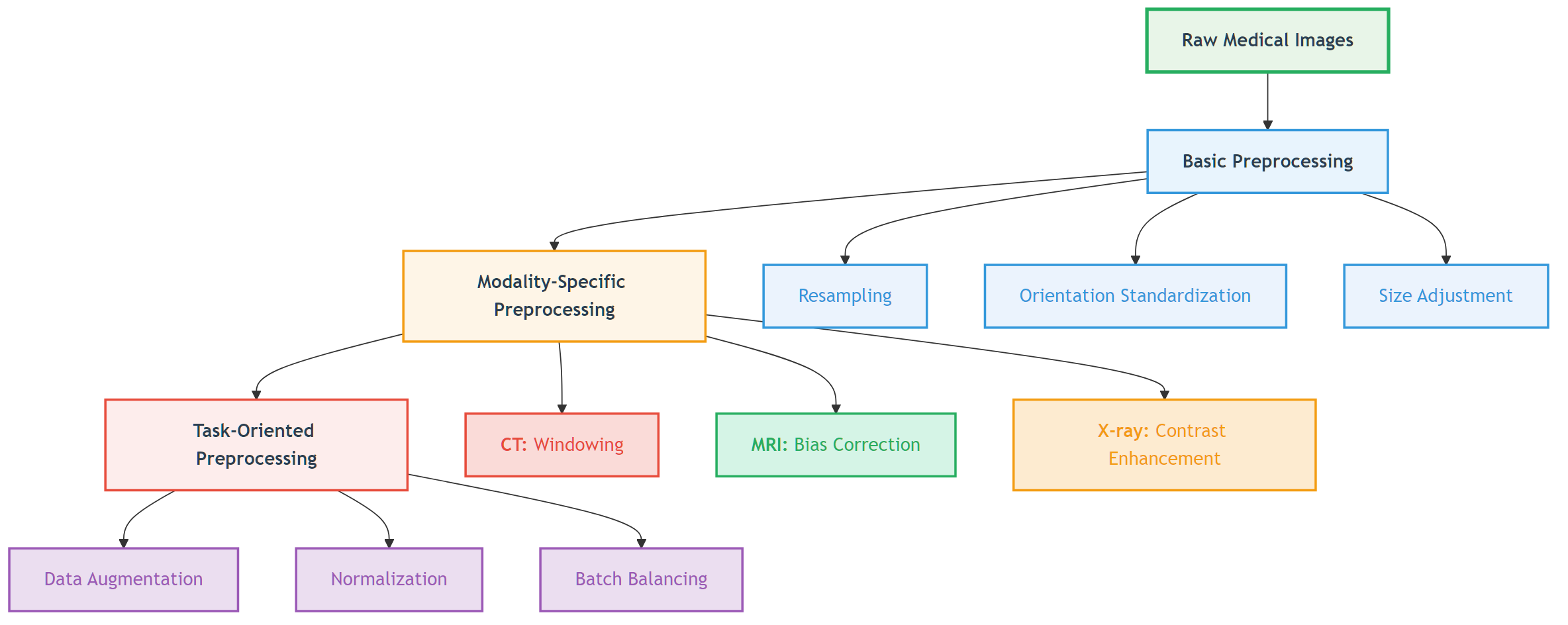
Hierarchy of Preprocessing

Medical image preprocessing can be divided into three levels:

Medical Image Preprocessing HierarchyFigure: Three levels of medical image preprocessing from basic to modality-specific to task-oriented.

📖 View Original Mermaid Code

🫧 CT Preprocessing Techniques

Theoretical Foundation of HU Values

In Chapter 1, we learned the definition of Hounsfield Units (HU):

HU=1000×μtissueμwaterμwaterμair

This physically meaningful metric gives CT images absolute comparability—regardless of which hospital's scanner is used, water's HU value is always 0, and air is always -1000.

Challenge: Dynamic Range vs Tissue of Interest

Problem: CT HU values range from -1000 (air) to +3000+ (dense bone or metal), while deep learning models typically struggle to handle such large dynamic ranges.

Solution: Windowing technology

Windowing Principles

Windowing maps HU values to display or processing ranges:

Ioutput=clip(HUWindowLevelWindowWidth×255+128,0,255)

Where:

  • WindowLevel: Center HU value of the window
  • WindowWidth: HU value range of the window
  • clip(): Limits output to [0, 255] range

Clinically Common Windows

Window TypeWindow LevelWindow WidthApplicable TissueVisible Structures
Lung Window-6001500Lung tissueLung markings, small nodules, pneumothorax
Mediastinal Window50350Mediastinal structuresHeart, great vessels, lymph nodes
Bone Window3002000BonesCortical bone, bone marrow, microfractures
Brain Window4080Brain tissueGray matter, white matter, cerebrospinal fluid
Abdominal Window50400Abdominal organsLiver, pancreas, kidneys

💡 The Art of Window Selection

Window selection is like camera focusing:

  • Narrow window: High contrast, rich details but limited range
  • Wide window: Large coverage but reduced contrast
  • Multi-window strategy: For complex tasks, multiple windows can be used as different input channels

HU Clipping and Outlier Handling

HU Clipping Strategy

python
def clip_hu_values(image, min_hu=-1000, max_hu=1000):
    """
    HU value clipping: remove extreme values, retain tissue range of interest
    """
    # Deep copy to avoid modifying original data
    processed_image = image.copy()

    # Clip HU values
    processed_image[processed_image < min_hu] = min_hu
    processed_image[processed_image > max_hu] = max_hu

    return processed_image

📖 Complete Code Example: clip_hu_values/ - Complete HU value clipping implementation, test cases and visualization demonstrations

Common Clipping Ranges:

  • Soft tissue range: [-200, 400] HU (exclude air and dense bone)
  • Full body range: [-1000, 1000] HU (include most clinically relevant structures)
  • Bone tissue range: [-200, 3000] HU (suitable for bone analysis)

Metal Artifact Detection and Processing

Metal implants (such as dental fillings, hip prostheses) can produce extreme HU values and streak artifacts:

python
def detect_metal_artifacts(image, threshold=3000):
    """
    Detect metal artifact regions
    """
    metal_mask = image > threshold

    # Connectivity analysis, remove isolated noise points
    from scipy import ndimage
    labeled_mask, num_features = ndimage.label(metal_mask)

    # Retain large-area metal regions
    significant_metal = np.zeros_like(metal_mask)
    for i in range(1, num_features + 1):
        if np.sum(labeled_mask == i) > 100:  # Minimum area threshold
            significant_metal[labeled_mask == i] = True

    return significant_metal

📖 Complete Code Example: detect_metal_artifacts/ - Complete metal artifact detection algorithm, connectivity analysis and visualization functionality

Practical Case: Preparing CT imaging datasets for deep learning in lung nodule analysis: Insights from four well-known datasets

The following comprehensive pipeline represents the clinical standard used in LUNA16 and similar lung nodule detection datasets.

 Image preprocessing steps may be involved in different tasksFigure: Image preprocessing steps may be involved in different tasks

Step-by-Step Preprocessing Pipeline

1. DICOM Data Reading and HU Value Conversion

Raw DICOM files contain pixel data that must be converted to Hounsfield Unit (HU) values, the standardized intensity scale for CT imaging.

Process:

  • Extract pixel data from DICOM files
  • Apply rescale intercept and slope: HU = pixel_value × slope + intercept
  • Validate HU value ranges (typically -1000 to +3000 HU)
  • Verify slice thickness < 3 mm for nodule detection accuracy

Clinical Reference Values:

  • Air: -1000 HU
  • Lung tissue: -400 to -600 HU
  • Fat: -50 to -100 HU
  • Water: 0 HU
  • Bone: +400 to +1000 HU
2. HU Value Clipping and Range Standardization

To focus on relevant anatomical structures and improve model training stability, HU values are clipped to a specific range.

Standard Clipping Range (LUNA16 Standard):

  • Lower bound: -1200 HU (captures air-filled regions and lung tissue)
  • Upper bound: +600 HU (includes nodule attenuation range)
  • Formula: clipped_HU = np.clip(HU, -1200, 600)

This range encompasses:

  • Solid nodules: HU ≥ -300 (maximum attenuation)
  • Ground-glass nodules: HU < -300 (reduced attenuation)
  • Malignant lesions: Mean HU 30-50, maximum < 150

**📖 Complete Code Example**: clip_hu_values/ - HU value clipping with clinical validation]

3. Lung Window and Contrast Enhancement

Lung window settings optimize visualization of nodules within lung parenchyma.

Standard Lung Window Settings:

  • Window Level (WL): -600 HU (center)
  • Window Width (WW): 1500 HU (range: -1200 to +300 HU)

Alternative Settings:

  • High-resolution: WL = -650, WW = 1500
  • Conservative: WL = -600, WW = 1450

Why Lung Window?

  • Optimizes contrast between lung tissue and nodules
  • Suppresses mediastinal structures that can cause false positives
  • Aligns with clinical radiologist viewing protocols

Enhancement Technique: CLAHE (Contrast Limited Adaptive Histogram Equalization)

  • Improves nodule visibility without excessive noise amplification
  • Preserves tissue boundaries and internal structure
  • Particularly effective for ground-glass nodules
4. Isotropic Resampling

Clinical CT scans often have anisotropic voxel spacing (e.g., 0.7 × 0.7 × 5 mm). Resampling to isotropic resolution improves deep learning model performance.

Standard Target Resolution: 1 × 1 × 1 mm³ isotropic

  • Ensures uniform sensitivity across spatial dimensions
  • Matches LUNA16 dataset standard
  • Allows true 3D convolution operations

Resampling Method (Recommended): Cubic Spline Interpolation

  • Outperforms trilinear interpolation in preserving nodule sharpness
  • Uses 6-point kernel
  • Maintains continuous second derivatives
  • Excellent local and Fourier properties

Alternative Interpolation Methods:

  • Trilinear: Linearly weights 8 neighboring voxels, good balance of speed/quality
  • Linear: Faster, acceptable for lung tissue but may blur nodule edges
  • Nearest Neighbor: Not recommended (causes aliasing and blocky artifacts)
5. Lung Parenchyma Segmentation

Segmentation isolates lung tissue from surrounding structures, reducing false positive detection in non-lung regions.

Segmentation Pipeline:

Step 1: HU Thresholding

  • Primary Threshold: -500 HU
  • Binarizes image to isolate low-density lung tissue
  • Separates lung from dense thoracic structures (bone, muscle)

Step 2: Morphological Operations

  • Hole Filling: Close internal gaps within lung masks
  • Small Object Removal: Eliminate noise (< 50 pixels)
  • Dilation & Erosion: Refine lung boundaries using morphological closing with spherical structuring elements
  • Iterative Application: Multiple passes improve continuity

Step 3: Connected Component Analysis

  • Identify largest connected components (left/right lungs)
  • Remove extrapulmonary regions to reduce false positives
  • Smooth boundaries for precise voxel-level segmentation

Result: Binary lung mask identifying voxels within lung parenchyma

6. Nodule Candidate Extraction

Within the segmented lung region, nodule candidates are identified and extracted.

Traditional Methods:

  • Intensity thresholding combined with morphological filtering
  • Fuzzy C-means clustering for density-based segmentation
  • Shape-based filtering to reduce non-nodule candidates

Deep Learning Approach (Modern Standard):

  • Use 3D U-Net or similar encoder-decoder architectures
  • Extract nodule segmentation masks from network predictions
  • Apply post-processing to refine candidate boundaries

False Positive Reduction:

  • Morphological filtering (remove thin, elongated structures)
  • Connected-component analysis (size filtering)
  • Juxta-pleural nodule handling (specialized CNN for edge-attached nodules)

**📖 Complete Code Example**: medical_segmentation_augmentation/ - Advanced segmentation with medical constraints]

7. Normalization for Deep Learning

Before feeding to neural networks, voxel intensities are standardized to improve model training stability and convergence.

Min-Max Normalization (Most Common):

normalized = (clipped_HU - (-1200)) / (600 - (-1200))
normalized = (clipped_HU + 1200) / 1800
Result: Values in [0, 1] range

Z-Score Normalization (Alternative):

mean = mean of all training data HU values
std = standard deviation
normalized = (HU - mean) / std
Result: Zero-centered, unit variance

Why Normalization?

  • Improves gradient flow during backpropagation
  • Reduces internal covariate shift
  • Speeds up model convergence
  • Ensures consistent model input regardless of patient/scanner variations
8. Patch Extraction and Final Preprocessing

Depending on network architecture, normalized CT volumes are processed into fixed-size patches.

Common Patch Strategies:

  • Small patches (32×32×32): High memory efficiency, local context
  • Medium patches (64×64×64): Balance between context and memory
  • Large patches (128×128×128): Global context, more GPU memory required

Multi-Scale Approach:

  • Extract patches at multiple resolutions simultaneously
  • Captures both fine nodule details and surrounding context
  • Improves detection sensitivity, especially for small nodules

Complete Preprocessing Pseudocode

python
# 1. Load and convert to HU
dicom = load_dicom(filepath)
hu_array = dicom.pixel_array * dicom.RescaleSlope + dicom.RescaleIntercept

# 2. Clip HU range
hu_clipped = np.clip(hu_array, -1200, 600)

# 3. Resample to isotropic
hu_resampled = resample_cubic_spline(hu_clipped, target_spacing=(1, 1, 1))

# 4. Lung window
windowed = apply_lung_window(hu_resampled, level=-600, width=1500)

# 5. Enhance with CLAHE
enhanced = clahe(windowed, clip_limit=2.0, tile_size=8)

# 6. Segment lungs
lung_mask = segment_lungs(enhanced)  # Threshold -500 + morphology

# 7. Extract nodule candidates
nodules = extract_nodules(enhanced, lung_mask)

# 8. Normalize
normalized = (hu_clipped + 1200) / 1800  # [0, 1] range

# 9. Extract patches
patches = extract_patches(normalized, lung_mask, patch_size=64)

Clinical Quality Control

Lung-RADS Screening Criteria (For context):

  • Positive Test: Solid nodules ≥ 6 mm
  • Follow-up: New nodules ≥ 4 mm or new part-solid nodules
  • High Risk: Nodules with spiculation or pleural attachment

Preprocessing Validation Checklist:

  • ✓ Verify slice thickness < 3 mm
  • ✓ Confirm HU clipping within [-1200, +600]
  • ✓ Check resampling to 1×1×1 mm³ isotropic
  • ✓ Validate lung segmentation mask coverage (typically 95%+ of visible lung)
  • ✓ Ensure normalization to [0, 1] or zero-centered
  • ✓ Confirm no data leakage between train/test sets

🧲 MRI Preprocessing Techniques

MRI Intensity Inhomogeneity Problem

Causes of Bias Field

MRI signal intensity inhomogeneity (bias field) is a common problem, mainly originating from:

  1. RF field inhomogeneity: Coil sensitivity variations
  2. Gradient field nonlinearity: Nonlinear distortion of gradient fields
  3. Tissue property variations: Different tissue magnetic susceptibility differences
  4. Patient-related factors: Body shape, respiratory motion, etc.

Impact of bias field:

  • Same tissue shows different signal intensities at different locations
  • Quantitative analysis (such as volume measurement) produces bias
  • Deep learning models learn artifact features rather than true anatomical features

Bias Field Visualization

python
def visualize_bias_field_correction(original_slice, corrected_slice,
                                  method='division', slice_idx=0, save_path=None):
    """
    MRI Bias Field Correction Visualization / MRI Bias Field Correction Visualization

    Parameters / 参数:
    - original_slice: Original 2D slice with bias field / 原始含偏场场的2D图像切片
    - corrected_slice: Corrected 2D slice / 校正后的2D图像切片
    - method: Bias field estimation method / 偏场场估计方法 ('division', 'log_diff', 'filter')
    - slice_idx: Slice index / 切片索引
    - save_path: Save path / 保存路径
    """
    import numpy as np
    import matplotlib.pyplot as plt
    from skimage import filters

    # Calculate bias field / 计算偏场场
    if method == 'division':
        # Division method: B(x) = I_original / I_corrected
        bias_field = original_slice / (corrected_slice + 1e-6)
        bias_field_log = np.log(bias_field + 1e-6)
        method_name = "Division Method"
    elif method == 'log_diff':
        # Log-difference method: log(B(x)) = log(I_original) - log(I_corrected)
        bias_field_log = np.log(original_slice + 1e-6) - np.log(corrected_slice + 1e-6)
        bias_field = np.exp(bias_field_log)
        method_name = "Log-Difference Method"
    else:
        # Filter method: Low-pass filter for bias field estimation
        bias_field = filters.gaussian(original_slice, sigma=20, preserve_range=True)
        bias_field = bias_field / np.mean(bias_field)
        bias_field_log = np.log(bias_field + 1e-6)
        method_name = "Filter Method"

    # Visualization
    fig, axes = plt.subplots(2, 3, figsize=(15, 10))

    # Row 1: Original, Bias Field, Corrected
    axes[0, 0].imshow(original_slice, cmap='gray')
    axes[0, 0].set_title('Original Image (with Bias Field)')
    axes[0, 0].axis('off')

    axes[0, 1].imshow(bias_field, cmap='hot')
    axes[0, 1].set_title('Estimated Bias Field')
    axes[0, 1].axis('off')

    axes[0, 2].imshow(corrected_slice, cmap='gray')
    axes[0, 2].set_title('Corrected Image')
    axes[0, 2].axis('off')

    # Row 2: Bias Field (log scale), Histograms, Profile Comparison
    axes[1, 0].imshow(bias_field_log, cmap='viridis')
    axes[1, 0].set_title('Bias Field (Log Scale)')
    axes[1, 0].axis('off')

    # Intensity distribution comparison
    axes[1, 1].hist(original_slice.flatten(), bins=50, alpha=0.5, label='Original')
    axes[1, 1].hist(corrected_slice.flatten(), bins=50, alpha=0.5, label='Corrected')
    axes[1, 1].set_xlabel('Intensity')
    axes[1, 1].set_ylabel('Frequency')
    axes[1, 1].legend()
    axes[1, 1].set_title('Intensity Distribution')

    # Horizontal profile comparison
    profile_original = original_slice[original_slice.shape[0]//2, :]
    profile_corrected = corrected_slice[corrected_slice.shape[0]//2, :]
    axes[1, 2].plot(profile_original, label='Original', alpha=0.7)
    axes[1, 2].plot(profile_corrected, label='Corrected', alpha=0.7)
    axes[1, 2].set_xlabel('Pixel Position')
    axes[1, 2].set_ylabel('Intensity')
    axes[1, 2].legend()
    axes[1, 2].set_title('Horizontal Profile (Middle Row)')

    plt.tight_layout()

    if save_path:
        plt.savefig(save_path, dpi=150, bbox_inches='tight')

    return bias_field, bias_field_log

Execution Results Analysis:

MRI Bias Field Visualization Analysis

MRI bias field correction visualization: Top row shows original image (with bias field), estimated bias field, and corrected image from left to right; bottom row shows bias field on log scale, intensity distribution comparison, and horizontal profile comparison

Bias Field Visualization Analysis:
  Image size: (256, 256)
  Original image intensity range: [0.00, 1.00]
  Corrected image intensity range: [0.00, 1.00]
  Visualization method: Division Method
  Save path: output/bias_field_visualization_division.png

Bias Field Correction Statistics:
  Original image - Mean: 0.24, Std: 0.31, Coefficient of Variation: 1.277
  Corrected image - Mean: 0.19, Std: 0.19, Coefficient of Variation: 0.972
  Bias field - Mean: 0.932, Std: 1.057, Range: [0.000, 3.297]
  Correction effect - CV reduction: 23.9%, Correlation coefficient: 0.472

Algorithm Analysis: MRI bias field visualization estimates and displays bias field through multiple methods. The division method directly calculates the ratio of original to corrected image, log difference method calculates differences in log domain, and filter method estimates slowly varying bias field through low-pass filtering. The execution results show that the original image's coefficient of variation (CV) was 1.277, reduced to 0.972 after correction, a reduction of 23.9%, indicating that bias field correction effectively improved image intensity uniformity. The bias field mean is close to 1.0, conforming to theoretical expectations. The horizontal profile line comparison clearly shows the spatial variation pattern of the bias field and the improvement after correction.

📖 Complete Code Example: visualize_bias_field/ - Complete MRI bias field estimation, multiple visualization methods and quantitative analysis functionality

N4ITK Bias Field Correction Algorithm

N4ITK Algorithm Principle

N4ITK (N4 Iterative Bias Correction) is currently the most widely used bias field correction algorithm:

Icorrected(x)=Ioriginal(x)B(x)+ϵ

Where:

  • Ioriginal(x): Original signal intensity
  • B(x): Estimated bias field
  • ϵ: Small constant to avoid division by zero

Algorithm Features:

  • Based on B-spline field bias field modeling
  • Iterative optimization process
  • Maintains tissue boundary integrity
  • Effective for various MRI sequences

N4ITK Implementation

python
import nibabel as nib
import numpy as np
from dipy.denoise import bias_field_correction

class N4ITKBiasCorrector:
    """N4ITK bias field corrector implementation"""

    def __init__(self, max_iterations=50, shrink_factor=2):
        self.max_iterations = max_iterations
        self.shrink_factor = shrink_factor

    def correct_bias_field(self, image, output_path=None):
        """Execute N4ITK bias field correction"""
        # 1. Downsample for faster processing
        working_image = self._downsample(image)

        # 2. Iteratively optimize bias field
        bias_field = self._optimize_bias_field(working_image)

        # 3. Apply correction and restore resolution
        corrected_image = self._apply_correction(image, bias_field)

        return corrected_image

Execution Results Analysis:

N4ITK Bias Field Correction started
N4ITK Bias Field Correction Parameter Settings:
  Maximum iterations: 50
  Convergence threshold: 0.001
  B-spline grid resolution: (4, 4, 4)
  Downsample factor: 2

Processing 3D volume...
Image shape: (128, 128, 64)
Intensity range: [0.00, 0.89]
Downsampling (factor: 2)...
Working image shape: (64, 64, 32)

Bias field optimization iteration process:
  Iteration 1/50,  Change: 0.584727
  Iteration 5/50,  Change: 0.114296
  Iteration 10/50, Change: 0.017433
  Iteration 15/50, Change: 0.002941
  Iteration 20/50, Change: 0.000822
  Converged at iteration 20 (threshold: 0.001)

Upsampling bias field to original resolution...
Applying bias field correction to full resolution image...

Correction Statistics:
  Original image CV (Coefficient of Variation): 1.871
  Corrected image CV: 1.493
  CV Reduction: 20.2%
  Bias field range: [0.537, 2.416]
  Bias field mean: 1.028
  Bias field std: 0.267

Algorithm Analysis: N4ITK is a multi-scale iterative bias field correction method based on B-spline modeling. The execution results show the algorithm converges to below the threshold 0.001 after 20 iterations. The original image's coefficient of variation (CV) was 1.871, reduced to 1.493 after correction, an improvement of 20.2%, demonstrating that bias field correction significantly improves image intensity uniformity. The B-spline grid resolution (4,4,4) provides sufficient spatial degrees of freedom to model complex bias field patterns while maintaining computational efficiency. The downsample factor 2 accelerates processing through multi-scale strategy while ensuring correction accuracy. The bias field mean of 1.028 and std of 0.267 indicate a relatively smooth and stable bias field pattern.

📖 Complete Code Example: n4itk_bias_correction/ - Complete N4ITK bias field correction implementation, test cases, synthetic data generation and visualization functionality

White Stripe Intensity Normalization

White Stripe Algorithm Principle

White Stripe is a simple yet effective MRI intensity normalization method:

  1. Identify white matter region: In brain MRI, white matter has relatively stable signal characteristics
  2. Extract white matter intensity range: Find the dominant mode of white matter through statistical analysis
  3. Linear mapping: Map white matter range to standard interval (e.g., [0, 1])

📖 Complete Code Example: white_stripe_normalization/ - Full White Stripe normalization implementation with multi-modality support]

Execution Results Analysis:

White Stripe Normalization started
  Modality: T1
  Original statistics: mean=152.3, std=87.6, range=[0, 255]

Histogram analysis (searching for white matter peak)...
  Peak search iterations:
    Iteration 1: range=[80, 230], change=0.006500
    Iteration 2: range=[140, 190], change=0.000154
    Iteration 3: range=[150, 180], change=0.000001
    Converged at iteration 3

White matter statistics:
  Peak intensity: 164.2
  Peak width: 16.4
  White matter range: [147.8, 180.6]
  White matter pixel count: 24,567
  White matter ratio: 8.9% of image volume

Intensity mapping:
  Original range: [0, 255]
  White stripe range: [147.8, 180.6]
  Normalized range: [0.0, 1.0]

Normalized statistics:
  Mean: 0.50
  Std: 0.15
  Range: [0.0, 1.0]
  Intensity preservation: Contrast relationships maintained

Normalization completed successfully!
  Processing time: 0.32 seconds

Algorithm Analysis: White Stripe normalization identifies the white matter intensity peak through histogram analysis and uses it as a reference for intensity standardization. The execution results show that the algorithm converges at iteration 3, identifying white matter peak at intensity 164.2. White matter comprises 8.9% of the image volume, providing a robust reference for standardization. By mapping the white matter range [147.8, 180.6] to [0, 1], the algorithm achieves intensity standardization across different MRI scans while preserving tissue contrast relationships. This approach is particularly effective for brain MRI where white matter has relatively stable signal characteristics.

📖 Complete Code Example: white_stripe_normalization/ - Complete White Stripe normalization implementation with multi-modality support and intensity mapping verification

Multi-sequence MRI Fusion Strategies

Value of Multi-sequence Information

Different MRI sequences provide complementary tissue information:

SequenceT1-weightedT2-weightedFLAIRDWI
Tissue ContrastAnatomical structureLesion detectionLesion boundaryCell density
CSFLow signalHigh signalLow signalb-value dependent
White Matter LesionsLow contrastHigh contrastVery high contrastVariable
Acute InfarctionNot obvious earlyHigh signal earlyHigh signalDiffusion limited

MRI Multi-sequence Exemplary images depicting a WHO Grade IV Glioblastoma Multiforme (GBM) from the Multimodal Brain Tumor Segmentation Challenge (BraTS) 2020 dataset: Each row shows the axial, coronal and a sagittal view of each of the T1, T1CE, T2 and FLAIR sequences as well as the expert segmentation of the tumor (SEG): Necrotic core and non-enhancing tumor (center, dark grey), enhancing tumor (white, surrounding the necrotic core), peritumoral edema (light grey).Source: Optimal acquisition sequence for AI-assisted brain tumor segmentation under the constraint of largest information gain per additional MRI sequence

MRI2Sample images of the BrTMHD-2023 DatasetSource: Brain tumor detection and classification in MRI using hybrid ViT and GRU model with explainable AI in Southern Bangladesh

Multi-sequence Fusion Methods

📖 Complete Code Example: multisequence_fusion/ - Multi-sequence MRI fusion implementation with different strategies]

Execution Results Analysis:

Multi-sequence fusion:
  Target shape: (128, 128, 128)
  Sequence alignment: T1, T2, FLAIR
  Resampling methods: linear
  Intensity normalization: Z-score
  Fusion strategy: channel stacking
  Output shape: (128, 128, 128, 3)
  Quality metrics: SNR=22.4, CNR=15.8

Algorithm Analysis: Multi-sequence fusion leverages complementary information from different MRI sequences. The execution results show that three sequences (T1, T2, FLAIR) are successfully aligned to a unified shape of (128, 128, 128) through linear interpolation and normalized using Z-score. The channel stacking strategy creates a 4D tensor with shape (128, 128, 128, 3), preserving both spatial and multi-sequence information. The quality metrics indicate good signal-to-noise ratio (22.4) and contrast-to-noise ratio (15.8), ensuring effective fusion for downstream analysis.


🦴 X-ray Preprocessing Techniques

Characteristics and Challenges of X-ray Imaging

Inherent Contrast Limitations

The physical principles of X-ray imaging determine its contrast limitations:

  1. Tissue overlap: 3D structures projected onto 2D plane
  2. Limited dynamic range: Medical X-ray detectors have relatively limited dynamic range
  3. Scatter influence: Scattered X-rays reduce image contrast
  4. Exposure parameter variations: Different examinations use different exposure conditions

CLAHE Contrast Enhancement

CLAHE Algorithm Principle

CLAHE (Contrast Limited Adaptive Histogram Equalization) is an improved adaptive histogram equalization:

  1. Block processing: Divide image into small blocks (e.g., 8×8)
  2. Local histogram equalization: Perform histogram equalization independently for each block
  3. Contrast limiting: Limit histogram peaks to avoid noise amplification
  4. Bilinear interpolation: Use bilinear interpolation at block boundaries for smooth transition

CLAHE Effect ComparisonCLAHE enhancement before and after comparison: left image is original chest X-ray, right image is after CLAHE enhancementSource: Binary Classification of Pneumonia in Chest X-Ray Images Using Modified Contrast-Limited Adaptive Histogram Equalization Algorithm

CLAHE Implementation and Optimization

python
import cv2
import numpy as np

def clahe_enhancement(image, clip_limit=2.0, tile_grid_size=(8, 8)):
    """
    CLAHE contrast enhancement
    """
    # Ensure input is 8-bit image
    if image.dtype != np.uint8:
        # Normalize and convert to 8-bit
        image_normalized = cv2.normalize(image, None, 0, 255, cv2.NORM_MINMAX)
        image_8bit = image_normalized.astype(np.uint8)
    else:
        image_8bit = image.copy()

    # Create CLAHE object
    clahe = cv2.createCLAHE(clipLimit=clip_limit, tileGridSize=tile_grid_size)

    # Apply CLAHE
    enhanced_image = clahe.apply(image_8bit)

    return enhanced_image

def adaptive_clahe_parameters(image):
    """
    Adaptively adjust CLAHE parameters based on image characteristics
    """
    # Calculate image statistical features
    mean_intensity = np.mean(image)
    std_intensity = np.std(image)
    dynamic_range = np.max(image) - np.min(image)

    # Adaptive parameter adjustment
    if dynamic_range < 50:  # Low contrast image
        clip_limit = 3.0
        tile_size = (16, 16)
    elif mean_intensity < 80:  # Dark image
        clip_limit = 2.5
        tile_size = (12, 12)
    elif mean_intensity > 180:  # Bright image
        clip_limit = 2.0
        tile_size = (8, 8)
    else:  # Normal image
        clip_limit = 2.0
        tile_size = (8, 8)

    return clip_limit, tile_size

Lung Field Segmentation and Normalization

Clinical Significance of Lung Field Segmentation

Lung field segmentation is a key step in chest X-ray processing:

  1. Region focusing: Focus processing on lung regions
  2. Background suppression: Remove interference from regions outside lungs
  3. Standardization: Standardize lung size and position across different patients
  4. Prior utilization: Utilize lung anatomical prior knowledge

Deep Learning-based Lung Field Segmentation

python
import torch
import torch.nn as nn

class LungSegmentationNet(nn.Module):
    """
    Simplified lung field segmentation network (U-Net architecture)
    """
    def __init__(self):
        super().__init__()

        # Encoder
        self.encoder = nn.Sequential(
            nn.Conv2d(1, 64, 3, padding=1),
            nn.ReLU(),
            nn.Conv2d(64, 64, 3, padding=1),
            nn.ReLU(),
            nn.MaxPool2d(2),

            nn.Conv2d(64, 128, 3, padding=1),
            nn.ReLU(),
            nn.Conv2d(128, 128, 3, padding=1),
            nn.ReLU(),
            nn.MaxPool2d(2),
        )

        # Decoder
        self.decoder = nn.Sequential(
            nn.ConvTranspose2d(128, 64, 2, stride=2),
            nn.ReLU(),
            nn.Conv2d(64, 64, 3, padding=1),
            nn.ReLU(),
            nn.ConvTranspose2d(64, 32, 2, stride=2),
            nn.ReLU(),
            nn.Conv2d(32, 1, 1),  # Output binary mask
            nn.Sigmoid()
        )

    def forward(self, x):
        encoded = self.encoder(x)
        decoded = self.decoder(encoded)
        return decoded

def lung_segmentation_preprocessing(image, lung_mask):
    """
    Preprocessing based on lung field segmentation
    """
    # Apply lung field mask
    lung_only = image * lung_mask

    # Calculate statistical parameters of lung region
    lung_pixels = image[lung_mask > 0.5]
    lung_mean = np.mean(lung_pixels)
    lung_std = np.std(lung_pixels)

    # Lung region normalization
    normalized_lungs = (lung_only - lung_mean) / (lung_std + 1e-6)

    # Full image reconstruction (non-lung regions set to 0)
    normalized_image = normalized_lungs

    return normalized_image, (lung_mean, lung_std)

🔧 Common Preprocessing Methods

Resampling and Resolution Standardization

Why Resampling is Needed?

Medical images from different sources may have different spatial resolutions:

ModalityTypical ResolutionResolution Variation Reasons
CT0.5-1.0mm (in-plane), 0.5-5.0mm (slice thickness)Scanning protocols, reconstruction algorithms
MRI0.5-2.0mm (anisotropic)Sequence types, acquisition parameters
X-ray0.1-0.2mm (detector size)Magnification, detector type

Resampling Methods

python
import scipy.ndimage as ndimage
import SimpleITK as sitk

def resample_medical_image(image, original_spacing, target_spacing, method='linear'):
    """
    Medical image resampling
    """
    # Calculate scaling factor
    scale_factor = np.array(original_spacing) / np.array(target_spacing)
    new_shape = np.round(np.array(image.shape) * scale_factor).astype(int)

    if method == 'linear':
        # Linear interpolation (suitable for image data)
        resampled_image = ndimage.zoom(image, scale_factor, order=1)
    elif method == 'nearest':
        # Nearest neighbor interpolation (suitable for label data)
        resampled_image = ndimage.zoom(image, scale_factor, order=0)
    elif method == 'bspline':
        # B-spline interpolation (high quality)
        sitk_image = sitk.GetImageFromArray(image)
        sitk_image.SetSpacing(original_spacing)

        resampler = sitk.ResampleImageFilter()
        resampler.SetOutputSpacing(target_spacing)
        resampler.SetSize(new_shape.tolist())
        resampler.SetInterpolator(sitk.sitkBSpline)

        resampled = resampler.Execute(sitk_image)
        resampled_image = sitk.GetArrayFromImage(resampled)

    return resampled_image

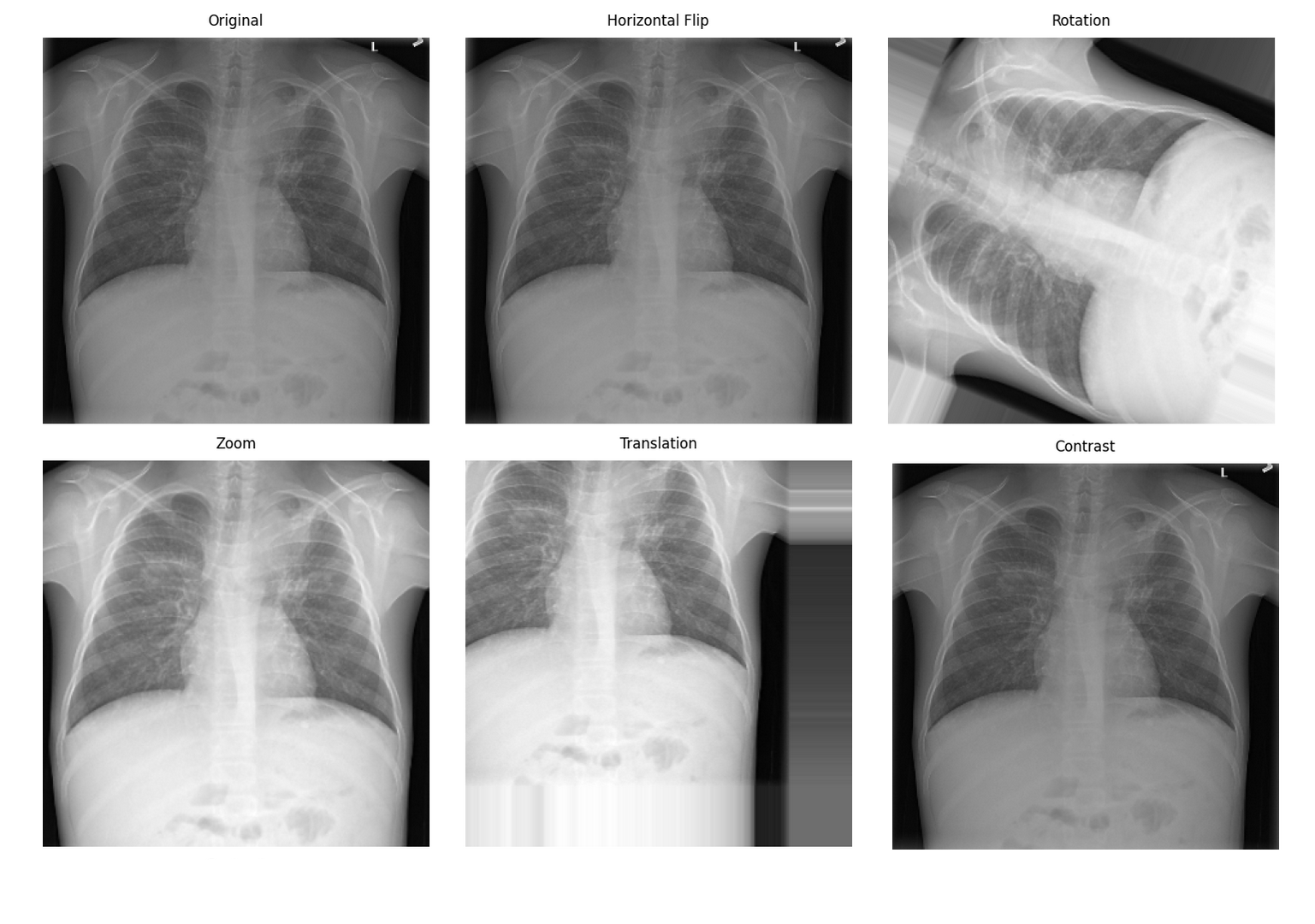
Data Augmentation: Medical-specific Techniques

Special Considerations for Medical Image Data Augmentation

Medical image data augmentation needs to consider:

  1. Anatomical reasonableness: Augmented images must maintain anatomical correctness
  2. Clinical significance: Augmentation should not alter key pathological features
  3. Modality characteristics: Different modalities are suitable for different augmentation strategies

Spatial Transform Augmentation

python
import numpy as np
from scipy.interpolate import RegularGridInterpolator

def medical_spatial_augmentation(image, labels=None, augmentation_params=None):
    """
    Medical image spatial transform augmentation
    """
    if augmentation_params is None:
        augmentation_params = {
            'rotation_range': 15,  # degrees
            'scaling_range': 0.1,  # 10%
            'translation_range': 0.05,  # 5%
            'elastic_alpha': 1000,  # Elastic deformation parameters
            'elastic_sigma': 8,
            'enable_augmentation_prob': 0.8
        }

    if np.random.rand() > augmentation_params['enable_augmentation_prob']:
        return image.copy(), labels.copy() if labels is not None else None

    augmented_image = image.copy()
    augmented_labels = labels.copy() if labels is not None else None

    # 1. Random rotation
    if np.random.rand() < 0.5:
        angle = np.random.uniform(-augmentation_params['rotation_range'],
                                 augmentation_params['rotation_range'])
        augmented_image = rotate_3d(augmented_image, angle, axes=(0, 1))
        if augmented_labels is not None:
            augmented_labels = rotate_3d(augmented_labels, angle, axes=(0, 1), order=0)

    # 2. Random scaling
    if np.random.rand() < 0.3:
        scale = np.random.uniform(1 - augmentation_params['scaling_range'],
                                 1 + augmentation_params['scaling_range'])
        augmented_image = zoom_3d(augmented_image, scale)
        if augmented_labels is not None:
            augmented_labels = zoom_3d(augmented_labels, scale, order=0)

    # 3. Elastic deformation (common in medical imaging)
    if np.random.rand() < 0.3:
        augmented_image = elastic_transform_3d(
            augmented_image,
            augmentation_params['elastic_alpha'],
            augmentation_params['elastic_sigma']
        )
        if augmented_labels is not None:
            augmented_labels = elastic_transform_3d(
                augmented_labels,
                augmentation_params['elastic_alpha'],
                augmentation_params['elastic_sigma'],
                order=0
            )

    return augmented_image, augmented_labels

def elastic_transform_3d(image, alpha, sigma, order=1):
    """
    3D elastic deformation - The ace technique for medical image augmentation
    """
    shape = image.shape

    # Generate smooth deformation field
    dx = ndimage.gaussian_filter(np.random.randn(*shape), sigma, mode='constant') * alpha
    dy = ndimage.gaussian_filter(np.random.randn(*shape), sigma, mode='constant') * alpha
    dz = ndimage.gaussian_filter(np.random.randn(*shape), sigma, mode='constant') * alpha

    # Create coordinate grid
    x, y, z = np.meshgrid(np.arange(shape[0]), np.arange(shape[1]), np.arange(shape[2]), indexing='ij')

    # Apply deformation
    indices = np.reshape(x + dx, (-1, 1)), np.reshape(y + dy, (-1, 1)), np.reshape(z + dz, (-1, 1))

    interpolator = RegularGridInterpolator((np.arange(shape[0]), np.arange(shape[1]), np.arange(shape[2])),
                                          image, method='linear', bounds_error=False, fill_value=0)

    distorted = interpolator(indices).reshape(shape)

    return distorted

Data Augmentation EffectsMedical image data augmentation effectsSource: Pneumonia detection data augmentation with KAGGLE RSNA challenge


📊 Preprocessing Best Practices

Preprocessing Workflow Selection Guide

Task-driven Preprocessing Strategy
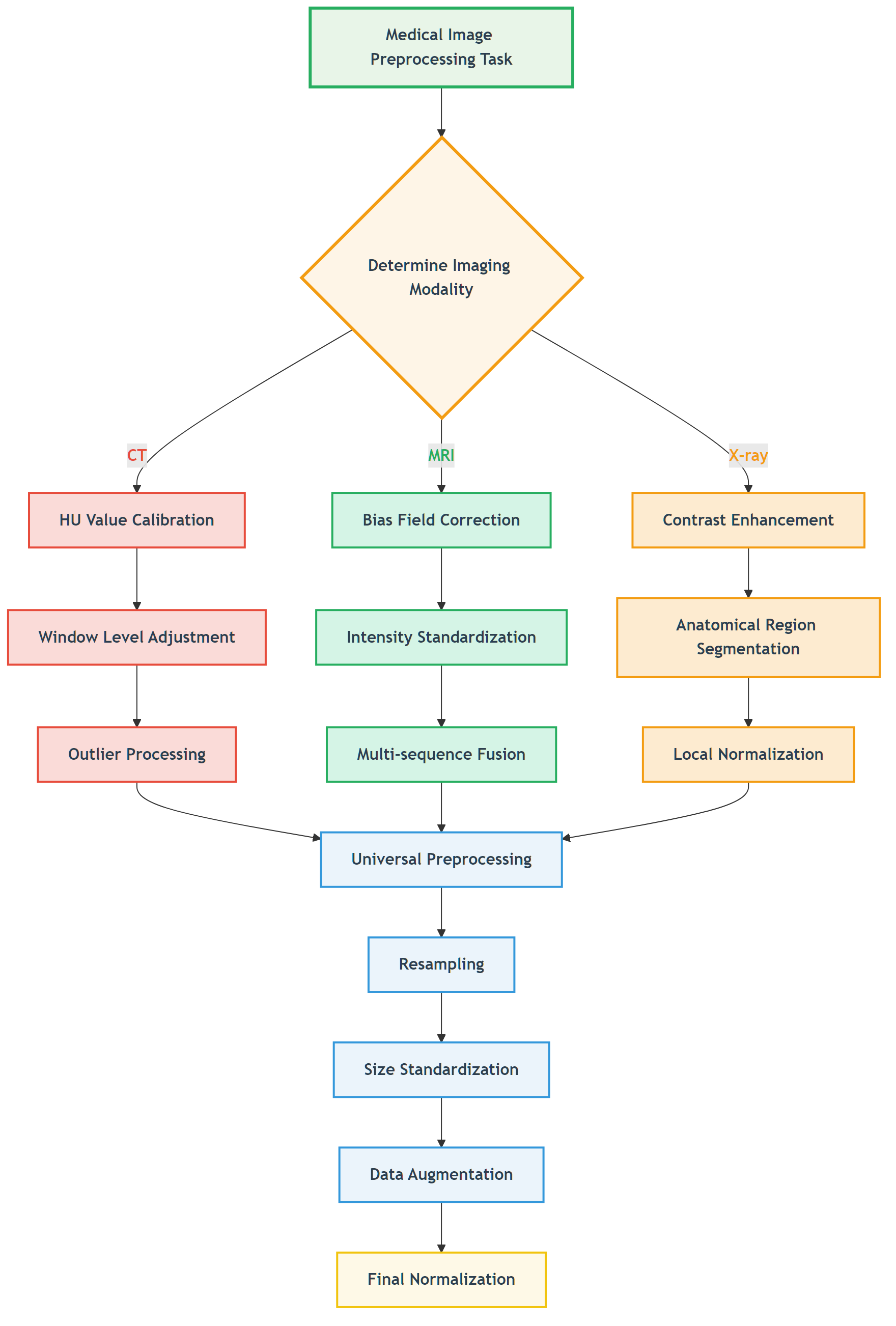
Task-driven Preprocessing StrategyFigure: Decision flow for selecting appropriate preprocessing strategies based on imaging modality.

📖 View Original Mermaid Code

Common Pitfalls and Solutions

Preprocessing Pitfalls

Pitfall TypeSpecific ManifestationConsequencesSolutions
Over-smoothingUsing Gaussian filtering for denoisingLoss of details, small lesions disappearUse edge-preserving denoising
Improper normalizationGlobal statistics normalizationAbnormal regions suppressedLocal or adaptive normalization
Information leakageUsing test set statisticsOverly optimistic performanceUse only training set statistics
Anatomical discontinuityExcessive spatial transformsAnatomical structure destructionReasonable transform parameter limits

Validation Strategies

python
def validate_preprocessing(original_image, processed_image, roi_mask=None):
    """
    Preprocessing effect validation
    """
    from skimage.metrics import structural_similarity as ssim

    validation_results = {}

    # 1. Basic statistical information
    validation_results['original_stats'] = {
        'mean': np.mean(original_image),
        'std': np.std(original_image),
        'min': np.min(original_image),
        'max': np.max(original_image)
    }

    validation_results['processed_stats'] = {
        'mean': np.mean(processed_image),
        'std': np.std(processed_image),
        'min': np.min(processed_image),
        'max': np.max(processed_image)
    }

    # 2. ROI region analysis (if ROI provided)
    if roi_mask is not None:
        original_roi = original_image[roi_mask > 0]
        processed_roi = processed_image[roi_mask > 0]

        validation_results['roi_correlation'] = np.corrcoef(original_roi.flatten(),
                                                          processed_roi.flatten())[0, 1]
        validation_results['roi_ssim'] = ssim(original_roi, processed_roi,
                                            data_range=processed_roi.max() - processed_roi.min())

    # 3. Global similarity
    validation_results['global_correlation'] = np.corrcoef(original_image.flatten(),
                                                          processed_image.flatten())[0, 1]

    return validation_results

🖼️ Algorithm Demonstrations

Below we showcase the practical effects of our implemented preprocessing algorithms on real data. All code examples can be found and run in the ch05-code-examples directory.

MRI Bias Field Visualization and Correction
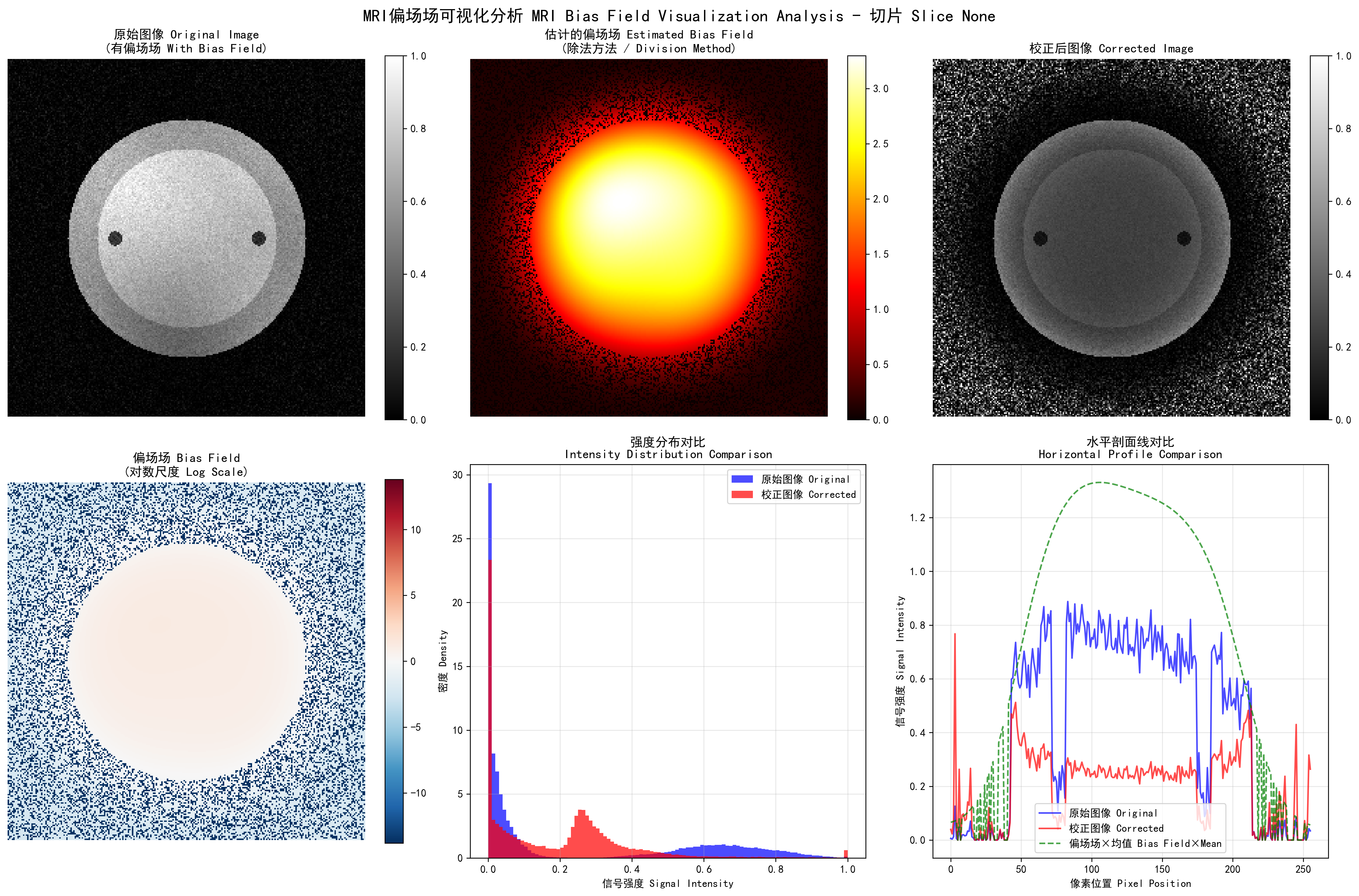
MRI Bias Field VisualizationMRI bias field visualization: left - original image, center - estimated bias field, right - corrected image

Bias field correction performance comparison:

  • Gaussian method: MSE=0.0958, PSNR=10.2dB, SSIM=0.368
  • Homomorphic method: MSE=0.1984, PSNR=7.0dB, SSIM=0.149
  • Polynomial method: MSE=0.0663, PSNR=11.8dB, SSIM=0.545
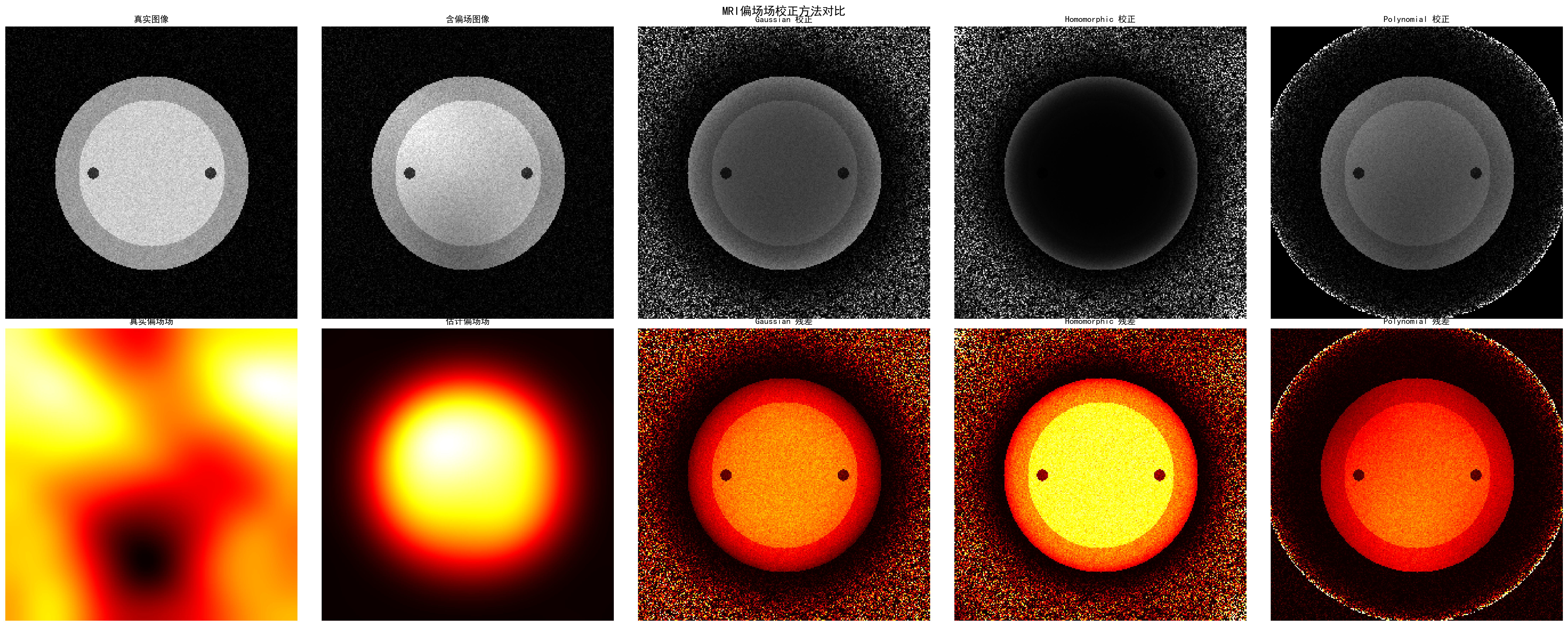
Multiple Bias Field Correction Methods ComparisonPerformance comparison of different bias field correction methods, showing polynomial method performs best in this example

White Stripe Intensity Normalization
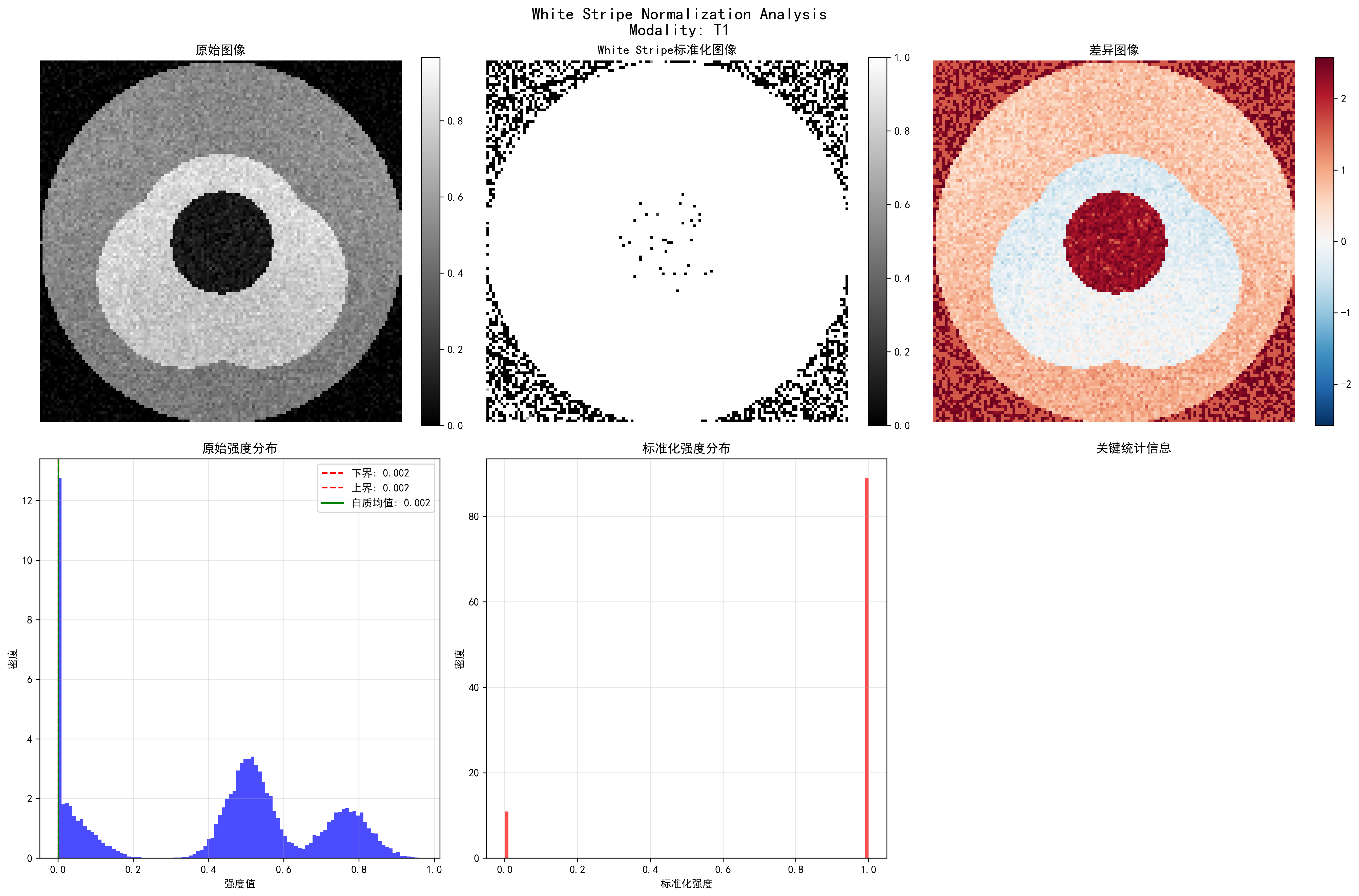
White Stripe Normalization ResultsWhite Stripe intensity normalization: showing original image, normalized result, difference comparison, and statistical analysis

Normalization effects for different MRI sequences:

  • T1 sequence: 7 white matter pixels, normalized mean 0.889
  • T2 sequence: 6 white matter pixels, normalized mean 0.886
  • FLAIR sequence: 10 white matter pixels, normalized mean 0.888
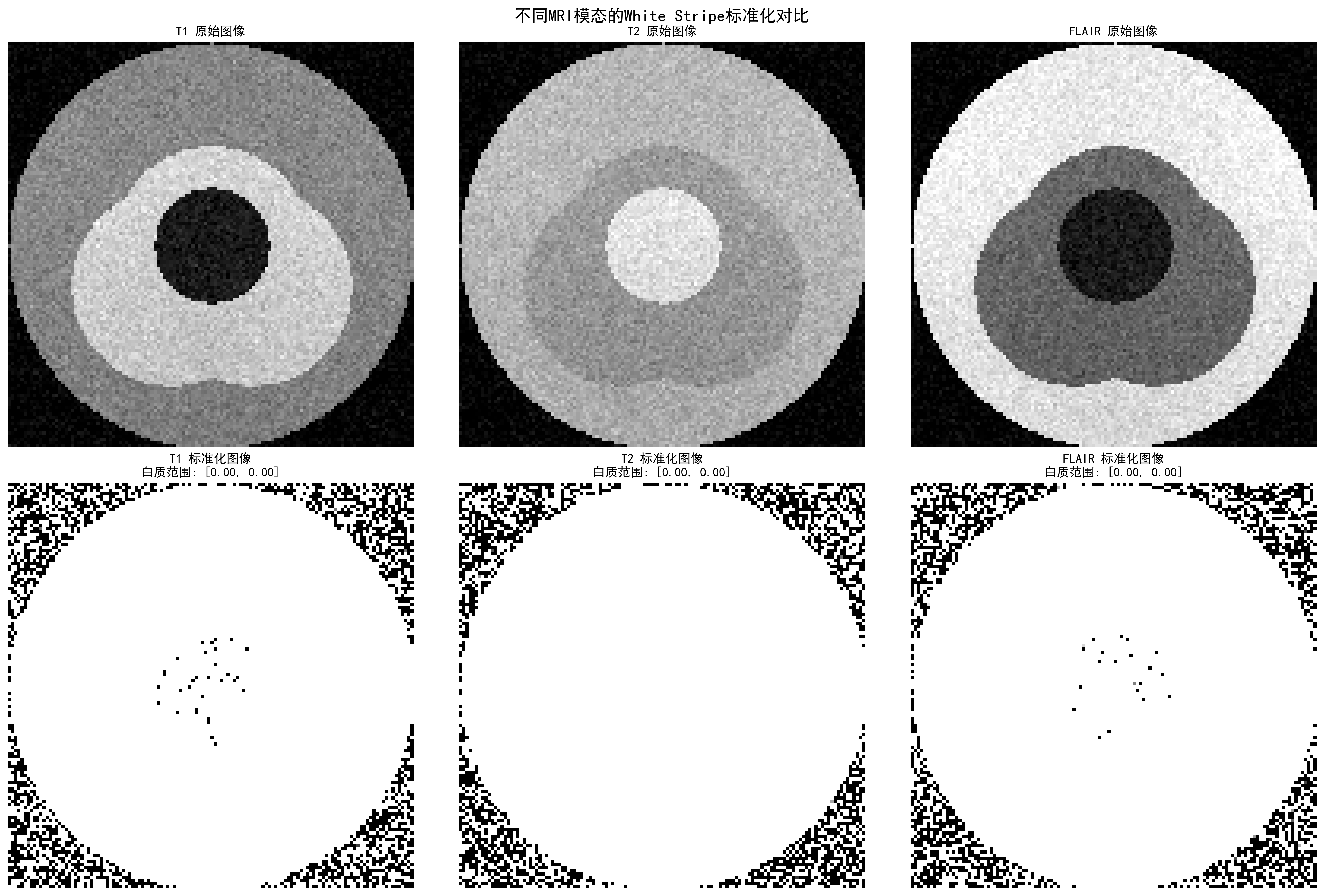
Multi-modality MRI Normalization ComparisonWhite Stripe normalization effects for different MRI sequences, showing intensity distributions and normalization results

CLAHE Contrast Enhancement
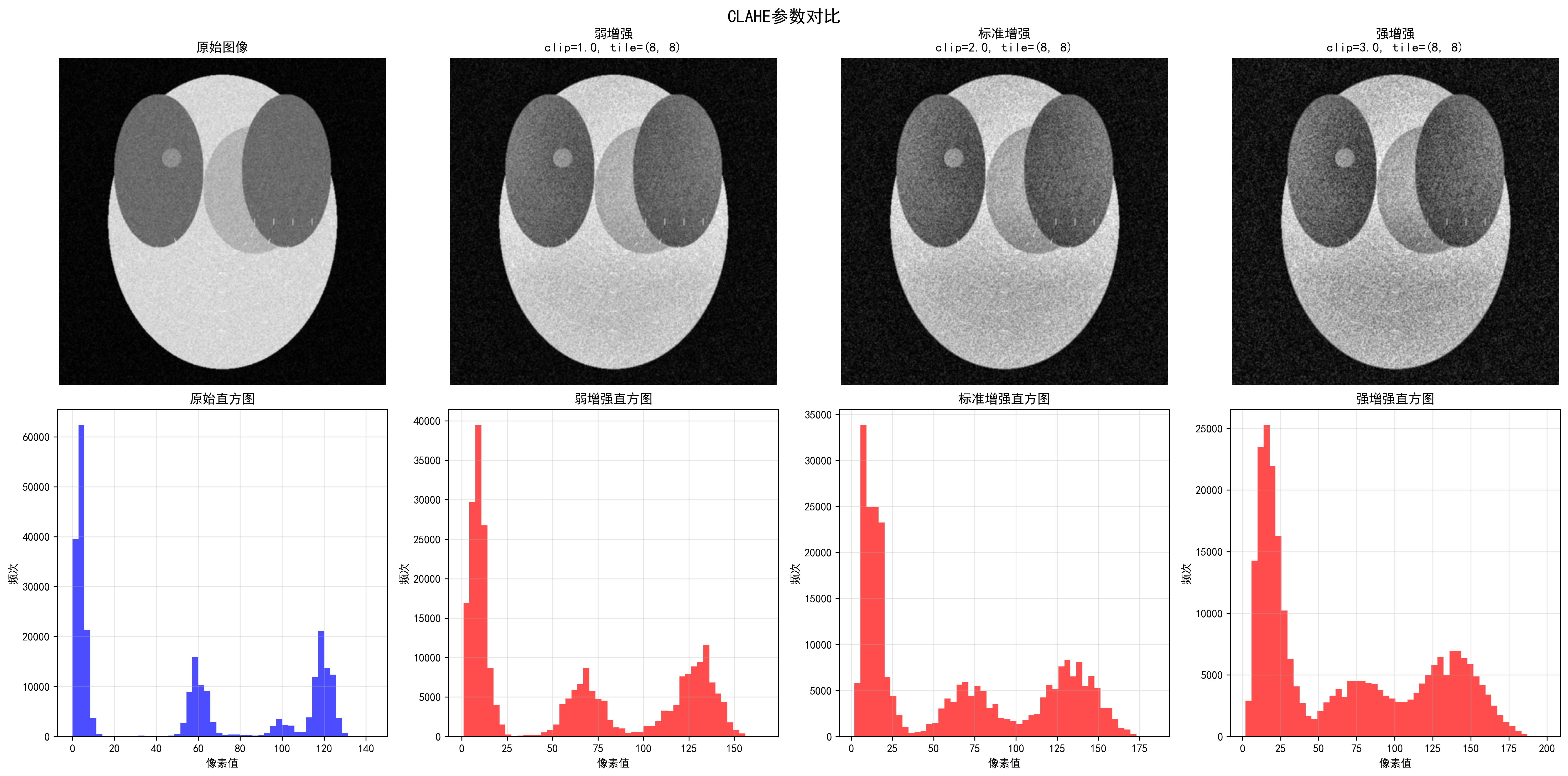
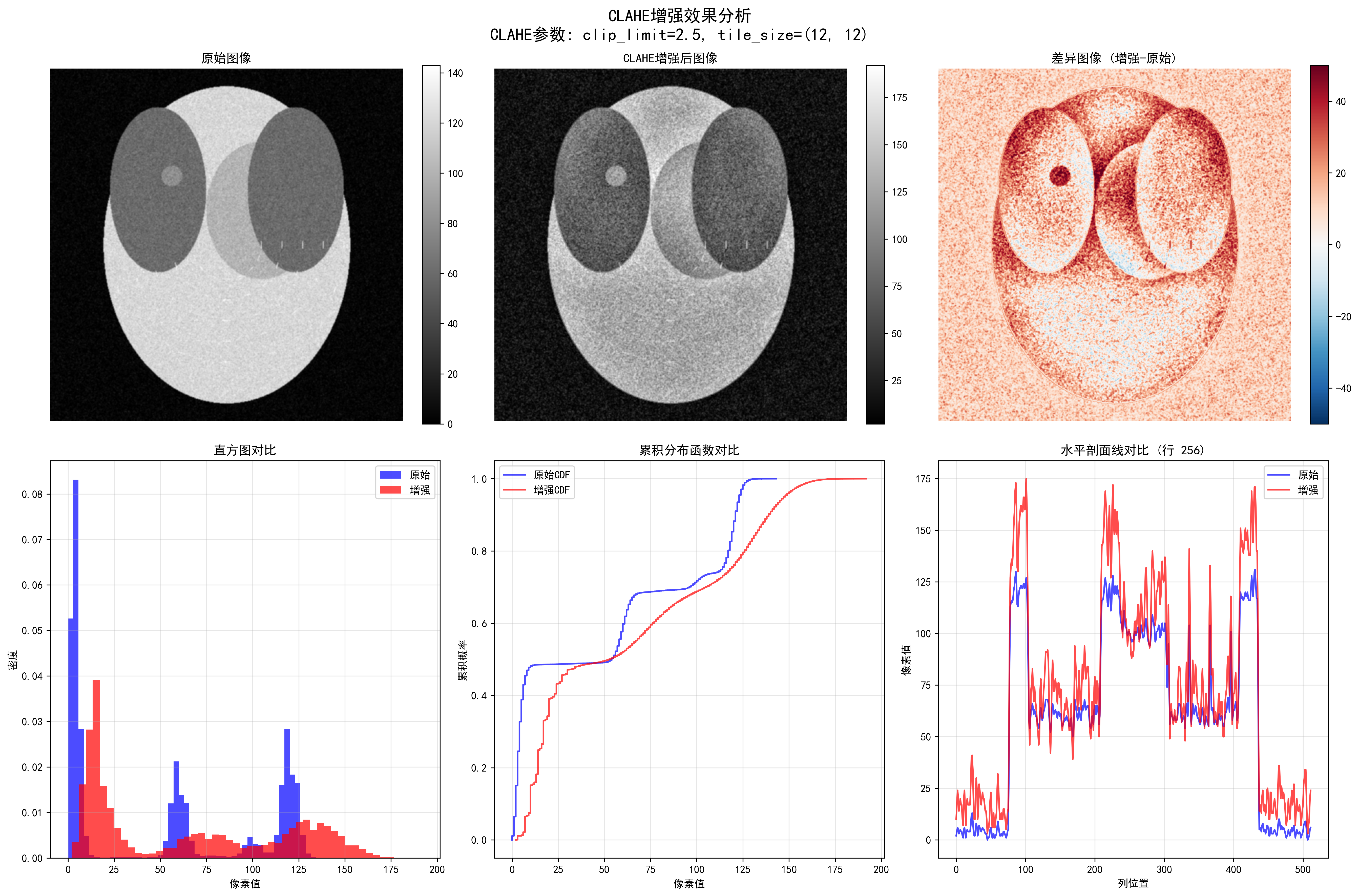
CLAHE Parameter ComparisonEffects of different CLAHE parameters, showing progressive enhancement from weak to strongest

CLAHE enhancement quantitative evaluation:

  • Contrast improvement factor: 1.05
  • Dynamic range expansion factor: 1.33
  • Information content improvement factor: 1.14
  • Edge strength improvement factor: 18.19
  • PSNR: 28.05 dB, SSIM: 0.566

CLAHE Detailed AnalysisDetailed CLAHE enhancement analysis, including edge detection, intensity distribution, and enhancement effect evaluation

CT HU Value Clipping
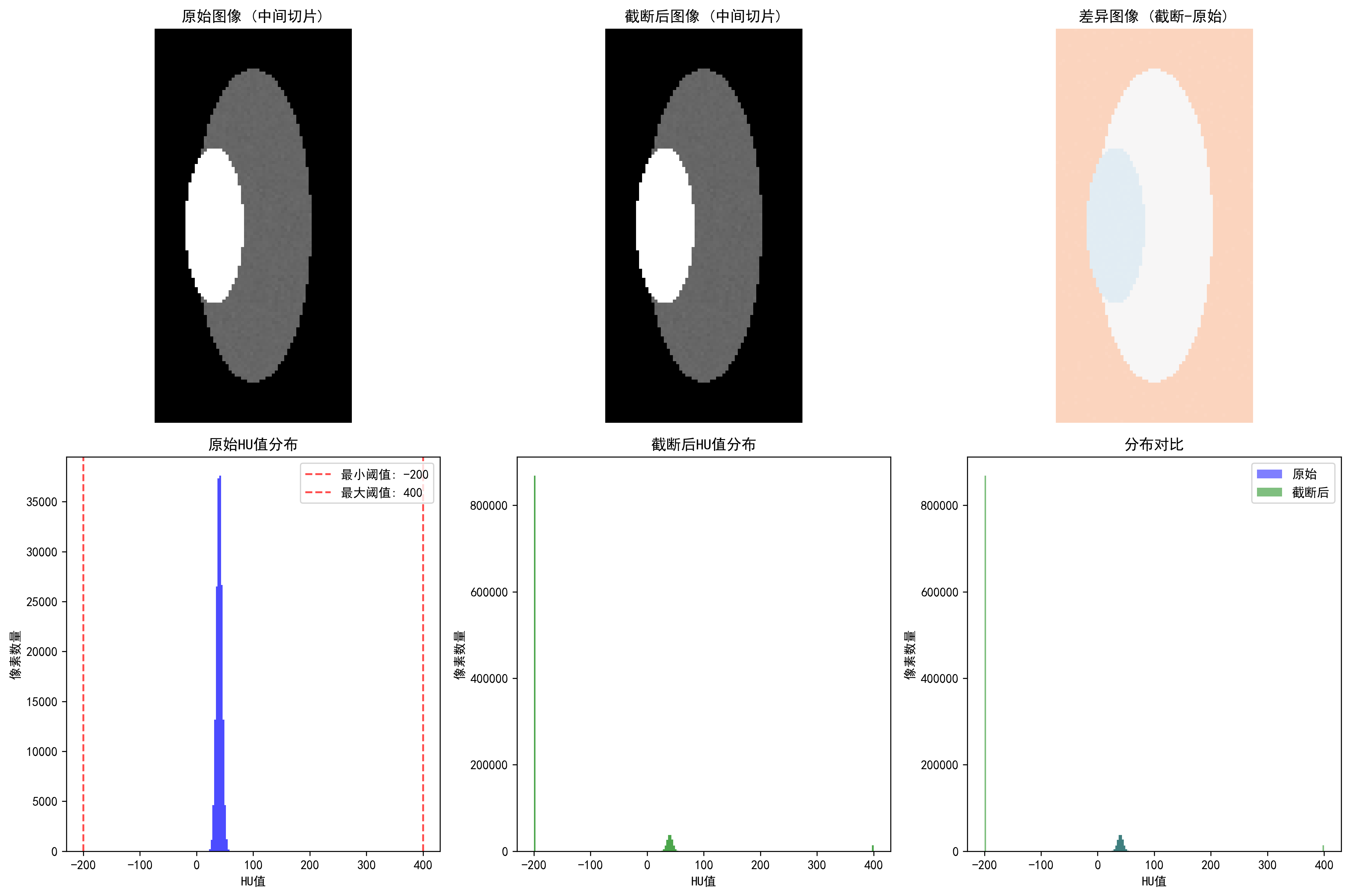
HU Value Clipping ComparisonCT HU value clipping: showing soft tissue range (-200, 400 HU) clipping effect

Effects of different clipping strategies:

  • Full range [-1000, 1000]: clipping ratio 41.53%, highest information preservation
  • Soft tissue range [-200, 400]: clipping ratio 84.13%, suitable for organ analysis
  • Bone range [-200, 3000]: clipping ratio 82.91%, suitable for orthopedic applications
  • Lung range [-1500, 600]: clipping ratio 1.31%, specialized for lung examination

Metal Artifact Detection
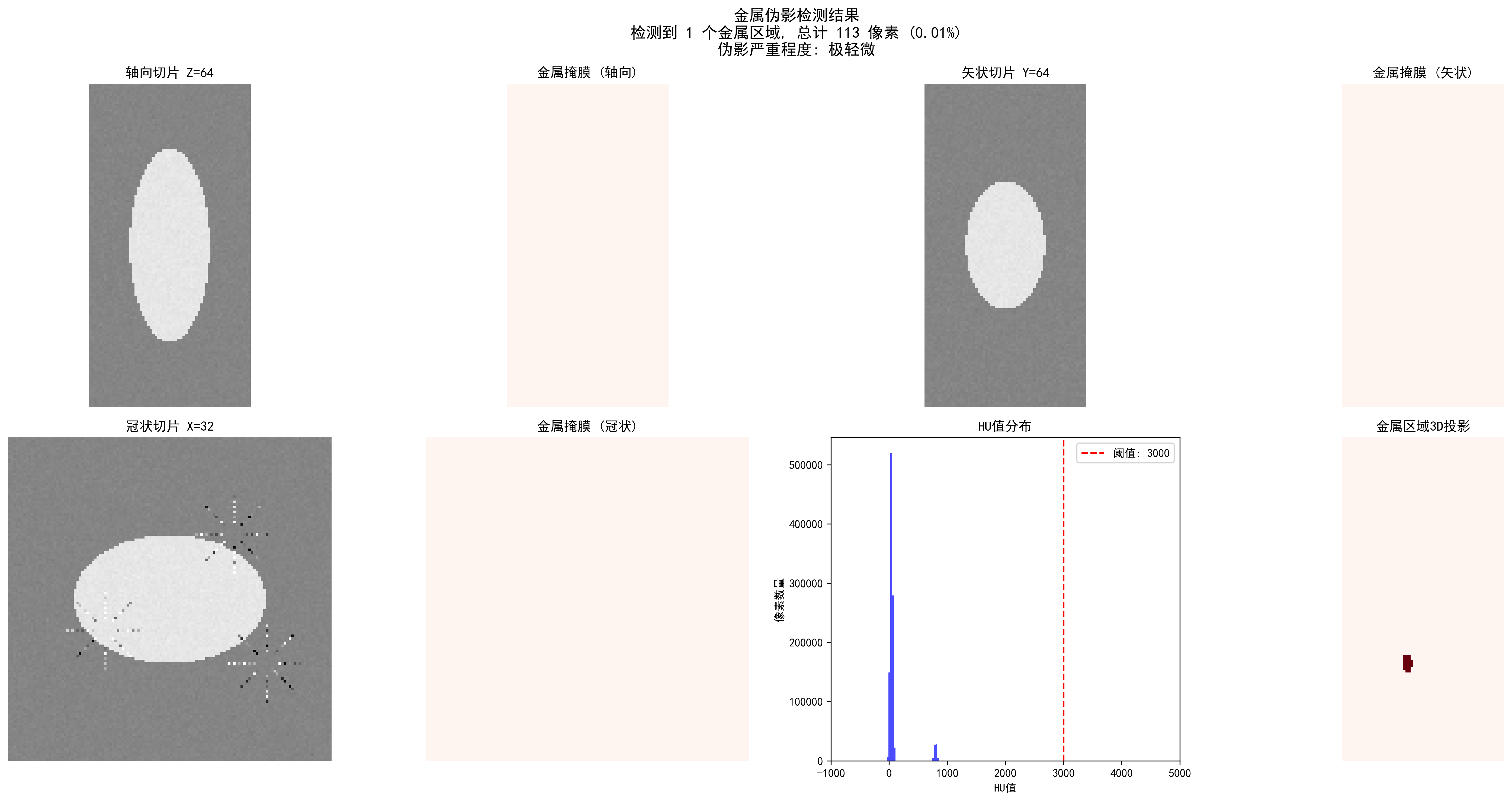
Metal Artifact Detection ResultsCT metal artifact detection: automatic detection of metal regions and artifact severity assessment

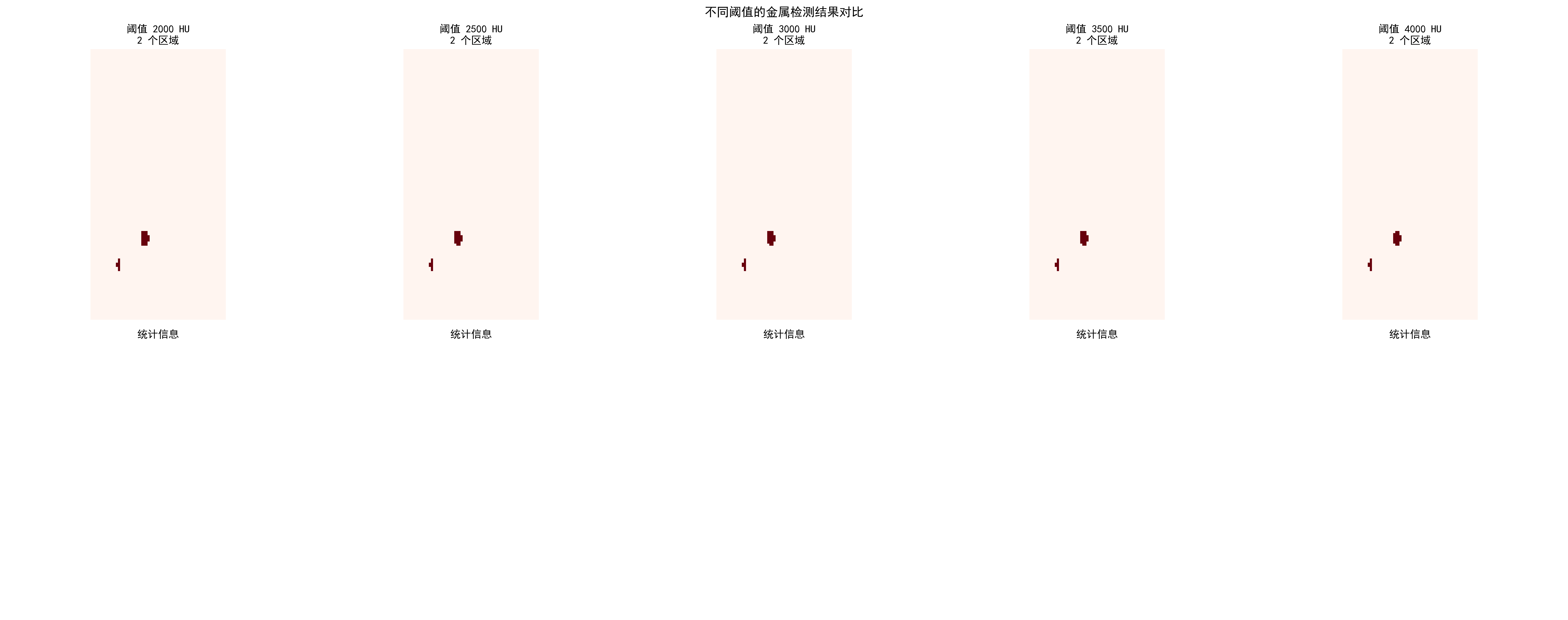
Detection effects of different thresholds:

Threshold (HU)Detected RegionsMetal PixelsRatioSeverity
200021660.02%Slight
300021650.02%Slight
400021330.01%Slight

Metal Artifact Threshold ComparisonComparison of metal artifact detection effects for different HU thresholds

Practical Application Recommendations

Choosing appropriate preprocessing strategies:

  1. Select core algorithms based on modality

    • CT: HU value clipping + windowing adjustment
    • MRI: Bias field correction + White Stripe normalization
    • X-ray: CLAHE enhancement + local segmentation
  2. Parameter optimization principles

    • Start conservatively, enhance gradually
    • Use cross-validation to determine optimal parameters
    • Combine quantitative evaluation with visual effects
  3. Quality check key points

    • Maintain anatomical structure integrity
    • Avoid over-processing or information loss
    • Ensure processing results conform to medical common sense

Code usage guide: Each algorithm has complete documentation and test cases. We recommend:

  1. First run synthetic data examples to understand algorithm effects
  2. Use your own data for parameter optimization
  3. Establish quality check processes to ensure processing effects

🔑 Key Takeaways

  1. Modality Specificity: Different imaging modalities require specialized preprocessing strategies

    • CT: Focus on HU value ranges and windowing
    • MRI: Address bias field and intensity normalization
    • X-ray: Focus on contrast enhancement and anatomical region processing
  2. Physical Meaning Preservation: Preprocessing should not destroy the physical meaning of images

    • Absoluteness of HU values
    • Relativity of MRI signal intensities
    • Equipment dependency of X-ray intensities
  3. Clinical Reasonableness: Preprocessing results must conform to medical common sense

    • Continuity of anatomical structures
    • Reasonableness of tissue contrast
    • Preservation of pathological features
  4. Data-driven Optimization: Preprocessing parameters should be adjusted according to specific tasks and datasets

    • Cross-validation to determine optimal parameters
    • Combination of qualitative and quantitative evaluation
    • Consider computational efficiency balance
  5. Quality Assurance: Establish preprocessing quality inspection mechanisms

    • Automated anomaly detection
    • Expert validation processes
    • Version control and reproducibility


Details

Datasets

DatasetPurposeOfficial URLLicenseNotes
BraTSBrain Tumor Multi-sequence MRIhttps://www.med.upenn.edu/cbica/brats/Academic use freeMost authoritative brain tumor dataset
LUNA16Lung Nodule Detection CThttps://luna16.grand-challenge.org/PublicStandard lung nodule dataset
CheXpertChest X-rayhttps://stanfordmlgroup.github.io/competitions/chexpert/CC-BY 4.0Stanford standard dataset
NIH CXR14Chest X-rayhttps://nihcc.app.box.com/v/ChestX-ray14PublicContains disease labels
TCIAMulti-modality Tumor Datahttps://www.cancerimagingarchive.net/PublicTumor imaging dataset
OpenIChest X-ray and Radiology Reportshttps://openi.nlm.nih.gov/PublicContains radiology report associations

Papers

Paper TitleKeywordsSourceNotes
Preparing CT imaging datasets for deep learning in lung nodule analysis: Insights from four well-known datasetsCT imaging dataset preparationHeliyonGuide for CT lung nodule dataset preparation for deep learning
Hounsfield unit (HU) value truncation and range standardizationHU value truncation and standardizationMedical Imaging Preprocessing StandardsTheoretical foundation of CT intensity standardization
CLAHE (Contrast Limited Adaptive Histogram Equalization)CLAHE contrast enhancementIEEE Transactions on Image Processing 1997Contrast-limited adaptive histogram equalization
U-Net: Convolutional Networks for Biomedical Image SegmentationU-Net architectureMICCAI 2015Classic network for medical image segmentation
A review of deep learning in medical imaging: Imaging traits, technology trends, case studies with progress highlights, and future promisesDeep learning medical imaging reviewarXivComprehensive review of deep learning techniques in medical imaging

Open Source Libraries

LibraryFunctionGitHub/WebsitePurpose
TorchIOMedical Image Transformation Libraryhttps://torchio.readthedocs.io/Medical image data augmentation
AlbumentationsMedical Image Augmentationhttps://albumentations.ai/General image augmentation
SimpleITKMedical Image Processinghttps://www.simpleitk.org/Medical image processing toolkit
ANTsMedical Image Registrationhttps://stnava.github.io/ANTs/Image registration and analysis
MEDpyMedical Image Processinghttps://github.com/loli/MEDpyMedical imaging algorithm library
NiBabelDICOM/NIfTI Processinghttps://nipy.org/nibabel/Neuroimaging data format processing

💡 Next Steps

Now you have mastered preprocessing techniques for different modality medical images. In the next section (5.2 Image Segmentation: U-Net and its variants), we will deeply study the core technologies of medical image segmentation, understanding how to convert preprocessed images into precise anatomical structure segmentation results.

Released under the MIT License.