
Double Diamond: First Do the Right Thing, Then Do It Right
After needs analysis and user interviews, we often have a large collection of material: accounts from different users, problems with existing tools, and several possible directions for improvement. Once the material grows, the next difficulty is deciding what to keep.
When "understanding the problem" and "designing the solution" are not separated, it is easy to conduct interviews while searching for reasons to support a preferred feature. The Double Diamond separates these two kinds of work through two cycles of divergence and convergence.
This chapter introduces Discover, Define, Develop, and Deliver, and explains the inputs, outputs, and common mistakes of each stage.
1. Two Cycles of Divergence and Convergence
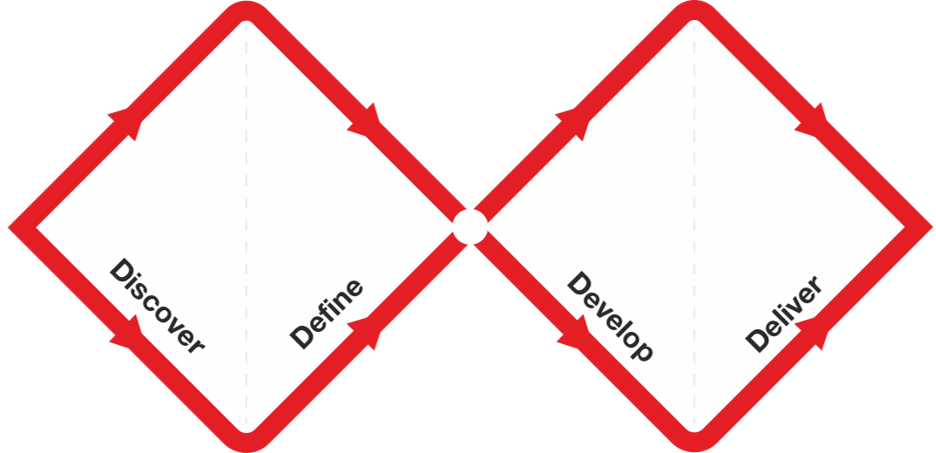
The Double Diamond is a classic design process framework promoted by the UK Design Council. It represents a full design and innovation process as two connected diamond shapes.
It is called a "diamond" because each diamond contains two opposite but equally important motions:
- diverge: open the view and look at more possibilities
- converge: narrow the scope and make choices
The full process has four steps:
- Discover: broadly understand users, problems, context, and market
- Define: extract the core problem that is actually worth solving
- Develop: explore multiple solution directions around that problem
- Deliver: choose, prototype, test, and deliver the more suitable solution
The first two stages address the problem space; the last two address the solution space.
2. Why Separate Problems from Solutions
The most common beginner rhythm looks like this:
- get an idea
- feel that the direction sounds exciting
- start prototyping immediately
- keep adding more features
- eventually lose track of the actual problem
The value of the Double Diamond is not that it makes the process more complicated. It forces you to separate "understanding the problem" from "designing the solution."
That sounds obvious, but it matters a lot. Many failed products were not badly executed. They failed because:
- they chose the wrong problem
- they misunderstood the user
- they locked in a solution too early
- they spent a lot of time polishing detail before validating direction
The Double Diamond keeps reminding you:
- do not assume a problem is real just because the idea is easy to imagine
- do not assume something is worth building just because it is technically buildable
- do not assume a prototype matters just because it looks complete
All three warnings address the same error: treating the amount already invested as evidence that the direction is correct. A prototype only shows what the team has made. Interviews, field observation, and real use provide evidence that the problem exists.
3. The First Diamond: The Problem Space
The first diamond is about the problem itself, not the solution. Its output is a problem definition, not a product prototype.
3.1 Discover: Open up the problem space first
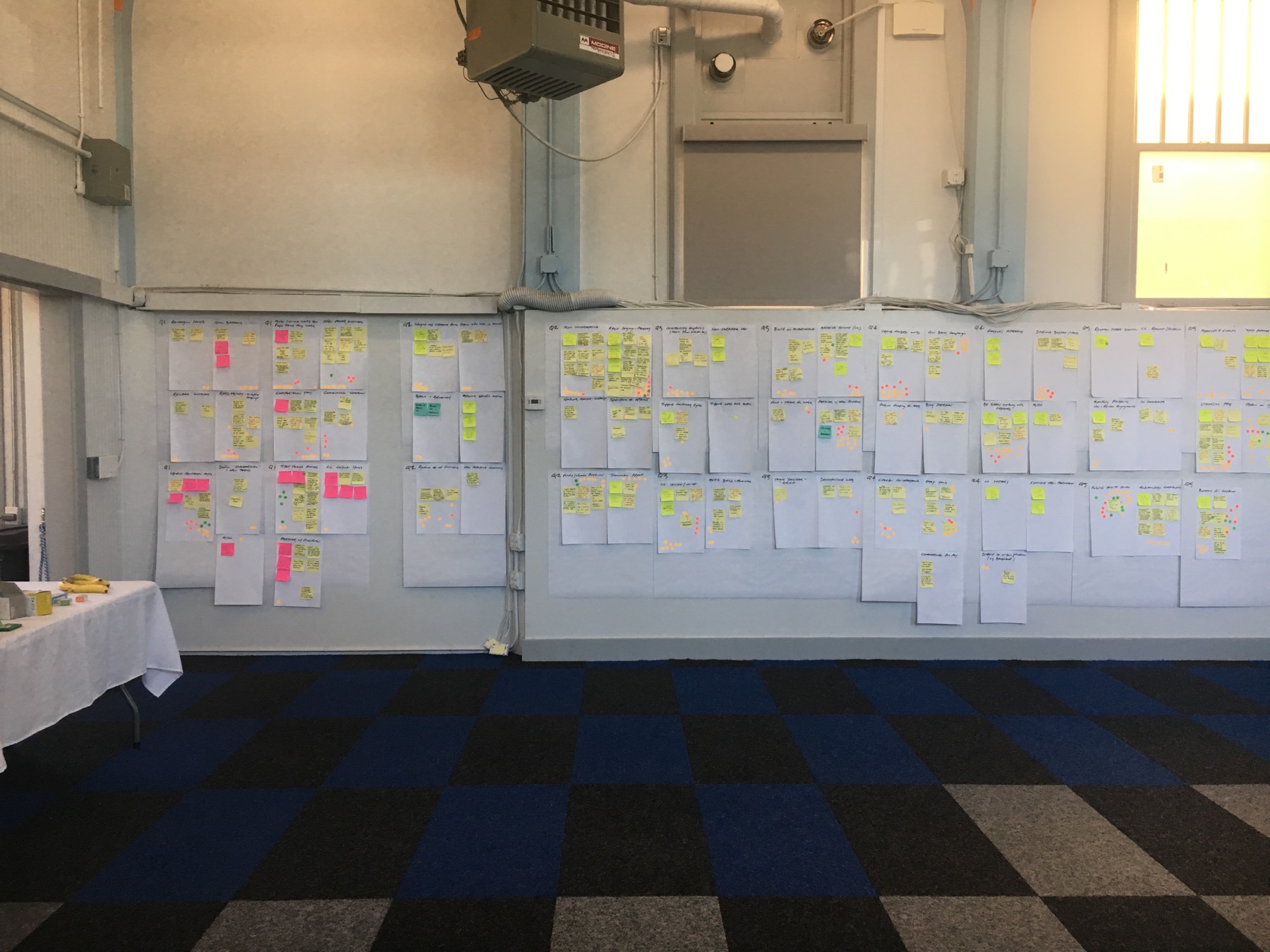
The core task in Discover is broad research, not quick conclusions.
Typical work in this phase includes:
- watching how users behave in real situations
- interviewing potential users and asking when the problem last happened
- seeing how they currently patch the issue together
- checking how competitors and substitutes handle it
- collecting context about market, workflow, constraints, and surrounding systems
Many people think Discover just means "read more things." But the more important part is this: you need to understand people and situations, not just collect information.
For example, imagine you want to build an AI tool for organizing meeting notes. In Discover, the better questions are:
- what exactly feels painful after a meeting
- is the hard part recording, organizing, or syncing
- are people writing notes themselves, asking interns to do it, listening to recordings later, or simply skipping documentation
- which meeting types really need notes, and which ones do not
The main goal in Discover is not to get the answer right away. It is to avoid assuming too early that you already know the answer.
3.2 Define: Extract the core problem from a pile of information
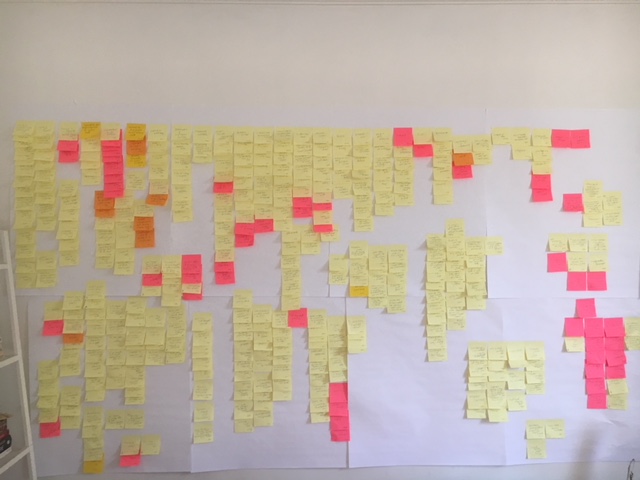
If Discover opens the view, Define starts to narrow it.
Define is not about preserving every observation. It is about asking:
- which problem is most worth solving first
- which problem shows up most often, hurts most, or matters most
- which single situation version one should focus on
The core of this phase is turning a broad topic into one clear problem definition.
For example, maybe you start with:
I want to build an AI tool that improves meeting efficiency.
By the time you reach Define, a much stronger version might be:
We will first solve the problem that project teams often cannot produce a shareable meeting note with action items, owners, and deadlines within 10 minutes after a 30-60 minute collaboration meeting.
At that point, the problem is starting to become clear:
- who the users are
- what the situation is
- where the bottleneck is
- what success would look like
The essence of Define is this: go from "there are many problems" to "this is the one problem we will solve first."
4. The Second Diamond: The Solution Space
Only after you complete the first diamond does it make sense to move fully into the second. By then, you are not solving a vague direction anymore. You are solving a specific problem that has already been narrowed down.
4.1 Develop: Explore multiple solutions around the same problem
The focus in Develop is to expand the solution space around one defined problem.
This kind of divergence is different from Discover:
- Discover expands the problem space
- Develop expands the solution space
Still using the meeting-note example, in Develop you can ask:
- should this be a web tool or a meeting plugin
- should it process recordings after the meeting or work in real time
- should it focus only on summary, or mainly on extracting action items
- should it optimize for personal productivity or team sync
- should the user edit freely, or should the product output a structured template directly
This is a good phase for brainstorming, comparison, and co-creation.
But there is an important precondition: all of these solution directions must still serve the same defined problem.
If the problem is not clear, Develop quickly turns back into random feature sprawl.

4.2 Deliver: Choose, prototype, test, and put the solution into reality
Deliver is the convergence phase inside the second diamond.
At this stage, you are no longer trying to imagine more possibilities. You are making choices:
- which direction fits the current stage best
- which version is smallest but still useful
- which features are necessary first and which can wait
- how to prototype, test, and validate with a smaller group
Many people think Deliver means "launch." A more accurate way to understand it is this:
turn one solution into something testable, usable, and improvable.
That could be:
- a low-fidelity flow diagram
- a Figma prototype
- a working MVP
- a small user test
- a revised version after one round of feedback
The point of Deliver is not perfection. It is to get the solution into a real environment quickly enough to validate it.

5. Distinguishing the Four Stages
We have now examined the four stages separately. The interactive diagram below places them in one process. Select a stage and compare its work, outputs, and the tasks deliberately postponed until later.
Compare the work and outputs at each stage
Select a stage to see the work it requires.
Observe users in context, interview them, and collect workarounds and unusual moments.
Context notes · Problem list · Behavioral evidence
Do not explain causes too early or start prototyping.
6. Common Double Diamond Mistakes
6.1 Jumping into Deliver before doing Discover
This is the most common one. People get an idea and immediately start drawing screens, writing PRDs, integrating models, or building pages.
The problem is not that they are not serious. The problem is that they may not even know whether the problem is worth solving.
6.2 Staying in Discover for too long and never reaching Define
The opposite mistake is endless research, endless reading, endless interviews, and no convergence.
The Double Diamond is not telling you to expand forever. It is reminding you that after expansion, you must eventually make choices.
6.3 Quietly changing the problem after Define
Some teams define a problem, but during Develop they discover that a certain solution is easier to build. Then they quietly rewrite the problem so it fits their preferred solution.
That is dangerous. At that point, you may no longer be solving the real problem. You may be defending a favorite implementation.
6.4 Treating Deliver as "build everything"
Deliver does not mean shipping a huge complete product. Often, a testable prototype or one round of real user testing is already a strong deliverable.
7. How to Use the Double Diamond in AI Products
AI products are especially likely to fall into capability-first thinking because model capabilities are so tempting. It is very easy to jump straight to:
- should we add multimodal input
- should we build an agent
- should we connect workflow automation
- should we add voice, image, or web search
The Double Diamond forces you to ask first:
- where are users actually stuck
- is this bottleneck something AI is truly needed for
- without AI, what is so weak about the current method
- if AI is added, what real progress does it create
That helps you avoid a very common failure mode:
high capability, low value.
A practical sequence looks like this:
- in Discover, observe how users currently handle the task
- in Define, write the most painful scenario as one clear problem statement
- in Develop, compare which AI capabilities best serve that problem
- in Deliver, build a small first version and test it with real users
8. A Double Diamond Template You Can Reuse
If you are working on your own product, you can write through the stages in this order:
Discover
- Who are the users I am observing?
- When did they last experience this problem?
- How do they solve it now?
- What feels most annoying, slow, or risky?
Define
- Out of all these problems, which one is most worth solving first?
- Which situation is most frequent or most important?
- Who exactly does version one serve, and what exactly does it solve?
- If we solve it well, what change happens in the user's state?
Develop
- What solution directions are possible for this problem?
- Which directions are lightest, fastest, and easiest to validate?
- Which parts are essential now, and which can wait?

Deliver
- What is the smallest thing we can deliver to validate this direction?
- Is it a flow sketch, a prototype, or an MVP?
- Who do we need to test with?
- After testing, how will we decide whether to continue, change, or stop?
9. A Full Example a Beginner Can Understand
Suppose you want to build an AI tool that helps college students prepare job-application resumes.
Many people would immediately jump into the second diamond and start asking:
- should there be one-click beautification
- should there be smart rewriting
- should it auto-match the job description
- should it generate self-introductions
But with the Double Diamond, a stronger process looks like this:
First diamond
Discover
- talk to recent graduates about the last time they revised a resume
- watch how they turn an old version into a new one
- figure out whether their biggest issue is "I cannot write," "I cannot revise," or "I cannot judge quality"
Define
- narrow it into a more specific problem
- not "students cannot make resumes"
- but "students applying for internships for the first time struggle to rewrite existing experiences into role-fit wording, so they delay applying"
Second diamond
Develop
- compare several directions: template library, AI rewriting, role comparison, resume scoring, example references
Deliver
- build only one narrow first version, such as "rewrite resume bullet points based on a job description"
- let five students test it and see whether it helps them submit a first version faster
Once the first diamond is solid, the second diamond becomes much clearer.

10. Using AI in the Double Diamond
The Double Diamond is not an AI tool, but AI works very well as an accelerator inside all four stages. The key is not to let AI decide for you. The key is to let it help you expand the view, organize information, compare directions, and generate validation material.
11.1 In Discover, use AI to build a rough problem map first
Before formal interviews and deeper research, AI can help you do a lightweight scan of the space, for example:
- what common substitutes already exist
- what users complain about most in public communities
- which scenarios and user groups this problem shows up in
- what current products often ignore
This cannot replace real research, but it is very useful for creating a first map of the space.
A simple beginner prompt could be:
I want to build a tool that helps college students improve resumes.
Do not help me think about features yet.
First help me figure out what problems people most often run into here.
Possible AI output:
Initial problem map:

1. They do not know what experiences to include
2. They do not know how to tailor the resume to different roles
3. They revise many times and still do not know if it is good enough
4. They need someone else to review it, but cannot always ask
5. Because they feel unsure, they keep delaying applications
That kind of output is not there to replace your judgment. It helps you enter Discover faster.
11.2 In Define, use AI to narrow the problem statement
After collecting a lot of information, one of the hardest things is turning it into one really clear problem statement. You can give research notes to AI and ask it to compress them into candidate definitions:
Below are user notes and research notes I collected during Discover:
[paste the content]

Please do 3 things:
1. summarize the most common problem patterns
2. based on frequency, pain, and ease of validation, suggest 3 problems worth prioritizing
3. write each problem as one clear problem statement
You can keep the input very simple too:
These are the issues I collected:
1. people do not know what to write on the resume
2. people do not know how to revise it
3. people keep feeling it is not good enough, so they do not apply

Please help me decide which problem is the best first one to solve.
Possible AI output:
Recommended first problem:

"Students applying for internships for the first time are unsure whether their resume has reached a submit-ready level, so they keep revising and delay applying."

Reasons:
1. it is more concrete
2. it explains the delay behavior
3. it is easier to test with a smaller first version
That is useful because it helps you narrow a fuzzy set of issues into something closer to an MVP starting point.
11.3 In Develop, use AI to expand multiple solution directions
Once people define a problem, they often fixate immediately on the first solution that comes to mind. AI is very useful here as a forced divergence tool:
I have defined this core problem: [your problem statement]
Please do not give me only one final answer.
Instead, propose 2-3 solution directions from each of these angles:
1. the lightest MVP
2. the best option for validating demand
3. the best option for improving user experience
4. a non-AI solution
5. an AI-based solution

At the end, compare the strengths, risks, and validation cost of each direction.
That stops you from getting trapped by one favorite solution too early.
A simpler prompt could be:
My problem statement is:
"Students delay applying because they are not sure whether their resume is ready."

Please suggest 4 different solution directions, not just one.
Possible AI output:
Option 1: resume readiness checklist
Option 2: job-description-based rewrite assistant
Option 3: resume risk detector
Option 4: example comparison library
Now you are in comparison mode instead of only staring at one AI rewriting path.
11.4 In Deliver, use AI to generate prototype copy and testing material
Once you reach Deliver, AI is very useful for speeding up work like:
- writing copy for low-fidelity prototypes
- organizing user test scripts
- generating multiple versions of titles, buttons, and instructions
- summarizing test feedback and issue lists
For example, you can ask AI to generate a 20-minute user test script, or summarize five pieces of feedback into a decision frame like "continue / revise / pause."
A very small input could be:
I made a very simple prototype:
the user uploads a resume, and the system tells them which parts are not yet ready for submission.

Please generate a 15-minute user testing script.
Possible AI output:
15-minute user testing script:

1. Ask the user to describe their most recent resume submission experience
2. Let them upload a resume independently
3. Observe whether they understand the feedback
4. Ask which parts feel helpful and which parts feel confusing
5. Ask whether they would want to use this again before the next application
That is useful because it moves you from "I finished the prototype" to "how do I actually test this?"
11.5 Let AI act as a stage guard
One of the biggest risks in the Double Diamond is that people skip stages. You can directly ask AI to act like a process guard:
Please act as a product process coach.
Here is my current project state: [your description]
Please judge whether I am mainly in Discover, Define, Develop, or Deliver.
Then tell me:
1. whether I am jumping ahead too early
2. what the most important action in the current stage is
3. what I should not do yet
That is especially helpful for beginners because it is very easy to start prototyping before the problem is truly clear.
11. Summary
- Discover and Define produce a problem definition; Develop and Deliver produce and test a solution.
- Divergence expands the candidate set; convergence uses evidence to make tradeoffs.
- The problem definition should precede solution exploration, but later tests may require revision.
- Deliver aims to produce test results that support learning, not necessarily a complete product.
12. Exercise
Organize Your Idea with the Double Diamond
- Pick one product idea you have been thinking about and write a draft for its Discover, Define, Develop, and Deliver stages
- In Define, force yourself to compress the problem into one concrete sentence
- In Develop, list at least 3 different solution directions instead of clinging to the first one
- In Deliver, write down one smallest validation version you could ship within a week
Further Reading
This article mainly draws on the Design Council's official material about the Double Diamond. These are good places to continue: