Chapter 5: Building a Large Language Model Hands-On — AMD ROCm Edition

5.1 Building a LLaMA2 Large Language Model from Scratch
Meta (formerly Facebook) released LLaMA, its first large language model based on the Transformer architecture, in February 2023, followed by LLaMA2 in July of the same year. In Chapter 4, we learned about LLMs and how to train them. In this section, we will learn how to build a LLaMA2 model from scratch.
The LLaMA2 model architecture is shown in Figure 5.1 below:
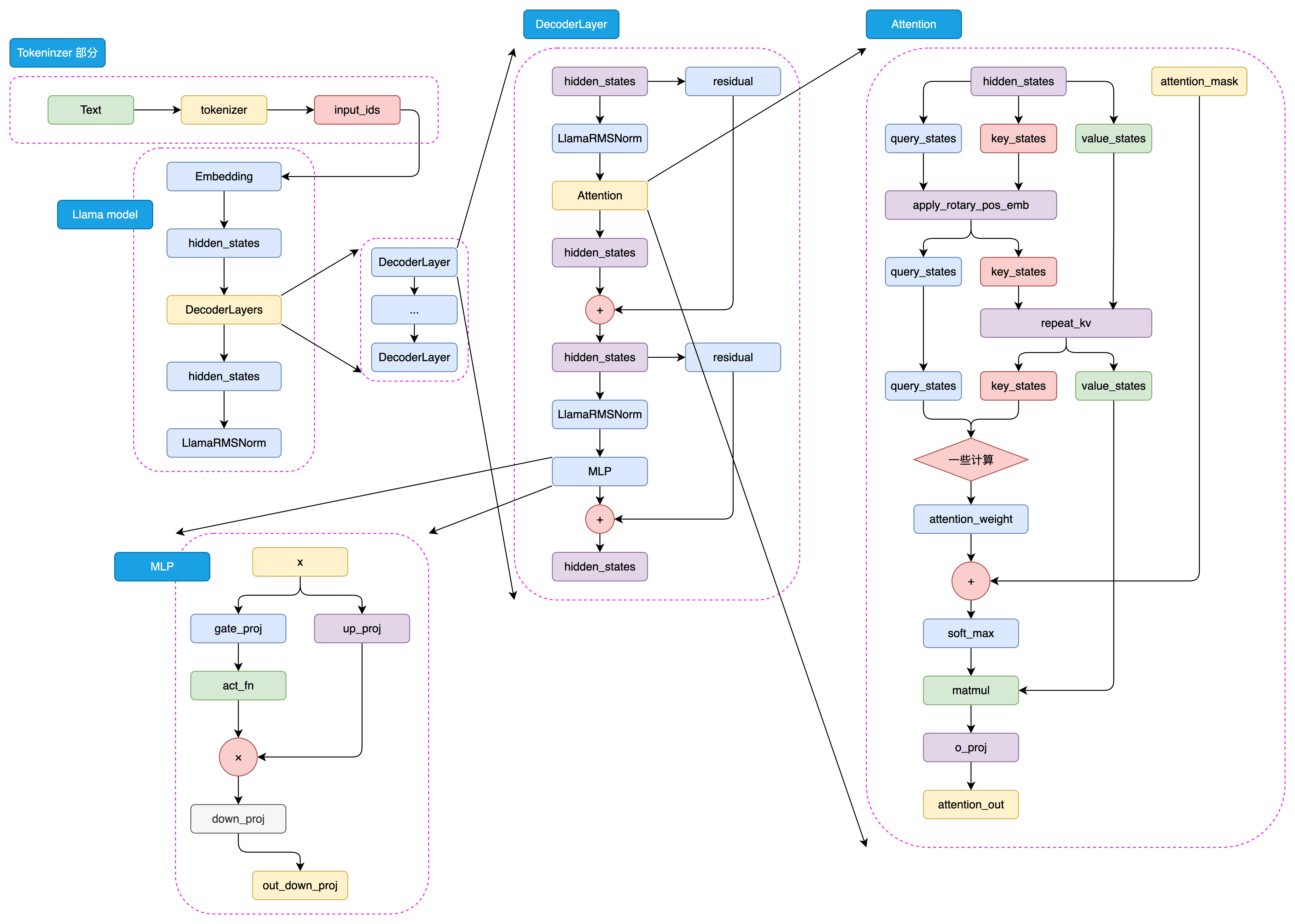
Figure 5.1 LLaMA2 Architecture
5.1.1 Defining Hyperparameters
First, we need to define some hyperparameters, including model size, number of layers, number of heads, embedding dimension, hidden layer dimension, and so on. These hyperparameters can be adjusted according to actual requirements.
Here we define a custom ModelConfig class to store and record our hyperparameters. We inherit from the PretrainedConfig class, which is a configuration class from the transformers library. By inheriting from this class, we can conveniently use some features of the transformers library, and it also makes it easier to export Hugging Face models later.
from transformers import PretrainedConfig

class ModelConfig(PretrainedConfig):
    model_type = "Tiny-K"
    def __init__(
            self,
            dim: int = 768, # Model dimension
            n_layers: int = 12, # Number of Transformer layers
            n_heads: int = 16, # Number of attention heads
            n_kv_heads: int = 8, # Number of key-value heads
            vocab_size: int = 6144, # Vocabulary size
            hidden_dim: int = None, # Hidden layer dimension
            multiple_of: int = 64,
            norm_eps: float = 1e-5, # Epsilon for normalization layers
            max_seq_len: int = 512, # Maximum sequence length
            dropout: float = 0.0, # Dropout probability
            flash_attn: bool = True, # Whether to use Flash Attention
            **kwargs,
    ):
        self.dim = dim
        self.n_layers = n_layers
        self.n_heads = n_heads
        self.n_kv_heads = n_kv_heads
        self.vocab_size = vocab_size
        self.hidden_dim = hidden_dim
        self.multiple_of = multiple_of
        self.norm_eps = norm_eps
        self.max_seq_len = max_seq_len
        self.dropout = dropout
        self.flash_attn = flash_attn
super().__init__(**kwargs)In the following code, whenever
argsappears, it refers to theModelConfigconfiguration above by default.
Let's look at the meaning of some of these hyperparameters. For example, dim is the model dimension, n_layers is the number of Transformer layers, n_heads is the number of attention heads, vocab_size is the vocabulary size, and max_seq_len is the maximum input sequence length, and so on. The code above also provides detailed comments for each parameter. In the following code, we will build our model based on these hyperparameters.
5.1.2 Building RMSNorm
RMSNorm can be expressed by the following mathematical formula:
Where:
- is the -th element of the input vector
- is a learnable scaling parameter (corresponding to
self.weightin the code) - is the number of dimensions of the input vector
- is a small constant for numerical stability (to avoid division by zero)
This normalization helps stabilize the learning process by ensuring that the scale of the weights does not become too large or too small, which is particularly useful in deep learning models with many layers.
We can implement RMSNorm with the following code:
class RMSNorm(nn.Module):
    def __init__(self, dim: int, eps: float):
        super().__init__()
        # eps is to prevent division by zero
        self.eps = eps
        # weight is a learnable parameter, initialized to all ones
        self.weight = nn.Parameter(torch.ones(dim))

    def _norm(self, x):
        # Core computation of RMSNorm
        # x.pow(2).mean(-1, keepdim=True) computes the mean of the squared input x
        # torch.rsqrt is the reciprocal of the square root, giving us the denominator of RMSNorm, plus eps to prevent division by zero
        # Finally multiply by x to get the RMSNorm result
        return x * torch.rsqrt(x.pow(2).mean(-1, keepdim=True) + self.eps)

    def forward(self, x):
        # forward function is the model's forward pass
        # First convert input x to float type, then apply RMSNorm, then convert back to the original data type
        # Finally multiply by weight, which is a learnable scaling factor of RMSNorm
        output = self._norm(x.float()).type_as(x)
return output * self.weightWe can use the following code to test the RMSNorm module. As you can see, the final output shape is torch.Size([1, 50, 768]), which is consistent with our input shape, confirming that the module is correctly implemented — normalization does not change the shape of the input.
norm = RMSNorm(args.dim, args.norm_eps)
x = torch.randn(1, 50, args.dim)
output = norm(x)
print(output.shape)

out:
torch.Size([1, 50, 768])5.1.3 Building LLaMA2 Attention
In the LLaMA2 model, although only the LLaMA2-70B model uses Grouped-Query Attention (GQA), we still choose to use GQA to build our LLaMA Attention module, as it can improve model efficiency and save some GPU memory.
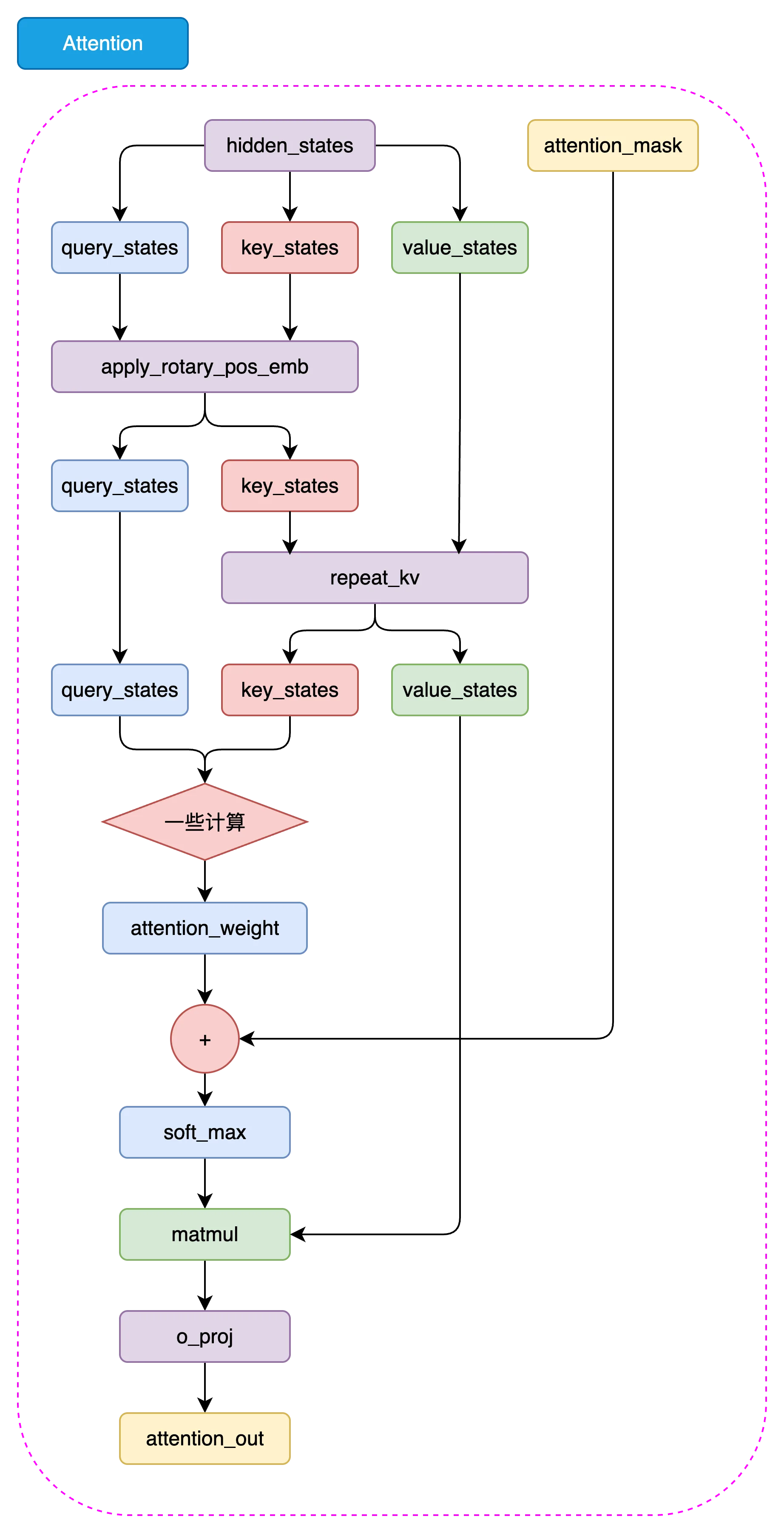
Figure 5.2 LLaMA2 Attention Architecture
5.1.3.1 repeat_kv
In the LLaMA2 model, we need to expand the dimensions of keys and values to match the dimensions of queries, so that attention computation can be performed. We can implement repeat_kv with the following code:
def repeat_kv(x: torch.Tensor, n_rep: int) -> torch.Tensor:
    # Get the shape of the input tensor: batch size, sequence length, number of key/value heads, dimension per head
    bs, slen, n_kv_heads, head_dim = x.shape

    # If the number of repetitions is 1, no repetition is needed, return the original tensor directly
    if n_rep == 1:
        return x

    # Expand and reshape the tensor to repeat the key-value pairs
    return (
        x[:, :, :, None, :]  # Add a new dimension before the head dimension (4th dimension)
        .expand(bs, slen, n_kv_heads, n_rep, head_dim)  # Expand the newly added dimension to n_rep size, achieving the repetition effect
        .reshape(bs, slen, n_kv_heads * n_rep, head_dim)  # Reshape to merge the key/value head count and repetition dimensions
)In the above code:
First, get the shape of the input tensor: The code obtains the shape of the input tensor via
x.shape, including the batch size (bs), sequence length (slen), number of key/value heads (n_kv_heads), and the dimension per head (head_dim).Then, check the number of repetitions: The code checks whether the repetition count
n_repis 1. If it is 1, it means the keys and values do not need to be repeated, and the original tensorxis returned directly.Finally, expand and reshape the tensor:
- Add a new dimension after the third dimension (i.e., the key/value head dimension), forming
x[:, :, :, None, :]. - Use the
expandmethod to expand the newly added dimension ton_repsize, achieving the key/value repetition effect. - Finally, use the
reshapemethod to reshape and merge the expanded dimension back into the key/value head count, i.e.,x.reshape(bs, slen, n_kv_heads * n_rep, head_dim), so that the final tensor shape matches the query dimensions.
- Add a new dimension after the third dimension (i.e., the key/value head dimension), forming
5.1.3.2 Rotary Embeddings
Next, let's implement rotary embeddings. Rotary embeddings are an important component in the LLaMA2 model that can provide stronger contextual information for the attention mechanism, thereby improving model performance.
First, we need to construct a function to obtain the real and imaginary parts of the rotary embeddings:
# Note: dim here should be dim//n_head, because we apply rotary embeddings to each head
def precompute_freqs_cis(dim: int, end: int, theta: float = 10000.0):
    # torch.arange(0, dim, 2)[: (dim // 2)].float() generates a sequence starting from 0 with step 2, of length dim/2
    # Then each element is divided by dim, and the reciprocal of theta is taken to get the frequencies
    freqs = 1.0 / (theta ** (torch.arange(0, dim, 2)[: (dim // 2)].float() / dim))
    # Generate a sequence from 0 to end, of length end
    t = torch.arange(end, device=freqs.device)
    # Compute the outer product, resulting in a 2D matrix where each row is an element of t multiplied by elements of freqs
    freqs = torch.outer(t, freqs).float()
    # Compute the cosine of the frequencies to get the real part
    freqs_cos = torch.cos(freqs)
    # Compute the sine of the frequencies to get the imaginary part
    freqs_sin = torch.sin(freqs)
return freqs_cos, freqs_sin- Compute the frequency sequence:
torch.arange(0, dim, 2)[: (dim // 2)].float()generates a sequence starting from 0 with step 2, of lengthdim/2.- Each element is divided by
dim, then the reciprocal ofthetais taken to obtain a frequency sequencefreqs. This step generates frequencies suitable for rotary embeddings.
- Generate the time sequence:
t = torch.arange(end, device=freqs.device)generates a sequence from0toend, of lengthend.endis typically the maximum sequence length.
- Compute the outer product of frequencies:
freqs = torch.outer(t, freqs).float()computes the outer product of the time sequencetand the frequency sequencefreqs, resulting in a 2D matrixfreqs. Each row is an element of the time sequencetmultiplied by elements of the frequency sequencefreqs.
- Compute the real and imaginary parts:
freqs_cos = torch.cos(freqs)computes the cosine of the frequency matrixfreqs, yielding the real part of the rotary embeddings.freqs_sin = torch.sin(freqs)computes the sine of the frequency matrixfreqs, yielding the imaginary part of the rotary embeddings.
Finally, this function returns two matrices freqs_cos and freqs_sin, representing the real and imaginary parts of the rotary embeddings respectively, which are used in subsequent computations.
Next, let's construct the reshape_for_broadcast function that adjusts tensor shapes. The main purpose of this function is to adjust the shape of freqs_cis so that its dimensions align with x during broadcasting operations, enabling correct tensor computations.
def reshape_for_broadcast(freqs_cis: torch.Tensor, x: torch.Tensor):
    # Get the number of dimensions of x
    ndim = x.ndim

    # Assert that 1 is within the range of x's dimensions
    assert 0 <= 1 < ndim

    # Assert that the shape of freqs_cis matches the second and last dimensions of x
    assert freqs_cis.shape == (x.shape[1], x.shape[-1])

    # Construct a new shape where all dimensions except the second and last are 1, to enable broadcasting of freqs_cis with x
    shape = [d if i == 1 or i == ndim - 1 else 1 for i, d in enumerate(x.shape)]

    # Reshape freqs_cis to the new shape and return
return freqs_cis.view(shape)Finally, we can implement rotary embeddings with the following code:
def apply_rotary_emb(
    xq: torch.Tensor,
    xk: torch.Tensor,
    freqs_cos: torch.Tensor,
    freqs_sin: torch.Tensor
) -> Tuple[torch.Tensor, torch.Tensor]:

    # Convert query and key tensors to float and reshape to separate real and imaginary parts
    xq_r, xq_i = xq.float().reshape(xq.shape[:-1] + (-1, 2)).unbind(-1)
    xk_r, xk_i = xk.float().reshape(xk.shape[:-1] + (-1, 2)).unbind(-1)

    # Reshape frequency tensors for broadcasting
    freqs_cos = reshape_for_broadcast(freqs_cos, xq_r)
    freqs_sin = reshape_for_broadcast(freqs_sin, xq_r)

    # Apply rotation, computing the rotated real and imaginary parts separately
    xq_out_r = xq_r * freqs_cos - xq_i * freqs_sin
    xq_out_i = xq_r * freqs_sin + xq_i * freqs_cos
    xk_out_r = xk_r * freqs_cos - xk_i * freqs_sin
    xk_out_i = xk_r * freqs_sin + xk_i * freqs_cos

    # Merge the last two dimensions and restore to the original tensor shape
    xq_out = torch.stack([xq_out_r, xq_out_i], dim=-1).flatten(3)
    xk_out = torch.stack([xk_out_r, xk_out_i], dim=-1).flatten(3)

return xq_out.type_as(xq), xk_out.type_as(xk)Here we provide code to test the apply_rotary_emb function. You can also try adding breakpoints in the code to inspect the computation results at each step.
xq = torch.randn(1, 50, 6, 48) # bs, seq_len, dim//n_head, n_head_dim
xk = torch.randn(1, 50, 6, 48) # bs, seq_len, dim//n_head, n_head_dim

# Use the precompute_freqs_cis function to get sin and cos
cos, sin = precompute_freqs_cis(288//6, 50)
print(cos.shape, sin.shape)
xq_out, xk_out = apply_rotary_emb(xq, xk, cos, sin)

xq_out.shape, xk_out.shapeOUT:
torch.Size([50, 24]) torch.Size([50, 24])

(torch.Size([1, 50, 6, 48]), torch.Size([1, 50, 6, 48]))5.1.3.3 Assembling LLaMA2 Attention
Above we have completed the implementation of rotary embeddings. Now we can build the LLaMA2 Attention module.
class Attention(nn.Module):
    def __init__(self, args: ModelConfig):
        super().__init__()
        # Determine the number of heads for keys and values based on whether n_kv_heads is specified.
        self.n_kv_heads = args.n_heads if args.n_kv_heads is None else args.n_kv_heads
        # Ensure the total number of heads is divisible by the number of key-value heads.
        assert args.n_heads % self.n_kv_heads == 0

        # Model parallel size, default is 1.
        model_parallel_size = 1
        # Number of local heads, equal to total heads divided by model parallel size.
        self.n_local_heads = args.n_heads // model_parallel_size
        # Number of local key-value heads, equal to key-value heads divided by model parallel size.
        self.n_local_kv_heads = self.n_kv_heads // model_parallel_size
        # Number of repetitions, used to expand the size of keys and values.
        self.n_rep = self.n_local_heads // self.n_local_kv_heads
        # Dimension per head, equal to model dimension divided by total number of heads.
        self.head_dim = args.dim // args.n_heads

        # Define weight matrices.
        self.wq = nn.Linear(args.dim, args.n_heads * self.head_dim, bias=False)
        self.wk = nn.Linear(args.dim, self.n_kv_heads * self.head_dim, bias=False)
        self.wv = nn.Linear(args.dim, self.n_kv_heads * self.head_dim, bias=False)
        # Output weight matrix.
        self.wo = nn.Linear(args.n_heads * self.head_dim, args.dim, bias=False)

        # Define dropout.
        self.attn_dropout = nn.Dropout(args.dropout)
        self.resid_dropout = nn.Dropout(args.dropout)
        # Save dropout probability.
        self.dropout = args.dropout

        # Check if Flash Attention is available (requires PyTorch >= 2.0).
        self.flash = hasattr(torch.nn.functional, 'scaled_dot_product_attention')
        if not self.flash:
            # If Flash Attention is not supported, use manually implemented attention with a mask.
            print("WARNING: using slow attention. Flash Attention requires PyTorch >= 2.0")
            # Create an upper triangular matrix to mask future information.
            mask = torch.full((1, 1, args.max_seq_len, args.max_seq_len), float("-inf"))
            mask = torch.triu(mask, diagonal=1)
            # Register as a model buffer
            self.register_buffer("mask", mask)

    def forward(self, x: torch.Tensor, freqs_cos: torch.Tensor, freqs_sin: torch.Tensor):
        # Get batch size and sequence length, [batch_size, seq_len, dim]
        bsz, seqlen, _ = x.shape

        # Compute queries (Q), keys (K), values (V).
        xq, xk, xv = self.wq(x), self.wk(x), self.wv(x)
        # Reshape to accommodate head dimensions.
        xq = xq.view(bsz, seqlen, self.n_local_heads, self.head_dim)
        xk = xk.view(bsz, seqlen, self.n_local_kv_heads, self.head_dim)
        xv = xv.view(bsz, seqlen, self.n_local_kv_heads, self.head_dim)

        # Apply Rotary Position Embeddings (RoPE).
        xq, xk = apply_rotary_emb(xq, xk, freqs_cos, freqs_sin)

        # Expand keys and values to match the repetition count.
        xk = repeat_kv(xk, self.n_rep)
        xv = repeat_kv(xv, self.n_rep)

        # Treat heads as a batch dimension.
        xq = xq.transpose(1, 2)
        xk = xk.transpose(1, 2)
        xv = xv.transpose(1, 2)

        # Choose implementation based on whether Flash Attention is supported.
        if self.flash:
            # Use Flash Attention.
            output = torch.nn.functional.scaled_dot_product_attention(xq, xk, xv, attn_mask=None, dropout_p=self.dropout if self.training else 0.0, is_causal=True)
        else:
            # Use manually implemented attention mechanism.
            scores = torch.matmul(xq, xk.transpose(2, 3)) / math.sqrt(self.head_dim)
            assert hasattr(self, 'mask')
            scores = scores + self.mask[:, :, :seqlen, :seqlen]
            scores = F.softmax(scores.float(), dim=-1).type_as(xq)
            scores = self.attn_dropout(scores)
            output = torch.matmul(scores, xv)

        # Restore time dimension and merge heads.
        output = output.transpose(1, 2).contiguous().view(bsz, seqlen, -1)

        # Final projection back into the residual stream.
        output = self.wo(output)
        output = self.resid_dropout(output)
return outputYou can use the following code to test the attention module. As you can see, the final output shape is torch.Size([1, 50, 768]), which is consistent with our input shape, confirming that the module is correctly implemented.
# Create an Attention instance
attention_model = Attention(args)

# Simulate input data
batch_size = 1
seq_len = 50  # Assume the actual sequence length used is 50
dim = args.dim
x = torch.rand(batch_size, seq_len, dim)  # Randomly generate input tensor
# freqs_cos = torch.rand(seq_len, dim // 2)  # Simulate cos frequencies for RoPE
# freqs_sin = torch.rand(seq_len, dim // 2)  # Simulate sin frequencies for RoPE

freqs_cos, freqs_sin = precompute_freqs_cis(dim//args.n_heads, seq_len)

# Run the Attention model
output = attention_model(x, freqs_cos, freqs_sin)

# The shape after attention is still [batch_size, seq_len, dim]
print("Output shape:", output.shape)OUT:
Output shape: torch.Size([1, 50, 768])5.1.4 Building the LLaMA2 MLP Module
Compared to the LLaMA2 Attention module we implemented earlier, the LLaMA2 MLP module is simpler to implement. We can implement MLP with the following code:
class MLP(nn.Module):
    def __init__(self, dim: int, hidden_dim: int, multiple_of: int, dropout: float):
        super().__init__()
        # If hidden dimension is not specified, set it to 4 times the input dimension
        # Then reduce it to 2/3, and finally ensure it is a multiple of multiple_of
        if hidden_dim is None:
            hidden_dim = 4 * dim
            hidden_dim = int(2 * hidden_dim / 3)
            hidden_dim = multiple_of * ((hidden_dim + multiple_of - 1) // multiple_of)
        # Define the first linear transformation, from input dimension to hidden dimension
        self.w1 = nn.Linear(dim, hidden_dim, bias=False)
        # Define the second linear transformation, from hidden dimension to input dimension
        self.w2 = nn.Linear(hidden_dim, dim, bias=False)
        # Define the third linear transformation, from input dimension to hidden dimension
        self.w3 = nn.Linear(dim, hidden_dim, bias=False)
        # Define dropout layer to prevent overfitting
        self.dropout = nn.Dropout(dropout)

    def forward(self, x):
        # Forward pass function
        # First, input x passes through the first linear transformation and SILU activation function
        # Then, the result is multiplied by the result of input x passing through the third linear transformation
        # Finally, it passes through the second linear transformation and dropout layer
return self.dropout(self.w2(F.silu(self.w1(x)) * self.w3(x)))Let's take a closer look at the implementation of the forward function. First, the input x passes through the first linear transformation self.w1 and the SILU activation function. Then, the result is multiplied by the result of input x passing through the third linear transformation self.w3. Finally, it passes through the second linear transformation self.w2 and the dropout layer to produce the final output.
You can use the following code to test the LLaMAMLP module. As you can see, the final output shape is torch.Size([1, 50, 768]), which is consistent with our input shape, confirming that the module is correctly implemented.
# Create an MLP instance
mlp = MLP(args.dim, args.hidden_dim, args.multiple_of, args.dropout)
# Randomly generate data
x = torch.randn(1, 50, args.dim)
# Run the MLP model
output = mlp(x)
print(output.shape)OUT:
torch.Size([1, 50, 768])5.1.5 LLaMA2 Decoder Layer
At this point, we have implemented the Attention module and the MLP module of the LLaMA2 model. Now we can build the LLaMA2 Decoder Layer.
class DecoderLayer(nn.Module):
    def __init__(self, layer_id: int, args: ModelConfig):
        super().__init__()
        # Define the number of multi-head attention heads
        self.n_heads = args.n_heads
        # Define the input dimension
        self.dim = args.dim
        # Define the dimension per head, equal to input dimension divided by number of heads
        self.head_dim = args.dim // args.n_heads
        # Define the LLaMA2Attention object for multi-head attention computation
        self.attention = Attention(args)
        # Define the LLaMAMLP object for feedforward neural network computation
        self.feed_forward = MLP(
            dim=args.dim,
            hidden_dim=args.hidden_dim,
            multiple_of=args.multiple_of,
            dropout=args.dropout,
        )
        # Define the layer ID
        self.layer_id = layer_id
        # Define the normalization layer for attention computation
        self.attention_norm = RMSNorm(args.dim, eps=args.norm_eps)
        # Define the normalization layer for feedforward neural network computation
        self.ffn_norm = RMSNorm(args.dim, eps=args.norm_eps)

    def forward(self, x, freqs_cos, freqs_sin):
        # Forward pass function
        # First, input x passes through the attention normalization layer, then through attention computation, and the result is added to input x to get h
        # Then, h passes through the feedforward network normalization layer, then through the feedforward network computation, and the result is added to h to get the output
        h = x + self.attention.forward(self.attention_norm(x), freqs_cos, freqs_sin)
        out = h + self.feed_forward.forward(self.ffn_norm(h))
return outThe DecoderLayer combines the Attention module and the MLP module we completed above, implementing a complete Transformer block.
You can use the following code to test the DecoderLayer module. As you can see, the final output shape is torch.Size([1, 50, 768]), which is consistent with our input shape, confirming that the module is correctly implemented.
# Create a LLaMADecoderLayer instance
decoderlayer = DecoderLayer(0, args)

# Simulate input data
dim = args.dim
seq_len = 50

x = torch.randn(1, seq_len, dim) # [bs, seq_len, dim]

freqs_cos, freqs_sin = precompute_freqs_cis(dim//args.n_heads, seq_len)

out = decoderlayer(x, freqs_cos, freqs_sin)

print(out.shape) # Shape is the same as input x [batch_size, seq_len, dim]OUT:
torch.Size([1, 50, 768])5.1.6 Building the LLaMA2 Model
Alright, we have completed the implementation of all the modules above. Now comes the exciting part — we can build the LLaMA2 model. The LLaMA2 model simply stacks the DecoderLayer modules together to form a complete Transformer model.
class Transformer(PreTrainedModel):
    config_class = ModelConfig  # Configuration class
    last_loss: Optional[torch.Tensor] # Record the last computed loss

    def __init__(self, args: ModelConfig = None):
        super().__init__(args)
        # Initialize model parameters
        self.args = args
        # Vocabulary size
        self.vocab_size = args.vocab_size
        # Number of layers
        self.n_layers = args.n_layers

        # Token embedding layer
        self.tok_embeddings = nn.Embedding(args.vocab_size, args.dim)
        # Dropout layer
        self.dropout = nn.Dropout(args.dropout)
        # Decoder layers
        self.layers = torch.nn.ModuleList()
        for layer_id in range(args.n_layers):
            self.layers.append(DecoderLayer(layer_id, args))
        # Normalization layer
        self.norm = RMSNorm(args.dim, eps=args.norm_eps)
        # Output layer
        self.output = nn.Linear(args.dim, args.vocab_size, bias=False)

        # Share the weights of the token embedding layer with the output layer
        self.tok_embeddings.weight = self.output.weight

        # Precompute frequencies for relative position embeddings
        freqs_cos, freqs_sin = precompute_freqs_cis(self.args.dim // self.args.n_heads, self.args.max_seq_len)
        self.register_buffer("freqs_cos", freqs_cos, persistent=False)
        self.register_buffer("freqs_sin", freqs_sin, persistent=False)

        # Initialize all weights
        self.apply(self._init_weights)
        # Apply special scaled initialization to residual projections
        for pn, p in self.named_parameters():
            if pn.endswith('w3.weight') or pn.endswith('wo.weight'):
                torch.nn.init.normal_(p, mean=0.0, std=0.02/math.sqrt(2 * args.n_layers))

        # Initialize the last forward pass loss attribute
        self.last_loss = None
        self.OUT = CausalLMOutputWithPast()  # Output container
        self._no_split_modules = [name for name, _ in self.named_modules()]  # List of modules not to split

    def _init_weights(self, module):
        # Weight initialization function
        if isinstance(module, nn.Linear):
            torch.nn.init.normal_(module.weight, mean=0.0, std=0.02)
            if module.bias is not None:
                torch.nn.init.zeros_(module.bias)
        elif isinstance(module, nn.Embedding):
            torch.nn.init.normal_(module.weight, mean=0.0, std=0.02)

    def forward(self, tokens: torch.Tensor, targets: Optional[torch.Tensor] = None, **kwargs) -> torch.Tensor:
        """
        - tokens: Optional[torch.Tensor], input token tensor.
        - targets: Optional[torch.Tensor], target token tensor.
        - kv_cache: bool, whether to use key-value cache.
        - kwargs: other keyword arguments.

        - self.OUT: CausalLMOutputWithPast, contains logits and loss.
        """

        if 'input_ids' in kwargs:
            tokens = kwargs['input_ids']
        if 'labels' in kwargs:
            targets = kwargs['labels']

        # Forward pass function
        _bsz, seqlen = tokens.shape
        # Pass through the token embedding layer and dropout layer
        h = self.tok_embeddings(tokens)
        h = self.dropout(h)
        # Get relative position embedding frequencies
        freqs_cos = self.freqs_cos[:seqlen]
        freqs_sin = self.freqs_sin[:seqlen]

        # Pass through decoder layers
        for layer in self.layers:
            h = layer(h, freqs_cos, freqs_sin)
        # Pass through normalization layer
        h = self.norm(h)

        if targets is not None:
            # If targets are given, compute the loss
            logits = self.output(h)
            self.last_loss = F.cross_entropy(logits.view(-1, logits.size(-1)), targets.view(-1), ignore_index=0, reduction='none')
        else:
            # Small optimization for inference: only forward the output for the last position
            logits = self.output(h[:, [-1], :])
            self.last_loss = None

        # Set output
        self.OUT.__setitem__('logits', logits)
        self.OUT.__setitem__('last_loss', self.last_loss)
        return self.OUT


    @torch.inference_mode()
    def generate(self, idx, stop_id=None, max_new_tokens=256, temperature=1.0, top_k=None):
        """
        Given an input sequence idx (a long tensor of shape (bz, seq_len)), complete the sequence by generating new tokens multiple times.
        Runs in model.eval() mode. A less efficient sampling version without k/v cache.
        """
        index = idx.shape[1]
        for _ in range(max_new_tokens):
            # If the sequence context is too long, truncate it to the maximum length
            idx_cond = idx if idx.size(1) <= self.args.max_seq_len else idx[:, -self.args.max_seq_len:]

            # Forward pass to get logits for the last position in the sequence
            logits = self(idx_cond).logits
            logits = logits[:, -1, :] # Only keep the output of the last time step

            if temperature == 0.0:
                # Select the most likely index
                _, idx_next = torch.topk(logits, k=1, dim=-1)
            else:
                # Scale logits and apply softmax
                logits = logits / temperature
                if top_k is not None:
                    v, _ = torch.topk(logits, min(top_k, logits.size(-1)))
                    logits[logits < v[:, [-1]]] = -float('Inf')
                probs = F.softmax(logits, dim=-1)
                idx_next = torch.multinomial(probs, num_samples=1)


            if idx_next == stop_id:
                break

            # Append the sampled index to the sequence and continue
            idx = torch.cat((idx, idx_next), dim=1)

return idx[:, index:] # Only return the generated tokensYou can use the following code to test the Transformer module. As you can see, the final output shape is torch.Size([1, 1, 6144]), which is consistent with our expectations, confirming that the module is correctly implemented.
# LLaMA2Model.forward takes two arguments, tokens and targets, where tokens is the input tensor and should be of int type
x = torch.randint(0, 6144, (1, 50)) # [bs, seq_len]
# Instantiate LLaMA2Model
model = Transformer(args=args)
# Calculate the total number of parameters in the model
num_params = sum(p.numel() for p in model.parameters())
print('Number of parameters:', num_params)

out = model(x)
print(out.logits.shape) # [batch_size, 1, vocab_size]OUT:
Number of parameters: 82594560
torch.Size([1, 1, 6144])5.2 Training a Tokenizer
In Natural Language Processing (NLP), a Tokenizer is a tool that breaks text into smaller units called tokens. These tokens can be words, subwords, characters, or even specific symbols. Tokenization is the first step in NLP and directly affects the effectiveness of subsequent processing and analysis. Different types of tokenizers are suited for different application scenarios. Below are several common tokenizers and their characteristics.
5.2.1 Word-based Tokenizer
Word-based Tokenizer is the simplest and most intuitive tokenization method. It splits text into words based on spaces and punctuation marks. The advantage of this method lies in its simplicity and directness—it is easy to implement and aligns with human intuition about language. However, it also has some notable drawbacks, such as the inability to handle out-of-vocabulary (OOV) words and rare words, as well as insufficient handling of compound words (e.g., "New York") or contractions (e.g., "don't"). Additionally, Word-based Tokenizer faces challenges when processing different languages, as some languages (such as Chinese and Japanese) do not have explicit word delimiters.
Example:
Input: "Hello, world! There is Datawhale."
Output: ["Hello", ",", "world", "!", "There", "is", "Datawhale", "."]In this example, the input sentence is split into a series of words and punctuation marks, with each word or punctuation mark serving as an independent token.
5.2.2 Character-based Tokenizer
Character-based Tokenizer treats each character in the text as an independent token. This method can process text at a very fine-grained level and is suitable for handling spelling errors, OOV words, or new words. Since each character is an independent token, this method can capture very subtle linguistic features. This is particularly useful for certain application scenarios, such as generative tasks or tasks that need to handle a large number of OOV words. However, this method also results in very long token sequences, increasing the model's computational complexity and training time. Furthermore, character-level segmentation may lose some word-level semantic information, making it difficult for the model to understand context.
Example:
Input: "Hello"
Output: ["H", "e", "l", "l", "o"]In this example, the word "Hello" is split into individual characters, with each character serving as an independent token. This method can handle any language and character set, offering great flexibility.
5.2.3 Subword Tokenizer
Subword Tokenizer falls between word-level and character-level tokenization, offering a better balance between fine-grained tokenization and the ability to handle OOV words. The key idea behind Subword Tokenizer is to split text into units smaller than words but larger than characters, enabling the handling of unknown words while preserving certain semantic information. Common subword tokenization methods include BPE, WordPiece, and Unigram.
(1) Byte Pair Encoding (BPE)
BPE is a statistical method that generates a subword vocabulary by repeatedly merging the most frequent character or character sequence pairs. The advantage of this method lies in its simplicity and efficiency—it can effectively handle unknown and rare words while maintaining a small vocabulary size. The BPE merging process is bottom-up, progressively merging the most frequent character pairs into new subwords until a predetermined vocabulary size is reached or no more high-frequency character pairs exist.
Example:
Input: "lower"
Output: ["low", "er"]

Input: "newest"
Output: ["new", "est"]In this example, the word "lower" is split into the subwords "low" and "er", while "newest" is split into "new" and "est". This method effectively handles stems and affixes, preserving the basic semantic structure of words.
(2) WordPiece
WordPiece is another subword-based tokenization method, originally used in Google's BERT model. Similar to BPE, WordPiece generates a vocabulary by maximizing the likelihood function of subword sequences, but it places greater emphasis on optimizing the language model when merging subwords. WordPiece preferentially selects subwords that maximize the overall sentence probability, resulting in tokenization that has higher probability within the language model.
Example:
Input: "unhappiness"
Output: ["un", "##happiness"]In this example, the word "unhappiness" is split into the subwords "un" and "##happiness", where "##" indicates that it is a suffix subword. Through this approach, WordPiece can better handle compound words and derived words, preserving more semantic information.
(3) Unigram
Unigram tokenization is based on a probabilistic model that splits text by selecting subwords with the highest probabilities. The Unigram vocabulary is generated by training a language model and can handle multiple languages and different types of text. The Unigram model assigns a probability to each subword and then performs optimal segmentation based on these probabilities.
Example:
Input: "unhappiness"
Output: ["un", "happiness"]

Input: "newest"
Output: ["new", "est"]In this example, the word "unhappiness" is split into the subwords "un" and "happiness", while "newest" is split into "new" and "est". This method effectively handles subword segmentation through probabilistic modeling, producing segmentation results that better align with language usage patterns.
Each Tokenizer method has its specific application scenarios, advantages, and disadvantages. Choosing the appropriate Tokenizer is crucial for the success of natural language processing tasks.
5.2.4 Training a Tokenizer
Here we choose to use the BPE algorithm to train a Subword Tokenizer. BPE is a simple yet effective tokenization method that can handle OOV and rare words while maintaining a small vocabulary size. We will use Hugging Face's tokenizers library to train a BPE Tokenizer.
Step 1: Install and Import Dependencies
First, we need to install the tokenizers library. In addition, we need to install the datasets and transformers libraries for loading training data and loading the trained Tokenizer.
pip install tokenizers datasets transformersThen, import the required libraries.
import random
import json
import os
from transformers import AutoTokenizer, PreTrainedTokenizerFast
from tokenizers import (
    decoders,
    models,
    pre_tokenizers,
    trainers,
    Tokenizer,
)
from tokenizers.normalizers import NFKC
from typing import GeneratorStep 2: Load Training Data
Here we use the same dataset as for pre-training (the Mobvoi Sequence Monkey open-source dataset) to train the tokenizer. You can use code/download_dataset.sh and code/deal_dataset.py to download and preprocess the dataset.
Note: Since the dataset is very large, it may cause out-of-memory issues during training. As this project is for learning purposes, we recommend that learners manually split a small portion of the dataset for training and validation. The author has also stored a pre-trained tokenizer in the GitHub repository, which can be used directly.
def read_texts_from_jsonl(file_path: str) -> Generator[str, None, None]:
    """Read JSONL file and safely extract text data"""
    with open(file_path, 'r', encoding='utf-8') as f:
        for line_num, line in enumerate(f, 1):
            try:
                data = json.loads(line)
                if 'text' not in data:
                    raise KeyError(f"Missing 'text' field in line {line_num}")
                yield data['text']
            except json.JSONDecodeError:
                print(f"Error decoding JSON in line {line_num}")
                continue
            except KeyError as e:
                print(e)
continueStep 3: Create Configuration Files
Before training the BPE Tokenizer, we need to create complete Tokenizer configuration files, including tokenizer_config.json and special_tokens_map.json. These configuration files define the Tokenizer parameters and special tokens used for training and loading the Tokenizer. Here, our chat_template is kept consistent with the Qwen2.5 model.
def create_tokenizer_config(save_dir: str) -> None:
    """Create complete tokenizer configuration files"""
    config = {
        "add_bos_token": False,
        "add_eos_token": False,
        "add_prefix_space": False,
        "bos_token": "<|im_start|>",
        "eos_token": "<|im_end|>",
        "pad_token": "<|im_end|>",
        "unk_token": "<unk>",
        "model_max_length": 1000000000000000019884624838656,
        "clean_up_tokenization_spaces": False,
        "tokenizer_class": "PreTrainedTokenizerFast",
        "chat_template": (
            "{% for message in messages %}"
            "{% if message['role'] == 'system' %}"
            "<|im_start|>system\n{{ message['content'] }}<|im_end|>\n"
            "{% elif message['role'] == 'user' %}"
            "<|im_start|>user\n{{ message['content'] }}<|im_end|>\n"
            "{% elif message['role'] == 'assistant' %}"
            "<|im_start|>assistant\n{{ message['content'] }}<|im_end|>\n"
            "{% endif %}"
            "{% endfor %}"
            "{% if add_generation_prompt %}"
            "{{ '<|im_start|>assistant\n' }}"
            "{% endif %}"
        )
    }

    # Save main configuration file
    with open(os.path.join(save_dir, "tokenizer_config.json"), "w", encoding="utf-8") as f:
        json.dump(config, f, ensure_ascii=False, indent=4)

    # Create special_tokens_map.json
    special_tokens_map = {
        "bos_token": "<|im_start|>",
        "eos_token": "<|im_end|>",
        "unk_token": "<unk>",
        "pad_token": "<|im_end|>",
        "additional_special_tokens": ["<s>", "</s>"]
    }
    with open(os.path.join(save_dir, "special_tokens_map.json"), "w", encoding="utf-8") as f:
json.dump(special_tokens_map, f, ensure_ascii=False, indent=4)Step 4: Train the BPE Tokenizer
Before training the BPE Tokenizer, we need to define a training function to train the Tokenizer and save the trained Tokenizer files. Here we use the Tokenizer class from the tokenizers library to train the BPE Tokenizer.
As you can see, when training the Tokenizer, we configured some special tokens such as <unk>, <s>, </s>, <|im_start|>, and <|im_end|>. These tokens are used to mark unknown words, the beginning and end of sentences, and the beginning and end of dialogues. These special tokens help the model better understand text data and improve the model's generalization ability and performance.
def train_tokenizer(data_path: str, save_dir: str, vocab_size: int = 8192) -> None:
    """Train and save a custom tokenizer"""
    os.makedirs(save_dir, exist_ok=True)

    # Initialize tokenizer
    tokenizer = Tokenizer(models.BPE(unk_token="<unk>"))
    tokenizer.normalizer = NFKC()  # Add text normalization
    tokenizer.pre_tokenizer = pre_tokenizers.ByteLevel(add_prefix_space=False)
    tokenizer.decoder = decoders.ByteLevel()

    # Configure special tokens
    special_tokens = [
        "<unk>",
        "<s>",
        "</s>",
        "<|im_start|>",
        "<|im_end|>"
    ]

    # Configure trainer
    trainer = trainers.BpeTrainer(
        vocab_size=vocab_size,
        special_tokens=special_tokens,
        min_frequency=2,  # Increase low-frequency word filtering
        show_progress=True,
        initial_alphabet=pre_tokenizers.ByteLevel.alphabet()
    )

    # Train tokenizer
    print(f"Training tokenizer with data from {data_path}")
    # texts = read_texts_from_jsonl(data_path)
    # tokenizer.train_from_iterator(texts, trainer=trainer, length=os.path.getsize(data_path))
    # ✅ Let tokenizers (Rust) read the file directly
    # Advantages:
    # 1. Multi-threaded (fully utilizes CPU)
    # 2. Avoids Python JSON parsing bottleneck
    # 3. Does not cache data in Python memory
    # 4. Training speed typically improves 5~20x

    tokenizer.train(
            files=[data_path],
            trainer=trainer
        )

    # Verify special token mappings
    try:
        assert tokenizer.token_to_id("<unk>") == 0
        assert tokenizer.token_to_id("<s>") == 1
        assert tokenizer.token_to_id("</s>") == 2
        assert tokenizer.token_to_id("<|im_start|>") == 3
        assert tokenizer.token_to_id("<|im_end|>") == 4
    except AssertionError as e:
        print("Special tokens mapping error:", e)
        raise

    # Save tokenizer files
    tokenizer.save(os.path.join(save_dir, "tokenizer.json"))

    # Create configuration files
    create_tokenizer_config(save_dir)
print(f"Tokenizer saved to {save_dir}")Step 5: Use the Trained Tokenizer
We can use the trained Tokenizer to process text data, such as encoding, decoding, and generating dialogues. Below is a simple example showing how to use the trained Tokenizer to process text data.
def eval_tokenizer(tokenizer_path: str) -> None:
    """Evaluate tokenizer functionality"""
    try:
        tokenizer = AutoTokenizer.from_pretrained(tokenizer_path)
    except Exception as e:
        print(f"Error loading tokenizer: {e}")
        return

    # Test basic properties
    print("\n=== Tokenizer Basic Info ===")
    print(f"Vocab size: {len(tokenizer)}")
    print(f"Special tokens: {tokenizer.all_special_tokens}")
    print(f"Special token IDs: {tokenizer.all_special_ids}")

    # Test chat template
    messages = [
        {"role": "system", "content": "你是一个AI助手。"},
        {"role": "user", "content": "How are you?"},
        {"role": "assistant", "content": "I'm fine, thank you. and you?"},
        {"role": "user", "content": "I'm good too."},
        {"role": "assistant", "content": "That's great to hear!"},
    ]

    print("\n=== Chat Template Test ===")
    prompt = tokenizer.apply_chat_template(
        messages,
        tokenize=False,
        # add_generation_prompt=True
    )
    print("Generated prompt:\n", prompt, sep="")

    # Test encoding and decoding
    print("\n=== Encoding/Decoding Test ===")
    encoded = tokenizer(prompt, truncation=True, max_length=256)
    decoded = tokenizer.decode(encoded["input_ids"], skip_special_tokens=False)
    print("Decoded text matches original:", decoded == prompt)

    # Test special token handling
    print("\n=== Special Token Handling ===")
    test_text = "<|im_start|>user\nHello<|im_end|>"
    encoded = tokenizer(test_text).input_ids
    decoded = tokenizer.decode(encoded)
    print(f"Original: {test_text}")
    print(f"Decoded:  {decoded}")
print("Special tokens preserved:", decoded == test_text)eval_tokenizer('your tokenizer path')OUT:
=== Tokenizer Basic Info ===
Vocab size: 6144
Special tokens: ['<|im_start|>', '<|im_end|>', '<unk>', '<s>', '</s>']
Special token IDs: [3, 4, 0, 1, 2]

=== Chat Template Test ===
Generated prompt:
<|im_start|>system
你是一个AI助手。<|im_end|>
<|im_start|>user
How are you?<|im_end|>
<|im_start|>assistant
I'm fine, thank you. and you?<|im_end|>
<|im_start|>user
I'm good too.<|im_end|>
<|im_start|>assistant
That's great to hear!<|im_end|>


=== Encoding/Decoding Test ===
Decoded text matches original: False

=== Special Token Handling ===
Original: <|im_start|>user
Hello<|im_end|>
Decoded:  <|im_start|> user
Hello<|im_end|>
Special tokens preserved: False5.3 Pre-training a Small LLM
In the previous sections, we familiarized ourselves with the model architectures of various large models, as well as how to train a Tokenizer. In this section, we will hands-on train an 80-million-parameter LLM.
5.3.1 Data Download
First, we need to download the pre-training dataset. Here, we use two open-source datasets that contain a large amount of Chinese dialogue data, which can be used to train dialogue generation models.
Mobvoi Seq-Monkey Open-Source Dataset: The Mobvoi Seq-Monkey general text dataset is a large language model pre-training corpus formed by aggregating and cleaning data from various publicly accessible sources including web pages, encyclopedias, blogs, Q&A forums, open-source code, books, newspapers, patents, textbooks, and exam questions. The total volume is approximately 10B tokens.
BelleGroup: A dataset of 3.5 million Chinese dialogue entries, including human-machine dialogues, human-human dialogues, character dialogues, and other types of dialogue data, which can be used to train dialogue generation models.
# Download pre-training dataset
os.system("modelscope download --dataset ddzhu123/seq-monkey mobvoi_seq_monkey_general_open_corpus.jsonl.tar.bz2 --local_dir your_local_dir")
# Extract pre-training dataset
os.system("tar -xvf your_local_dir/mobvoi_seq_monkey_general_open_corpus.jsonl.tar.bz2")

# Download SFT dataset
os.system(f'huggingface-cli download --repo-type dataset --resume-download BelleGroup/train_3.5M_CN --local-dir BelleGroup')


# 1 Process pre-training data
def split_text(text, chunk_size=512):
    """Split text into chunks of specified length"""
    return [text[i:i+chunk_size] for i in range(0, len(text), chunk_size)]

input_file = 'mobvoi_seq_monkey_general_open_corpus.jsonl'

with open('seq_monkey_datawhale.jsonl', 'a', encoding='utf-8') as pretrain:
    with open(input_file, 'r', encoding='utf-8') as f:
        data = f.readlines()
        for line in tqdm(data, desc=f"Processing lines in {input_file}", leave=False):  # Add line-level progress bar
            line = json.loads(line)
            text = line['text']
            chunks = split_text(text)
            for chunk in chunks:
                pretrain.write(json.dumps({'text': chunk}, ensure_ascii=False) + '\n')

# 2 Process SFT data

def convert_message(data):
    """
    Convert raw data to standard format
    """
    message = [
        {"role": "system", "content": "你是一个AI助手"},
    ]
    for item in data:
        if item['from'] == 'human':
            message.append({'role': 'user', 'content': item['value']})
        elif item['from'] == 'assistant':
            message.append({'role': 'assistant', 'content': item['value']})
    return message

with open('BelleGroup_sft.jsonl', 'a', encoding='utf-8') as sft:
    with open('BelleGroup/train_3.5M_CN.json', 'r', encoding='utf-8') as f:
        data = f.readlines()
        for item in tqdm(data, desc="Processing", unit="lines"):
            item = json.loads(item)
            message = convert_message(item['conversations'])
sft.write(json.dumps(message, ensure_ascii=False) + '\n')5.3.2 Training the Tokenizer
First, we need to train a Tokenizer for text processing. The role of the Tokenizer is to convert text into numerical sequences so that the model can understand and process it. The dataset we use is the Mobvoi Seq-Monkey Open-Source Dataset, which contains a large amount of Chinese text data suitable for training a Tokenizer.
Note: Since the dataset is quite large, training locally on your own computer can be slow. Therefore, we provide a pre-trained Tokenizer here that you can use directly. If you want to train your own, you can refer to the code below.
python code/train_tokenizer.pyimport random
import json
import os
from transformers import AutoTokenizer, PreTrainedTokenizerFast
from tokenizers import (
decoders,
models,
pre_tokenizers,
trainers,
Tokenizer,
)
from tokenizers.normalizers import NFKC
from typing import Generator
random.seed(42)
def read_texts_from_jsonl(file_path: str) -> Generator[str, None, None]:
"""Read JSONL file and safely extract text data"""
with open(file_path, 'r', encoding='utf-8') as f:
for line_num, line in enumerate(f, 1):
try:
data = json.loads(line)
if 'text' not in data:
raise KeyError(f"Missing 'text' field in line {line_num}")
yield data['text']
except json.JSONDecodeError:
print(f"Error decoding JSON in line {line_num}")
continue
except KeyError as e:
print(e)
continue
def create_tokenizer_config(save_dir: str) -> None:
"""Create complete tokenizer configuration files"""
config = {
"add_bos_token": False,
"add_eos_token": False,
"add_prefix_space": True,
"bos_token": "<|im_start|>",
"eos_token": "<|im_end|>",
"pad_token": "<|im_end|>",
"unk_token": "<unk>",
"model_max_length": 1000000000000000019884624838656,
"clean_up_tokenization_spaces": False,
"tokenizer_class": "PreTrainedTokenizerFast",
"chat_template": (
"{% for message in messages %}"
"{% if message['role'] == 'system' %}"
"<|im_start|>system\n{{ message['content'] }}<|im_end|>\n"
"{% elif message['role'] == 'user' %}"
"<|im_start|>user\n{{ message['content'] }}<|im_end|>\n"
"{% elif message['role'] == 'assistant' %}"
"<|im_start|>assistant\n{{ message['content'] }}<|im_end|>\n"
"{% endif %}"
"{% endfor %}"
"{% if add_generation_prompt %}"
"{{ '<|im_start|>assistant\n' }}"
"{% endif %}"
)
}
# Save main configuration file
with open(os.path.join(save_dir, "tokenizer_config.json"), "w", encoding="utf-8") as f:
json.dump(config, f, ensure_ascii=False, indent=4)
# Create special_tokens_map.json
special_tokens_map = {
"bos_token": "<|im_start|>",
"eos_token": "<|im_end|>",
"unk_token": "<unk>",
"pad_token": "<|im_end|>",
"additional_special_tokens": ["<s>", "</s>"]
}
with open(os.path.join(save_dir, "special_tokens_map.json"), "w", encoding="utf-8") as f:
json.dump(special_tokens_map, f, ensure_ascii=False, indent=4)
def train_tokenizer(data_path: str, save_dir: str, vocab_size: int = 8192) -> None:
"""Train and save a custom tokenizer"""
os.makedirs(save_dir, exist_ok=True)
# Initialize tokenizer
tokenizer = Tokenizer(models.BPE(unk_token="<unk>"))
tokenizer.normalizer = NFKC() # Add text normalization
tokenizer.pre_tokenizer = pre_tokenizers.ByteLevel(add_prefix_space=False)
tokenizer.decoder = decoders.ByteLevel()
# Configure special tokens
special_tokens = [
"<unk>",
"<s>",
"</s>",
"<|im_start|>",
"<|im_end|>"
]
# Configure trainer
trainer = trainers.BpeTrainer(
vocab_size=vocab_size,
special_tokens=special_tokens,
min_frequency=2, # Increase low-frequency word filtering
show_progress=True,
initial_alphabet=pre_tokenizers.ByteLevel.alphabet()
)
# Train tokenizer
print(f"Training tokenizer with data from {data_path}")
texts = read_texts_from_jsonl(data_path)
tokenizer.train_from_iterator(texts, trainer=trainer, length=os.path.getsize(data_path))
# Verify special token mappings
try:
assert tokenizer.token_to_id("<unk>") == 0
assert tokenizer.token_to_id("<s>") == 1
assert tokenizer.token_to_id("</s>") == 2
assert tokenizer.token_to_id("<|im_start|>") == 3
assert tokenizer.token_to_id("<|im_end|>") == 4
except AssertionError as e:
print("Special tokens mapping error:", e)
raise
# Save tokenizer files
tokenizer.save(os.path.join(save_dir, "tokenizer.json"))
# Create configuration files
create_tokenizer_config(save_dir)
print(f"Tokenizer saved to {save_dir}")
def eval_tokenizer(tokenizer_path: str) -> None:
"""Evaluate tokenizer functionality"""
try:
tokenizer = AutoTokenizer.from_pretrained(tokenizer_path)
except Exception as e:
print(f"Error loading tokenizer: {e}")
return
# Test basic properties
print("\n=== Tokenizer Basic Info ===")
print(f"Vocab size: {len(tokenizer)}")
print(f"Special tokens: {tokenizer.all_special_tokens}")
print(f"Special token IDs: {tokenizer.all_special_ids}")
# Test chat template
messages = [
{"role": "system", "content": "你是一个AI助手。"},
{"role": "user", "content": "How are you?"},
{"role": "assistant", "content": "I'm fine, thank you. and you?"},
{"role": "user", "content": "I'm good too."},
{"role": "assistant", "content": "That's great to hear!"},
]
print("\n=== Chat Template Test ===")
prompt = tokenizer.apply_chat_template(
messages,
tokenize=False,
# add_generation_prompt=True
)
print("Generated prompt:\n", prompt, sep="")
# Test encoding and decoding
print("\n=== Encoding/Decoding Test ===")
encoded = tokenizer(prompt, truncation=True, max_length=256)
decoded = tokenizer.decode(encoded["input_ids"], skip_special_tokens=False)
print("Decoded text matches original:", decoded == prompt)
# Test special token handling
print("\n=== Special Token Handling ===")
test_text = "<|im_start|>user\nHello<|im_end|>"
encoded = tokenizer(test_text).input_ids
decoded = tokenizer.decode(encoded)
print(f"Original: {test_text}")
print(f"Decoded: {decoded}")
print("Special tokens preserved:", decoded == test_text)
def main():
# Configure paths
data_path = "your data path"
save_dir = "tokenizer_k"
# Train tokenizer
train_tokenizer(
data_path=data_path,
save_dir=save_dir,
vocab_size=6144
)
# Evaluate tokenizer
eval_tokenizer(save_dir)
if __name__ == '__main__':
main()After training is complete, you can use eval_tokenizer() to test the Tokenizer's functionality and ensure it works correctly. In this function, we first load the trained Tokenizer, then test its basic properties, chat template, encoding/decoding, and other functionalities. These tests help us verify the correctness of the Tokenizer and ensure it works properly. The correct output is:
OUT:
=== Tokenizer Basic Info ===
Vocab size: 6144
Special tokens: ['<|im_start|>', '<|im_end|>', '<unk>', '<s>', '</s>']
Special token IDs: [3, 4, 0, 1, 2]

=== Chat Template Test ===
Generated prompt:
<|im_start|>system
你是一个AI助手。<|im_end|>
<|im_start|>user
How are you?<|im_end|>
<|im_start|>assistant
I'm fine, thank you. and you?<|im_end|>
<|im_start|>user
I'm good too.<|im_end|>
<|im_start|>assistant
That's great to hear!<|im_end|>


=== Encoding/Decoding Test ===
Decoded text matches original: False

=== Special Token Handling ===
Original: <|im_start|>user
Hello<|im_end|>
Decoded:  <|im_start|> user
Hello<|im_end|>
Special tokens preserved: False5.3.3 Dataset
PretrainDataset
Before feeding data into the model, we need to perform some processing to convert text data into tokens that the model can understand. Here we use PyTorch's Dataset class to load the dataset. We define a PretrainDataset class for loading pre-processed datasets. We inherit from torch.utils.data.IterableDataset to define this dataset, which allows us to handle data more flexibly and efficiently.
from torch.utils.data import Dataset

class PretrainDataset(Dataset):
    def __init__(self, data_path, tokenizer, max_length=512):
        super().__init__()
        self.data_path = data_path
        self.tokenizer = tokenizer
        self.max_length = max_length
        self.padding = tokenizer.pad_token_id if tokenizer.pad_token_id is not None else 0
        # Pre-compute byte offset for the start of each line
        self._offsets = []
        with open(data_path, 'rb') as f:
            self._offsets.append(0)
            while f.readline():
                self._offsets.append(f.tell())
        self._total_lines = len(self._offsets) - 1  # The last tell() is EOF

    def __len__(self):
        return self._total_lines

    def __getitem__(self, index: int):
        with open(self.data_path, 'rb') as f:
            f.seek(self._offsets[index])
            line = f.readline().decode('utf-8')
        sample = json.loads(line)
        text = f"{self.tokenizer.bos_token}{sample['text']}"
        input_id = self.tokenizer(text).data['input_ids'][:self.max_length]
        text_len = len(input_id)
        # Pad the remaining part if not reaching max length
        padding_len = self.max_length - text_len
        input_id = input_id + [self.padding] * padding_len
        # 0 means no loss computation
        loss_mask = [1] * text_len + [0] * padding_len

        input_id = np.array(input_id)
        X = np.array(input_id[:-1]).astype(np.int64)
        Y = np.array(input_id[1:]).astype(np.int64)
        loss_mask = np.array(loss_mask[1:]).astype(np.int64)
return torch.from_numpy(X), torch.from_numpy(Y), torch.from_numpy(loss_mask)As shown in the code above and Figure 5.3, the Pretrain Dataset primarily converts text into input_id through the tokenizer, then splits input_id into X and Y, where X consists of the first n-1 elements of input_id, and Y consists of the last n-1 elements of input_id. The loss_mask is used to indicate which positions require loss computation and which do not.
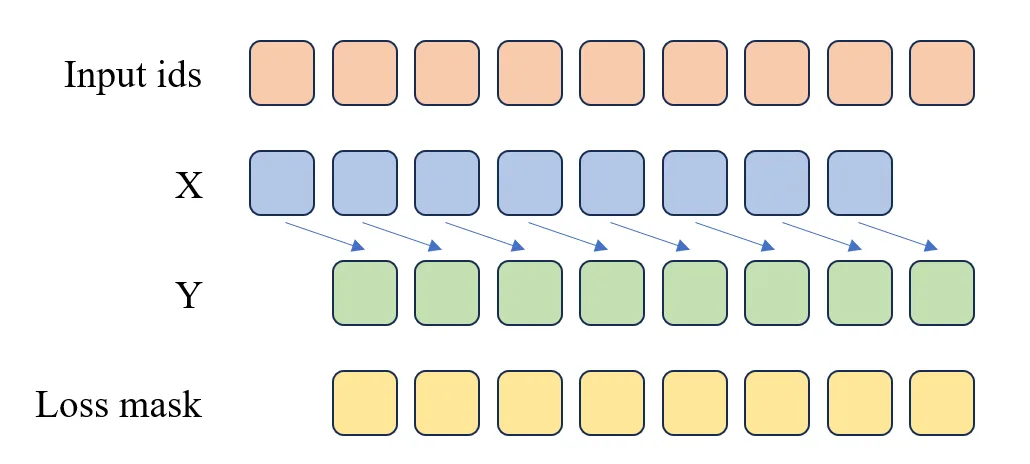
Figure 5.3 Pre-training Loss Computation
The figure illustrates the processing when max_length=9:
- Input sequence:
[BOS, T1, T2, T3, T4, T5, T6, T7, EOS] - Sample splitting:
- X:
[BOS, T1, T2, T3, T4, T5, T6, T7]→ Model input context - Y:
[T1, T2, T3, T4, T5, T6, T7, EOS]→ Model prediction target
- X:
- Loss mask:
- Valid positions:
[0, 1, 1, 1, 1, 1, 1, 1, 1]→ Loss is computed only for T1 through EOS
- Valid positions:
SFTDataset
The SFTDataset is essentially a multi-turn dialogue dataset. Our goal is to have the model learn how to conduct multi-turn conversations. In this stage, our input is the previous turn's dialogue content, and the output is the current turn's dialogue content.
class SFTDataset(Dataset):
    def __init__(self, data_path, tokenizer, max_length=512):
        super().__init__()
        self.data_path = data_path
        self.tokenizer = tokenizer
        self.max_length = max_length
        self.padding = tokenizer.pad_token_id if tokenizer.pad_token_id is not None else 0
        self._offsets = []
        with open(data_path, 'rb') as f:
            self._offsets.append(0)
            while f.readline():
                self._offsets.append(f.tell())
        self._total_lines = len(self._offsets) - 1

    def __len__(self):
        return self._total_lines

    def generate_loss_mask(self, input_ids):
        # Generate loss mask, 0 means no loss computation, 1 means compute loss
        mask = [0] * len(input_ids)
        a_sequence = self.tokenizer("<|im_start|>assistant\n")['input_ids']  # <|im_start|>assistant\n
        a_length = len(a_sequence)
        n = len(input_ids)
        i = 0

        while i <= n - a_length:
            # Check if current position matches the target subsequence
            match = True
            for k in range(a_length):
                if input_ids[i + k] != a_sequence[k]:
                    match = False
                    break
            if match:
                # Starting from the end of the subsequence, find the first 4 (eos_token_id)
                j = None
                for idx in range(i + a_length, n):
                    if input_ids[idx] == self.tokenizer.eos_token_id:
                        j = idx
                        break
                if j is not None:
                    start = i + a_length
                    end = j  # End position set to j (including 4)
                    # Mark the range as 1 (from start to end inclusive)
                    if start <= end:
                        for pos in range(start, end + 1):
                            if pos < len(mask):
                                mask[pos] = 1
                # Skip the current subsequence to avoid overlapping matches
                i += a_length
            else:
                i += 1
        return mask

    def __getitem__(self, index: int):
        with open(self.data_path, 'rb') as f:
            f.seek(self._offsets[index])
            line = f.readline().decode('utf-8')
        sample = json.loads(line)
        text = self.tokenizer.apply_chat_template(sample, tokenize=False, add_generation_prompt=False)
        input_id = self.tokenizer(text).data['input_ids'][:self.max_length]
        text_len = len(input_id)
        # Pad the remaining part if not reaching max length
        padding_len = self.max_length - text_len
        input_id = input_id + [self.padding] * padding_len
        # 0 means no loss computation
        loss_mask = self.generate_loss_mask(input_id)

        input_id = np.array(input_id)
        X = np.array(input_id[:-1]).astype(np.int64)
        Y = np.array(input_id[1:]).astype(np.int64)
        loss_mask = np.array(loss_mask[1:]).astype(np.int64)
return torch.from_numpy(X), torch.from_numpy(Y), torch.from_numpy(loss_mask)During the SFT stage, since we use a multi-turn dialogue dataset, we need to distinguish which positions require loss computation and which do not. In the code above, we use a generate_loss_mask function to generate the loss_mask. The generation rule for this function is: when <|im_start|>assistant\n is encountered, loss computation begins, and continues until <|im_end|> is reached. This ensures that our model only computes loss for the current turn's dialogue content during the SFT stage, as shown in Figure 5.4.
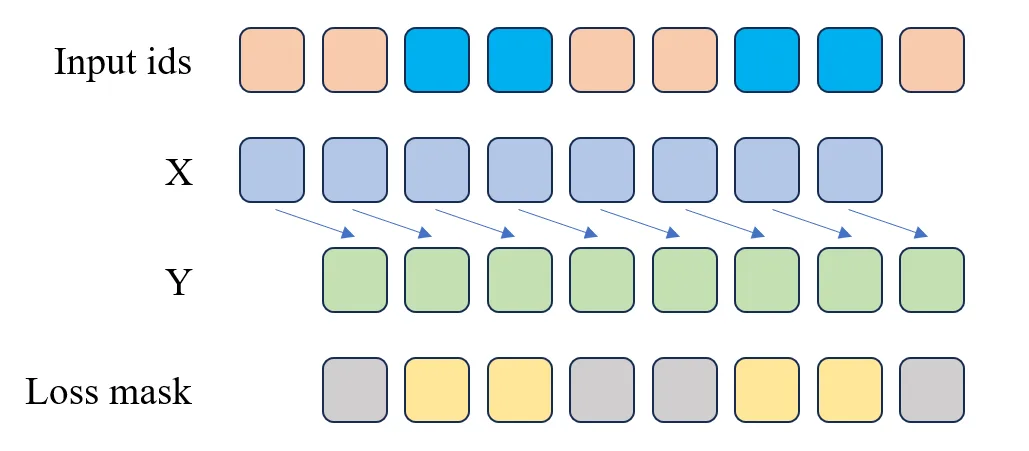
Figure 5.4 SFT Loss Computation
As you can see, the X and Y in the SFT Dataset are actually the same as in the Pretrain Dataset. The only difference is that in the SFT Dataset, we need to generate a loss_mask to indicate which positions require loss computation and which do not. The blue cells in the Input ids in the figure represent the AI's responses, which are the parts the model needs to learn. Therefore, in the loss_mask, the positions corresponding to the blue cells are yellow, while other positions are gray. In the code, positions with 1 in loss_mask compute loss, while positions with 0 do not.
5.3.4 Pre-training
After data preprocessing is complete, we can begin training the model. The model we use is a Decoder-only Transformer model with the same architecture as LLaMA 2, implemented in PyTorch. The relevant code is in the code/k_model.py file. We won't go into detail here, as the source code contains detailed Chinese comments, and we have also provided thorough explanations in previous sections.
In the model section, it's worth paying special attention to how a generative model implements token generation. You can look at the generate method in the Transformer class in the k_model.py file.
@torch.inference_mode()
    def generate(self, idx, stop_id=None, max_new_tokens=256, temperature=1.0, top_k=None):
        """
        Given an input sequence idx (a long tensor of shape (bz, seq_len)), complete the sequence
        by generating new tokens multiple times. Runs in model.eval() mode. This is a less efficient
        sampling version without k/v cache.
        """
        index = idx.shape[1]
        for _ in range(max_new_tokens):
            # If the sequence context is too long, truncate it to max length
            idx_cond = idx if idx.size(1) <= self.args.max_seq_len else idx[:, -self.args.max_seq_len:]

            # Forward pass to get logits at the last position in the sequence
            logits = self(idx_cond).logits
            logits = logits[:, -1, :] # Only keep the output of the last time step

            if temperature == 0.0:
                # Select the most likely index
                _, idx_next = torch.topk(logits, k=1, dim=-1)
            else:
                # Scale logits and apply softmax
                logits = logits / temperature
                if top_k is not None:
                    v, _ = torch.topk(logits, min(top_k, logits.size(-1)))
                    logits[logits < v[:, [-1]]] = -float('Inf')
                probs = F.softmax(logits, dim=-1)
                idx_next = torch.multinomial(probs, num_samples=1)


            if idx_next == stop_id:
                break

            # Append the sampled index to the sequence and continue
            idx = torch.cat((idx, idx_next), dim=1)

return idx[:, index:] # Only return the generated tokensIn the generate method, we first obtain the logits at the last position in the sequence, then generate a new token based on these logits. The newly generated token is then appended to the sequence, and the model continues to generate the next token. Through this iterative process, we can generate complete text.
Now comes the most important part — training the model!
Note: When using the code below for model training, you need to specify the
--data_pathparameter as the path to the preprocessed dataset, e.g.,--data_path seq_monkey_datawhale.jsonl. You also need to specify which GPUs to use for training, e.g.,--gpus 0,1.
def get_lr(it, all):
    """
    Calculate the learning rate for the current iteration using cosine annealing schedule

    Learning rate schedule strategy:
    1. Warmup phase: learning rate linearly increases from 0 to the target learning rate
    2. Cosine annealing phase: learning rate decays following a cosine function to the minimum learning rate
    3. Beyond training steps: maintain the minimum learning rate

    Args:
        it (int): Current iteration step
        all (int): Total iteration steps

    Returns:
        float: Learning rate corresponding to the current step
    """
    warmup_iters = args.warmup_iters  # Warmup iteration count
    lr_decay_iters = all  # Total iterations for learning rate decay
    min_lr = args.learning_rate / 10  # Minimum learning rate, 1/10 of the initial learning rate

    # Warmup phase: linear growth
    if it < warmup_iters:
        return args.learning_rate * it / warmup_iters

    # Beyond training steps: maintain minimum learning rate
    if it > lr_decay_iters:
        return min_lr

    # Cosine annealing phase
    decay_ratio = (it - warmup_iters) / (lr_decay_iters - warmup_iters)
    assert 0 <= decay_ratio <= 1
    coeff = 0.5 * (1.0 + math.cos(math.pi * decay_ratio))  # Cosine coefficient
    return min_lr + coeff * (args.learning_rate - min_lr)

def train_epoch(epoch):
    """
    Function to train one epoch

    Implements a complete training loop including:
    1. Data loading and device transfer
    2. Dynamic learning rate adjustment
    3. Forward pass and loss computation
    4. Gradient accumulation and backpropagation
    5. Gradient clipping and optimizer update
    6. Logging and model saving

    Args:
        epoch (int): Current epoch number
    """
    start_time = time.time()  # Record start time

    # Iterate through each batch in the data loader
    for step, (X, Y, loss_mask) in enumerate(train_loader):
        # Transfer data to the specified device (GPU/CPU)
        X = X.to(args.device)  # Input sequence
        Y = Y.to(args.device)  # Target sequence
        loss_mask = loss_mask.to(args.device)  # Loss mask, used to ignore padding tokens

        # Calculate the learning rate for the current step
        lr = get_lr(epoch * iter_per_epoch + step, args.epochs * iter_per_epoch)
        # Update the learning rate for all parameter groups in the optimizer
        for param_group in optimizer.param_groups:
            param_group['lr'] = lr

        # Use mixed precision training context
        with ctx:
            # Forward pass
            out = model(X, Y)
            # Compute loss and divide by accumulation steps (for gradient accumulation)
            loss = out.last_loss / args.accumulation_steps
            # Flatten loss_mask to 1D
            loss_mask = loss_mask.view(-1)
            # Apply mask to compute effective loss (ignore padding positions)
            loss = torch.sum(loss * loss_mask) / loss_mask.sum()

        # Use scaler for mixed precision backpropagation
        scaler.scale(loss).backward()

        # Perform optimizer update every accumulation_steps
        if (step + 1) % args.accumulation_steps == 0:
            # Unscale gradients, prepare for gradient clipping
            scaler.unscale_(optimizer)
            # Gradient clipping to prevent gradient explosion
            torch.nn.utils.clip_grad_norm_(model.parameters(), args.grad_clip)

            # Perform optimizer step
            scaler.step(optimizer)
            # Update scaler's scaling factor
            scaler.update()

            # Zero out gradients, set_to_none=True saves memory
            optimizer.zero_grad(set_to_none=True)

        # Log every log_interval steps
        if step % args.log_interval == 0:
            spend_time = time.time() - start_time
            # Print training progress information
            Logger(
                'Epoch:[{}/{}]({}/{}) loss:{:.3f} lr:{:.7f} epoch_Time:{}min;'.format(
                    epoch + 1,
                    args.epochs,
                    step,
                    iter_per_epoch,
                    loss.item() * args.accumulation_steps,  # Restore the actual loss value
                    optimizer.param_groups[-1]['lr'],
                    spend_time / (step + 1) * iter_per_epoch // 60 - spend_time // 60))

            # If SwanLab is enabled, log training metrics
            if args.use_swanlab:
                swanlab.log({
                    "loss": loss.item() * args.accumulation_steps,
                    "lr": optimizer.param_groups[-1]['lr']
                })

        # Save model every save_interval steps
        if (step + 1) % args.save_interval == 0:
            model.eval()  # Switch to evaluation mode
            # Construct checkpoint filename
            ckp = f'{args.save_dir}/pretrain_{lm_config.dim}_{lm_config.n_layers}_{lm_config.vocab_size}.pth'

            # Handle multi-GPU saving: if DataParallel model, need to access .module attribute
            state_dict = model.module.state_dict() if isinstance(model, torch.nn.DataParallel) else model.state_dict()
            torch.save(state_dict, ckp)
            model.train()  # Switch back to training mode

        # Save a checkpoint with step number every 20000 steps
        if (step + 1) % 20000 == 0:
            model.eval()
            # Construct checkpoint filename with step number
            ckp = f'{args.save_dir}/pretrain_{lm_config.dim}_{lm_config.n_layers}_{lm_config.vocab_size}_step{step+1}.pth'

            # Save model state dict
            state_dict = model.module.state_dict() if isinstance(model, torch.nn.DataParallel) else model.state_dict()
            torch.save(state_dict, ckp)
            model.train()


def init_model():
    """
    Initialize the model and tokenizer

    Features include:
    1. Load the pre-trained tokenizer
    2. Create the Transformer model
    3. Set up multi-GPU parallel training (if available)
    4. Move the model to the specified device
    5. Count and print model parameter count

    Returns:
        tuple: (model, tokenizer) The initialized model and tokenizer
    """
    def count_parameters(model):
        """
        Count the number of trainable parameters in the model

        Args:
            model: PyTorch model

        Returns:
            int: Total number of trainable parameters
        """
        return sum(p.numel() for p in model.parameters() if p.requires_grad)

    # Load the pre-trained tokenizer from local path
    tokenizer = AutoTokenizer.from_pretrained('./tokenizer_k/')

    # Create Transformer model based on configuration
    model = Transformer(lm_config)

    # Multi-GPU initialization: check available GPU count and set up DataParallel
    num_gpus = torch.cuda.device_count()
    if num_gpus > 1:
        Logger(f"Using {num_gpus} GPUs with DataParallel!")
        # Wrap model with DataParallel for multi-GPU training
        model = torch.nn.DataParallel(model)

    # Move model to the specified device (GPU or CPU)
    model = model.to(args.device)

    # Calculate and print model parameter count (in millions)
    Logger(f'Total LLM parameters: {count_parameters(model) / 1e6:.3f} million')
    return model, tokenizer


if __name__ == "__main__":
    # ==================== Command Line Argument Parsing ====================
    parser = argparse.ArgumentParser(description="Tiny-LLM Pretraining")

    # Basic training parameters
    parser.add_argument("--out_dir", type=str, default="base_model_215M", help="Model output directory")
    parser.add_argument("--epochs", type=int, default=1, help="Number of training epochs")
    parser.add_argument("--batch_size", type=int, default=64, help="Batch size")
    parser.add_argument("--learning_rate", type=float, default=2e-4, help="Learning rate")
    parser.add_argument("--device", type=str, default="cuda:0" if torch.cuda.is_available() else "cpu", help="Training device")
    parser.add_argument("--dtype", type=str, default="bfloat16", help="Data type")

    # Experiment tracking and data loading parameters
    parser.add_argument("--use_swanlab", action="store_true", help="Whether to use SwanLab for experiment tracking")
    parser.add_argument("--num_workers", type=int, default=8, help="Number of data loading worker processes")
    parser.add_argument("--data_path", type=str, default="./seq_monkey_datawhale.jsonl", help="Training data path")

    # Training optimization parameters
    parser.add_argument("--accumulation_steps", type=int, default=8, help="Gradient accumulation steps")
    parser.add_argument("--grad_clip", type=float, default=1.0, help="Gradient clipping threshold")
    parser.add_argument("--warmup_iters", type=int, default=0, help="Learning rate warmup iterations")

    # Logging and saving parameters
    parser.add_argument("--log_interval", type=int, default=100, help="Logging interval")
    parser.add_argument("--save_interval", type=int, default=1000, help="Model saving interval")

    # Multi-GPU training parameters
    parser.add_argument("--gpus", type=str, default='0,1,2,3,4,5,6,7', help="GPU IDs to use, comma-separated (e.g., '0,1,2')")

    args = parser.parse_args()

    # ==================== GPU Environment Setup ====================
    # Set visible GPU devices
    if args.gpus is not None:
        os.environ["CUDA_VISIBLE_DEVICES"] = args.gpus
        # Automatically set the primary device to the first available GPU
        if torch.cuda.is_available():
            args.device = "cuda:0"
        else:
            args.device = "cpu"

    # ==================== Experiment Tracking Initialization ====================
    if args.use_swanlab:
        # Note: You need to login first using swanlab.login(api_key='your key')
        run = swanlab.init(
            project="Happy-LLM",  # Project name
            experiment_name="Pretrain-215M",  # Experiment name
            config=args,  # Save all hyperparameters
        )

    # ==================== Model Configuration ====================
    # Define language model configuration parameters
    lm_config = ModelConfig(
        dim=1024,      # Model dimension
        n_layers=18,   # Number of Transformer layers
    )

    # ==================== Training Environment Setup ====================
    max_seq_len = lm_config.max_seq_len  # Maximum sequence length
    args.save_dir = os.path.join(args.out_dir)  # Model save directory

    # Create necessary directories
    os.makedirs(args.out_dir, exist_ok=True)

    # Set random seed to ensure reproducibility
    torch.manual_seed(42)

    # Determine device type (for selecting the appropriate context manager)
    device_type = "cuda" if "cuda" in args.device else "cpu"

    # Set up context manager for mixed precision training
    # Use nullcontext for CPU training, autocast for GPU training
    ctx = nullcontext() if device_type == "cpu" else torch.cuda.amp.autocast()

    # ==================== Model and Data Initialization ====================
    # Initialize model and tokenizer
    model, tokenizer = init_model()

    # Create training dataset
    train_ds = PretrainDataset(args.data_path, tokenizer, max_length=max_seq_len)

    # Create data loader
    train_loader = DataLoader(
        train_ds,
        batch_size=args.batch_size,  # Batch size
        pin_memory=True,             # Load data into pinned memory for faster GPU transfer
        drop_last=False,             # Don't drop the last incomplete batch
        shuffle=True,                # Randomly shuffle data
        num_workers=args.num_workers # Number of parallel worker processes for data loading
    )

    # ==================== Optimizer and Training Components Initialization ====================
    # Initialize gradient scaler for mixed precision training
    # Only enabled when using float16 or bfloat16
    scaler = torch.cuda.amp.GradScaler(enabled=(args.dtype in ['float16', 'bfloat16']))

    # Initialize Adam optimizer
    optimizer = optim.Adam(model.parameters(), lr=args.learning_rate)

    # ==================== Start Training ====================
    # Calculate iterations per epoch
    iter_per_epoch = len(train_loader)

    # Begin training loop
    for epoch in range(args.epochs):
train_epoch(epoch)5.3.5 SFT Training
The SFT training code is essentially the same as the pre-training code, except that a different Dataset is imported. Here we use SFTDataset for multi-turn dialogue training.
import os
import platform
import argparse
import time
import warnings
import math
import pandas as pd
import torch
from torch import optim
from torch.utils.data import DataLoader
from contextlib import nullcontext

from transformers import AutoTokenizer

from k_model import ModelConfig, Transformer
from dataset import SFTDataset

import swanlab

# Suppress warnings
warnings.filterwarnings('ignore')


def Logger(content):
    """Logger"""
    print(content)

def get_lr(it, all):
    """Get learning rate"""
    # 1) Linear warmup for warmup_iters steps
    warmup_iters = args.warmup_iters
    lr_decay_iters = all
    min_lr = args.learning_rate / 10

    if it < warmup_iters:
        return args.learning_rate * it / warmup_iters

    # 2) If it > lr_decay_iters, return min learning rate
    if it > lr_decay_iters:
        return min_lr

    # 3) In between, use cosine decay down to min learning rate
    decay_ratio = (it - warmup_iters) / (lr_decay_iters - warmup_iters)
    assert 0 <= decay_ratio <= 1
    coeff = 0.5 * (1.0 + math.cos(math.pi * decay_ratio))
    return min_lr + coeff * (args.learning_rate - min_lr)

def train_epoch(epoch):
    """Train one epoch"""
    start_time = time.time()
    for step, (X, Y, loss_mask) in enumerate(train_loader):
        X = X.to(args.device)
        Y = Y.to(args.device)
        loss_mask = loss_mask.to(args.device)

        # Get learning rate and update optimizer
        lr = get_lr(epoch * iter_per_epoch + step, args.epochs * iter_per_epoch)
        for param_group in optimizer.param_groups:
            param_group['lr'] = lr

        # Forward pass
        with ctx:
            out = model(X, Y)
            loss = out.last_loss / args.accumulation_steps
            loss_mask = loss_mask.view(-1)
            loss = torch.sum(loss * loss_mask) / loss_mask.sum()

        # Backward pass
        scaler.scale(loss).backward()

        # Update weights
        if (step + 1) % args.accumulation_steps == 0:
            scaler.unscale_(optimizer)
            torch.nn.utils.clip_grad_norm_(model.parameters(), args.grad_clip)

            scaler.step(optimizer)
            scaler.update()

            optimizer.zero_grad(set_to_none=True)

        # Print logs
        if step % args.log_interval == 0:
            spend_time = time.time() - start_time
            Logger(
                'Epoch:[{}/{}]({}/{}) loss:{:.3f} lr:{:.7f} epoch_Time:{}min:'.format(
                    epoch + 1,
                    args.epochs,
                    step,
                    iter_per_epoch,
                    loss.item() * args.accumulation_steps,
                    optimizer.param_groups[-1]['lr'],
                    spend_time / (step + 1) * iter_per_epoch // 60 - spend_time // 60))
            if args.use_swanlab:
                swanlab.log({
                    "loss": loss.item() * args.accumulation_steps,
                    "lr": optimizer.param_groups[-1]['lr']
                })

        # Save model
        if (step + 1) % args.save_interval == 0:
            model.eval()
            ckp = f'{args.save_dir}/sft_dim{lm_config.dim}_layers{lm_config.n_layers}_vocab_size{lm_config.vocab_size}.pth'

            # Handle multi-GPU saving
            state_dict = model.module.state_dict() if isinstance(model, torch.nn.DataParallel) else model.state_dict()
            torch.save(state_dict, ckp)
            model.train()

        # Periodically save model
        if (step + 1) % 20000 == 0:
            model.eval()
            ckp = f'{args.save_dir}/sft_dim{lm_config.dim}_layers{lm_config.n_layers}_vocab_size{lm_config.vocab_size}_step{step+1}.pth'

            state_dict = model.module.state_dict() if isinstance(model, torch.nn.DataParallel) else model.state_dict()
            torch.save(state_dict, ckp)
            model.train()


def init_model():
    """Initialize model"""
    def count_parameters(model):
        """Count model parameters"""
        return sum(p.numel() for p in model.parameters() if p.requires_grad)

    # Load tokenizer
    tokenizer = AutoTokenizer.from_pretrained('./tokenizer_k/')

    # Initialize model
    model = Transformer(lm_config)

    # Load pre-trained weights
    ckp = './base_model_215M/pretrain_1024_18_6144.pth'
    state_dict = torch.load(ckp, map_location=args.device)
    unwanted_prefix = '_orig_mod.'
    for k, v in list(state_dict.items()):
        if k.startswith(unwanted_prefix):
            state_dict[k[len(unwanted_prefix):]] = state_dict.pop(k)
    model.load_state_dict(state_dict, strict=False)

    # Multi-GPU initialization
    num_gpus = torch.cuda.device_count()
    if num_gpus > 1:
        Logger(f"Using {num_gpus} GPUs with DataParallel!")
        model = torch.nn.DataParallel(model)

    model = model.to(args.device)
    Logger(f'Total LLM parameters: {count_parameters(model) / 1e6:.3f} million')
    return model, tokenizer


if __name__ == "__main__":
    parser = argparse.ArgumentParser(description="Tiny-LLM Pretraining")
    parser.add_argument("--out_dir", type=str, default="sft_model_215M", help="Output directory")
    parser.add_argument("--epochs", type=int, default=1, help="Number of training epochs")
    parser.add_argument("--batch_size", type=int, default=64, help="Batch size")
    parser.add_argument("--learning_rate", type=float, default=2e-4, help="Learning rate")
    parser.add_argument("--device", type=str, default="cuda:0" if torch.cuda.is_available() else "cpu", help="Device to use")
    parser.add_argument("--dtype", type=str, default="bfloat16", help="Data type")
    parser.add_argument("--use_swanlab", action="store_true", help="Whether to use SwanLab for experiment tracking")
    parser.add_argument("--num_workers", type=int, default=8, help="Number of data loading worker processes")
    parser.add_argument("--data_path", type=str, default="./BelleGroup_sft.jsonl", help="Training data path")
    parser.add_argument("--accumulation_steps", type=int, default=8, help="Gradient accumulation steps")
    parser.add_argument("--grad_clip", type=float, default=1.0, help="Gradient clipping threshold")
    parser.add_argument("--warmup_iters", type=int, default=0, help="Warmup iterations")
    parser.add_argument("--log_interval", type=int, default=100, help="Logging interval")
    parser.add_argument("--save_interval", type=int, default=1000, help="Model saving interval")
    # Add multi-GPU parameter
    parser.add_argument("--gpus", type=str, default='0,1,2,3,4,5,6,7', help="Comma-separated GPU IDs (e.g., '0,1,2')")

    args = parser.parse_args()

    # Set visible GPUs
    if args.gpus is not None:
        os.environ["CUDA_VISIBLE_DEVICES"] = args.gpus
        # Automatically set the primary device to the first GPU
        if torch.cuda.is_available():
            args.device = "cuda:0"
        else:
            args.device = "cpu"

    # Initialize swanlab
    if args.use_swanlab:
        run = swanlab.init(
            project="Happy-LLM",
            experiment_name="SFT-215M",
            config=args,
        )

    # Model configuration
    lm_config = ModelConfig(
        dim=1024,
        n_layers=18,
    )
    max_seq_len = lm_config.max_seq_len
    args.save_dir = os.path.join(args.out_dir)
    os.makedirs(args.out_dir, exist_ok=True)
    torch.manual_seed(42)
    device_type = "cuda" if "cuda" in args.device else "cpu"

    # Context manager
    ctx = nullcontext() if device_type == "cpu" else torch.cuda.amp.autocast()

    # Initialize model and tokenizer
    model, tokenizer = init_model()

    # Create dataset and data loader
    train_ds = SFTDataset(args.data_path, tokenizer, max_length=max_seq_len)
    train_loader = DataLoader(
        train_ds,
        batch_size=args.batch_size,
        pin_memory=True,
        drop_last=False,
        shuffle=True,
        num_workers=args.num_workers
    )

    # Scaler and optimizer
    scaler = torch.cuda.amp.GradScaler(enabled=(args.dtype in ['float16', 'bfloat16']))
    optimizer = optim.AdamW(model.parameters(), lr=args.learning_rate)

    # Start training
    iter_per_epoch = len(train_loader)
    for epoch in range(args.epochs):
train_epoch(epoch)5.3.6 Using the Model to Generate Text
After model training is complete, model files will be generated in the output directory — this is our trained model. We can use the following command to generate text.
python model_sample.pyLet's look at the code in the model_sample.py file, which defines a TextGenerator class for generating text.
import os
import pickle
from contextlib import nullcontext
import torch
from k_model import ModelConfig, Transformer
from transformers import AutoTokenizer, AutoModelForCausalLM
import argparse

class TextGenerator:
    def __init__(self,
                 checkpoint='./base_model_215M/pretrain_1024_18_6144.pth',  # Model checkpoint path
                 tokenizer_model_path='./tokenizer_k/',  # Tokenizer model path
                 seed=42,  # Random seed for reproducibility
                 device=None,  # Device, preferring CUDA; falls back to CPU if CUDA is unavailable
                 dtype="bfloat16"):  # Data type, default float32, can choose float16 or bfloat16
        """
        Initialize the TextGenerator class, loading the model, setting up device and tokenizer, etc.
        """
        # Model loading configuration
        self.checkpoint = checkpoint  # Saved model checkpoint path
        self.tokenizer_model_path = tokenizer_model_path  # Tokenizer model file path
        self.seed = seed  # Random seed for generation reproducibility
        self.device = device or ('cuda:0' if torch.cuda.is_available() else 'cpu')  # Select device based on hardware
        self.dtype = dtype  # Model floating point type
        self.device_type = 'cuda' if 'cuda' in self.device else 'cpu'  # Determine if current device is CUDA

        # Set random seed for generation reproducibility
        torch.manual_seed(seed)  # Set CPU random seed
        torch.cuda.manual_seed(seed)  # Set CUDA random seed
        torch.backends.cuda.matmul.allow_tf32 = True  # Allow CUDA to use TF32 precision for matrix multiplication
        torch.backends.cudnn.allow_tf32 = True  # Allow cuDNN to use TF32 precision for acceleration

        # Select appropriate auto mixed precision context based on dtype
        ptdtype = {'float32': torch.float32, 'bfloat16': torch.bfloat16, 'float16': torch.float16}[self.dtype]
        self.ctx = nullcontext() if self.device_type == 'cpu' else torch.amp.autocast(device_type=self.device_type, dtype=ptdtype)

        # Load model checkpoint file
        checkpoint_dict = torch.load(self.checkpoint, map_location=self.device)  # Load model parameters
        self.model = Transformer(ModelConfig(dim=1024, n_layers=18))  # Instantiate Transformer model
        sunwanted_prefix = '_orig_mod.'
        for k, v in list(checkpoint_dict.items()):
            if k.startswith(sunwanted_prefix):
                checkpoint_dict[k[len(sunwanted_prefix):]] = checkpoint_dict.pop(k)
        self.model.load_state_dict(checkpoint_dict, strict=False)

        # Calculate model parameter count
        num_params = sum(p.numel() for p in self.model.parameters() if p.requires_grad)
        print(f"Model has {num_params / 1e6:.3f} M parameters.")
        # Set model to evaluation mode to prevent dropout and other training-mode operations from affecting results
        self.model.eval()
        # Place model on the correct device (GPU or CPU)
        self.model.to(self.device)
        # Initialize tokenizer
        self.tokenizer = AutoTokenizer.from_pretrained(self.tokenizer_model_path)  # Load tokenizer from specified path

    def chat_template(self, prompt):
        message = [
            {"role": "system", "content": "你是一个AI助手,你的名字叫小明。"},
            {"role": "user", "content": prompt}
        ]
        return self.tokenizer.apply_chat_template(message, tokenize=False, add_generation_prompt=True)

    def sft_sample(self,
               start="Hello!",  # Starting prompt for text generation, can be any string
               num_samples=3,  # Number of samples to generate, default 3
               max_new_tokens=256,  # Maximum tokens per sample, default 256
               temperature=0.7,  # Controls generation randomness, 1.0 is standard, higher is more random
               top_k=300):  # Keep top_k highest probability tokens, limiting selection range during generation
        """
        Generate samples based on the given starting text.

        :param start: Starting prompt for text generation
        :param num_samples: Number of text samples to generate
        :param max_new_tokens: Maximum tokens per sample
        :param temperature: Controls generation randomness, lower is more deterministic, higher is more random
        :param top_k: Limits the token selection range during generation
        :return: List of generated text samples
        """
        start = self.chat_template(start)
        # Encode starting text into token id sequence
        start_ids = self.tokenizer(start).data['input_ids']
        # print('start_ids:', start_ids)
        x = (torch.tensor(start_ids, dtype=torch.long, device=self.device)[None, ...])  # Convert encoded token ids to PyTorch tensor
        generated_texts = []  # Store generated text samples
        with torch.no_grad():  # Disable gradient computation for efficiency
            with self.ctx:  # Enter auto mixed precision context (if using GPU with float16)
                for k in range(num_samples):  # Loop to generate specified number of samples
                    y = self.model.generate(x, self.tokenizer.eos_token_id, max_new_tokens, temperature=temperature, top_k=top_k)  # Generate text
                    generated_texts.append(self.tokenizer.decode(y[0].tolist()))  # Decode generated token sequence to readable text
        return generated_texts  # Return generated text samples


    def pretrain_sample(self,
               start="Hello!",  # Starting prompt for text generation, can be any string
               num_samples=3,  # Number of samples to generate, default 3
               max_new_tokens=256,  # Maximum tokens per sample, default 256
               temperature=0.7,  # Controls generation randomness, 1.0 is standard, higher is more random
               top_k=300):  # Keep top_k highest probability tokens, limiting selection range during generation
        """
        Generate samples based on the given starting text.

        :param start: Starting prompt for text generation
        :param num_samples: Number of text samples to generate
        :param max_new_tokens: Maximum tokens per sample
        :param temperature: Controls generation randomness, lower is more deterministic, higher is more random
        :param top_k: Limits the token selection range during generation
        :return: List of generated text samples
        """
        # If start begins with 'FILE:', read starting text from a file
        if start.startswith('FILE:'):
            with open(start[5:], 'r', encoding='utf-8') as f:
                start = f.read()  # Read file content as starting text

        # Encode starting text into token id sequence
        start_ids = self.tokenizer(start).data['input_ids']
        # print('start_ids:', start_ids)
        x = (torch.tensor(start_ids, dtype=torch.long, device=self.device)[None, ...])  # Convert encoded token ids to PyTorch tensor
        # print(x.shape)
        generated_texts = []  # Store generated text samples
        with torch.no_grad():  # Disable gradient computation for efficiency
            with self.ctx:  # Enter auto mixed precision context (if using GPU with float16)
                for k in range(num_samples):  # Loop to generate specified number of samples
                    y = self.model.generate(x, max_new_tokens=max_new_tokens, temperature=temperature, top_k=top_k)  # Generate text
                    generated_texts.append(self.tokenizer.decode(y[0].tolist()))  # Decode generated token sequence to readable text

        return generated_texts  # Return generated text samples

if __name__ == "__main__":
    print("------------------- Pretrain Sample ------------------- \n")

    pretrain_prompt_datas = [
        '<|im_start|>北京大学是',
        '<|im_start|>中国矿业大学(北京)地球科学与测绘工程学院',
    ]

    generator = TextGenerator(checkpoint='./base_model_215M/pretrain_1024_18_6144.pth')  # Initialize generator
    for i in range(len(pretrain_prompt_datas)):
        samples = generator.pretrain_sample(start=pretrain_prompt_datas[i], num_samples=1, max_new_tokens=120, temperature=0.75)
        print(f"\nSample {i+1}:\n{pretrain_prompt_datas[i]}{samples[0]}\n{'-'*20}")  # Print generated samples separated by dividers

    print("\n ------------------- SFT Sample ------------------- \n")

    sft_prompt_datas = [
        '你好呀',
        "中国的首都是哪里?",
        "1+12等于多少?",
        "你是谁?"
    ]
    generator = TextGenerator(checkpoint='./sft_model_215M/sft_dim1024_layers18_vocab_size6144.pth')  # Initialize generator
    for i in range(len(sft_prompt_datas)):
        samples = generator.sft_sample(start=sft_prompt_datas[i], num_samples=1, max_new_tokens=128, temperature=0.6)
print(f"\nSample {i+1}:\nQuestion: {sft_prompt_datas[i]} \nAI answer: {samples[0]}\n{'-'*20}") # Print generated samples separated by dividersFinally, let's look at the model's output results:
------------------- SFT Sample -------------------

Model has 215.127 M parameters.

Sample 1:
Question: 你好呀
AI answer: 你好!有什么我可以帮你的吗?
--------------------

Sample 2:
Question: 中国的首都是哪里?
AI answer: 中国的首都是北京。
--------------------

Sample 3:
Question: 1+1等于多少?
AI answer: 1+1等于2。
--------------------
------------------- Pretrain Sample -------------------

Model has 215.127 M parameters.

Sample 1:
<|im_start|>北京大学是中国最早建立的研究型大学之一,是我国最早设置研究生院的高校之一,是第一、二国教育委员会师资培训基地;北京大学是第一、二所国立大学,其校名与北京大学相同。
北京大学录取标准:本科三批1万元,本科一批1万元,本科一批2000元,专科一批2000元,高中起点:非本科一批
--------------------

Sample 2:
<|im_start|>中国矿业大学(北京)地球科学与测绘工程学院副教授黄河流域地质学科带头人古建平教授为大家介绍世界地质变化的概念及工作经验。
古建平教授介绍了最近几年的植物学和地质学的基本概念,尤其是树都黄河、松涛、暗河等都有地质学工作者的身影,其中树都黄河以分布面积最大,是树都黄河中华砂岩公园的主景区。
黄河内蒙古
--------------------At this point, our model training is complete. Congratulations — you have trained your very own large language model!
When training, you can lower the batch size to reduce GPU memory usage and avoid out-of-memory issues. Of course, this will increase training time, so you can adjust the batch size based on your GPU's memory capacity. In our tests, with a pretrain batch size of 4, only 7GB of GPU memory is needed, with an estimated training time of 533 hours. The author trained on 8× RTX 4090 GPUs, with pre-training taking a total of 46 hours and the SFT stage training on BelleGroup's 3.5 million Chinese instructions taking 24 hours.
The author has also uploaded the model trained in this chapter to the ModelScope platform. If your hardware is insufficient for training large models, you can download the model from ModelScope for debugging and experimentation. The model download links are as follows:
ModelScope model download: 🤖 ModelScope
ModelScope demo space: 🤖 Demo Space
References
[1] Andrej Karpathy. (2023). llama2.c: Fullstack Llama 2 LLM solution in pure C. GitHub repository. https://github.com/karpathy/llama2.c
[2] Andrej Karpathy. (2023). llm.c: GPT-2/GPT-3 pretraining in C/CUDA. GitHub repository. https://github.com/karpathy/llm.c
[3] Hugging Face. (2023). Tokenizers documentation. https://huggingface.co/docs/tokenizers/index
[4] Skywork Team. (2023). SkyPile-150B: A large-scale bilingual dataset. Hugging Face dataset. https://huggingface.co/datasets/Skywork/SkyPile-150B
[5] BelleGroup. (2022). train_3.5M_CN: Chinese dialogue dataset. Hugging Face dataset. https://huggingface.co/datasets/BelleGroup/train_3.5M_CN
[6] Jingyao Gong. (2023). minimind: Minimalist LLM implementation. GitHub repository. https://github.com/jingyaogong/minimind
[7] Mobvoi. (2023). seq-monkey-data: Llama2 training/inference data. GitHub repository. https://github.com/mobvoi/seq-monkey-data