🚀 Happy-LLM - Train Large Language Models from Scratch: AMD ROCm Edition

Happy-LLM is a comprehensive tutorial suite for learning and practicing large language models (LLMs), explaining core principles and implementation methods from scratch, covering the complete workflow of model architecture design, pre-training, and fine-tuning. This version has been optimized and adapted for the AMD ROCm 7.2.0+ platform, supporting multi-card distributed training in Linux environments.
Happy-LLM Original Project: Link
This tutorial will guide you step-by-step from scratch to implement a complete large language model and deeply understand the principles and practices of LLMs!
Introduction
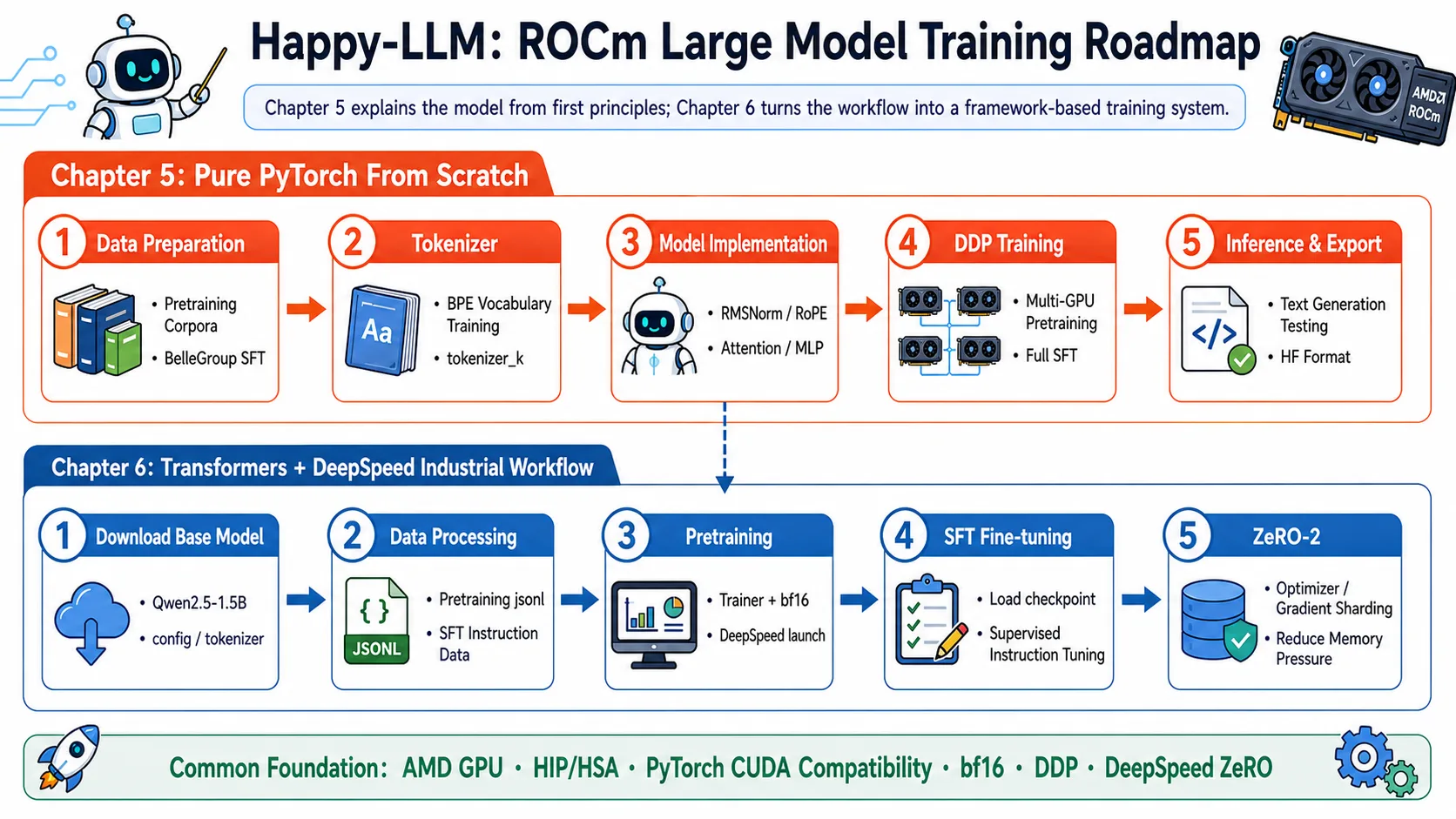
This module is based on the Happy-LLM tutorial, optimized and adapted for AMD GPUs and the ROCm platform. It contains two core chapters:
- Chapter 5: Building Large Language Models from Scratch - Implement the complete structure of the LLaMA2 model from zero, including core components like RMSNorm, Attention, and FFN
- Chapter 6: Large Language Model Training Workflow in Practice - Implement complete pre-training and fine-tuning workflows using mainstream frameworks (Transformers, DeepSpeed)
Through this tutorial, you will deeply understand how large language models work and master the skills to efficiently train LLMs on AMD GPUs.
Happy-LLM ROCm Training Route
Original Project Chapter Overview
Happy-LLM's complete tutorial consists of 7 chapters + 1 extra chapter, divided into Fundamentals and Hands-on Practice:
📘 Fundamentals (Chapters 1-4)
The following chapters cover theoretical knowledge without GPU training. You can study them directly from the original project; this module does not modify them.
| Chapter | Content | Link |
|---|---|---|
| Chapter 1 — NLP Fundamentals | NLP development history, task classification, text representation evolution (from Bag-of-Words to Word2Vec) | Original Chapter 1 |
| Chapter 2 — Transformer Architecture | Attention mechanism principles, Encoder-Decoder structure, step-by-step Transformer implementation | Original Chapter 2 |
| Chapter 3 — Pre-trained Language Models | BERT / T5 / GPT architecture comparison, pre-training paradigm evolution | Original Chapter 3 |
| Chapter 4 — Large Language Models | LLM definition, training strategies (Pre-training → SFT → RLHF), emergent abilities analysis | Original Chapter 4 |
🛠️ Hands-on Practice (Chapters 5-7)
Chapters 5 and 6 have been adapted for AMD ROCm and can be run directly in this module. Chapter 7 covers general application knowledge and can be found in the original project.
| Chapter | Content | This Module Status |
|---|---|---|
| Chapter 5 — Building LLMs from Scratch 🟢 | Pure PyTorch implementation of LLaMA2 (80M parameters), pre-training + SFT fine-tuning | ✅ ROCm Adapted |
| Chapter 6 — LLM Training Workflow Practice 🟢 | Transformers + DeepSpeed framework, production-grade pre-training and SFT workflow | ✅ ROCm Adapted |
| Chapter 7 — LLM Applications | Model evaluation, RAG retrieval-augmented generation, Agent | Original Chapter 7 |
| Extra Chapter — LLM Blog | Community-contributed excellent LLM learning notes | Extra Chapter |
💡 Learning Path Recommendation: If you are new to LLMs, we recommend following the order 1 → 2 → 3 → 4 → 5 → 6. Read chapters 1-4 in the original project, then return to this module for hands-on work with chapters 5-6. Experienced developers can skip chapters 1-4 and proceed directly to chapter 5.
Chapter Navigation
📚 Chapter 5: Building Large Language Models from Scratch
Implement the LLaMA2 model with 80 million parameters entirely in pure PyTorch from zero, completing pre-training and SFT fine-tuning on AMD ROCm without relying on any training framework.
📖 Chapter Tutorial | 🚀 Execution Process and Script Instructions
🔧 Chapter 6: Large Language Model Training Workflow in Practice
Based on the Transformers + DeepSpeed framework, reproduce production-grade pre-training and SFT workflows with support for AMD ROCm multi-card distributed training and ZeRO optimization.
📖 Chapter Tutorial | 🚀 Execution Process and Script Instructions
Environment Requirements
Hardware Requirements
- GPU: AMD RDNA 2/3 series (such as RX 6700 XT, RX 7900 XTX) or MI series (such as MI300X)
- VRAM: Recommended 64GB or higher
- System Memory: 128GB+ recommended
- Storage Space: 300GB+ (for models and datasets)
Software Requirements
- Operating System: Linux (Ubuntu 22.04 LTS / 24.04 LTS recommended)
- ROCm Version: 7.12.0 or higher
- Python Version: 3.10~3.12
Quick Start
Step 1: Environment Preparation
📖 For ROCm + PyTorch base environment installation, see 00-Environment. Continue below after completing that setup.
cd 04-happy-llm

# After activating your virtual environment, install project-specific dependencies
uv pip install -r ./chapter5/code/requirements.txt
uv pip install -r ./chapter6/code/requirements.txtThis project was tested with 4×AMD Radeon™ AI PRO R9700 (gfx1201). For other architectures, replace the
--index-urlin 00-Environment.
Step 2: Choose Your Learning Path
Recommended Route for Beginners:
- First complete Chapter 5 Section 1 to understand the complete LLaMA2 structure
- Complete Chapter 5 sequentially to master implementing large models from scratch
- Move to Chapter 6 to learn how to train models using mainstream frameworks
Advanced Developer Route:
- Skip the basic parts of Chapter 5, start from Chapter 5 Section 2
- Focus on learning distributed training and optimization techniques in Chapter 6
- Complete performance benchmarking and optimization case studies
Step 3: Run Examples
# Run Chapter 5 model implementation examples
cd chapter5/code

# Run Chapter 6 pre-training script
cd chapter6/codeKey Technical Points
Model Architecture
| Component | Description |
|---|---|
| Token Embedding | Word embedding layer |
| RMSNorm | Root Mean Square Layer Normalization |
| Attention | Multi-head self-attention mechanism with FlashAttention2 support |
| FFN | Feed-Forward Network (MLP) |
| Rotary Embedding | Rotary position encoding |
Training Optimization
| Technique | Purpose |
|---|---|
| DDP | Data-parallel distributed training |
| DeepSpeed ZeRO | Memory optimization and parameter sharding |
| FlashAttention | Reduce attention computation complexity |
| PEFT/LoRA | Parameter-efficient fine-tuning |
| Gradient Accumulation | Increase effective batch size |
| Mixed Precision Training | Reduce VRAM consumption |
Frequently Asked Questions
Q: What if ROCm cannot find the GPU?
A: Follow these troubleshooting steps:
Verify GPU and driver:
bashrocminfo rocm-smiCheck environment variables:
bashecho $LD_LIBRARY_PATH export HSA_OVERRIDE_GFX_VERSION=gfx90a # May be needed for some GPUsReinstall the PyTorch ROCm version, paying attention to the GPU architecture:
bashpip install torch torchvision torchaudio --index-url https://repo.amd.com/rocm/whl/gfx120X-all/If the issue persists, refer to the ROCm Official Guide
Q: How to solve out-of-memory (OOM) errors?
A: Try the following methods (in order of priority):
- Reduce batch size - Set
per_device_train_batch_size = 1in the configuration file - Enable gradient accumulation - Set
gradient_accumulation_steps = 8 - Use mixed precision - Set
fp16 = trueorbf16 = true - Enable DeepSpeed ZeRO-3 - Complete parameter sharding
- Use LoRA fine-tuning - Instead of full fine-tuning
- Enable FlashAttention - Reduce attention VRAM consumption
Q: What if multi-card training performance is not ideal?
A: Check and optimize:
Verify multi-card recognition:
bashrocm-smi # Check all GPUsCheck communication bandwidth:
bashrocm-bandwidth-testEnable distributed debug in training script:
bashexport NCCL_DEBUG=INFO # Or the equivalent environment variable for HIPTry increasing
num_train_epochsandlogging_stepsto balance communication overhead
Q: How to run these projects on a server in practice?
A: Recommended workflow:
Environment Preparation (First run)
- Run
code/install_rocm_deps.shto install all dependencies - Run
code/setup_environment.shto configure environment variables
- Run
Verify Environment
- Run
code/performance_benchmark.pyto perform performance testing - Check the GPU utilization and throughput in the output
- Run
Select Model
- Choose an appropriate model size based on hardware VRAM
- Refer to the "Performance Reference" table to adjust hyperparameters
Start Training
- Start learning basic concepts from chapter5
- Perform actual training according to chapter6's scripts
Monitor and Optimize
- Use
rocm-smito monitor GPU status in real-time - Adjust hyperparameters based on training logs
- Use
For detailed running guides, see the documentation for each chapter.
Q: What is the difference between Chapter 5 and Chapter 6?
A:
- Chapter 5: Pure PyTorch implementation, building LLaMA2 from scratch, suitable for understanding model principles
- Chapter 6: Using the Transformers framework, focusing on production-grade training and optimization, suitable for practical applications
If you want to get started training quickly, you can go directly to Chapter 6. If you want to deeply understand model principles, it is recommended to complete Chapter 5 first.
Project Structure
src/amd-yes/happy-llm/
├── chapter5/                           # Chapter 5: Building LLaMA2 Model from Scratch
│   └── code/
│       ├── 00_download_dataset.sh          # Step 0: Download dataset (Linux)
│       ├── 00_windows_download_dataset.sh  # Step 0: Download dataset (Windows)
│       ├── 01_deal_dataset.py              # Step 1: Pre-process dataset
│       ├── 02_train_tokenizer.py           # Step 2: Train BPE Tokenizer
│       ├── 03_ddp_pretrain.py              # Step 3: DDP multi-card pre-training
│       ├── 04_ddp_sft_full.py              # Step 4: DDP multi-card SFT fine-tuning
│       ├── 05_model_sample.py              # Step 5: Inference testing
│       ├── 06_export_model.py              # Step 6: Export to HuggingFace format
│       ├── k_model.py                      # Model definition (library file)
│       ├── dataset.py                      # Dataset class (library file)
│       ├── tokenizer_k/                    # Pre-trained Tokenizer
│       │   ├── special_tokens_map.json
│       │   ├── tokenizer.json
│       │   └── tokenizer_config.json
│       └── requirements.txt
└── chapter6/                           # Chapter 6: LLM Training Based on Transformers
    └── code/
        ├── 00_download_model.py        # Step 0: Download base model
        ├── 01_download_dataset.py      # Step 1a: Download dataset
        ├── 01_process_dataset.ipynb    # Step 1b: Dataset processing (Notebook)
        ├── 02_pretrain.py              # Step 2: Pre-training script
        ├── 02_pretrain.sh              # Step 2: DeepSpeed launch script
        ├── 02_pretrain.ipynb           # Step 2: Pre-training (Notebook)
        ├── 03_finetune.py              # Step 3: SFT fine-tuning script
        ├── 03_finetune.sh              # Step 3: DeepSpeed launch script
        ├── ds_config_zero2.json        # DeepSpeed ZeRO-2 configuration
        ├── whole.ipynb                 # Complete workflow Notebook
└── requirements.txtReference Resources
- 📚 Happy-LLM Original Project
- 📖 ROCm Official Documentation
- 📖 ROCm Official Preview Documentation
- 🤗 Hugging Face Transformers
- ⚡ DeepSpeed Official Documentation
- 🔧 PyTorch Official Documentation
Contribution and Feedback
We welcome Issues and Pull Requests!
- 📝 Improve documentation and tutorials
- 🐛 Report bugs
- 💡 Share optimization tips
- 📊 Contribute performance testing results
Start learning large language models, build LLMs from scratch! 🎓
Made with ❤️ by the hello-rocm community