Chapter 6 Practical LLM Training Workflow
In Chapter 5, we built a LLaMA2 model from scratch and fully implemented its pretraining and fine-tuning workflow. In this chapter, we go deeper into the practice of LLM training, focusing on how to use mainstream LLM frameworks to train models efficiently and how to optimize performance.
6.1 Model Pretraining
In the previous chapter, we step-by-step took apart the LLM architecture and training process, hand-implementing the LLaMA model and the full Pretrain + SFT flow from zero, and gained a deeper understanding of LLM principles and training details. However, in real applications, hand-written LLM training has the following problems:
- Implementing LLM structures by hand is time-consuming and hard to keep up with the latest architectural innovations;
- Hand-implemented LLM training does not handle multi-GPU distributed training well, so training efficiency is low;
- It is incompatible with existing pre-trained LLMs and cannot reuse pre-trained weights.
Therefore, in this chapter, we introduce the mainstream LLM training framework Transformers, and combine it with distributed frameworks such as DeepSpeed and efficient fine-tuning frameworks such as PEFT. We will use Transformers in practice to implement the full Pretrain + SFT flow, so that the workflow lines up with the mainstream LLM technology stack used in industry.
6.1.1 Framework Introduction
Transformers is an NLP framework developed by Hugging Face. Through a modular design it provides unified support for hundreds of mainstream model architectures including BERT, GPT, LLaMA, T5, ViT, and many more. With Transformers, developers do not need to re-implement the basic network structures: by using the AutoModel class they can load any pre-trained model with a single line. Figure 6.1 shows the homepage of the Hugging Face Transformers course:

Figure 6.1 Hugging Face Transformers
In addition, the framework's built-in Trainer class encapsulates the core logic of distributed training, supporting PyTorch native DDP, DeepSpeed, Megatron-LM, and many other distributed training strategies. By simply configuring the training arguments, you can implement data parallelism, model parallelism, pipeline parallelism, or hybrid parallelism. On an 8 × A100 cluster, it can easily support efficient training of models with tens of billions of parameters. Together with components like SavingPolicy and LoggingCallback, the training process can be managed automatically. Transformers also integrates with DeepSpeed, PEFT, wandb, SwanLab, etc., and you can hook them in just by setting parameters, so LLM training can be implemented quickly and efficiently.
For NLP researchers in the LLM era, an even more important point is that, based on the Transformers framework, Hugging Face has built a huge AI community with hundreds of millions of pre-trained model parameters and 250k+ datasets of various types. Through Transformers, Datasets, Evaluate and other frameworks, models, datasets, and evaluation functions are integrated, so developers can conveniently use any pre-trained model and quickly implement their own model development and applications on top of open-source models and datasets.
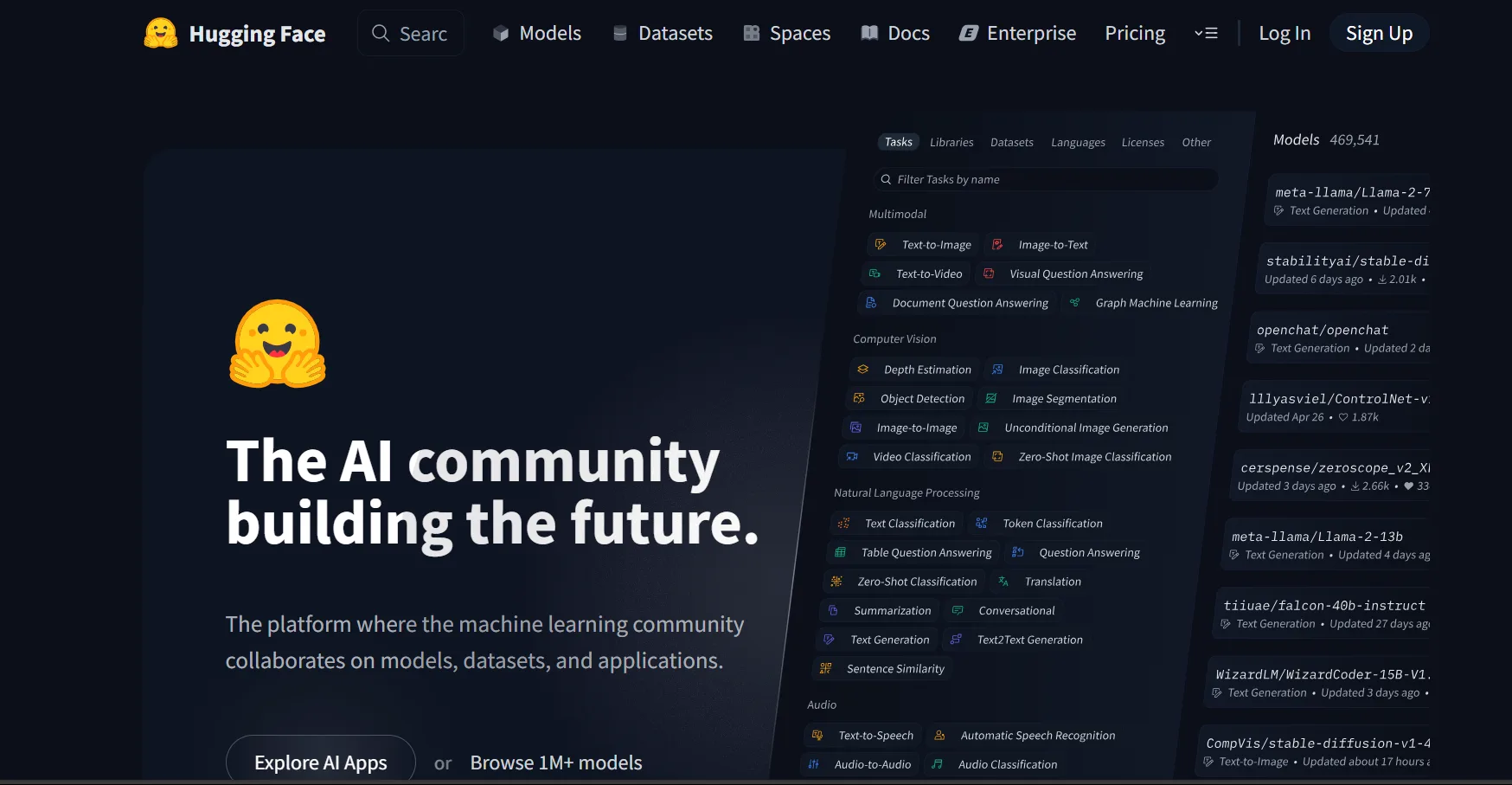
Figure 6.2 Hugging Face Transformers model community
In the LLM era, modifying model architectures and re-pretraining are increasingly rare. Most developers' business applications focus on Post-Training and SFT on top of pre-trained LLMs to support downstream business needs. And because pre-trained models are large, conveniently integrating distributed training frameworks like DeepSpeed has become a must-have skill for NLP model training in the LLM era. Therefore, Transformers has gradually become the mainstream NLP framework in both academia and industry. Whether for enterprise business development or scientific research, more and more people choose Transformers as their default tool. New open-source LLMs such as DeepSeek and Qwen also release their pre-trained weights and call demos on the Transformers community as soon as they are published. With the Transformers framework, you can complete LLM training and development efficiently and conveniently, with industrial-grade output quality. Next, we will use the Transformers framework as the basis to introduce how to implement Pretrain and SFT for an LLM with Transformers.
6.1.2 Initializing an LLM
We can use the AutoModel class of Transformers to directly initialize already-implemented models. For any pre-trained model, the parameters include the model's configuration. If you want to train an LLM from scratch, you can directly initialize using an existing model architecture. Here we take the architecture of Qwen-2.5-1.5B as an example:
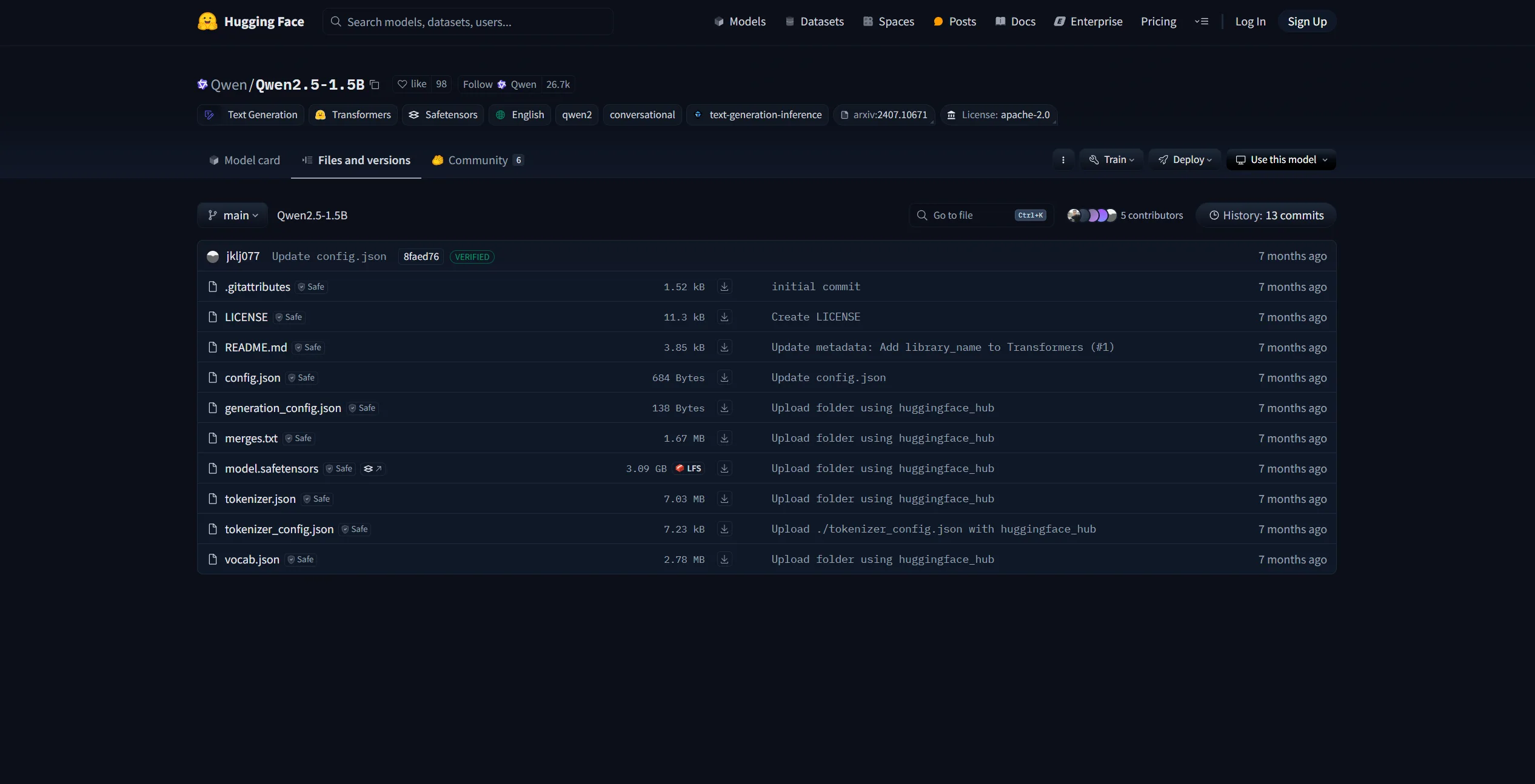
Figure 6.3 Qwen-2.5-1.5B
The page above is the Qwen-2.5-1.5B model parameters in the HuggingFace community. The config.json file is the model configuration, including the architecture, hidden size, number of layers, etc., as shown in Figure 6.4:
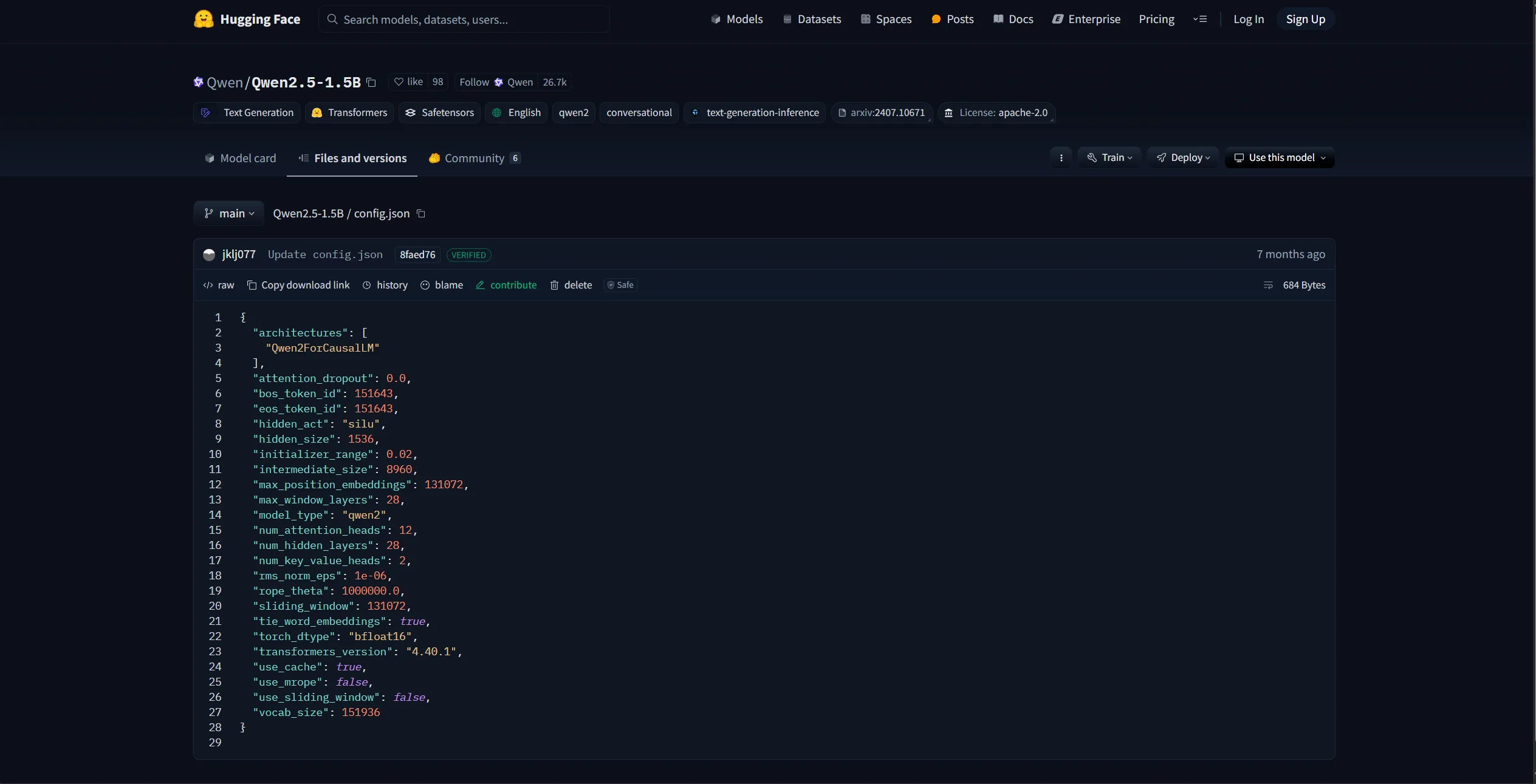
Figure 6.4 Qwen-2.5-1.5B config.json
We can reuse this config to initialize a Qwen-2.5-1.5B model for training, or we can modify it (e.g., change the hidden size, number of attention heads) to customize a model architecture. HuggingFace provides Python tools for conveniently downloading model parameters:
import os
# Set environment variable; here we use the HuggingFace mirror site
os.environ['HF_ENDPOINT'] = 'https://hf-mirror.com'
# Download model
os.system('huggingface-cli download --resume-download Qwen/Qwen2.5-1.5B --local-dir your_local_dir')As Figure 6.5 shows, "Qwen/Qwen2.5-1.5B" here is the identifier of the model to download. For other models, you can directly copy the model name from HuggingFace:
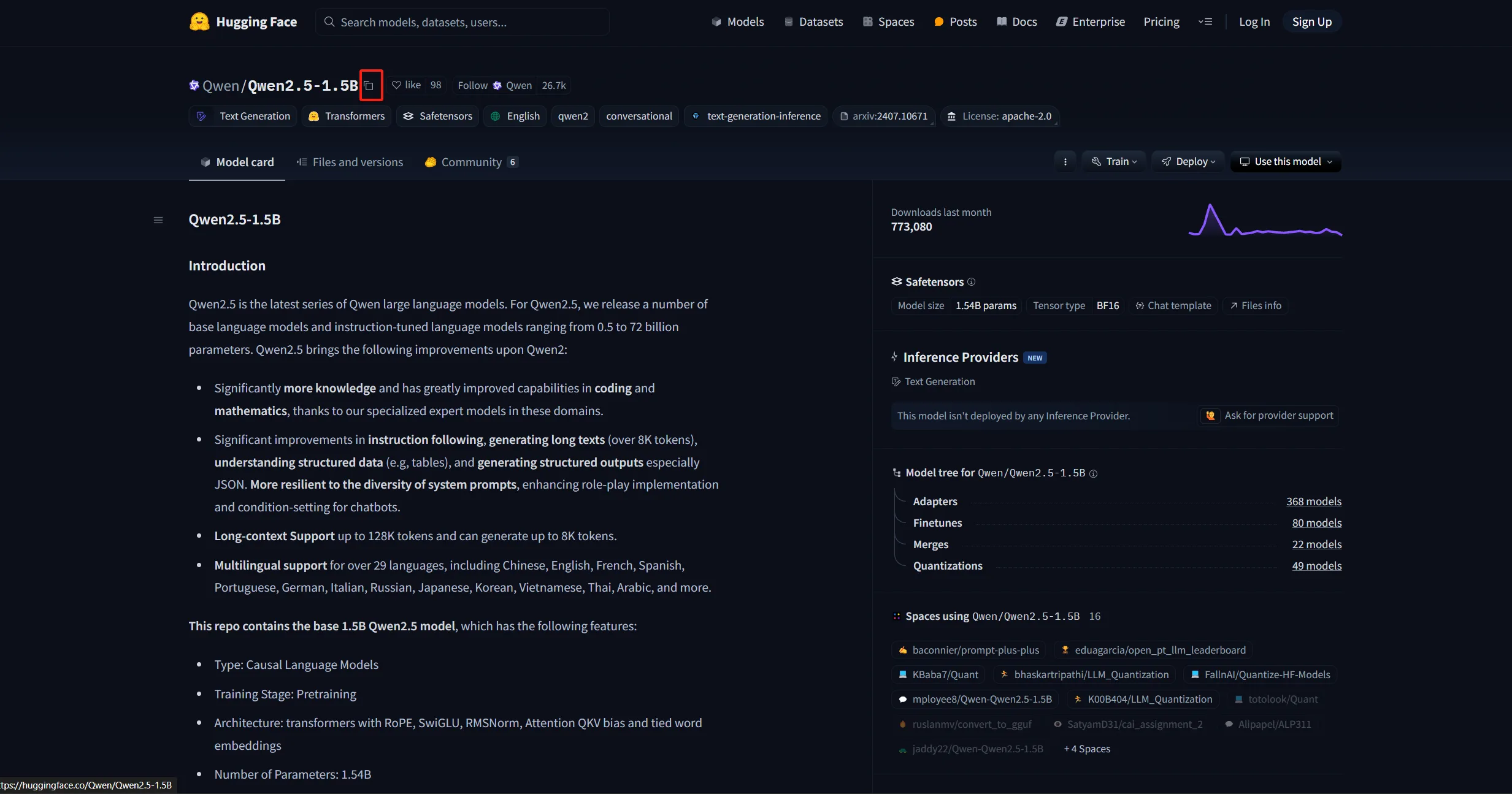
Figure 6.5 Model download identifier
After downloading, you can load the config directly using the AutoConfig class:
# Load defined model parameters — here using Qwen-2.5-1.5B as an example
# Use the transformers Config class
from transformers import AutoConfig

# Local path of downloaded parameters
model_path = "qwen-1.5b"
config = AutoConfig.from_pretrained(model_name_or_path)You can also customize the config file and load it the same way. Then use AutoModel to generate the corresponding model based on the loaded config object:
# Create a defined model based on the config
from transformers import AutoModelForCausalLM

model = AutoModelForCausalLM.from_config(config, trust_remote_code=True)Since LLMs are typically CausalLM architectures, here we use AutoModelForCausalLM to load. If used for classification training, you would use AutoModelForSequenceClassification instead. Inspecting model, Figure 6.6 shows that its architecture matches the config:
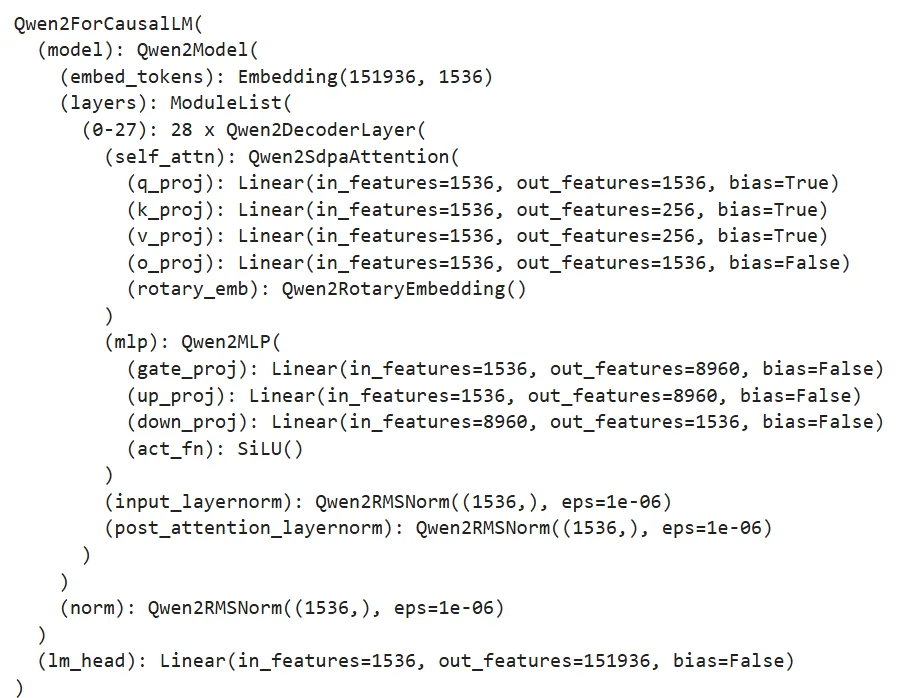
Figure 6.6 Output of model structure
This model is now a Qwen-2.5-1.5B model initialized from scratch. In general, we rarely initialize an LLM from scratch for pretraining; the more common practice is to load a pre-trained LLM weight and post-train it on our own corpus. Here we also show how to initialize a pre-trained model from already-downloaded parameters:
from transformers import AutoModelForCausalLM

model = AutoModelForCausalLM.from_pretrained(model_name_or_path, trust_remote_code=True)Similarly, just call from_pretrained. Here model_name_or_path is the local path to the downloaded parameters.
We also need to initialize a tokenizer. Here we directly use the Qwen-2.5-1.5B tokenizer:
# Load a pre-trained tokenizer
from transformers import AutoTokenizer

tokenizer = AutoTokenizer.from_pretrained(model_name_or_path)The loaded tokenizer can then be used directly to tokenize any text.
6.1.3 Pretraining Data Processing
Similar to Chapter 5, we use the Mobvoi SeqMonkey open dataset as the pretraining dataset; it can be downloaded and decompressed in the same way as in Chapter 5. HuggingFace's datasets library is the third-party library used together with Transformers for data loading and processing. We can directly use datasets.load_dataset to load pretraining data:
# Load pretraining data
from datasets import load_dataset

ds = load_dataset('json', data_files='/mobvoi_seq_monkey_general_open_corpus.jsonl')Note: since the dataset is large, loading may take a long time or run out of memory. For early testing, it is recommended to split off a small portion of the pretraining data for testing. The loaded ds is a DatasetDict object; the loaded data is by default stored under the train key, and you can inspect it as follows:
ds["train"][0]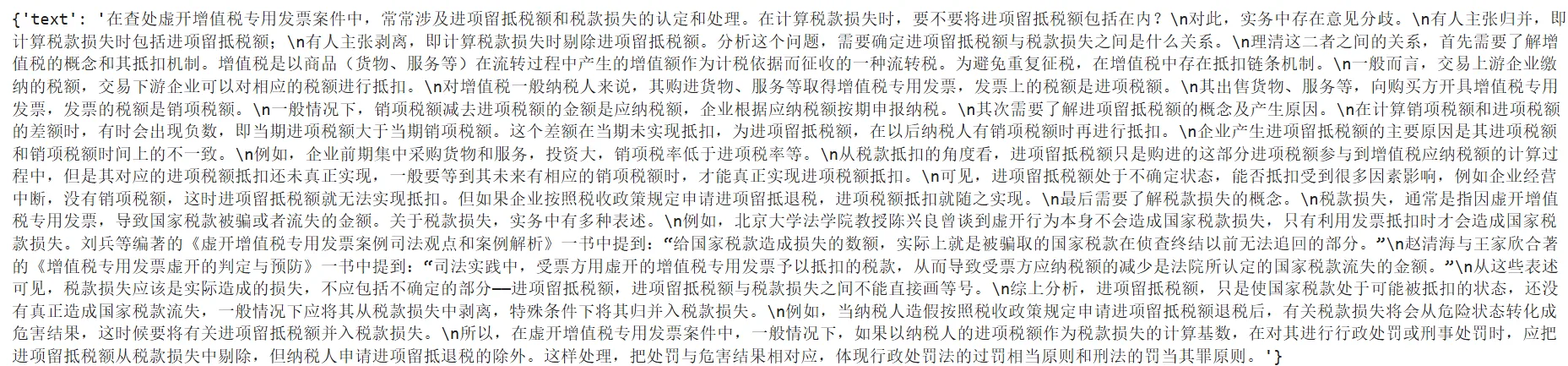
Figure 6.7 Dataset preview
You can also view the dataset features (i.e., columns) via the features attribute. We need to save the column names, because after later tokenizing the text, we need to remove the original text column:
# Inspect features
column_names = list(ds["train"].features)
# columnes_name: ["text"]Then use the loaded tokenizer to process the dataset; here we use map for batch processing:
# Tokenize the dataset
def tokenize_function(examples):
    # Use the previously loaded tokenizer
    output = tokenizer([item for item in examples["text"]])
    return output

# Batch processing
tokenized_datasets = ds.map(
    tokenize_function,
    batched=True,
    num_proc=10,
    remove_columns=column_names,
    load_from_cache_file=True,
    desc="Running tokenizer on dataset",
)After processing, the dataset will contain the columns 'input_ids' and 'attention_mask', representing the tokenized numeric sequence and the attention mask (indicating whether a position is padding). The map method removes the original 'text' column via the remove_columns parameter, so it will not be used during training.
Since pretraining is generally a CLM (causal language modeling) task, learning the sequence semantics of multiple samples at once does not hurt model performance, while data volume is large and training time is long, so training efficiency matters. During pretraining, multiple text segments are typically concatenated together and split into uniformly sized text blocks for training. Here we implement a concatenation function that produces blocks of 2048 tokens, applied via map for batch processing:
# Pretraining usually concatenates text into fixed-length blocks
from itertools import chain

# Here we use 2048 as block length
block_size = 2048

def group_texts(examples):
    # Concatenate text segments
    concatenated_examples = {k: list(chain(*examples[k])) for k in examples.keys()}
    # Compute total concatenated length
    total_length = len(concatenated_examples[list(examples.keys())[0]])
    # If too long, drop the remainder so it divides evenly
    if total_length >= block_size:
        total_length = (total_length // block_size) * block_size
    # Split by block_size
    result = {
        k: [t[i : i + block_size] for i in range(0, total_length, block_size)]
        for k, t in concatenated_examples.items()
    }
    # For CLM, labels and inputs are the same
    result["labels"] = result["input_ids"].copy()
    return result

# Batch processing
lm_datasets = tokenized_datasets.map(
    group_texts,
    batched=True,
    num_proc=10,
    load_from_cache_file=True,
    desc=f"Grouping texts in chunks of {block_size}",
    batch_size = 40000,
)
train_dataset = lm_datasets["train"]The resulting train_dataset is now a pretraining dataset that can be directly used for CLM pretraining; each sample is 2048 tokens long.
6.1.4 Training with Trainer
Next, we use the Trainer class provided by Transformers to train. Trainer encapsulates the model training logic and includes good efficiency optimizations and visualization support, making LLM training efficient and convenient.
First we configure the training hyperparameters by instantiating a TrainingArguments object:
from transformers import TrainingArguments
# Configure training arguments

training_args = TrainingArguments(
    output_dir="output",                 # Where training output goes
    per_device_train_batch_size=4,        # Per-device batch size
    gradient_accumulation_steps=4,        # Gradient accumulation steps; effective batch = bs * accum
    logging_steps=10,                     # Log loss every N steps
    num_train_epochs=1,                   # Number of epochs
    save_steps=100,                       # Save checkpoint every N steps
    learning_rate=1e-4,                   # Learning rate
    gradient_checkpointing=True           # Enable gradient checkpointing
)Then, based on the initialized model, tokenizer, and training_args, and feeding in the processed training dataset, instantiate a trainer object:
from transformers import Trainer, default_data_collator
from torchdata.datapipes.iter import IterableWrapper

# Trainer
trainer = Trainer(
    model=model,
    args=training_args,
    train_dataset= IterableWrapper(train_dataset),
    eval_dataset= None,
    tokenizer=tokenizer,
    # Default is the MLM collator; we use the CLM collator
    data_collator=default_data_collator
)Then call train() to train and save according to the configured hyperparameters:
trainer.train()Note: the above code is in
./code/pretrain.ipynb.
6.1.5 Distributed Training with DeepSpeed
Pretraining is large in scale and long in duration, so it is generally not recommended to run it inside Jupyter Notebook because notebooks are easily interrupted. Furthermore, due to the scale, multi-GPU distributed training is typically required, otherwise training takes too long. Here we describe how, based on the code above, to use the DeepSpeed framework to enable distributed training, achieving an industry-grade LLM Pretrain.
For long training runs, we typically use a bash script to set hyperparameters and then launch a Python script. We use a Python script (./code/pretrain.py) to implement the entire training pipeline.
First import the required third-party libraries:
import logging
import math
import os
import sys
from dataclasses import dataclass, field
from torchdata.datapipes.iter import IterableWrapper
from itertools import chain
import deepspeed
from typing import Optional, List

import datasets
import pandas as pd
import torch
from datasets import load_dataset
import transformers
from transformers import (
    AutoConfig,
    AutoModelForCausalLM,
    AutoTokenizer,
    HfArgumentParser,
    Trainer,
    TrainingArguments,
    default_data_collator,
    set_seed,
)
import datetime
from transformers.testing_utils import CaptureLogger
from transformers.trainer_utils import get_last_checkpoint
import swanlabWe need to define a few hyperparameter classes to handle the values set in the shell script. Since transformers already provides TrainingArguments (which contains many essential training hyperparameters), we only need to define the ones not covered there: model-related arguments (in ModelArguments) and data-related arguments (in DataTrainingArguments):
# Hyperparameter classes
@dataclass
class ModelArguments:
    """
    Model-related arguments
    """

    model_name_or_path: Optional[str] = field(
        default=None,
        metadata={
            "help": (
                "Used for post-training; path to a pre-trained model"
            )
        },
    )
    config_name: Optional[str] = field(
        default=None, metadata={"help": "Used for pretraining; path to config file"}
    )
    tokenizer_name: Optional[str] = field(
        default=None, metadata={"help": "Pretraining tokenizer path"}
    )
    torch_dtype: Optional[str] = field(
        default=None,
        metadata={
            "help": (
                "Data type for training; bfloat16 recommended"
            ),
            "choices": ["auto", "bfloat16", "float16", "float32"],
        },
    )


@dataclass
class DataTrainingArguments:
    """
    Training data-related arguments
    """

    train_files: Optional[List[str]]  = field(default=None, metadata={"help": "Path(s) to training data"})
    block_size: Optional[int] = field(
        default=None,
        metadata={
            "help": (
                "Configured text block length"
            )
        },
    )
    preprocessing_num_workers: Optional[int] = field(
        default=None,
        metadata={"help": "Number of threads used for preprocessing."},
)Then we define a main function that wraps the training pipeline. First, use HfArgumentParser provided by Transformers to load the hyperparameters set in the shell script:
# Load script arguments
parser = HfArgumentParser((ModelArguments, DataTrainingArguments, TrainingArguments))
model_args, data_args, training_args = parser.parse_args_into_dataclasses()For large-scale training, we typically use logs to record training information, instead of print, which makes it easy to lose key information. Here we use Python's built-in logging. First we set up the logging:
# Set up logging
logging.basicConfig(
    format="%(asctime)s - %(levelname)s - %(name)s - %(message)s",
    datefmt="%m/%d/%Y %H:%M:%S",
    handlers=[logging.StreamHandler(sys.stdout)],
)

# Set log level to INFO
transformers.utils.logging.set_verbosity_info()
log_level = training_args.get_process_log_level()
logger.setLevel(log_level)
datasets.utils.logging.set_verbosity(log_level)
transformers.utils.logging.set_verbosity(log_level)
transformers.utils.logging.enable_default_handler()
transformers.utils.logging.enable_explicit_format()Here the level is set to INFO. Logging in Python has five levels — DEBUG, INFO, WARNING, ERROR, CRITICAL. Whatever level you set, only messages of that level or above are printed. After the setup, simply use logger wherever you want to log; specify the level when logging, for example:
# Log overall training info
logger.warning(
    f"Process rank: {training_args.local_rank}, device: {training_args.device}, n_gpu: {training_args.n_gpu}"
    + f"distributed training: {bool(training_args.local_rank != -1)}, 16-bits training: {training_args.fp16}"
)
logger.info(f"Training/evaluation parameters {training_args}")We will not repeat further logging code in the script.
In large-scale training, interruptions are often unavoidable. Training generally saves checkpoints at fixed intervals so it can resume from the most recent checkpoint after an interruption. We therefore first detect any old checkpoint and resume from it:
# Check checkpoint
last_checkpoint = None
if os.path.isdir(training_args.output_dir):
    # Use transformers' get_last_checkpoint to auto-detect
    last_checkpoint = get_last_checkpoint(training_args.output_dir)
    if last_checkpoint is None and len(os.listdir(training_args.output_dir)) > 0:
        raise ValueError(
            f"Output dir ({training_args.output_dir}) is not empty"
        )
    elif last_checkpoint is not None and training_args.resume_from_checkpoint is None:
        logger.info(
            f"Resuming from {last_checkpoint}"
)Then initialize the model in the way we discussed above; here we wrap "init from scratch" and "init from existing pre-trained model" together:
# Initialize the model
if model_args.config_name is not None:
    # from scratch
    config = AutoConfig.from_pretrained(model_args.config_name)
    logger.warning("You are initializing a model from scratch")
    logger.info(f"Model config path: {model_args.config_name}")
    logger.info(f"Model config: {config}")
    model = AutoModelForCausalLM.from_config(config, trust_remote_code=True)
    n_params = sum({p.data_ptr(): p.numel() for p in model.parameters()}.values())
    logger.info(f"Pretraining a new model - Total size={n_params/2**20:.2f}M params")
elif model_args.model_name_or_path is not None:
    logger.warning("You are initializing from a pre-trained model")
    logger.info(f"Model path: {model_args.model_name_or_path}")
    model = AutoModelForCausalLM.from_pretrained(model_args.model_name_or_path, trust_remote_code=True)
    n_params = sum({p.data_ptr(): p.numel() for p in model.parameters()}.values())
    logger.info(f"Continuing from a pre-trained model - Total size={n_params/2**20:.2f}M params")
else:
    logger.error("config_name and model_name_or_path cannot both be empty")
raise ValueError("config_name and model_name_or_path cannot both be empty")Then load the tokenizer and process the pretraining data in a similar way. This part is identical to what was shown above and is not repeated; readers can find the details in the code. Then use Trainer to train:
logger.info("Initializing Trainer")
trainer = Trainer(
    model=model,
    args=training_args,
    train_dataset= IterableWrapper(train_dataset),
    tokenizer=tokenizer,
    data_collator=default_data_collator
)

# Load from checkpoint
checkpoint = None
if training_args.resume_from_checkpoint is not None:
    checkpoint = training_args.resume_from_checkpoint
elif last_checkpoint is not None:
        checkpoint = last_checkpoint

logger.info("Start training")
train_result = trainer.train(resume_from_checkpoint=checkpoint)
trainer.save_model()Note that since we already detected whether a checkpoint exists, here we use resume_from_checkpoint to enable resuming training from a checkpoint.
Since monitoring training progress and loss curves matters a lot in large-scale training, the script uses swanlab as a training monitoring tool. SwanLab is initialized at the beginning of the script:
# Initialize SwanLab
swanlab.init(project="pretrain", experiment_name="from_scrach")After training starts, the terminal will print the SwanLab monitoring URL; click it to see the training progress. We do not go into SwanLab usage details here; readers can refer to the relevant docs.
After completing the code above, we use a shell script (./code/pretrain.sh) to define hyperparameter values and launch the training via DeepSpeed for efficient multi-GPU distributed training:
# Set visible GPUs
CUDA_VISIBLE_DEVICES=0,1

deepspeed pretrain.py \
    --config_name autodl-tmp/qwen-1.5b \
    --tokenizer_name autodl-tmp/qwen-1.5b \
    --train_files autodl-tmp/dataset/pretrain_data/mobvoi_seq_monkey_general_open_corpus_small.jsonl \
    --per_device_train_batch_size 16 \
    --gradient_accumulation_steps 4 \
    --do_train \
    --output_dir autodl-tmp/output/pretrain \
    --evaluation_strategy  no \
    --learning_rate 1e-4 \
    --num_train_epochs 1 \
    --warmup_steps 200 \
    --logging_dir autodl-tmp/output/pretrain/logs \
    --logging_strategy steps \
    --logging_steps 5 \
    --save_strategy steps \
    --save_steps 100 \
    --preprocessing_num_workers 10 \
    --save_total_limit 1 \
    --seed 12 \
    --block_size 2048 \
    --bf16 \
    --gradient_checkpointing \
    --deepspeed ./ds_config_zero2.json \
    --report_to swanlab
# --resume_from_checkpoint ${output_model}/checkpoint-20400 \After installing the DeepSpeed third-party library, you can launch multi-GPU training directly with the deepspeed command. The script above mainly defines the values of various hyperparameters and can be reused. In Chapter 4, we introduced the principles of DeepSpeed distributed training and the ZeRO stage settings; here we use ZeRO-2. The DeepSpeed configuration file ds_config_zero.json is loaded as follows:
{
    "fp16": {
        "enabled": "auto",
        "loss_scale": 0,
        "loss_scale_window": 1000,
        "initial_scale_power": 16,
        "hysteresis": 2,
        "min_loss_scale": 1
    },
    "bf16": {
        "enabled": "auto"
    },
    "optimizer": {
        "type": "AdamW",
        "params": {
            "lr": "auto",
            "betas": "auto",
            "eps": "auto",
            "weight_decay": "auto"
        }
    },

    "scheduler": {
        "type": "WarmupLR",
        "params": {
            "warmup_min_lr": "auto",
            "warmup_max_lr": "auto",
            "warmup_num_steps": "auto"
        }
    },

    "zero_optimization": {
        "stage": 2,
        "offload_optimizer": {
            "device": "none",
            "pin_memory": true
        },
        "allgather_partitions": true,
        "allgather_bucket_size": 2e8,
        "overlap_comm": true,
        "reduce_scatter": true,
        "reduce_bucket_size": 2e8,
        "contiguous_gradients": true
    },

    "gradient_accumulation_steps": "auto",
    "gradient_clipping": "auto",
    "steps_per_print": 100,
    "train_batch_size": "auto",
    "train_micro_batch_size_per_gpu": "auto",
    "wall_clock_breakdown": false
}Finally, run the pretrain.sh script in your terminal to start training.
6.2 Supervised Fine-Tuning of the Model
In the previous section we showed how to use the Transformers framework for fast and efficient model pretraining. In this section, building on that content, we describe how to use Transformers to perform supervised fine-tuning on a pre-trained model.
6.2.1 Pretrain vs. SFT
First, let us recall the core difference between pretraining and supervised fine-tuning of an LLM. As mentioned in Chapter 4, modern LLMs are typically trained in three stages — Pretrain, SFT, RLHF. In Pretrain, the model performs self-supervised modeling on massive unlabeled text to learn linguistic regularities and world knowledge encoded in the text. In SFT, we generally do instruction tuning on a Pretrained model — i.e., training the model to perform tasks given user instructions, so that the model can follow user instructions, plan, act, and produce output accordingly. So Pretrain and SFT both use CLM-style modeling; the key difference is that Pretrain uses a massive amount of unsupervised text, where the model directly performs "predict the next token" on the entire text; SFT uses paired instruction–response data, where the model learns to model the response given the input instruction. In the actual training implementation, Pretrain computes loss over the entire text, requiring the model to model the whole text; SFT only computes loss on the output and does not compute loss on the instruction part.
Therefore, compared to the Pretrain code in the previous section, SFT only needs to modify the data processing part to convert instruction-pair data into training samples. Everything else follows exactly the same logic as Pretrain. The script for this section is ./code/finetune.py.
6.2.2 Fine-Tuning Data Processing
Similar to Chapter 5, we use the BelleGroup open dataset for SFT.
In SFT, we define a Chat Template, which describes how to convert dialogue data into a text sequence the model can fit. When using a model that has been SFT-ed for downstream task fine-tuning, we typically need to inspect the model's Chat Template and adapt to it, in order not to damage the instruction-following capability learned during SFT. Since here we are doing SFT from a Pretrain model, we can define our own Chat Template. Because we used the Qwen-2.5-1.5B model architecture for pretraining, we inherit the Qwen-2.5 Chat Template. If you do not have enough resources to do the previous Pretrain section, you can also use the official Qwen-2.5-1.5B model as the SFT base.
We first define a few special tokens. Special tokens have particular roles during model fitting, including beginning-of-sequence (BOS), end-of-sequence (EOS), newlines, etc. Defining special tokens helps avoid semantic confusion during fitting:
# Different tokenizers may need their own definitions
# BOS
im_start = tokenizer("<|im_start|>").input_ids
# EOS
im_end = tokenizer("<|im_end|>").input_ids
# PAD
IGNORE_TOKEN_ID = tokenizer.pad_token_id
# Newline
nl_tokens = tokenizer('\n').input_ids
# Role identifiers
_system = tokenizer('system').input_ids + nl_tokens
_user = tokenizer('human').input_ids + nl_tokens
_assistant = tokenizer('assistant').input_ids + nl_tokensThe Chat Template of the Qwen series typically has three roles: System, User, and Assistant. System is the system prompt that activates the model's capabilities; the default is "You are a helpful assistant." It is generally not changed during SFT. User is the prompt given by the user; here, since the conversation role in the dataset is "human", we change "user" to "human". Assistant is the LLM's reply, i.e., the text the model needs to fit during SFT.
Then, since the dataset is a multi-turn dialogue dataset, we need to concatenate the multi-turn dialogue into a single text sequence:
# Concatenate multi-turn dialogue
input_ids, targets = [], []
# Multiple samples
for i in tqdm(range(len(sources))):
    # source is a multi-turn dialogue sample
    source = sources[i]
    # Start from user
    if source[0]["from"] != "human":
        source = source[1:]
    # Inputs and outputs
    input_id, target = [], []
    # system: <|im_start|>system\nYou are a helpful assistant.<|im_end|>\n
    system = im_start + _system + tokenizer(system_message).input_ids + im_end + nl_tokens
    input_id += system
    # System part is not fitted
    target += im_start + [IGNORE_TOKEN_ID] * (len(system)-3) + im_end + nl_tokens
    assert len(input_id) == len(target)
    # Concatenate turn by turn
    for j, sentence in enumerate(source):
        # sentence is one turn of dialogue
        role = roles[sentence["from"]]
        # user:      <|im_start|>human\ninstruction<|im_end|>\n
        # assistant: <|im_start|>assistant\nresponse<|im_end|>\n
        _input_id = tokenizer(role).input_ids + nl_tokens + \
            tokenizer(sentence["value"]).input_ids + im_end + nl_tokens
        input_id += _input_id
        if role == '<|im_start|>human':
            # User part is not fitted
            _target = im_start + [IGNORE_TOKEN_ID] * (len(_input_id)-3) + im_end + nl_tokens
        elif role == '<|im_start|>assistant':
            # Assistant part is fitted
            _target = im_start + [IGNORE_TOKEN_ID] * len(tokenizer(role).input_ids) + \
                _input_id[len(tokenizer(role).input_ids)+1:-2] + im_end + nl_tokens
        else:
            print(role)
            raise NotImplementedError
        target += _target
    assert len(input_id) == len(target)
    # PAD at the end
    input_id += [tokenizer.pad_token_id] * (max_len - len(input_id))
    target += [IGNORE_TOKEN_ID] * (max_len - len(target))
    input_ids.append(input_id[:max_len])
targets.append(target[:max_len])The above code follows the Chat Template logic of Qwen; readers may modify it according to preference. The key point is that User text does not need to be fitted, so the corresponding positions in targets are masked using IGNORE_TOKEN_ID, while the Assistant text is the original text and is included for loss. The mainstream LLM IGNORE_TOKEN_ID is generally set to -100.
After concatenation, convert the tokenized numeric sequences to torch.tensor, and pack them into the dictionary required by Dataset and return:
input_ids = torch.tensor(input_ids)
targets = torch.tensor(targets)

return dict(
    input_ids=input_ids,
    labels=targets,
    attention_mask=input_ids.ne(tokenizer.pad_token_id),
)After implementing the above logic, we define a custom Dataset class that uses this logic to process the data:
class SupervisedDataset(Dataset):

    def __init__(self, raw_data, tokenizer, max_len: int):
        super(SupervisedDataset, self).__init__()
        # Load and preprocess data
        sources = [example["conversations"] for example in raw_data]
        # `preprocess` is the data preprocessing logic defined above
        data_dict = preprocess(sources, tokenizer, max_len)

        self.input_ids = data_dict["input_ids"]
        self.labels = data_dict["labels"]
        self.attention_mask = data_dict["attention_mask"]

    def __len__(self):
        return len(self.input_ids)

    def __getitem__(self, i) -> Dict[str, torch.Tensor]:
        return dict(
            input_ids=self.input_ids[i],
            labels=self.labels[i],
            attention_mask=self.attention_mask[i],
)This class inherits from PyTorch's Dataset and can be used directly with Trainer. After data processing, just modify the data-processing logic in the previous script; the rest of the training is almost identical. Here is the main function logic:
# Load script arguments
parser = HfArgumentParser((ModelArguments, DataTrainingArguments, TrainingArguments))
model_args, data_args, training_args = parser.parse_args_into_dataclasses()

# Initialize SwanLab
swanlab.init(project="sft", experiment_name="qwen-1.5b")

# Set up logging
logging.basicConfig(
    format="%(asctime)s - %(levelname)s - %(name)s - %(message)s",
    datefmt="%m/%d/%Y %H:%M:%S",
    handlers=[logging.StreamHandler(sys.stdout)],
)

# Set log level to INFO
transformers.utils.logging.set_verbosity_info()
log_level = training_args.get_process_log_level()
logger.setLevel(log_level)
datasets.utils.logging.set_verbosity(log_level)
transformers.utils.logging.set_verbosity(log_level)
transformers.utils.logging.enable_default_handler()
transformers.utils.logging.enable_explicit_format()

# Log overall training info
logger.warning(
    f"Process rank: {training_args.local_rank}, device: {training_args.device}, n_gpu: {training_args.n_gpu}"
    + f"distributed training: {bool(training_args.local_rank != -1)}, 16-bits training: {training_args.fp16}"
)
logger.info(f"Training/evaluation parameters {training_args}")

# Check checkpoint
last_checkpoint = None
if os.path.isdir(training_args.output_dir):
    last_checkpoint = get_last_checkpoint(training_args.output_dir)
    if last_checkpoint is None and len(os.listdir(training_args.output_dir)) > 0:
        raise ValueError(
            f"Output dir ({training_args.output_dir}) is not empty"
        )
    elif last_checkpoint is not None and training_args.resume_from_checkpoint is None:
        logger.info(
            f"Resuming from {last_checkpoint}"
        )

# Set random seed
set_seed(training_args.seed)

# Initialize model
logger.warning("Loading pre-trained model")
logger.info(f"Model path: {model_args.model_name_or_path}")
model = AutoModelForCausalLM.from_pretrained(model_args.model_name_or_path, trust_remote_code=True)
n_params = sum({p.data_ptr(): p.numel() for p in model.parameters()}.values())
logger.info(f"Continuing from a pre-trained model - Total size={n_params/2**20:.2f}M params")

# Initialize tokenizer
tokenizer = AutoTokenizer.from_pretrained(model_args.model_name_or_path)
logger.info("Tokenizer loaded")

# Load fine-tuning data
with open(data_args.train_files) as f:
    lst = [json.loads(line) for line in f.readlines()[:10000]]
logger.info("Training data loaded")
logger.info(f"Training data path: {data_args.train_files}")
logger.info(f'Total training samples: {len(lst)}')
# logger.info(f"Training sample: {ds['train'][0]}")

train_dataset = SupervisedDataset(lst, tokenizer=tokenizer, max_len=2048)

logger.info("Initializing Trainer")
trainer = Trainer(
    model=model,
    args=training_args,
    train_dataset= IterableWrapper(train_dataset),
    tokenizer=tokenizer
)

# Load from checkpoint
checkpoint = None
if training_args.resume_from_checkpoint is not None:
    checkpoint = training_args.resume_from_checkpoint
elif last_checkpoint is not None:
        checkpoint = last_checkpoint

logger.info("Start training")
train_result = trainer.train(resume_from_checkpoint=checkpoint)
trainer.save_model()Launching the script also uses DeepSpeed in a shell script — see ./code/finetune.sh for the source.
6.3 Parameter-Efficient Fine-Tuning
In the previous sections, we have described in detail the principles and practice of using the Transformers framework for Pretrain, SFT, and RLHF. However, because LLMs have huge parameter counts and large training data, the methods above (mainly SFT and RLHF) require updating all model parameters, which puts significant pressure on resources. For enterprises or research groups with limited resources, how to efficiently and quickly fine-tune a model for a specific domain or task and use the LLM at low cost to accomplish the target task is very important.
6.3.1 Efficient Fine-Tuning Approaches
To address the high cost of full fine-tuning, there are mainly two solutions:
Adapter Tuning. Add Adapter layers to the model; during fine-tuning, the original parameters are frozen and only the Adapter layers are updated.
Specifically, it inserts task-specific parameters — i.e., Adapter modules — into each layer of the pre-trained model. During fine-tuning the model body is frozen and only the task-specific parameters are trained, as shown in Figure 6.8.
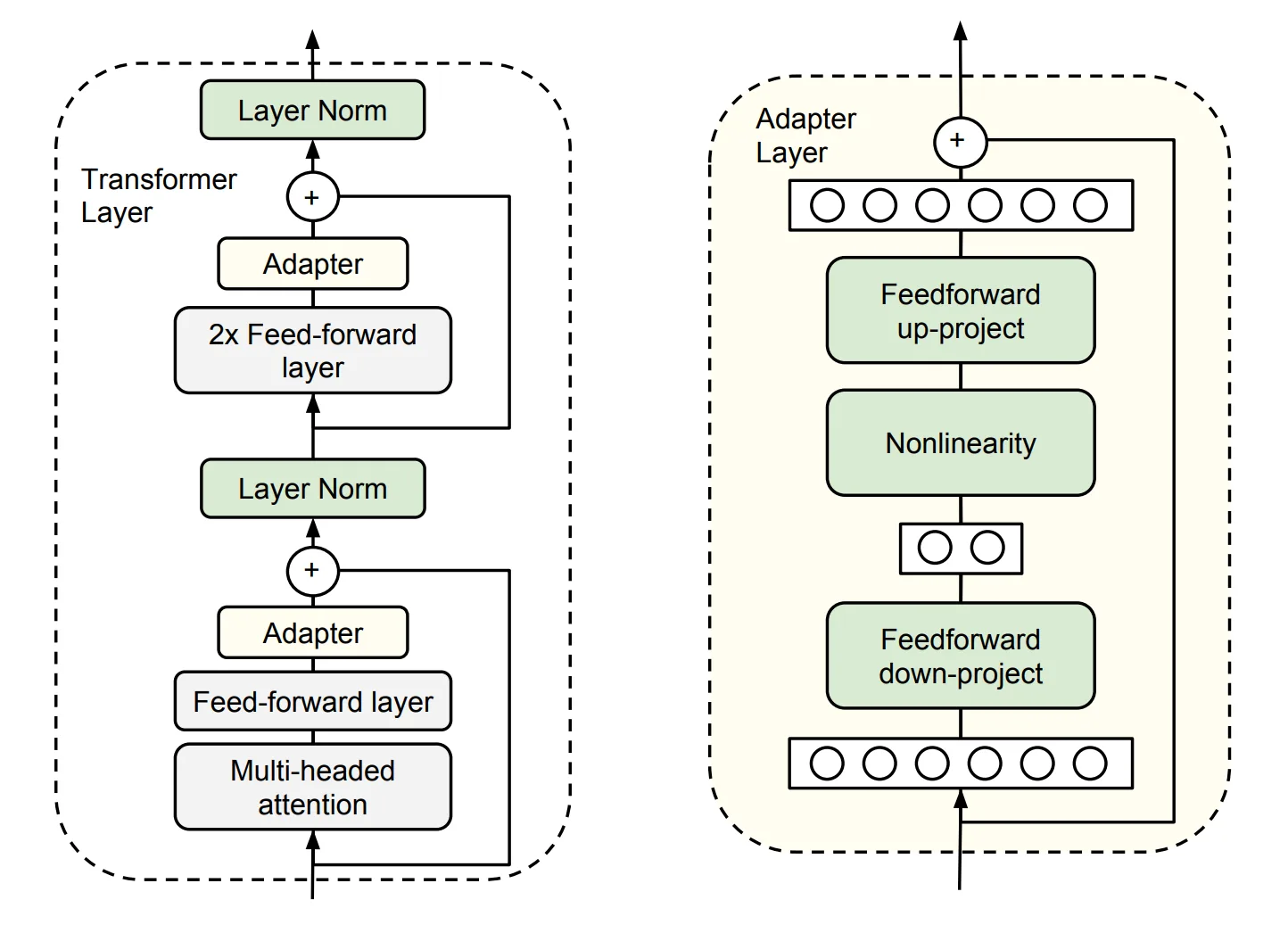
Figure 6.8 Adapter Tuning
Each Adapter module consists of two feed-forward sub-layers. The first sub-layer takes the output of a Transformer block as input and projects the original input dimension to ; the parameter size of the Adapter module is controlled by , and typically . At the output stage, the second feed-forward sub-layer projects back to as the Adapter module's output (right side of the figure above).
LoRA is in fact an improved Adapter Tuning method. But Adapter Tuning has an inference latency problem: due to the extra parameters and computation, the model after fine-tuning runs slower than the original pre-trained model.
Prefix Tuning. Freeze the pre-trained LM and add a trainable, task-specific prefix to the LM, so different tasks can keep different prefixes; the fine-tuning cost is also small. Specifically, before each input token a sequence of task-related virtual tokens is constructed as the prefix; only the prefix parameters are updated during fine-tuning while the others are frozen.
A commonly used parameter-efficient method, P-tuning, is in fact an improvement of Prefix Tuning. But Prefix Tuning has an inherent drawback: the available sequence length of the model is reduced. Adding virtual tokens consumes available sequence length, so the higher the fine-tuning quality, the lower the available sequence length.
6.3.2 LoRA Fine-Tuning
If a large model maps data into a high-dimensional space for processing, then it can be assumed that for a small downstream task, such a complex large model is unnecessary, and the task can be solved within some subspace; therefore there is no need to optimize all parameters. We can define that, when optimizing parameters in some subspace can achieve a certain level (say 90% accuracy) of the performance of full-parameter optimization, then the rank of this subspace parameter matrix can be called the intrinsic rank with respect to the problem at hand.
Pre-trained models implicitly reduce the intrinsic rank, and after fine-tuning for a specific task, the weight matrix of the model in fact has an even lower intrinsic rank. Furthermore, the simpler the downstream task, the lower the corresponding intrinsic rank (Intrinsic Dimensionality Explains the Effectiveness of Language Model Fine-Tuning). Therefore, even if the parameter matrix of the weight update is randomly projected to a smaller subspace, it can still be learned effectively. Intuitively, for a specific downstream task, these weight matrices are not required to be full rank. We can train some dense layers in the neural network indirectly by optimizing the rank decomposition matrices of the changes that the dense layers undergo during adaptation, thereby achieving fine-tuning by only optimizing the rank-decomposition matrices of the dense layers.
For example, suppose the pre-trained parameter is , and on a particular downstream task the intrinsic rank corresponding to the dense layer's weight parameter matrix is , with the fine-tuned parameter on this downstream task being , then:
This is the rank-decomposition matrix optimized by LoRA.
Compared to other parameter-efficient methods, LoRA has the following advantages:
- You can build small LoRA modules for different downstream tasks, switching between downstream tasks effectively while sharing the pre-trained model parameters.
- LoRA uses an Adaptive Optimizer; it does not need to compute gradients or maintain optimizer states for most parameters, making training more efficient with lower hardware requirements.
- LoRA uses a simple linear design; at deployment time the trainable matrices can be merged with the frozen weights, so there is no inference latency.
- LoRA is orthogonal to other methods and can be combined with them.
Therefore, LoRA has become the mainstream method for efficient LLM fine-tuning, especially when resources or supervised training data are limited. LoRA fine-tuning often becomes the first choice for LLM fine-tuning.
6.3.3 Principles of LoRA Fine-Tuning
(1) Low-Rank Parameterized Update Matrices
LoRA assumes that the weight update process also has a lower intrinsic rank. For a pre-trained weight parameter matrix ( is the previous layer's output dimension, is the next layer's input dimension), use a low-rank decomposition to represent its update:
During training, is frozen and not updated; and contain the trainable parameters.
Therefore, the forward pass of LoRA is:
At the start of training, is initialized with random Gaussian, is initialized to zero, and Adam is used to optimize.
The training idea is shown in Figure 6.9:
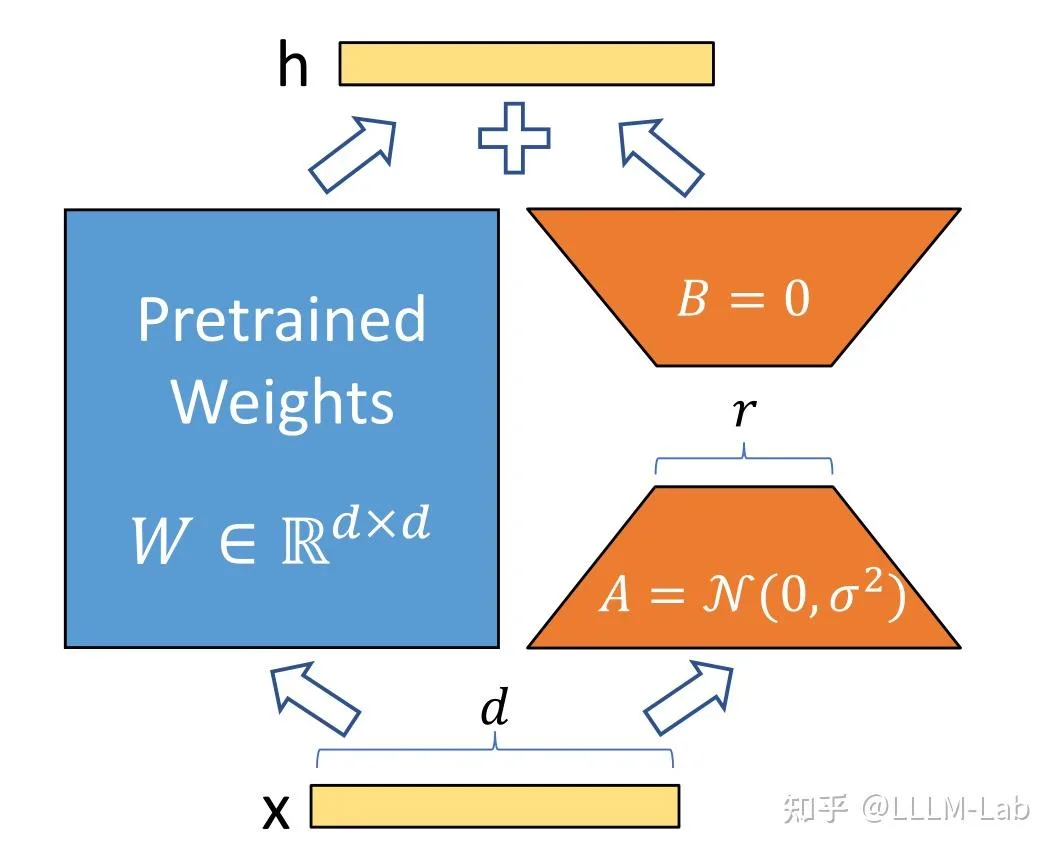
Figure 6.9 LoRA
(2) Application to Transformer
In the Transformer architecture, LoRA is mainly applied to the four weight matrices of the attention module: , , , , while the MLP weight matrices are frozen.
Ablation studies show that adapting both and at the same time gives the best result.
Under such conditions, the number of trainable parameters is:
Where is the number of weight matrices to which LoRA is applied, is the input/output dimension of the Transformer, and is the configured LoRA rank.
In general, is taken as 4, 8, or 16.
6.3.4 LoRA Code Implementation
LoRA fine-tuning of models is typically implemented via the peft library. peft is a third-party library developed by HuggingFace that wraps several efficient fine-tuning methods including LoRA, Adapter Tuning, and P-tuning, allowing convenient LoRA fine-tuning.
This section briefly walks through the LoRA fine-tuning code in the peft library to give a simple analysis of how LoRA fine-tuning is implemented.
(1) Implementation Flow
The internal implementation flow of LoRA fine-tuning mainly consists of the following steps:
Identify the layers to apply LoRA to. The
peftlibrary currently supports applying LoRA to three types of layers:nn.Linear,nn.Embedding, andnn.Conv2d.For each layer to which LoRA should be applied, replace it with a LoRA layer. A LoRA layer adds a side branch on top of the original layer's output, simulating the parameter update via low-rank decomposition (matrix and matrix ).
Freeze the original parameters, do fine-tuning, and update the LoRA layer parameters.
(2) Identifying LoRA Layers
When doing LoRA fine-tuning, you first need to set the LoRA fine-tuning parameters. One important parameter is target_modules. target_modules is generally a list of strings, each one being the name of a layer to apply LoRA to, e.g.:
target_modules = ["q_proj", "v_proj"]Here q_proj is the in the attention mechanism, and v_proj is the . We can customize the layers to be LoRA-fied based on the model architecture and task requirements.
When the LoRA model is created, this parameter is read, and then matched against the original model's layer names; the operation is implemented mainly with re for regex matching:
# Find components whose names contain "q_proj" or "v_proj" in the model
target_module_found = re.fullmatch(self.peft_config.target_modules, key)
# `key` is the component name(3) Replacing with LoRA Layers
For each found target layer, a new LoRA layer is created and used to replace it.
LoRA layers are concretely implemented by defining a Linear class based on the Lora base class; this class inherits from both nn.Linear and LoraLayer. LoraLayer is the LoRA base class and mainly constructs LoRA hyperparameters:
class LoraLayer:
    def __init__(
        self,
        r: int,                # LoRA rank
        lora_alpha: int,       # Normalization parameter
        lora_dropout: float,   # Dropout ratio for the LoRA layer
        merge_weights: bool,   # In eval mode, whether to merge LoRA matrices into the original weights
    ):
        self.r = r
        self.lora_alpha = lora_alpha
        # Optional dropout
        if lora_dropout > 0.0:
            self.lora_dropout = nn.Dropout(p=lora_dropout)
        else:
            self.lora_dropout = lambda x: x
        # Mark the weight as unmerged
        self.merged = False
        self.merge_weights = merge_weights
self.disable_adapters = Falsenn.Linear is the standard PyTorch linear layer. The Linear class is the actual LoRA layer, mainly implemented as:
class Linear(nn.Linear, LoraLayer):
    # LoRA layer
    def __init__(
        self,
        in_features: int,
        out_features: int,
        r: int = 0,
        lora_alpha: int = 1,
        lora_dropout: float = 0.0,
        fan_in_fan_out: bool = False,
        merge_weights: bool = True,
        **kwargs,
    ):
        # Inherit constructors of both base classes
        nn.Linear.__init__(self, in_features, out_features, **kwargs)
        LoraLayer.__init__(self, r=r, lora_alpha=lora_alpha, lora_dropout=lora_dropout, merge_weights=merge_weights)

        self.fan_in_fan_out = fan_in_fan_out
        # Actual trainable parameters
        if r > 0:
            # Parameter matrix A
            self.lora_A = nn.Linear(in_features, r, bias=False)
            # Parameter matrix B
            self.lora_B = nn.Linear(r, out_features, bias=False)
            # Normalization coefficient
            self.scaling = self.lora_alpha / self.r
            # Freeze original parameters; only update A and B
            self.weight.requires_grad = False
        # Initialize A and B
        self.reset_parameters()
        if fan_in_fan_out:
self.weight.data = self.weight.data.TWhen replacing, just copy the original layer's weight and bias to the new LoRA layer, and move the new LoRA layer to the specified device.
(4) Training
After replacing with LoRA layers, just do fine-tuning. Since the original parameters are frozen in the LoRA layer, only and are updated during training, achieving efficient fine-tuning. The overall training process is similar to the original Fine-tune and is not repeated here. Because LoRA is used, the forward is also adjusted accordingly:
    def forward(self, x: torch.Tensor):
        if self.disable_adapters:
            if self.r > 0 and self.merged:
                self.weight.data -= (
                    transpose(self.lora_B.weight @ self.lora_A.weight, self.fan_in_fan_out) * self.scaling
                )
                self.merged = False

            return F.linear(x, transpose(self.weight, self.fan_in_fan_out), bias=self.bias)
        '''Main branch'''
        elif self.r > 0 and not self.merged:
            result = F.linear(x, transpose(self.weight, self.fan_in_fan_out), bias=self.bias)
            if self.r > 0:
                result += self.lora_B(self.lora_A(self.lora_dropout(x))) * self.scaling
            return result
        else:
return F.linear(x, transpose(self.weight, self.fan_in_fan_out), bias=self.bias)The above code has several branches because of weight-merging concerns; here we only need to read the second branch (the elif branch). The forward computation under LoRA follows the formula above: first compute the product of the original parameters and the input, then add the products of and with the input.
6.3.5 Implementing LoRA Fine-Tuning with peft
peft is well-encapsulated and supports convenient and efficient large-model fine-tuning. Here we take the LLM SFT in Section 2 as an example to briefly introduce how to use peft for large-model fine-tuning. The overall idea is the same when applied to RLHF.
First import the required libraries:
import torch.nn as nn
from transformers import AutoTokenizer, AutoModel
from peft import get_peft_model, LoraConfig, TaskType, PeftModel
from transformers import TrainerThen load the original model and original tokenizer, the same as Section 2:
# Load base model
tokenizer = AutoTokenizer.from_pretrained(MODEL_PATH, trust_remote_code=True)
model = AutoModel.from_pretrained(
    MODEL_PATH, trust_remote_code=True
)Next, set the peft parameters:
peft_config = LoraConfig(
            task_type=TaskType.CAUSAL_LM,
            inference_mode=False,
            r=8,
            lora_alpha=32,
            lora_dropout=0.1,
)Note that LoRA parameters may differ across models. For example, for ChatGLM you do not need to specify target_modules; peft can find them automatically. For BaiChuan you need to specify them manually. task_type is the task type of the model; large models are generally CAUSAL_LM (i.e., traditional language model).
Then get the LoRA model:
model = get_peft_model(model, peft_config)The underlying behavior of get_peft_model is the implementation discussed above.
Finally, just use the Trainer provided by Transformers to train; the GPU memory usage will drop substantially:
trainer = Trainer(
    model=model,
    args=training_args,
    train_dataset= IterableWrapper(train_dataset),
    tokenizer=tokenizer
)
trainer.train()If applied on DPO or KTO, similarly add LoRA arguments and obtain a LoRA model via get_peft_model; nothing else needs to change. Note that LoRA fine-tuning can substantially reduce GPU memory usage and works well for downstream task adaptation; but for tasks that require learning new knowledge, since LoRA only adjusts low-rank matrices, it is hard to inject knowledge, and the effect is often poor. Therefore LoRA is not recommended for model pretraining or post-training.
References
[1] Neil Houlsby, Andrei Giurgiu, Stanislaw Jastrzebski, Bruna Morrone, Quentin de Laroussilhe, Andrea Gesmundo, Mona Attariyan, and Sylvain Gelly. (2019). Parameter-Efficient Transfer Learning for NLP. arXiv preprint arXiv:1902.00751.
[2] Edward J. Hu, Yelong Shen, Phillip Wallis, Zeyuan Allen-Zhu, Yuanzhi Li, Shean Wang, Lu Wang, and Weizhu Chen. (2021). LoRA: Low-Rank Adaptation of Large Language Models. arXiv preprint arXiv:2106.09685.
[3] Armen Aghajanyan, Luke Zettlemoyer, and Sonal Gupta. (2020). Intrinsic Dimensionality Explains the Effectiveness of Language Model Fine-Tuning. arXiv preprint arXiv:2012.13255.
[4] Xiang Lisa Li and Percy Liang. (2021). Prefix-Tuning: Optimizing Continuous Prompts for Generation. arXiv preprint arXiv:2101.00190.