🎭 How Chat-Zhenxuan Was Created: AMD ROCm Edition

Chat-Zhenxuan is a chat language model that imitates Zhenxuan's speech patterns, created by fine-tuning a large language model using LoRA with all dialogues and sentences about Zhenxuan from the script of "Zhenxuan's Tale."
Zhenxuan is the female protagonist and core main character in the novel "Imperial Harem: Zhenxuan's Tale" and the TV series "Zhenxuan's Tale". Her original name is Zhen Yuxuan, which she changed to Zhenxuan because she disliked the character Yu as being too common. She is the daughter of Han aristocrat Zhen Yuandao and was later granted the surname Niohuru by Emperor Yongzheng, elevated to the upper three banners as a Manchu, and given the name "Niohuru Zhenxuan". She participated in the imperial concubine selection along with Shen Meizhuang and An Lingrong, and was selected for her striking resemblance to the Pure Consort. After entering the palace, she faced relentless pressure from the Imperial Noble Consort Hua, dealt with Shen Meizhuang being wronged, and witnessed An Lingrong's betrayal, transforming from a timid young girl into a ruthless veteran of palace intrigue capable of causing bloodshed. After Emperor Yongzheng discovered the Nian clan's ambitions, he had Zhenxuan's father eliminate them, and Zhenxuan used her elaborate schemes in the palace to help the emperor eliminate political enemies, earning his deep affection. After many twists and turns, she finally defeated the arrogant Imperial Noble Consort Hua. When promoted to imperial concubine status, she was sabotaged by Empress Yixiu and fell out of favor with the emperor. After giving birth to a daughter, Lingyue, she became disheartened and requested to leave the palace to become a nun. However, she was admired by the Guo Prince, and they fell in love. Learning of the Guo Prince's death, she immediately devised a plan to meet the emperor again and returned to the palace in glory. Subsequently, her father's wronged case was overturned and the Zhen family was restored; she gave birth to twin sons and evaded Empress Yixiu's assassination attempts through blood tests and other conspiracies. Finally, she brought down the conspirator empress by sacrificing her own biological child. However, the emperor then forced Zhenxuan to poison Prince Yonglix to test her loyalty and sent her on a diplomatic marriage mission to Dzungar despite having already borne children. Zhenxuan then viewed the emperor as the ultimate object of destruction, and the finale reveals that "all human conflicts arise from the injustice and tyranny of rulers," ultimately poisoning the emperor. After the Fourth Prince Hongli ascended the throne as Emperor Qianlong, Zhenxuan was honored as the Imperial Dowager and wielded immense power, spending her later years peacefully as depicted in "Tales of Ruyi."
Chat-Zhenxuan realizes, starting with "Zhenxuan's Tale" as an entry point, a complete process for creating personalized AI fine-tuned large language models based on novels and scripts. By providing any novel or script and specifying a character, running the complete workflow of this project allows each user to create their own personalized AI that matches their favorite character from their favorite novel or script, aligning with the character's persona and possessing high-level intelligence.
Chat-Zhenxuan model has accumulated 15.6k downloads, ModelScope link: Link
Chat-Zhenxuan has accumulated 500 stars, huanhuan-chat project link: Link, xlab-huanhuan-chat project link: Link
Chat-Zhenxuan LoRA Fine-Tuning Pipeline
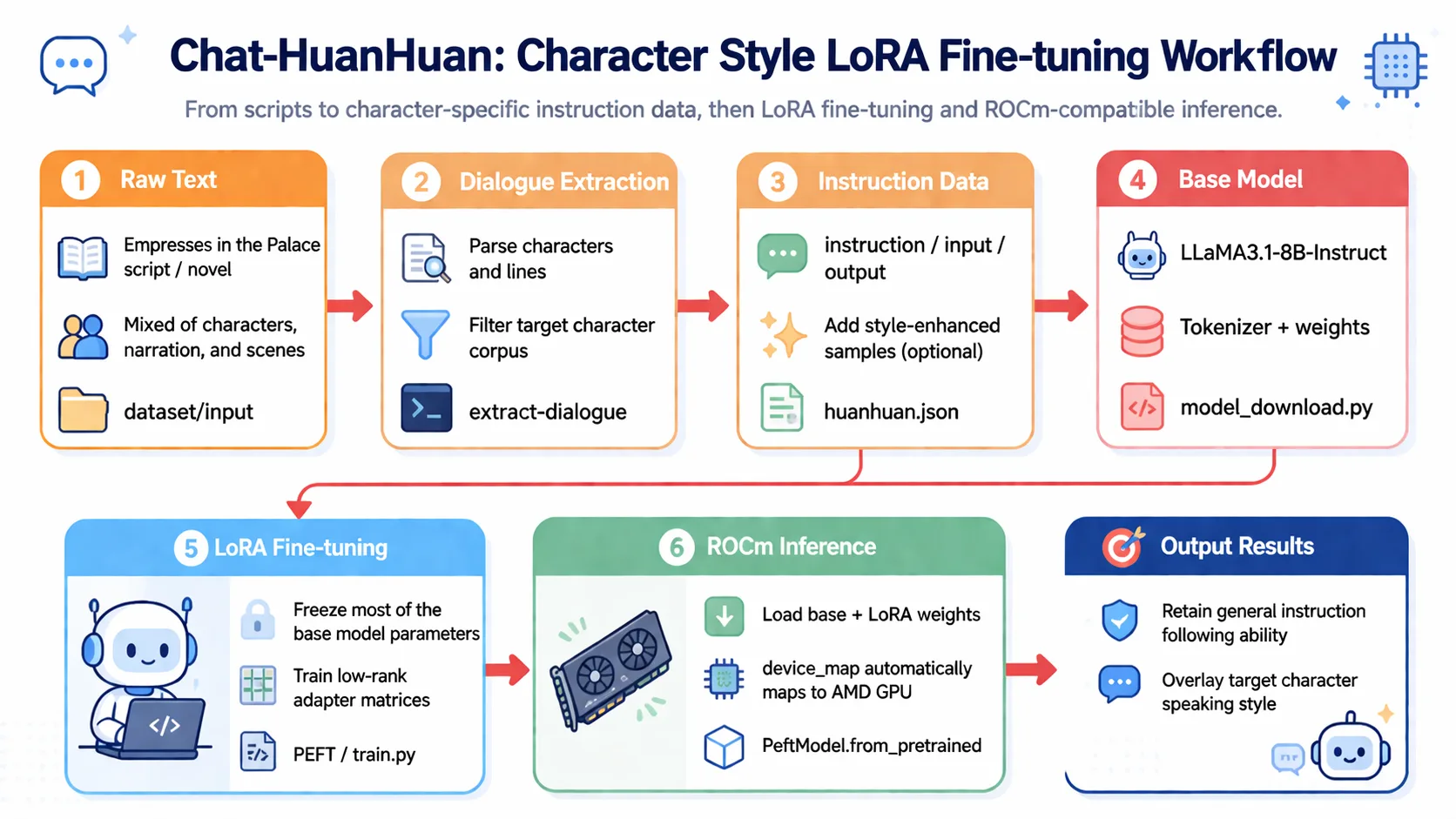
Alright, next I will guide you through implementing Chat-Zhenxuan's training process step by step. Let's experience it together~
Step 1: Environment Preparation
The basic environment for this article is as follows:
----------------
Windows 11 / Ubuntu 24.04
Python 3.12
ROCm 7.12.0
PyTorch 2.9.1
----------------📖 For ROCm + PyTorch base environment installation, see 00-Environment. Continue below after completing that setup.
Install project-specific dependencies:
# After activating your virtual environment
uv pip install modelscope==1.16.1
uv pip install transformers==4.43.1
uv pip install accelerate==0.32.1
uv pip install peft==0.11.1
uv pip install datasets==2.20.0
uv pip install huggingface_hubStep 2: Data Preparation
First, we need to prepare the script data for Zhenxuan's Tale. Here we use the script data from the series. Let's look at the format of the original data.
Scene 2
(After court dismissal, all officials disperse)
Official A: Our emperor truly favors General Nian and Grand Eunuch Long.
Official B: Grand Eunuch Long, congratulations! You are a great hero of our nation!
Official C: General Nian, the emperor surely holds you in high regard!
Official D: General Nian, you are the emperor's trusted aide!
Su Peisheng (catching up with Nian Gengyao): General Nian, please wait. General—
Nian Gengyao: Grand Eunuch Su, what instructions do you have?
Su Peisheng: I dare not. The emperor is concerned about your arm injury, and has instructed me to give you this secret healing salve. Please use it.
Nian Gengyao (bowing toward the Golden Hall): Your subject Nian Gengyao humbly thanks the emperor for his grace! May I ask, Grand Eunuch Su, how is my sister faring in the palace today?
Su Peisheng: The Imperial Noble Consort Hua is graceful and favored above all concubines, General, please rest assured.
Nian Gengyao: Then I trouble you, Grand Eunuch. (Turns to leave)
Su Peisheng: As you wish.Each line has a character and corresponding dialogue, so we can simply convert this data into dialogue form, like this:
[
	{"role":"Official A", "content":"Our emperor truly favors General Nian and Grand Eunuch Long."},
	{"role":"Official B", "content":"Grand Eunuch Long, congratulations! You are a great hero of our nation!"},
	{"role":"Official C", "content":"General Nian, the emperor surely holds you in high regard!"},
	{"role":"Official D", "content":"General Nian, you are the emperor's trusted aide!"},
	{"role":"Su Peisheng", "content":"General Nian, please wait. General—"},
	...
]Then extract the dialogues of the characters we're interested in and form QA pairs. For such data, we can use regular expressions or other methods to quickly extract and filter dialogues of the target character.
In many cases, however, we don't have such well-formatted dialogue data. So we may need to extract character dialogues from a large text block and convert them into the format we need.
For example, "Journey to the West" in vernacular Chinese has text formatted like this. For such text, we need to leverage the capabilities of large language models to extract characters and their corresponding dialogues from the text, and then filter for the character dialogues we need.
You can use a small tool: extract-dialogue to extract dialogues from text.
......
After Sun Wukong left, a Chaotic World Demon King occupied the Water-Curtain Cave alone and captured many monkey offspring. When Sun Wukong heard this, he was so angry he gnashed his teeth. After finding out where the Chaotic World Demon King lived, he decided to seek revenge and rode his cloud somersault toward the north.

Soon, Sun Wukong arrived at the Water-Curtain Cave and shouted to the little demons at the gate: "Your lousy demon king has repeatedly bullied us monkeys. Today I've come to see who is the stronger!

"The little demon ran into the cave and reported to the demon king. The demon king hurried to put on iron armor, picked up his great sword, and walked out with the support of his servants.

Sun Wukong, bare-handed, seized the Chaotic World Demon King's great sword and cut him in half. Then, he plucked out a handful of hair, chewed it into pieces, and blew it out, turning it into many little monkeys that rushed into the cave, killed all the demons, rescued the captured monkey offspring, and set fire to the Water-Curtain Cave.
......Original data for Chat-Zhenxuan: Zhenxuan's Tale
Original data for Journey to the West: Journey to the West
Finally, organize it into JSON format data, like this:
[
	{
		"instruction": "Miss, all the other selected concubines are trying to be favored, but only our Miss wishes to be rejected. Buddha surely remembers Zhenyi's sincere prayer—",
		"input": "",
		"output": "Shh— they say that wishes are broken if spoken aloud."
	},
	{
		"instruction": "This Imperial Physician Wen is quite peculiar. Everyone knows that imperial physicians cannot take the pulse or diagnose anyone outside the imperial family by imperial decree, yet he comes to visit our mansion every half month.",
		"input": "",
		"output": "You two talk too much. I should ask Imperial Physician Wen for some medicine to cure your chattiness."
	},
	{
		"instruction": "Sister Zhenxuan, just now when I went to the residence to take your pulse, I heard your mother say you came here to burn incense.",
		"input": "",
		"output": "I came out for a walk to clear my mind."
	}
]Chat-Zhenxuan data: Chat-Zhenxuan
So the general approach for processing data in this step is:
1. Extract characters and dialogues from raw data 2. Filter for the dialogues of the character we care about 3. Convert dialogues into the format we need
This step can also include a data augmentation phase, such as providing two or three data samples to an LLM and having it generate similarly-styled data. Alternatively, you can find some daily conversation datasets and use RAG to generate dialogue data in a fixed character style. Here you can boldly try whatever approaches you want!
Step 3: Model Training
In this step, you all may be quite familiar with the process. In each model section of self-llm, there is a LoRA fine-tuning module. We just need to process the data into the format we need, and then call our training script.
Here we select the LLaMA3.1-8B-Instruct model for fine-tuning. First, we need to download the model by creating a model_download.py file with the following content:
import torch
from modelscope import snapshot_download, AutoModel, AutoTokenizer
import os

model_dir = snapshot_download('LLM-Research/Meta-Llama-3.1-8B-Instruct', cache_dir='/root/autodl-tmp', revision='master')

# Hugging Face download method
# from huggingface_hub import snapshot_download
# model_dir = snapshot_download(repo_id='meta-llama/Meta-Llama-3.1-8B-Instruct', cache_dir='/root/autodl-tmp')Note: Remember to modify
cache_dirto your model download path!
Next, prepare the training code. For those familiar with self-llm, this step should be straightforward. I will place train.py in the current directory; you just need to modify the dataset path and model path in it.
Of course, you can also use the
LoRAfine-tuning tutorial fromself-llm. Tutorial link: Link
Run the following command in the terminal:
python train.pyNote: Remember to modify the dataset path and model path in
train.py!
Training will take approximately 1 to 3 hours. After training completes, a LoRA model will be generated in the output directory. You can test it using the following code:
from transformers import AutoModelForCausalLM, AutoTokenizer
import torch
from peft import PeftModel

mode_path = './LLM-Research/Meta-Llama-3___1-8B-Instruct'
lora_path = './output/llama3_1_instruct_lora/checkpoint-699' # Change this to your LoRA output checkpoint path

# Load tokenizer
tokenizer = AutoTokenizer.from_pretrained(mode_path, trust_remote_code=True)

# Load model
model = AutoModelForCausalLM.from_pretrained(mode_path, device_map="auto",torch_dtype=torch.bfloat16, trust_remote_code=True).eval()

# Load LoRA weights
model = PeftModel.from_pretrained(model, model_id=lora_path)ROCm Note: On the ROCm platform,
device_map="auto"and.to('cuda')will automatically map to AMD GPUs without requiring any parameter modifications. PyTorch'scudainterface is natively compatible on ROCm.
prompt = "Zhenxuan, what's wrong? Let me take up this matter for you!"

messages = [
		{"role": "system", "content": "Assume you are Zhenxuan, the woman by the emperor's side."},
		{"role": "user", "content": prompt}
]

input_ids = tokenizer.apply_chat_template(messages, tokenize=False, add_generation_prompt=True)

# print(input_ids)

model_inputs = tokenizer([input_ids], return_tensors="pt").to('cuda')
generated_ids = model.generate(model_inputs.input_ids,max_new_tokens=512)

generated_ids = [
	output_ids[len(input_ids):] for input_ids, output_ids in zip(model_inputs.input_ids, generated_ids)
]
response = tokenizer.batch_decode(generated_ids, skip_special_tokens=True)[0]
print('Your Majesty: ', prompt)
print('Zhenxuan: ',response)Your Majesty: Zhenxuan, what's wrong? Let me take up this matter for you!
Zhenxuan: Your Majesty, it was not intentional on my part.Next, we can start chatting with this Zhenxuan model~
Interested students can try fine-tuning other models from self-llm to test your learning!
A Final Word
Chat-Zhenxuan was created at the height of the LLM boom last year. We felt that if we didn't do something interesting, we might miss out on many exciting opportunities. So, together with a few friends, we spent considerable time creating this project. Through this project, we learned a lot and encountered many challenges, but we solved them all. Chat-Zhenxuan also received awards and attracted significant attention. Therefore, I believe this project is very meaningful and very interesting.
- 2023 iFLYTEK Spark Cup Cognitive Large Model Scenario Innovation Competition Top 50
- 2024 Internlm Challenge (Spring Season) Creative Application Award Top 12
Chat-Zhenxuan Contributors
- Song Zhixue (Datawhale Member - China University of Mining and Technology, Beijing)
- Zou Yuheng (Datawhale Member - University of International Business and Economics)
- Wang Yiming (Datawhale Member - Ningxia University)
- Deng Yuwen (Datawhale Member - Guangzhou University)
- Du Sen (Datawhale Member - Nanyang Institute of Technology)
- Xiao Hongru (Datawhale Member - Tongji University)