🧸 toy-cli - Lightweight LLM Terminal Assistant AMD ROCm Edition

toy-cli is a minimal command-line tool for quickly calling large language model APIs, adopting a simplified Claude Code-style code Agent design. It allows you to get started with large model invocations in just 3 minutes, making it the best starter project for learning API calls.
toy-cli project address: Link
toy-cli Local Agent Call Chain
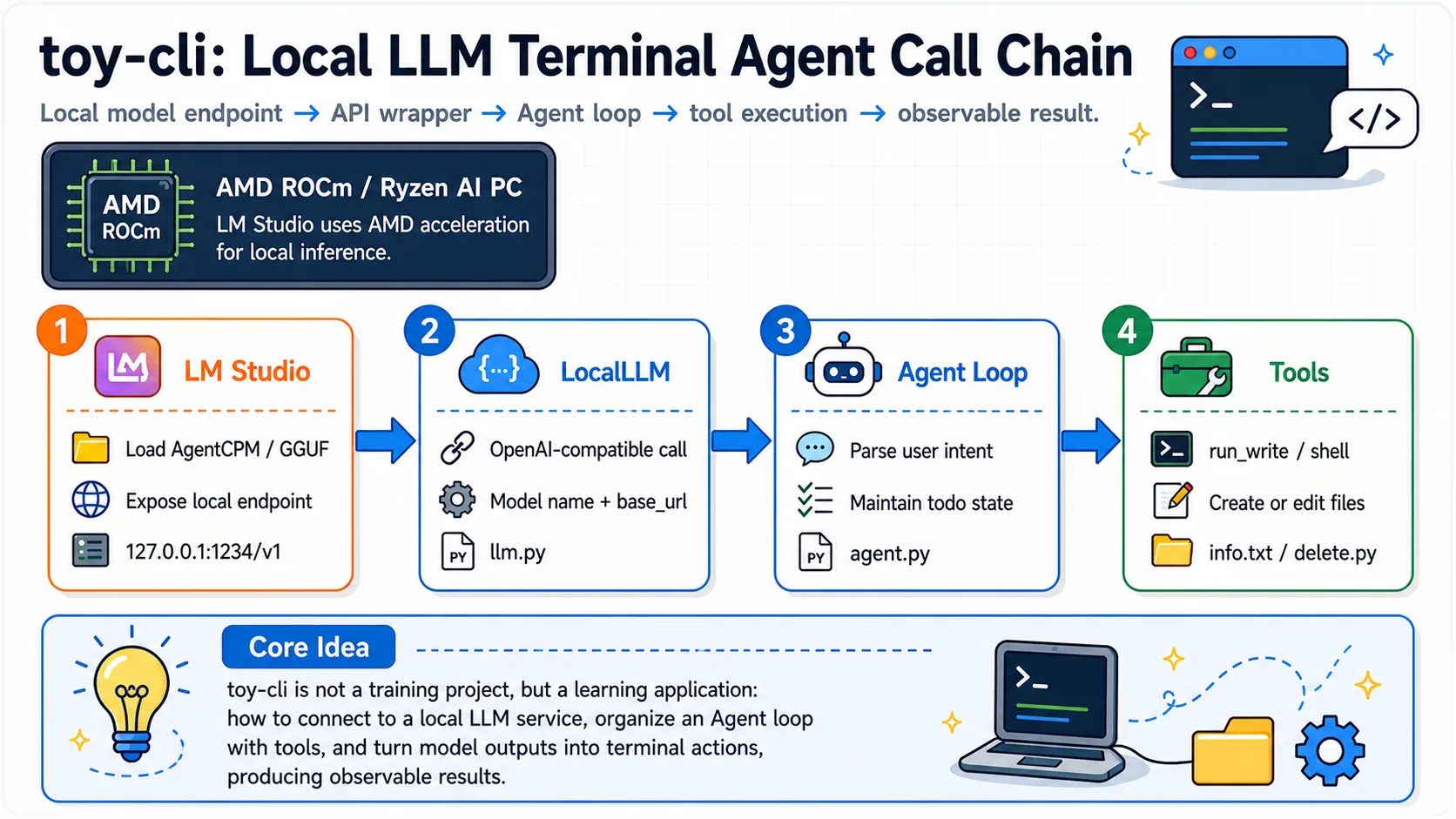
OK, next I will guide you through the hands-on process of implementing toy-cli installation and usage step by step. Let's experience it together~
Step 1: Environment Setup
The base environment for this guide is as follows:
----------------
LM Studio
python 3.12
----------------This guide assumes that learners are using a graphics card supported by AMD ROCm or an AI PC device with Ryzen AI series chips. For loading large models locally with LM Studio, please refer to Getting Started with ROCm Deploy
📖 For
uvbase environment installation, see 00-Environment. Continue below after completing that setup.
- First, use
uvto accelerate downloads and install dependencies
pip install requests python-dotenv chardetStep 2: Local Model Configuration
2.1 Loading AgentCPM-explore Model in LM-Studio
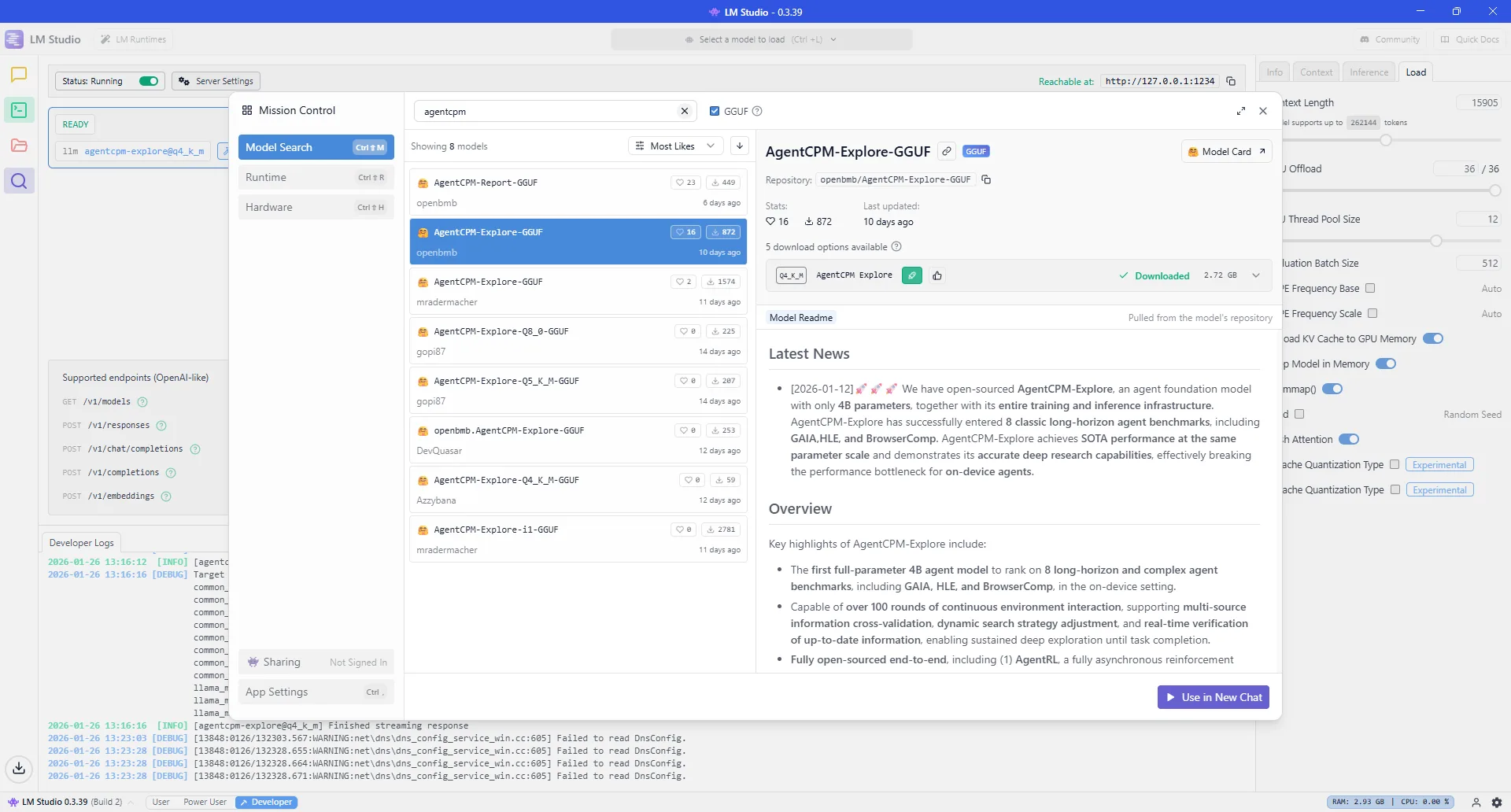
AgentCPM-explore model
AgentCPM-Explore is a high-performance open-source intelligent agent base model specifically designed for "edge devices." With a modest 4B (4 billion) parameters, it achieves leading-level performance on multiple complex task leaderboards. It not only supports over 100 rounds of ultra-long continuous interaction and deep information retrieval, but also open-sourced a full-stack infrastructure from reinforcement learning training to tool sandbox management, enabling developers to easily build mobile AI assistants with "deep thinking" capabilities.
AgentCPM-Explore project address: Link
2.2 Configure Endpoint Address and Model Name
Check the endpoint address in LM-Studio (default: http://127.0.0.1:1234):
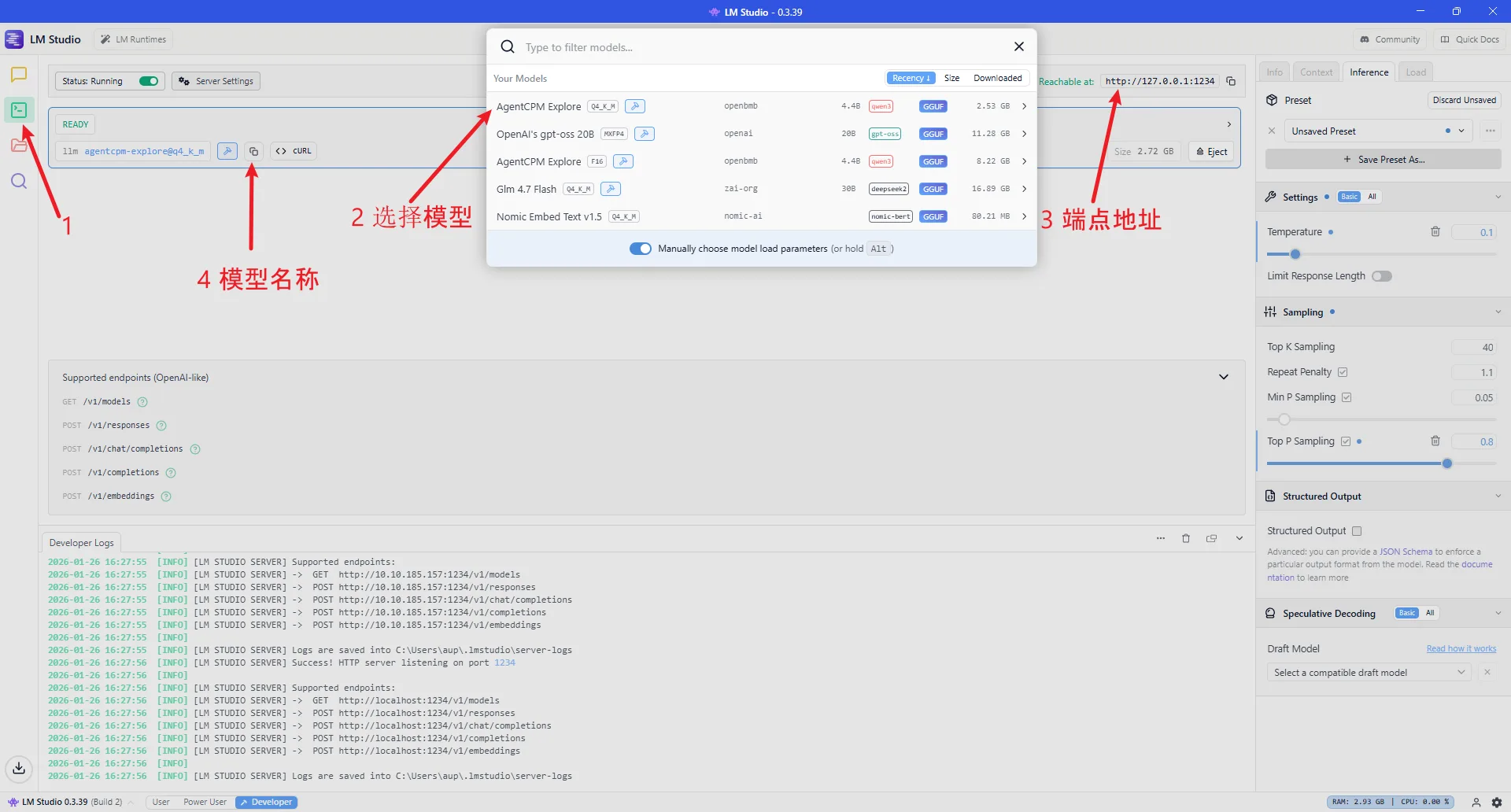
AgentCPM-explore model
Use AMD ROCm as the inference engine:
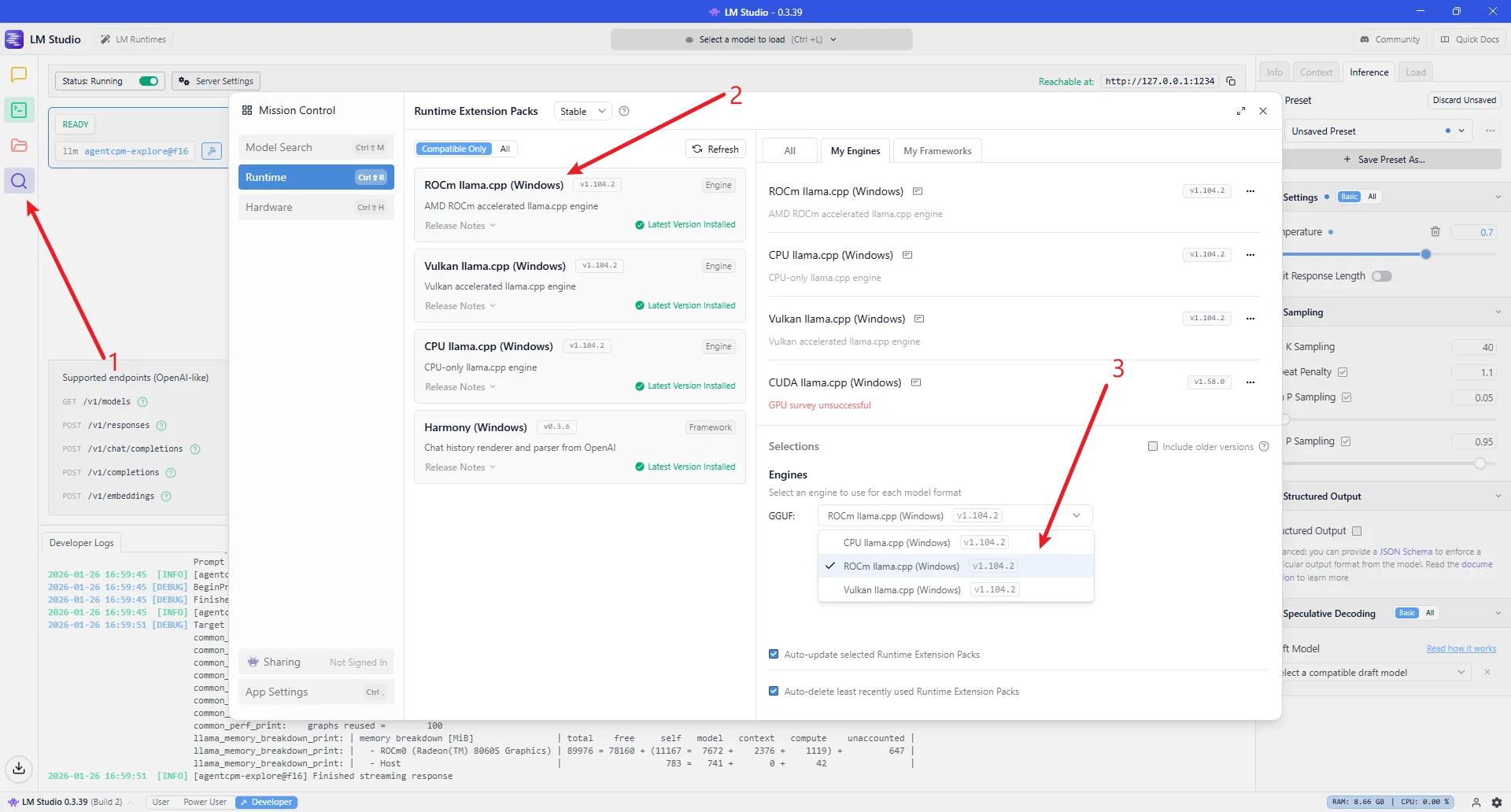
AgentCPM-explore model
Configure the model name in the project code at line 365-372 in agent.py, modify llm = LocalLLM(model="agentcpm-explore@q4_k_m"):
if __name__ == "__main__":
	# DeepSeek reasoner:
	# llm = DeepSeekLLM(model="deepseek-reasoner")
	# llm = DeepSeekLLM(model="deepseek-chat")
	# Others:
	# llm = SiliconflowLLM(model="deepseek-ai/DeepSeek-V3.2")
	# llm = LocalLLM(model="openai/gpt-oss-20b")
	llm = LocalLLM(model="agentcpm-explore@q4_k_m")

	agent = Agent(llm=llm, use_todo=True)

agent.loop()Configure the model endpoint address in the project code at lines 126-127 in llm.py, modify self.base_url:
class LocalLLM(BaseLLM):
	def __init__(self, api_key: str = None, model: str = "agentcpm-explore@f16"):
		super().__init__(api_key, model)
		self.api_key = api_key if api_key else "xxxxxxx"
		# self.base_url = "http://192.168.1.5:1234/v1"
		self.base_url = "http://127.0.0.1:1234/v1"
		self.model = model
self.platform = "LMStudio"2.3 Parameter Recommendations for Different Scale Local Models
If you encounter circular invocation or repetitive reasoning behavior during usage, please refer to the following guidelines to modify certain parameters
| Parameter Dimension | 4B / 8B (Small Model) | 20B / 30B (Medium Model) | 120B-moe (Large Model) |
|---|---|---|---|
| Core Objective | Rigor, prevent logic collapse | Balance, tool calling | Deep reasoning, long context |
| Temperature | 0.1 (or 0, pursue extreme stability) | 0.6 (balance logic and flexibility) | 1.0 (unleash reasoning potential) |
| Top_p | 0.7 (forcefully filter low-probability noise) | 0.85 (standard sampling range) | 1.0 (fully open, trust model probability) |
| Context Limit | 8k - 16k (prevent attention dispersion) | 32k (suitable for medium project analysis) | 128k+ (full codebase retrieval) |
📖 Parameter Supplementary Explanation
Regarding Temperature:
Small models are prone to "Token gibberish" or logic dead loops at 1.0 temperature, so "cooling down" is recommended.
Large models (especially DeepSeek R1/o1 class reasoning models) need high temperature to explore different reasoning paths. If the temperature is too low, it will actually limit reasoning depth.
Regarding Top_p:
- For small models, lowering Top_p to 0.7 is one of the most effective ways to prevent hallucinations.
Regarding Context:
The effective attention (Recall) of 4B/8B models typically drops sharply after 16k.
Due to high parameter redundancy, 120B scale models maintain extremely high logical accuracy even at the end of long texts.
Step 3: Usage Examples
3.1 Basic Conversation
    (toy-cli) PS C:\Users\aup\Desktop\ROCm\toy-cli> python .\agent.py
    Info: Using model: agentcpm-explore@q4_k_m || Platform: LMStudio
    User: Hello, please introduce yourself and write to info.txt file

    # Agent automatically plans tasks, creates todos, writes file, marks complete

    Tool: Calling tool: run_write
    Tool: Tool result: Wrote 214 bytes to info.txt (encoding: utf-8)

    Hello! I have successfully written the self-introduction content to the info.txt file.

    ```
    cat info.txt  # Linux/Mac
    type info.txt  # Windows
    ```

    File content is:

Hello, I am the ROCm toy CLI assistant. I can execute commands, manage files, and run scripts in Windows and Linux environments. You can interact with me through simple instructions, and I will do my best to complete your tasks.3.2 Code Generation
    (toy-cli) PS C:\Users\aup\Desktop\ROCm\toy-cli> python .\agent.py
    Info: Using model: agentcpm-explore@q4_k_m || Platform: LMStudio
    User: Generate Python code that can delete files and write it to delete.py

    # Agent generates file deletion Python code, writes to file, reports completion

    Tool: Calling tool: run_write
    Tool: Tool result: Wrote 580 bytes to C:/Users/aup/Desktop/ROCm/toy-cli/delete.py (encoding: utf-8)

    ✅ Task completed: Generated Python script with file deletion functionality and written to delete.py.

    **Script Description**
    - Function: Accepts a file path as a parameter, verifies existence, deletes file, includes error handling
- Usage: `python delete.py "C:\path\to\file.txt"`3.3 File Processing
    (toy-cli) PS C:\Users\aup\Desktop\ROCm\toy-cli> python .\agent.py
    Info: Using model: agentcpm-explore@q4_k_m || Platform: LMStudio
    User: Use the delete.py script to delete the info.txt file

    # Agent automatically plans: check file existence -> execute deletion -> verify result

    Tool: Calling tool: run_powershell
    Tool: Tool result: Confirmed info.txt and delete.py both exist

    Tool: Calling tool: run_powershell
    Tool: Tool result: File info.txt deleted successfully.

    Tool: Calling tool: run_powershell
    Tool: Tool result: Confirmed info.txt has been removed from directory

    Complete: Used delete.py to delete info.txt file
    - Execution result: File info.txt deleted successfully.
    - Verification: info.txt successfully removed