🌀 Qwen3.8-Flash-CIRU - Strix Halo llama-server 部署



本节介绍如何在 AMD Ryzen AI MAX+ 395(Radeon 8060S,gfx1151)+ 128 GB 统一内存 上,按 ciru-ai/Qwen3.8-Flash-CIRU-STRIX-IU4 v1.1 编译 CIRU llama-server,加载 Hugging Face jcbtc/Qwen3.8-Flash-CIRU-STRIX-IU4 的 GGUF + PLE + MTP,提供 OpenAI 兼容接口。
前置条件:已完成 ROCm 基础环境安装。本教程实测环境为 Ubuntu 24.04 + ROCm 7.1.0,GPU 性能档
high(sclk 2900 MHz)。
不是 stock llama.cpp,也 不是 DeepSeek-V4-Flash 的 luceboxdflash_server。普通 GGUF 加载器读不了 PLE sidecar。
模型简介
Qwen3.8-Flash-CIRU-STRIX-IU4 是专为 Strix Halo 做的 IU4 / PLE 发行包:主权重约 74 GiB,PLE payload 约 49 GiB 从 NVMe 分页,MTP 草稿约 3.9 GiB。/v1/models 回报约 126B MoE(n_params=125,743,653,760),上下文可开到 262144。
| 项 | 值 |
|---|---|
| 运行时 | CIRU llama-server v1.1(仓库标签 v1.1) |
| 权重 | jcbtc/Qwen3.8-Flash-CIRU-STRIX-IU4 |
| 磁盘 | 完整包约 127 GiB(务必先 sha256sum -c checksums.sha256) |
| 常驻内存 | 约 96 / 125 GiB(PLE 只缓存 4 GiB 热页) |
| 官方配方 | profiles/strix-halo-production.env;本机把 MTP 深度从 3 调到 4 |
它和 DeepSeek-V4-Flash 抢同一块统一内存,不能同时常驻。
一、确认硬件与 ROCm
amd-smi
rocminfo | grep -A2 -E 'Name:|Marketing Name|gfx1151'
df -h . # 至少再留 ~130 GiB建议 GPU 锁到 high:
echo performance | sudo tee /sys/firmware/acpi/platform_profile
sudo rocm-smi -d 0 --setperflevel high若本机还跑着 DS4(dflash_server),先停掉:
pkill -x dflash_server || true
ss -tlnp | grep -E ':8000|:8080' || true二、编译 CIRU llama-server
mkdir -p ~/rocm-llm && cd ~/rocm-llm
git clone --branch v1.1 --depth 1 \
  https://github.com/ciru-ai/Qwen3.8-Flash-CIRU-STRIX-IU4.git
cd Qwen3.8-Flash-CIRU-STRIX-IU4

export ROCM_ROOT=/opt/rocm
export PATH="/opt/rocm/bin:$PATH"
unset HSA_OVERRIDE_GFX_VERSION

./scripts/ciru/build-linux-amd.sh
./build-gfx1151/bin/llama-server --version
./build-gfx1151/bin/llama-server --help | grep -E 'ple-sidecar|spec-draft-model'官方脚本会编 build-gfx1151/bin/llama-server,并打开 GGML_HIP / gfx1151。帮助里应出现 --ple-sidecar 和 --spec-draft-model。
三、下载权重并校验
export HF_ENDPOINT=https://hf-mirror.com
python3 -m pip install -q "huggingface_hub>=0.26"

python3 - <<'PY'
from huggingface_hub import snapshot_download
path = snapshot_download(
    repo_id="jcbtc/Qwen3.8-Flash-CIRU-STRIX-IU4",
    local_dir="model",
)
print("local_dir", path)
PY

ls -lh model/Qwen3.8-Flash-CIRU-STRIX-IU4.gguf \
       model/mtp/Qwen3.8-Flash-CIRU-STRIX-IU4-MTP-Q8_0.gguf \
       model/ple/ple.payload.bin \
       model/ple/ple.manifest.json \
       model/ple/ple.scale.bf16

(cd model && sha256sum -c checksums.sha256)本机校验通过的文件:
| 文件 | 大小 |
|---|---|
Qwen3.8-Flash-CIRU-STRIX-IU4.gguf | 74 GiB |
ple/ple.payload.bin | 49 GiB |
mtp/Qwen3.8-Flash-CIRU-STRIX-IU4-MTP-Q8_0.gguf | 3.9 GiB |
官方 run-server.sh 默认读仓库下的 model/ 目录。若权重放在别处,启动时设 MODEL_DIR。
四、启动服务
CIRU 自带 scripts/ciru/run-server.sh,会加载 profiles/strix-halo-production.env(PLE 4 GiB 页缓存、prompt cache 8 GiB、ctx 262144、MTP)。本机扫描后把 MTP 深度改成 4(官方默认 3)。
export ROCM_PATH=/opt/rocm
export HIP_PATH=/opt/rocm
export LD_LIBRARY_PATH=/opt/rocm/lib:/opt/rocm/lib64:${LD_LIBRARY_PATH:-}
unset HSA_OVERRIDE_GFX_VERSION

cd ~/rocm-llm/Qwen3.8-Flash-CIRU-STRIX-IU4
mkdir -p slot-state

# Agent / 短回复建议关思考,避免 max_tokens 被 reasoning 吃掉
HOST=0.0.0.0 PORT=8080 MTP_DEPTH=4 \
  ./scripts/ciru/run-server.sh \
  --reasoning off \
--chat-template-kwargs '{"enable_thinking":false}'加载约 60 s(主模型 + MTP)。日志就绪后:
curl -s http://127.0.0.1:8080/health
curl -s http://127.0.0.1:8080/v1/models | jq '.data[0].id'应看到 Qwen3.8-Flash-CIRU-STRIX-IU4。回退官方 MTP 深度:MTP_DEPTH=3。需要思考时不要在启动参数里关,改为请求里传 "chat_template_kwargs": {"enable_thinking": true} 并加大 max_tokens。
五、冒烟测试
curl -s -X POST http://127.0.0.1:8080/v1/chat/completions \
  -H 'Content-Type: application/json' \
  -d '{
    "model": "Qwen3.8-Flash-CIRU-STRIX-IU4",
    "messages": [{"role": "user", "content": "只回答:ok"}],
    "max_tokens": 16,
    "temperature": 0,
    "chat_template_kwargs": {"enable_thinking": false}
}' | jq -r '.choices[0].message.content'本机关思考时短问返回 ok,约 0.5 s,无 reasoning_content。
质量冒烟(temperature=0,关思考,MTP depth 4)全部通过:23*17=391、中文压缩、回文函数、上海天气 JSON、拼音排序。
六、本机测评结果
机器与 DS4 同一台。数字取服务端 timings。官方 HumanEval / ARC 分数引自 CIRU README,未在本机重跑全量套件。
6.1 Prefill:512–8K 达到或超过官方
冷 prompt,生成 128 token,MTP depth 3(与官方配方对齐)。
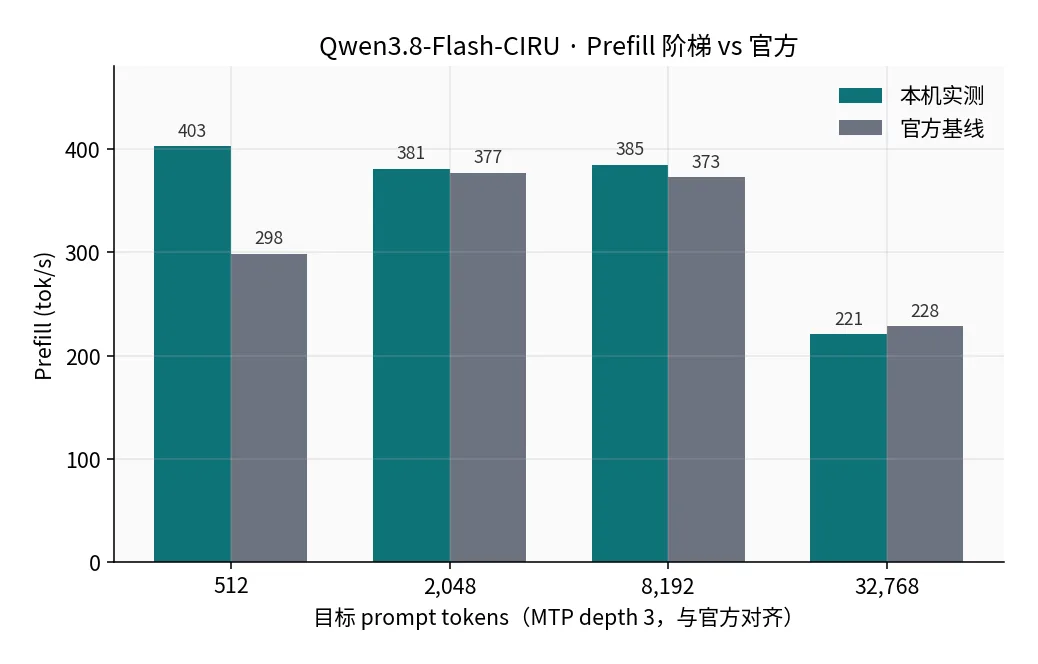
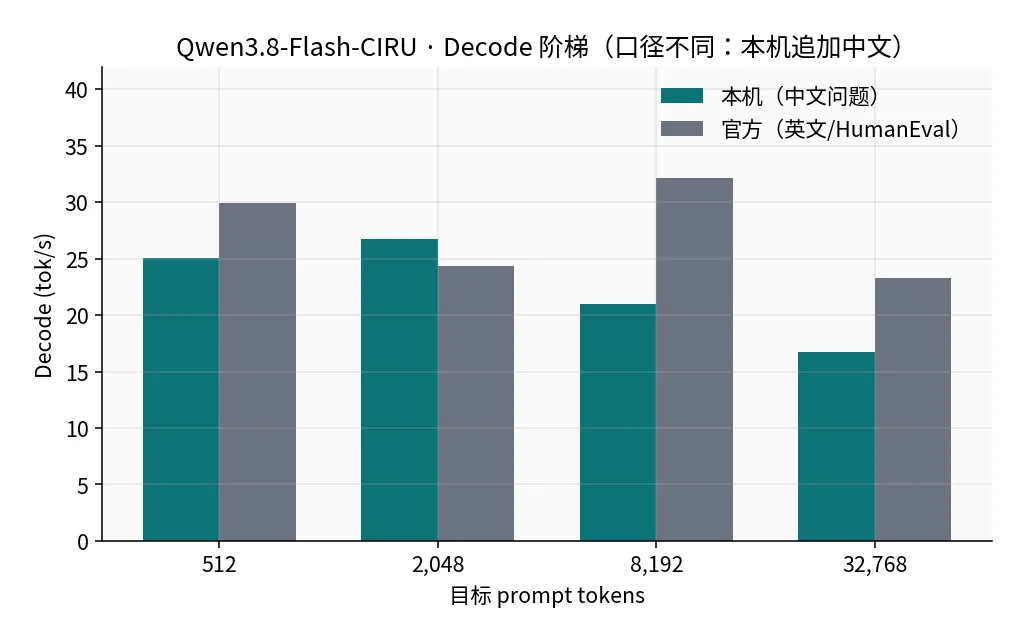
| 目标 token | 本机 prefill | 官方 prefill | 本机 decode | 官方 decode |
|---|---|---|---|---|
| 512 | 402.7 | 298.3 | 25.1 | 30.0 |
| 2,048 | 380.6 | 377.0 | 26.7 | 24.4 |
| 8,192 | 384.7 | 372.8 | 21.0 | 32.1 |
| 32,768 | 220.6 | 228.3 | 16.8 | 23.3 |
8K 冷 prefill 约 21 s。32K 与官方几乎持平。本机 decode 在 8K/32K 低于官方,是因为阶梯追加的是中文问题,MTP 接受率只有 37–70%;官方数字来自高接受率的英文 / HumanEval。
6.2 负载:代码 / JSON 大约是中文的两倍
生产配置 MTP depth 4:
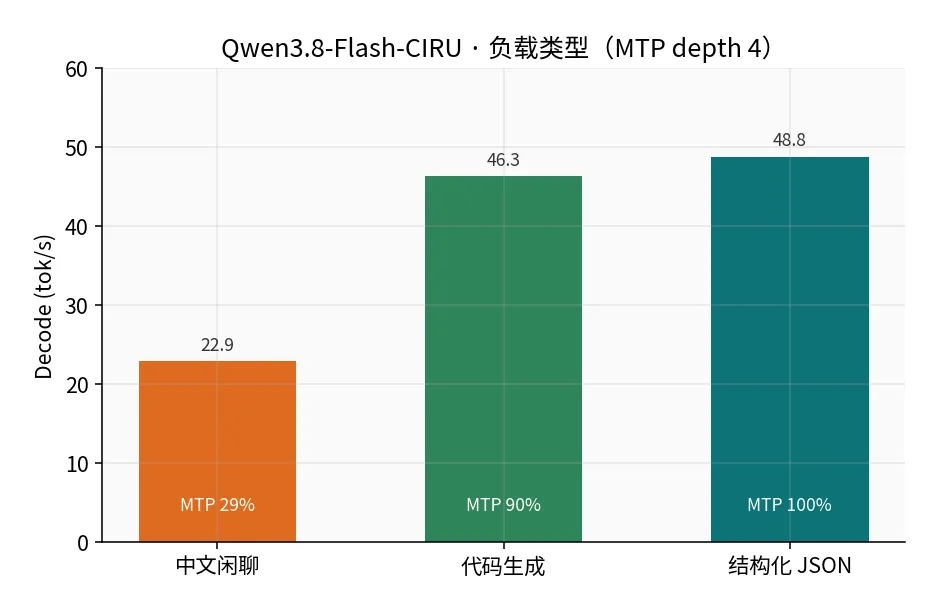
| 负载 | decode tok/s | MTP 接受率 |
|---|---|---|
| 中文闲聊 | 22.9 | 28.9% |
| 代码生成 | 46.3 | 90.0% |
| 结构化 JSON | 48.8 | 100% |
草稿(Q8_0 MTP)对英文 / 符号更准。短中文流式首字约 0.23 s。
6.3 MTP 深度:甜点是 4
同一组负载只改 --spec-draft-n-max:
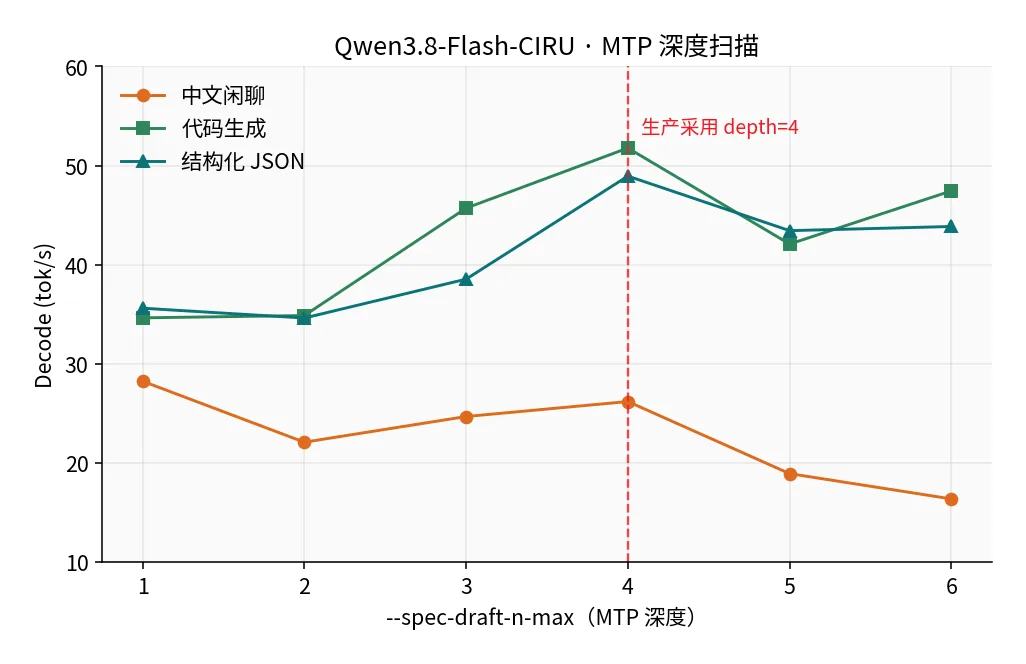
| depth | 中文 | 代码 | JSON | 相对官方 depth 3 |
|---|---|---|---|---|
| 1 | 28.3 | 34.7 | 35.6 | 中文最好,代码差 |
| 3(官方) | 24.7 | 45.7 | 38.6 | 基线 |
| 4(已采用) | 26.2 | 51.8 | 48.9 | 代码 +13%,结构化 +27% |
| 5 | 18.9 | 42.1 | 43.4 | 中文崩 |
| 6 | 16.4 | 47.5 | 43.9 | 草稿浪费过大 |
depth ≥ 5 时中文接受率掉到 ~23%。六轮扫描无 MTP 位置错误、HSA 或 pager 失败。
6.4 前缀缓存
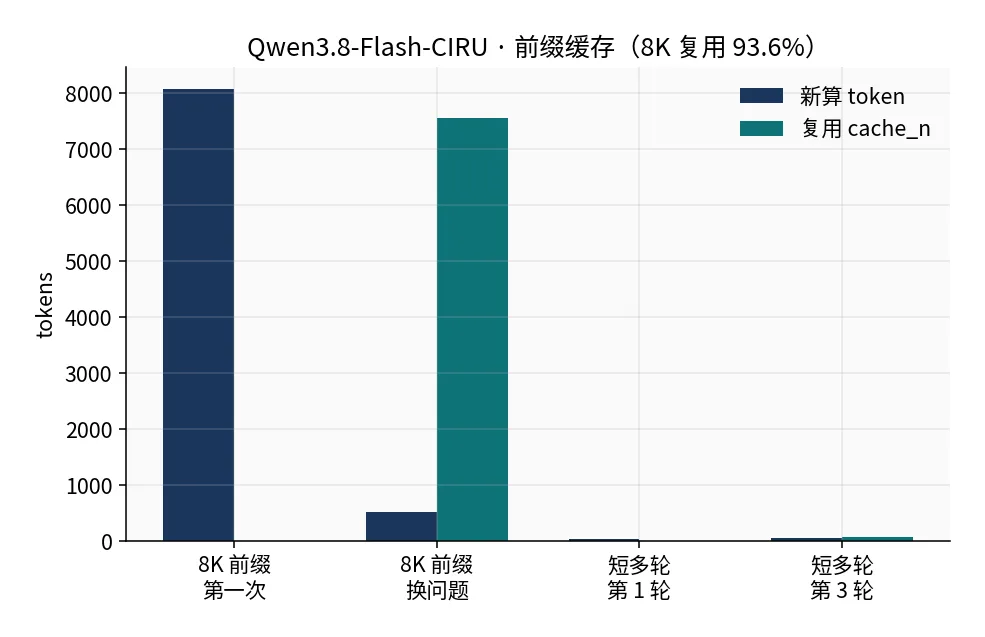
约 8K 前缀换问题:第一次 cache_n=0,第二次复用 7548 / (7548+517) = 93.6%,只重算约 0.5K token。短多轮的 cache_n 也会逐轮递增。客户端保持 cache_prompt: true,系统提示和工具 JSON 不要每轮改写。
PLE 页缓存从 4 GiB 加到 12 GiB,8K/32K prefill 几乎不变,热页已被 OS page cache 兜住。保持官方 4 GiB 即可。
七、接入注意
{
  "model": "Qwen3.8-Flash-CIRU-STRIX-IU4",
  "messages": [{"role": "user", "content": "你好"}],
  "temperature": 0.7,
  "top_p": 0.8,
  "top_k": 20,
  "presence_penalty": 1.5,
  "cache_prompt": true,
  "chat_template_kwargs": {"enable_thinking": false}
}| 项 | 建议 |
|---|---|
| Base URL | http://127.0.0.1:8080/v1 |
| 思考 | 默认关;需要推理时再开,并加大 max_tokens |
| 预期速度 | 短中文首字 ~0.2 s;中文生成约 23–28 tok/s;代码 / JSON 约 46–52 tok/s |
| 长上下文 | 8K 冷启动约 21 s 才出第一个 token,之后靠缓存 |
| 并发 | --parallel 1,同时只处理一个请求 |
| SSD | PLE 49 GiB 持续分页,盘慢会掉速 |
和 DS4 的选型:写代码、出 JSON、要精确计算 → CIRU。中文长文、要可预测的 25 tok/s、讨厌 NVMe 依赖 → DS4。
八、常见问题
Q: 普通 llama.cpp / Lemonade 预编译能不能直接加载?
不能。缺少 --ple-sidecar 时专家权重是错的。必须用 CIRU 这份运行时。
Q: 短回复只有思考没有正文?
服务端默认可能开思考。启动加 --reasoning off,请求里再显式 enable_thinking: false。短 max_tokens 会被 reasoning_content 占满。
Q: checksum 失败?
不要混用未完成的断点文件。删掉对应 blob 后重下,再 sha256sum -c checksums.sha256。
Q: 和 DS4 一起开内存立刻打满?
正常。先 pkill -x dflash_server(或反过来 pkill -x llama-server)再启动另一个。