
06. PyTorch Tensor Layout and Indexing | PyTorch 张量布局与索引
难度: Medium | 环境: CPU-first | 标签: PyTorch, layout, indexing, broadcast | 目标人群: 已会创建 Tensor、准备阅读序列与多头张量变换的学习者
🚀 云端运行环境
本章节的实战代码可以点击以下链接在免费 GPU 算力平台上直接运行:
(国内推荐:魔搭社区免费实例)

本节导读
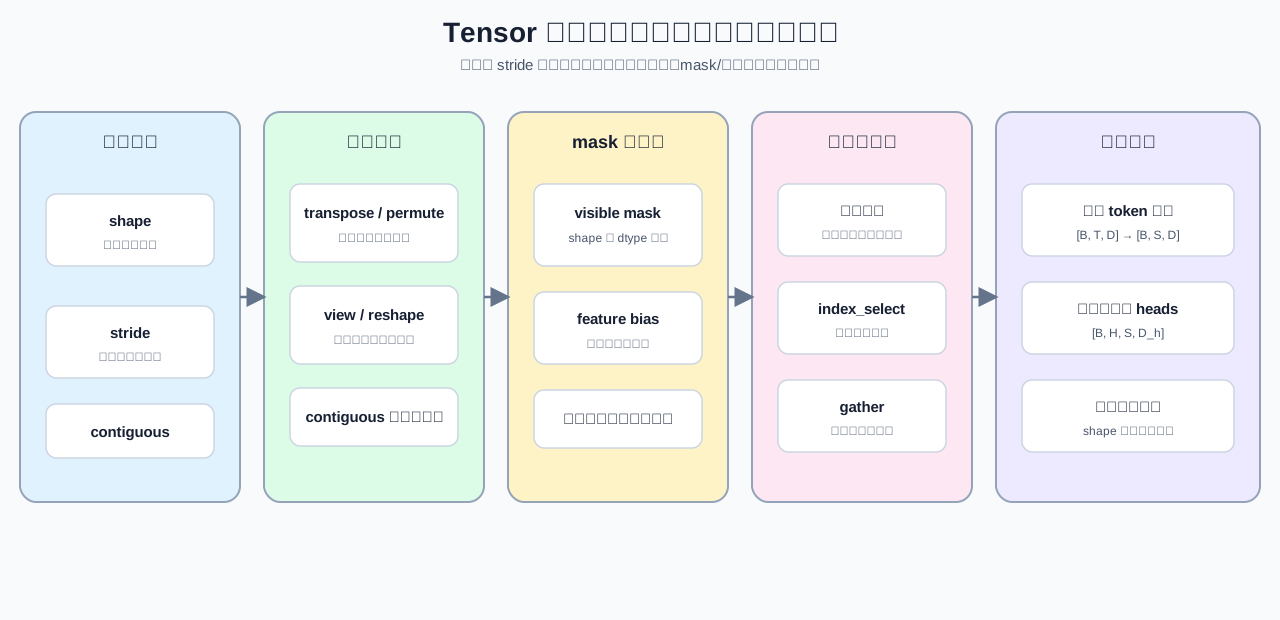
形状说明逻辑维度,步幅说明访问布局,索引决定取出哪些位置。相同形状不代表相同布局,维度变换也可能改变连续性和共享存储关系。
完成本节后,你应能联合检查形状、步幅、连续性和索引规则,并判断变形、广播与位置选择是否保持原有数据语义。
关键词: shape, stride, contiguous, gather
前置阅读
导语: 先掌握 Tensor 的 dtype、device 和复制/共享语义,再进入 layout 与索引。
Q1:shape、stride、contiguous 与共享存储分别说明什么?
shape 是逻辑维度,stride 是沿每一维移动一个位置跨过的元素数,contiguous 表示布局是否满足默认连续顺序。切片和转置通常仍与原 Tensor 共享存储,但可能变成非连续视图。
import torch


def describe_layout(tensor):
    """返回 shape、stride、连续性和底层存储地址。"""
    return {
        'shape': tuple(tensor.shape),
        'stride': tuple(tensor.stride()),
        'contiguous': tensor.is_contiguous(),
        'storage_ptr': tensor.untyped_storage().data_ptr(),
    }


base = torch.arange(12).reshape(3, 4)
sliced = base[:, 1:3]
transposed = base.t()
print('base:', describe_layout(base))
print('sliced:', describe_layout(sliced))
print('transposed:', describe_layout(transposed))
Q1 验证:视图是否共享存储但拥有不同布局?
base = torch.arange(12).reshape(3, 4)
sliced = base[:, 1:3]
transposed = base.t()
assert base.is_contiguous()
assert not sliced.is_contiguous()
assert not transposed.is_contiguous()
assert describe_layout(base)['storage_ptr'] == describe_layout(sliced)['storage_ptr']
assert describe_layout(base)['storage_ptr'] == describe_layout(transposed)['storage_ptr']
print('✅ layout 与共享存储通过')
Q2:transpose 后为什么 view() 可能失败?
transpose/permute 只改变维度解释和 stride,不自动重排存储。view() 需要当前布局能够直接解释为目标 shape;reshape() 必要时会复制,contiguous() 则显式生成连续布局。
base = torch.arange(24).reshape(2, 3, 4)
transposed = base.transpose(1, 2)

view_failed = False
try:
    transposed.view(-1)
except RuntimeError:
    view_failed = True

reshaped = transposed.reshape(-1)
contiguous_tensor = transposed.contiguous()
print({
    'view_failed': view_failed,
    'reshape_shape': tuple(reshaped.shape),
    'contiguous': contiguous_tensor.is_contiguous(),
})
Q2 验证:不同变形路径是否保持元素数量与顺序?
base = torch.arange(24).reshape(2, 3, 4)
transposed = base.transpose(1, 2)
reshaped = transposed.reshape(-1)
contiguous_tensor = transposed.contiguous()
assert not transposed.is_contiguous()
assert reshaped.numel() == base.numel()
assert torch.equal(reshaped, contiguous_tensor.view(-1))
assert contiguous_tensor.is_contiguous()
assert contiguous_tensor.untyped_storage().data_ptr() != base.untyped_storage().data_ptr()
print('✅ view、reshape 与 contiguous 通过')
Q3:mask 与广播需要满足哪些 shape 条件?
逐位置 mask 应与目标 Tensor shape 一致或明确可广播;feature bias 通常要求最后一维与 hidden size 相同。入口先校验这些条件,可以避免广播成功却语义错误。
def mask_and_add_bias(values, visible_mask, feature_bias, fill_value=0):
    """先广播 feature bias,再把不可见位置写成 fill_value。"""
    if visible_mask.dtype != torch.bool or visible_mask.shape != values.shape:
        raise ValueError('visible_mask must be boolean and match values.shape')
    if feature_bias.ndim != 1 or feature_bias.shape[0] != values.shape[-1]:
        raise ValueError('feature_bias must match the last dimension')
    return (values + feature_bias).masked_fill(~visible_mask, fill_value)


values = torch.arange(12).reshape(3, 4)
visible_mask = values % 2 == 0
bias = torch.tensor([10, 20, 30, 40])
print(mask_and_add_bias(values, visible_mask, bias))
Q3 验证:mask 数值和非法广播是否可检查?
values = torch.arange(8).reshape(2, 4)
visible_mask = values % 2 == 0
bias = torch.tensor([10, 20, 30, 40])
result = mask_and_add_bias(values, visible_mask, bias)
assert result.tolist() == [[10, 0, 32, 0], [14, 0, 36, 0]]

try:
    mask_and_add_bias(values, visible_mask[:, :3], bias)
except ValueError as error:
    assert 'visible_mask' in str(error)
else:
    raise AssertionError('错误 mask shape 应触发 ValueError')
print('✅ mask 与广播契约通过')Q4:高级索引、index_select 与 gather 分别按什么规则取值?
高级索引和 index_select 按某一维选择整行或整列;gather 则要求 index 与输出 shape 对齐,并为每个位置指定来源索引。高级索引通常产生新 Tensor,不再与原表共享存储。
table = torch.tensor([
    [10, 11, 12, 13],
    [20, 21, 22, 23],
    [30, 31, 32, 33],
])
row_ids = torch.tensor([2, 0], dtype=torch.long)
positions = torch.tensor([[0, 3], [1, 2], [3, 0]], dtype=torch.long)

advanced = table[row_ids]
selected = torch.index_select(table, dim=0, index=row_ids)
gathered = torch.gather(table, dim=1, index=positions)
print('selected:', selected)
print('gathered:', gathered)
Q4 验证:整行选择、逐位置选择和副本语义是否正确?
table = torch.tensor([[10, 11, 12, 13], [20, 21, 22, 23], [30, 31, 32, 33]])
row_ids = torch.tensor([2, 0], dtype=torch.long)
positions = torch.tensor([[0, 3], [1, 2], [3, 0]], dtype=torch.long)
advanced = table[row_ids]
selected = torch.index_select(table, 0, row_ids)
gathered = torch.gather(table, 1, positions)
assert torch.equal(advanced, selected)
assert selected.tolist() == [[30, 31, 32, 33], [10, 11, 12, 13]]
assert gathered.tolist() == [[10, 13], [21, 22], [33, 30]]
assert advanced.untyped_storage().data_ptr() != table.untyped_storage().data_ptr()
print('✅ 索引与 gather 通过')
Q5:怎样把位置选择和 head 拆分整理成稳定输入?
综合流程先按 token 位置选择 [B, S, D],再把 hidden 维拆成 head,最后排列为 [B, H, S, D_h]。每一步都要检查索引范围、hidden 是否可整除,以及最终布局是否满足后续接口。
def prepare_head_input(features, positions, num_heads):
    """从 [B, T, D] 选择位置并整理为连续的 [B, H, S, D_h]。"""
    if features.ndim != 3:
        raise ValueError('features must have shape [B, T, D]')
    if positions.dtype != torch.long or positions.ndim != 1:
        raise ValueError('positions must be a one-dimensional long tensor')
    if positions.numel() and (positions.min() < 0 or positions.max() >= features.shape[1]):
        raise IndexError('positions are out of range')
    if num_heads <= 0 or features.shape[-1] % num_heads != 0:
        raise ValueError('hidden size must be divisible by num_heads')

    selected = features.index_select(1, positions)
    batch, selected_tokens, hidden = selected.shape
    head_dim = hidden // num_heads
    heads = selected.reshape(batch, selected_tokens, num_heads, head_dim).permute(0, 2, 1, 3)
    return heads.contiguous()


features = torch.arange(2 * 4 * 8).reshape(2, 4, 8)
ready = prepare_head_input(features, torch.tensor([0, 2]), num_heads=2)
print('ready shape:', tuple(ready.shape), 'contiguous:', ready.is_contiguous())
Q5 验证:综合整理是否保持位置内容和目标布局?
features = torch.arange(2 * 4 * 8).reshape(2, 4, 8)
positions = torch.tensor([0, 2], dtype=torch.long)
ready = prepare_head_input(features, positions, num_heads=2)
assert ready.shape == (2, 2, 2, 4)
assert ready.is_contiguous()
restored = ready.permute(0, 2, 1, 3).reshape(2, 2, 8)
assert torch.equal(restored, features.index_select(1, positions))
print('✅ 输入整理闭环通过')
本节小结
- shape、stride、连续性与共享存储共同决定 Tensor 的布局语义。
transpose()只改变维度解释;reshape()必要时复制,contiguous()显式生成连续布局。- mask、bias 和索引都需要明确 shape/dtype 契约,且不可见位置应保持填充值语义。
- 位置选择与 head 拆分应逐步验证内容守恒和最终布局。
相关阅读
建立布局和索引契约后,可以继续观察它们如何进入计算图与注意力机制。